 Connecteam Review (2026)
The free-for-10 plan is one of the most generous in the category, but the three-hub structure means costs can stack if you need all of them — price the specific hubs you'll actually use, not the full bundle.
Visit Connecteam → Affiliate link — the rest of this page is the honest version, including who should skip it.
Watch the 2-minute review
Same honest take, in video form — from our YouTube channel.
⚡ Short on time? Watch the 30-second verdict Short.
Pricing (2026)
✓ Pricing re-verified 14 Sep 2026
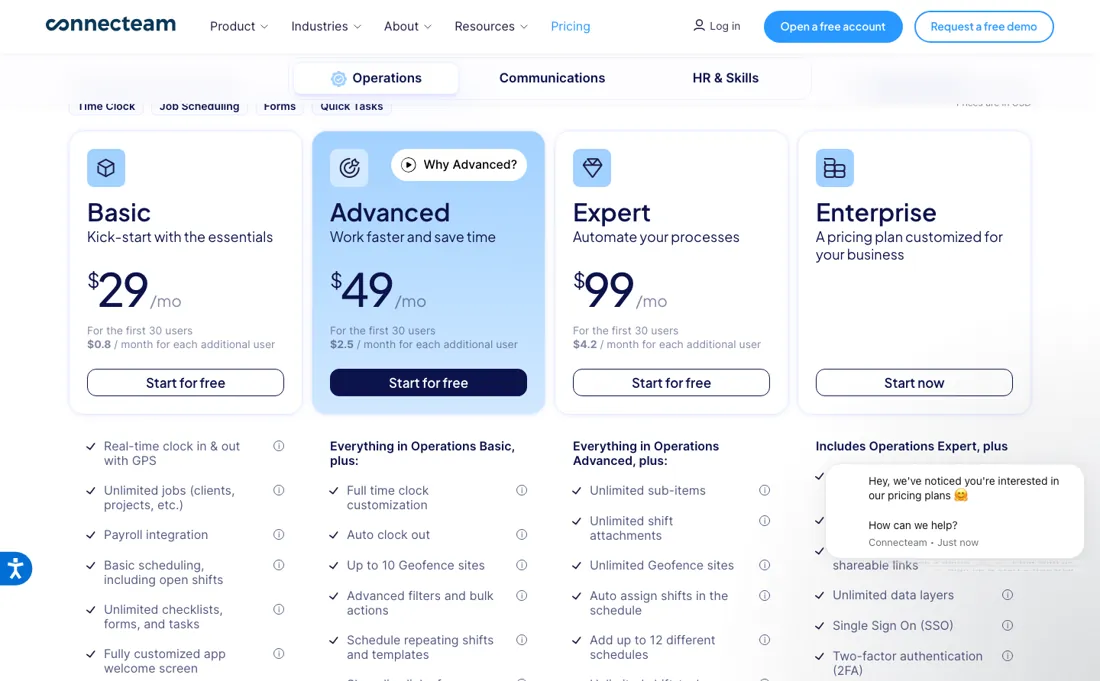
The free tier is real and not a trial: the Small Business Plan is $0 for life, covers up to 10 users and includes all hubs and features. Above that you buy per hub — Operations, Communications or HR & Skills — and each hub carries a flat base price covering the first 30 users, plus a per-user surcharge only from user 31 onward.
Billed yearly that base is $29/mo at Basic, $49 at Advanced and $99 at Expert; billed monthly it is $35, $59 and $119. The surcharge is where the hubs diverge: on the yearly plans Operations adds $0.80, $2.50 and $4.20 per extra user a month, while Communications and HR & Skills add $0.50, $1.50 and $3.00. Quoting only the per-user rate understates a small team's bill, because a shop of 30 or fewer pays the flat base either way.
Price it per hub you will actually switch on, not per user. Plans change — always verify the live price on their site.
Correction after re-checking: Extra seats beyond 30 are billed per hub at rates that differ by hub, not at one flat rate. On Basic the pricing page lists $0.8 per month for each additional user on the Operations Hub, and $0.5 per month for each additional user on both the Communications Hub and the HR & Skills Hub. The generic "$0.8 per month per hub" figure from the seat-pricing help article overstates two of the three hubs by 60%. (re-verified 2026-08-04)
What the price did
We capture Connecteam’s own pricing page every month and keep the figures, so this is our record of the page — not a forecast, and not someone else’s summary.
Connecteam's per-user ladder held steady over the summer. Our July and August 2026 captures carry exactly the same set of rates — $0, $0.50, $0.60, $0.80, $1.00, $1.50, $1.80, $2.50, $3.00, $3.60, $4.20 and $5.00 — and the page returned the same structure on 17 August 2026.
Connecteam’s pricing page, as we read it
What Connecteam does
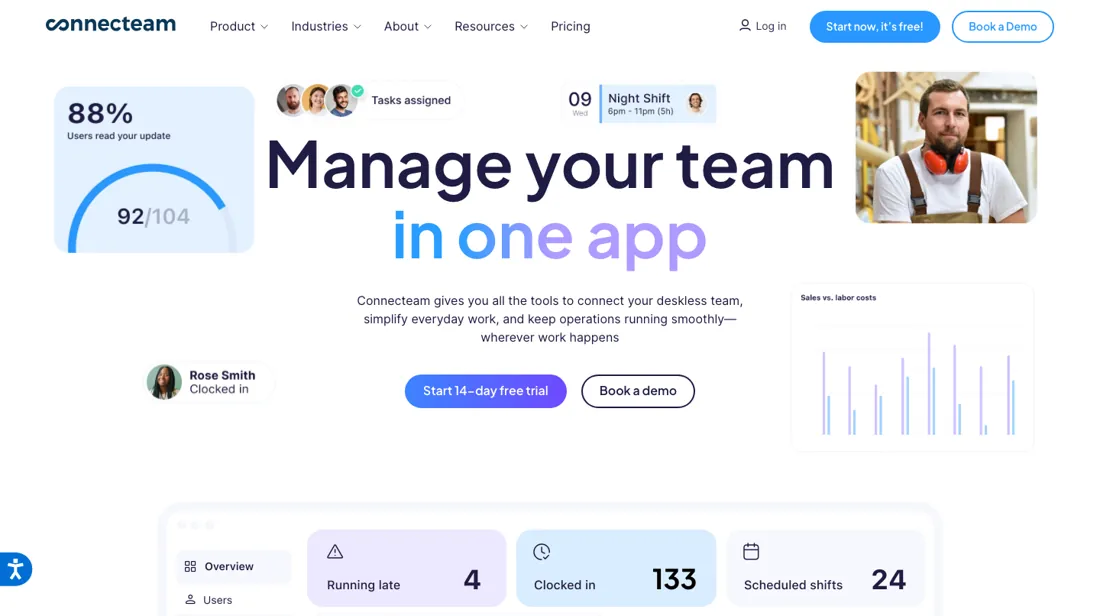
All-in-one app for managing deskless teams. Scheduling, time clock, tasks, training and team chat for hourly and frontline workforces.
What buyers report about Connecteam
Recurring themes from the buyer-review sites listed at the foot of this page, read in August 2026. We have not run Connecteam ourselves, so this is other buyers' experience rather than ours. We summarise it here because the complaints are usually the part a vendor page leaves out.
- • Mobile-first in a way that deskless teams actually use — 4.6 on G2 across 3,500+ ratings, with scheduling and time tracking the named strengths.
- • Customisable, and support gets consistently good marks.
- • A July 2026 TrustRadius reviewer names the compliance feature that sells it to distributed teams: required acknowledgements on updates, so you can prove every employee received and read a notice.
- • The costing angle comes up too — time can be categorised (office, customer, field travel), which lets a service business see how much of a technician's day is travel rather than work, and certifications live in the same app.
- • The mobile app is reported as glitchy, and system alerts do not always fire on time. In a shift business a late alert is a missed shift.
- • Scheduling and timekeeping problems come up alongside the praise for the same features — worth testing your own rota pattern in the trial.
- • Advanced reporting and complex integrations are where it runs out.
- • The app feels cluttered once you switch several modules on.
- • Time-zone management across distributed teams is the gap named by the same reviewers who otherwise rate it at the top.
When the paid plan is worth it
Under 10 users there is no case for paying anything. Connecteam documents its Small Business Plan as free for life, with every feature in the platform and no expiry date, making the free tier unusually complete. Paid tiers become unavoidable at one point: the vendor states that once you add your 11th user you have to choose a plan. Pricing is then per hub, not per account. Operations, Communications and HR & Skills are sold separately, each carrying a fixed price for up to 30 users.
So a company that only needs scheduling and time tracking buys one hub, while one that also wants internal messaging and onboarding pays again for each hub it turns on. Past 30 users, extra seats are billed per hub, and the rate depends on which hub: on Basic the pricing page lists $0.8 per month for each additional user on the Operations Hub and $0.5 on the Communications and HR & Skills hubs.
Upgrading pointedly does not fix headcount hygiene: Connecteam states that archived or deleted users keep being billed until the seats are manually removed. A higher tier also buys no adoption; the rollout still depends on staff installing the app.
Our monthly capture read this vendor's pricing page in July 2026 and again in August 2026, and the amounts were the same both times. We keep watching — the registry records what moves.
How to actually use Connecteam
The fastest route to something usable is the 14-day free trial, which the pricing page says needs no credit card. Before touching features, open the account name in the top-right of the Admin Dashboard and go to Settings to fix time zone, time format and the company logo, since these shape what every employee later sees in the app. Then select "Let's Go" on the dashboard to run the 7-step tutorial, which switches on Time Clock, Job Scheduler, Chat and Directory.
Real value only arrives once employees are in the app, which the tutorial itself does not cover. Users are added under the Users tab via Add Users and +Add manually, where First Name, Last Name and Mobile Phone are mandatory, and the documentation warns to mark the right country code. The invite is an SMS carrying a download link, so a mistyped country code simply means it never lands. Skip the "Send an invite" checkbox and the invite has to be re-sent later from the Users or Overview page. Watching a feature playlist adds a $5 account credit.
Distilled from Connecteam pricing page and vendor help-centre articles on seat pricing, the Small Business Plan and admin-dashboard onboarding, read 4 August 2026.
The natural comparison is When I Work or Homebase — other deskless-team scheduling apps.
More on Connecteam
Everything we publish about Connecteam links back here — the review stays the honest hub:
The ex-banker filter — the same yardstick on every review (how we review): My ex-banker filter is simple: does Connecteam remove a real cost — time, errors, missed revenue — bigger than what it charges?
Frequently asked questions
Is Connecteam really free for a small team?
Yes, and it is unusually generous: the Small Business Plan is $0 for life for up to 10 users and includes all hubs and all features, not a limited subset. The cliff is the eleventh user, at which point you are choosing hubs and paying per user. Read on 17 August 2026.
How does the per-hub pricing work?
You buy the hubs you need — Operations, Communications or HR — rather than one bundle, and each is priced to cover the first 30 users with a surcharge per user after that. The published per-user rates run from $0.50 to $5.00 a month depending on hub and tier. A team that only needs scheduling pays for one hub, which is what makes the entry price so low.
Why is it so much cheaper than the competition?
Because the unit is different. Most workforce tools charge per user for everything; Connecteam charges per hub with the first 30 users included, so a 30-person team using one hub pays a flat fee rather than 30 seats. The comparison flips once you need all three hubs for a large team — price the hubs you will actually switch on.
What should I weigh before buying Operations & Workflow software?
Usually it sits on top rather than replacing everything. Tools in this class tend to become the layer where work is tracked and handed off, while your existing systems stay the source of truth for their own data. Before you buy, map which tools it would replace outright and which it would merely sync with. If the answer is that it syncs with all of them, you are adding a layer rather than removing one.
Is this a hands-on review of Connecteam?
This is a researched assessment, not a hands-on test — where we've used a tool ourselves, we say so explicitly. We name what each tool is genuinely good and bad at, and we earn a commission only if you sign up, at no cost to you.
- Buyer reviews on G2, Capterra, Gartner Peer Insights and TrustRadius, read August 2026.
- Re-verified 2026-09-14 on their own pricing page, USD.
- A dated screenshot of that pricing page, kept on this site as the receipt.
Others in this category
Reviewed operations & workflow tools that share ground with Connecteam — comparable in what they do, not drop-in swaps:
New dossiers, cost-traps we found, and tools that earned a keep — no hype, no sponsored-disguised-as-advice. Unsubscribe anytime.
This is our researched assessment — not a paid placement. The “Visit” links on this page are affiliate links: we may earn a commission if you sign up, at no extra cost to you, and it never changes our take. How we review →