 folk Review (2026)Standard Has No Zapier, No API
One gap has closed and one has narrowed. Throughout this review we weigh it against HubSpot.
Visit folk → Affiliate link — we may earn a commission if you sign up; it does not change what this page says.
Watch the 2-minute review
The video version of this review, from our YouTube channel.
⚡ Short on time? Watch the 30-second verdict Short.
Pricing (2026)
✓ Pricing re-verified 19 Sep 2026
$30/member/month on Standard, $60 on Premium and from $100 on Enterprise when billed monthly; billed yearly those drop to $24, $48 and from $80 per member per month — 20% off — for $288, $576 and $960 per member per year (re-verified 2026-09-03; every figure held). The same page publishes euro rates: 27€, 54€ and from 83€ monthly, 22€, 43€ and from 67€ yearly, for 259€, 518€ and 804€ a year.
The free trial is two weeks and needs no credit card; folk's own FAQ says an account that does not upgrade is blocked rather than deleted at the end, and that the trial can be extended by a week on request. The published caps: email enrichment 500 a month on Standard, 1,000 on Premium and custom on Enterprise; AI magic fields 2,000 and 5,000; account sync one per member and five per member. Plans change — always verify the live price on their site.
What the pricing page doesn’t say
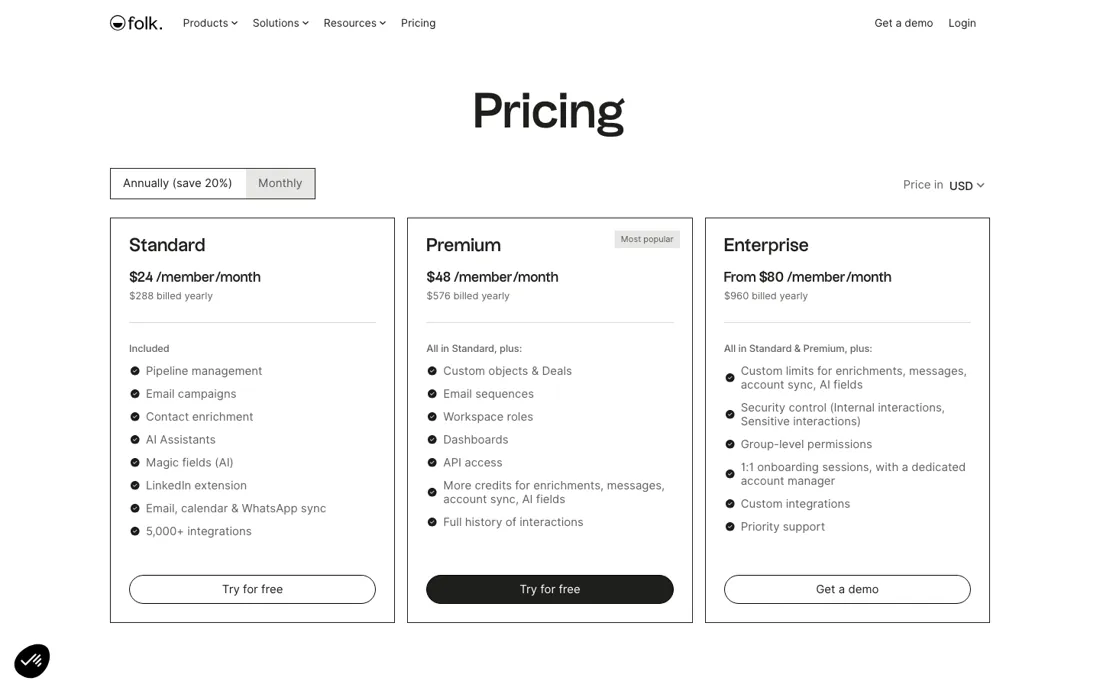
folk now has a mobile app — the pricing table carries a Mobile app row ticked on all three plans — so the browser-only complaint is out of date. Automation is still uneven, but the picture moved in September: Zapier and Make stay Premium and Enterprise only, and so does the REST API, yet the table now carries an MCP row ticked on all three plans. Standard therefore does have a programmatic route — through an AI client rather than a workflow builder — and no plan shows a native multi-step workflow.
Enrichment is capped at 500 a month on Standard and 1,000 on Premium, and email sequences need at least Premium.
What folk does
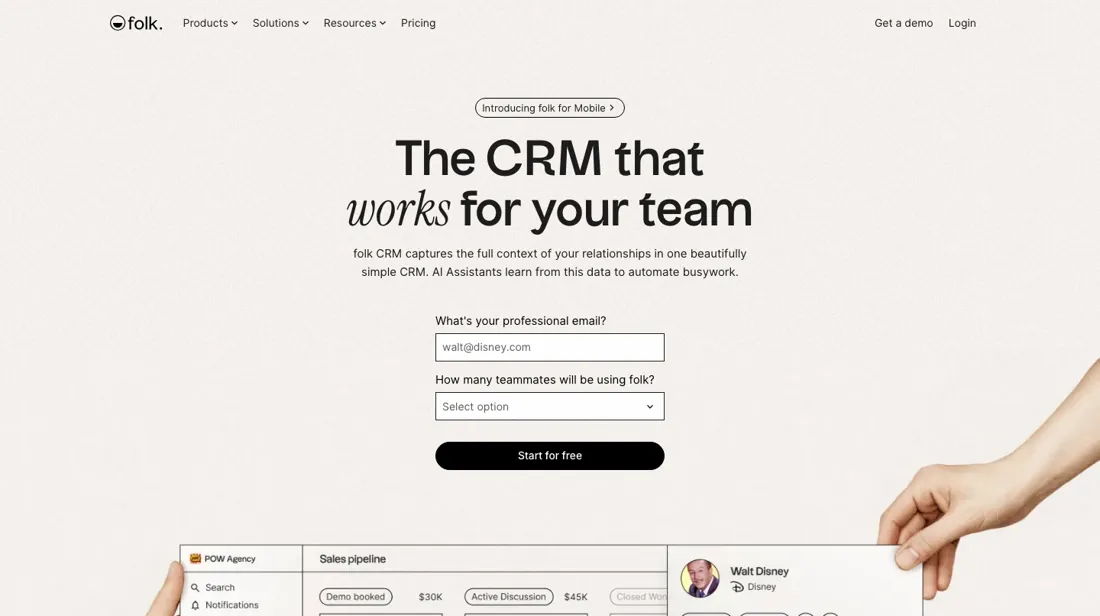
Lightweight, collaborative CRM for managing contacts and relationships. Centralize your network and personalize outreach without the bloat. A mobile app (Contacts by folk) adds on-the-go search, one-tap contact capture with business-card scanning, voice notes and interaction tracking across WhatsApp, LinkedIn, email and calendar.
What buyers report about folk
Recurring themes from the buyer-review sites listed at the foot of this page, read in August 2026. We have not run folk ourselves, so this is other buyers' experience rather than ours. We summarise it here because the complaints are usually the part a vendor page leaves out.
- • 4.5 on both G2 (318 reviews) and Capterra, with 70% five-star and ease of use the number one named pro.
- • A 14-day full-feature trial with no card required.
- • As of April 2026 there is no iOS or Android app at all. The web interface works on a phone but is clearly built for desktop.
- • Workflow automation is missing, analytics are basic, and email sends and enrichment credits carry monthly caps.
- • Native integrations are limited — most things go through Zapier or Make — and there are no cross-group custom fields.
- • It fits teams up to around fifty. Beyond that, forecasting, automation and revenue attribution are gaps. Standard is $24 per member per month billed yearly ($30 monthly), Premium $48 ($60) and Enterprise from $80 ($100), with no free plan (re-verified 2026-08-06).
- • When the trial ends your account locks, though your data is kept.
When the paid plan is worth it
This is one of the cleaner ladders we have read, and the price itself gives you no signal at all: Premium is exactly double Standard at every billing mode -- $30 against $60 monthly, $24 against $48 yearly. When the multiple is that tidy the tiers were drawn around features rather than cost, so the decision is entirely which capabilities you need. Do not read the doubling as an indication that Premium is twice the product.
The annual discount is a uniform 20% across all three tiers: $288, $576 and from $960 per member per year, and the same page publishes the euro equivalents (259€, 518€, 804€). Because it is priced per member rather than per company, that discount compounds with headcount -- a team of ten saves $720 a year on Standard by paying up front, which is worth more than most feature differences at this level.
Enterprise starts at $100 a member monthly and is the only open-ended one; “from” means the quote can go up. The trial is two weeks and needs no credit card, which is the right way to settle Standard versus Premium.
Our monthly capture read this vendor's pricing page in July 2026 and again in August 2026, and the amounts were the same both times. We keep watching — the registry records what moves.
How to actually use folk
Two things we told you before have changed, so check them yourself rather than trusting older reviews. folk now has a mobile app: the pricing table carries a Mobile app row ticked on all three plans and the help centre has a download page for it, so the browser-only complaint is out of date. Automation is the one that still bites, and it is not even across the ladder — Zapier and Make are marked Premium and Enterprise only, and so is the REST API.
What changed in September is an MCP row, ticked on all three plans: on Standard your only programmatic route runs through an AI client rather than a workflow builder, and no plan shows a native multi-step workflow. Then check where email sequences sit, because they need at least Premium. If outreach is why you are buying, your entry is $48 a member a month annually — $576 a year — not the $24 Standard rate, and that doubling belongs in your comparison from the start.
Watch the caps as meters rather than features. Use the two-week trial, which needs no card, on your own messy contact import rather than a clean sample. folk's argument is that it is pleasant enough that people keep it updated, and that only shows once your real duplicates and half-finished records are in it.
Distilled from the folk pricing page at https://www.folk.app/pricing plus www.folk.app/llms.txt, both read 3 September 2026, and the plan table re-read on 10 September 2026 after folk announced MCP support. The plan comparison was read column by column out of the page source, because the plan marks are check images rather than words and flattened text throws the column away; that re-read is what showed the new MCP row ticked on all three plans while Rest API and Zapier stay Premium and up.
folk vs Pipedrive, side by side
Both columns come from the same place: each vendor’s own published pricing, read on the date shown in the sources at the foot of this page. We do not average them into a score.
Both names above are affiliate links: we may earn a commission if you sign up, at no extra cost to you. Neither changes what this table says: both columns come straight from the vendors’ own pricing pages.
The natural comparison is Pipedrive or HubSpot — the more automated, heavier CRMs. Weigh it against HubSpot on the job you actually need done.
Frequently asked questions
The page title says Free, Standard and Premium — so where is the free plan?
Nowhere on the page, and that is worth knowing before you plan around it. The browser tab reads "folk CRM Pricing — Free, Standard & Premium Plans" and the cancellation answer tells you to "click 'downgrade' on the free plan to cancel your subscription", so two parts of the page assume a free tier exists. The three priced cards are Standard, Premium and Enterprise, and the feature comparison below them has exactly those three columns. What the page actually offers you at no cost is a two-week trial. Treat the free plan as a cancellation destination rather than a place to run a CRM.
Which allowances are per seat and which does the whole workspace share?
The comparison table is precise about it, and the split is not the one you would guess. Messages are per seat: 2,000 a member a month on Standard and 5,000 on Premium. Account sync is per seat too, at 1 and 5. But email enrichment (500 a month on Standard, 1,000 on Premium), Magic AI fields (2,000 and 5,000) and the Workflow Assistant (1,500 and 10,000) carry no "member" in their units, so they read as a single workspace pool. If that is right, the enrichment budget of a five-person team is the same as a solo user's. Confirm it before you size the plan.
What happens to my data if the trial runs out before I decide?
You lose access, not the data. folk's own FAQ says the two-week trial needs no card, and that if you do not upgrade at the end they block the account — explicitly adding that the data is not immediately deleted, and that you can either ask for one more week or upgrade to get back in. The same mechanism applies to a failed payment later: seven days to fix your card, then the account is blocked until you do. So the risk of a stalled evaluation is a locked workspace and an email to support, not a wiped one.
Does Standard give me the full history of who said what?
No, and this is the line where Standard stops being a small Premium. The comparison table caps interaction sharing on Standard at the last 30 interactions, and "full history of interactions" is listed as a Premium addition. The Research Assistant follows the same pattern: the row prints 200 a month for Premium and Custom for Enterprise, with no number against Standard at all. For a solo user that ceiling may never bite. For a team that bought a CRM precisely so the context survives a handover, the useful tier is $48 a member a month on the annual term, not $24.
What should I weigh before buying Growth & Revenue software?
It depends on whether you have the bottleneck it solves. Small teams get the most out of this category when one clear problem is already costing real hours or revenue; buying ahead of that just adds cost and another login. Price it against the hours or lost deals it removes, not against its feature list, and start on the smallest plan that covers the job.
Is this a hands-on review of folk?
This is a researched assessment, not a hands-on test — where we've used a tool ourselves, we say so explicitly. We name what each tool is good and bad at, and we earn a commission only if you sign up, at no cost to you.
- Buyer reviews on G2 and Capterra, read August 2026.
- folk’s own published pricing page.
- A dated screenshot of that pricing page, kept on this site as the receipt.
Others in this category
Reviewed growth & revenue tools that share ground with folk — comparable in what they do, not drop-in swaps:
New reviews, price changes we recorded, and the cost conditions we found. No sponsored placements. Unsubscribe anytime.
This is our researched assessment — not a paid placement. The “Visit” links on this page are affiliate links: we may earn a commission if you sign up, at no extra cost to you, and it never changes our take. How we review →