 Murf Review (2026)
The meter is generation hours per YEAR, not per month — 24 hours sounds generous until you count retakes, and regenerating a script three times bills three times. Throughout this review we weigh it against ElevenLabs.
Visit Murf → Affiliate link — we may earn a commission if you sign up; it does not change what this page says.
Watch the 2-minute review
The video version of this review, from our YouTube channel.
⚡ Short on time? Watch the 30-second verdict Short.
Pricing (2026)
✓ Pricing re-verified 14 Sep 2026
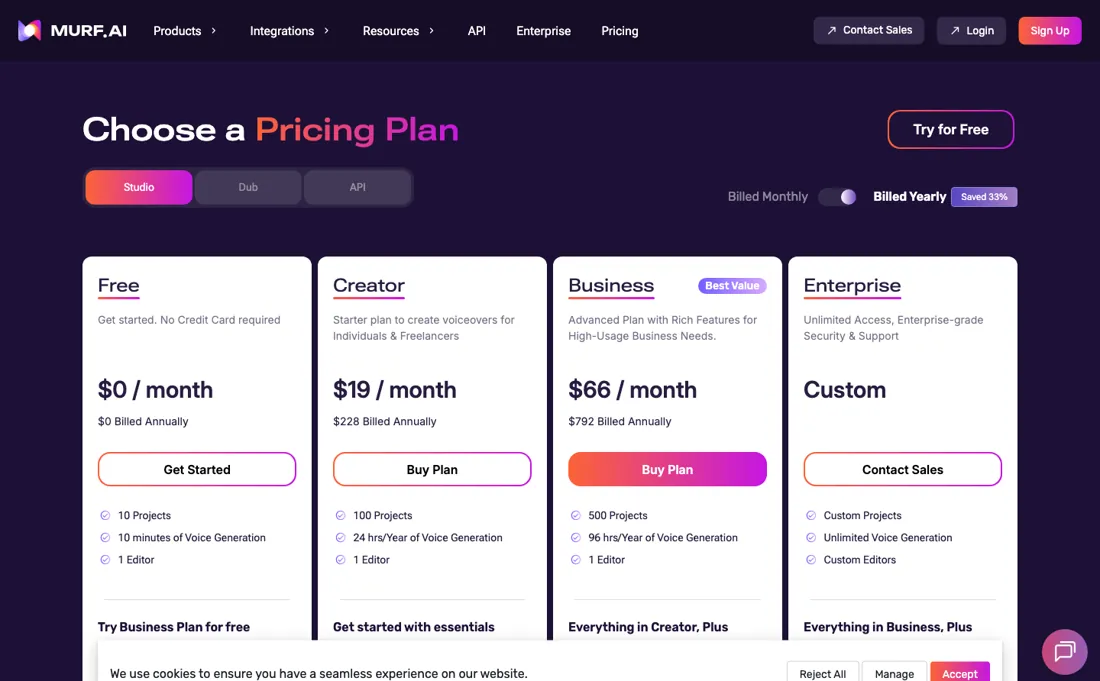
Studio plans: Free $0 for 10 projects, 10 minutes of voice generation and one editor, with no downloads and no commercial rights. Creator $19/mo billed annually ($228 a year): 100 projects, 24 hours of voice generation a year, 1 editor, all 200+ voices, unlimited downloads and commercial rights. Business $66/mo billed annually ($792 a year): 500 projects, 96 hours of generation a year, business licence, PowerPoint integration and audio-to-text.
Enterprise is custom and is where voice cloning, SSO and AI translation sit. Annual billing is advertised as saving 33%. Dub and the API are separate products with their own pricing — Murf's own homepage advertises API voice generation from $0.01 a minute, which is a different meter from the Studio hour allowances above. The Studio ladder on the page is Free, Creator, Business and Enterprise; there is no Growth plan, and Creator and Business are capped at one editor seat each, so a second person means Enterprise. Plans change — always verify the live price on their site.
Correction after re-checking: Free workspace: 10 minutes of voice generation time, 2 project credits, no downloads. Paid tiers are Creator (2 hours/month, 24 hours/year, 5 project credits), Growth (8 hours/month, 96 hours/year, 50 project credits), Business (20 hours/month, 240 hours/year, 200 project credits) and Enterprise (custom; the only workspace that allows inviting users to collaborate on projects). Note the earlier entry mislabelled the tiers: the 96 hours/year allowance belongs to Growth, not Business, and Growth was missing entirely. Yearly billing is a flat 33% off all subscriptions; a 20% discount is available to students, teachers, educational institutes and non-profits on request. API access is billed separately as pay-as-you-go: $0.01 per 1,000 characters on the Falcon model and $0.03 per 1,000 characters on Gen 2, with a $10 minimum top-up and a 100,000-character free trial. Monthly and annual subscription amounts in dollars could not be re-verified, because Murf's pricing page serves only a client-side JavaScript shell to fetchers and its pricing FAQ is behind a Cloudflare block. (re-verified 2026-08-04)
What the pricing page doesn’t say
Voice quality is genuinely strong, but the honest test for any TTS is your specific language, names and jargon: generate your hardest paragraph in the trial before subscribing, because demo voices always sound better than your edge cases.
What Murf does
AI voiceover generation for explainers, courses and product video.
What buyers report about Murf
Recurring themes from the buyer-review sites listed at the foot of this page, read in August 2026. We have not run Murf ourselves, so this is other buyers' experience rather than ours. We summarise it here because the complaints are usually the part a vendor page leaves out.
- • Voice quality is the consistent praise — 200+ voices across 30+ languages, with pitch, speed, pause and emphasis controllable per line.
- • It has real traction with instructional designers and content teams who need clean narration without booking talent.
- • The free tier is 10 minutes for the lifetime of the account, with no downloads. It is a demo, not a trial.
- • Voice cloning — the reason many people look at Murf — is enterprise-only and needs a custom contract.
- • Unused minutes do not roll over, and monthly billing costs about 33% more than annual.
- • Refunds close after 24 hours or 10 minutes of use, whichever comes first.
- • It is not built for real-time work. For an IVR or a live agent, latency becomes the ceiling.
- • TrustRadius carries only one written Murf review, so treat it as a single voice — but it independently reaches the same two conclusions as the other platforms: no real-time or on-the-fly synthesis, so it is the wrong tool for live applications, and long texts process slowly. It adds one more: integration with other tools is thin.
When the paid plan is worth it
The split is unusually clear on Murf's side. The free workspace carries 10 minutes of voice generation time and a limit of 10 projects, and Murf states plainly that the free trial does not support downloads. That makes the free tier an audition sandbox rather than a production tool: anyone who needs a finished audio file has to pay, regardless of how little they generate. The paid tiers earn their keep when output is steady and predictable, because generation time is metered rather than unlimited.
The pricing page, read 14 September 2026, sells that time in yearly buckets: 24 hours on Creator and 96 on Business, which is about 2 and 8 hours a month, and only Enterprise is unmetered. Annual billing is where the economics shift, since Murf advertises a flat 33% off yearly subscriptions. Upgrading pointedly does not solve two things. It does not buy collaboration, because Murf documents that only the Enterprise workspace allows inviting users to collaborate on projects, so extra seats become a sales conversation rather than a checkbox.
And it does not cover API usage, which is billed separately on its own pay-as-you-go meter.
How to actually use Murf
The shortest route to something usable is to open a free workspace, paste a script into the Studio editor and generate it in sub-blocks rather than as one long block. Voice selection is not the place to economise: Murf documents that changing voice actor, style, pitch, speed, pause, emphasis, pronunciation, punctuation and volume for the same text will not consume any voice generation time. Editing the text is what bills.
The practical discipline is therefore to lock the script first, then experiment with delivery afterwards. Budget before generating. Murf estimates that a 1,000-word English script consumes roughly 6 minutes of voice generation time, so the free allowance of 10 minutes covers about one script and little rehearsal. That is also where most people hit the wall, because the free trial does not support downloads and the export step requires a paid plan.
Upgrading happens on the pricing page, where the Buy Now button is replaced by an Upgrade button that shows a pro-rated breakdown before anything is charged.
Distilled from Murf help center: free trial, workspace, voice generation time, subscription upgrade and API plan/pay-as-you-go pages (help.murf.ai), read 4 August 2026.
Murf vs ElevenLabs, side by side
Both columns come from the same place: each vendor’s own published pricing, read on the date shown in the sources at the foot of this page. We do not average them into a score.
Both names above are affiliate links: we may earn a commission if you sign up, at no extra cost to you. Neither changes what this table says: both columns come straight from the vendors’ own pricing pages.
The natural comparison is ElevenLabs or Synthesia — ElevenLabs leads on raw voice realism, Synthesia bundles avatar video — Murf's edge is the studio workflow and per-language breadth. Weigh it against ElevenLabs on the job you actually need done.
Frequently asked questions
What does Murf cost, and what do the hours mean?
Creator is $19 a month billed annually ($228 a year) and Business $66 a month ($792 a year), read on 17 August 2026. The unit that decides which you need is not projects but generation time: 24 hours a year on Creator, 96 on Business. That is an annual pool, not a monthly one, and Murf states unused time does not roll over, so a bursty production month is the case to plan for.
How does Murf compare with Synthesia?
They solve different halves of the same job and the comparison is one of the searches that brings people here. Murf is voice: 200+ voices across 30+ languages with per-line control over pitch, speed, pause and emphasis, priced by generation time. Synthesia is video with a presenter avatar. If you already have the visuals and need narration, Murf is the cheaper half; if you need a talking presenter on screen, Murf alone will not get you there.
Can I use Murf for dubbing or in a live application?
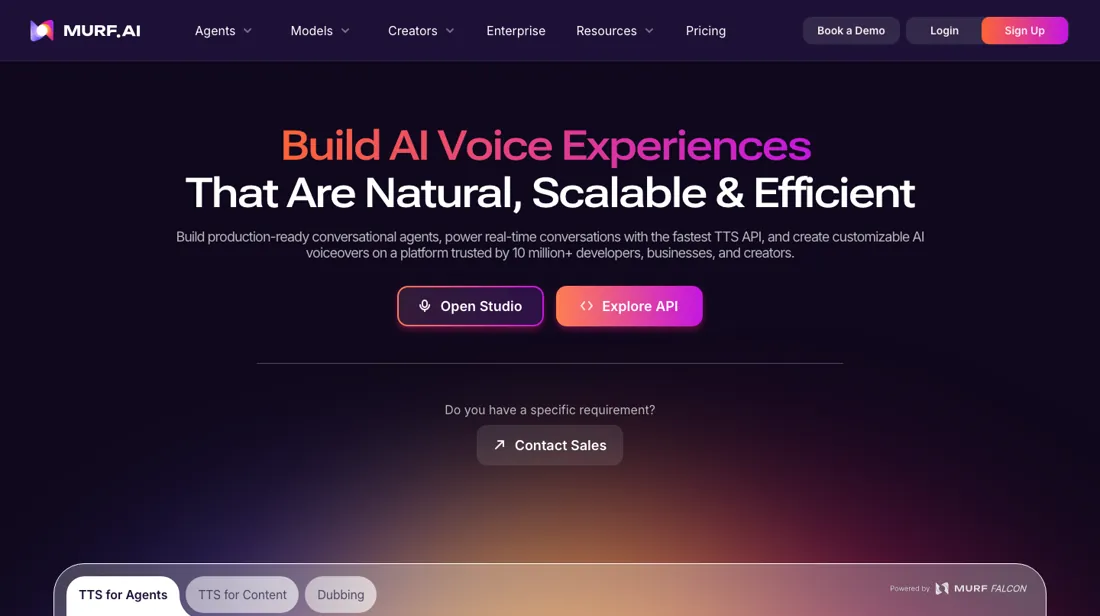
Dubbing is a separate Murf product with its own pricing, so a Studio subscription is not automatically a dubbing subscription — check which product you are buying. For live use the answer is no: reviewers consistently report that it is not built for real-time synthesis, and latency is the ceiling for anything like an IVR or a live agent. The API, advertised from $0.01 a minute, is the route for programmatic generation, not for live conversation.
What should I weigh before buying Operations & Workflow software?
Usually it sits on top rather than replacing everything. Tools in this class tend to become the layer where work is tracked and handed off, while your existing systems stay the source of truth for their own data. Before you buy, map which tools it would replace outright and which it would merely sync with. If the answer is that it syncs with all of them, you are adding a layer rather than removing one.
Is this a hands-on review of Murf?
This is a researched assessment, not a hands-on test — where we've used a tool ourselves, we say so explicitly. We name what each tool is good and bad at, and we earn a commission only if you sign up, at no cost to you.
- Buyer reviews on Product Hunt, G2, TrustRadius and hands-on write-ups, read August 2026.
- Re-verified 2026-09-14 in a browser; the page renders client-side and opens on annual billing, so check which column you are reading.
- A dated screenshot of that pricing page, kept on this site as the receipt.
Others in this category
Reviewed operations & workflow tools that share ground with Murf — comparable in what they do, not drop-in swaps:
Also in operations & workflow, for browsing rather than as an alternative:
New reviews, price changes we recorded, and the cost conditions we found. No sponsored placements. Unsubscribe anytime.
This is our researched assessment — not a paid placement. The “Visit” links on this page are affiliate links: we may earn a commission if you sign up, at no extra cost to you, and it never changes our take. How we review →