 InVideo Review (2026)
Transparency: the “Visit” links on this page are affiliate links — we may earn a commission if you sign up, at no extra cost to you. No vendor can pay for a better review or verdict. How we make money →
The honest catch is the credit model — each plan is a fixed monthly credit allowance that different models consume at different rates, and unused credits do not roll over, so a heavy month can exhaust an allowance long before it renews while a slow month simply wastes what you paid for.
Visit InVideo → Affiliate link — we may earn a commission if you sign up; it does not change what this page says.
Watch the 2-minute review
The video version of this review, from our YouTube channel.
⚡ Short on time? Watch the 30-second verdict Short.
Pricing (2026)
✓ Pricing re-verified 24 Sep 2026
Three plans priced per seat, re-verified on invideo.io/pricing on 24 September 2026; the page was rebuilt after 5 September, when it listed Plus, Max, Generative and Elite. Starter is $20 a seat a month on either billing (400 credits a seat a month, up to 5 seats), Plus $50 a seat annually or $60 monthly (2,000 credits, up to 10 seats) and Max $100 a seat annually or $150 monthly (5,000 credits, up to 20 seats; 10,000- and 15,000-credit sizes are offered but not priced in the served page).
Storage is 200 GB, 600 GB and 2,000 GB; Seedance 2.5 and Seedance 2.0 at 4K start on Plus. Credits are the meter: AI generations draw them down, timeline editing and downloads do not, the allowance resets each billing cycle without rollover, and extra credit packs are sold separately. No free tier is published, although a cancelled plan drops to a Free plan. Plans change — always verify the live price on their site.
Category context: Operations & Workflow. Across the 49 tools in this category that we researched with a public US-dollar price, the median entry price is $25 a month (lowest paid plan as listed, per seat where the vendor prices per seat). InVideo’s entry price of $20 a month sits below that median. Compare pricing conditions in the Software Cost Atlas →
What the pricing page doesn’t say
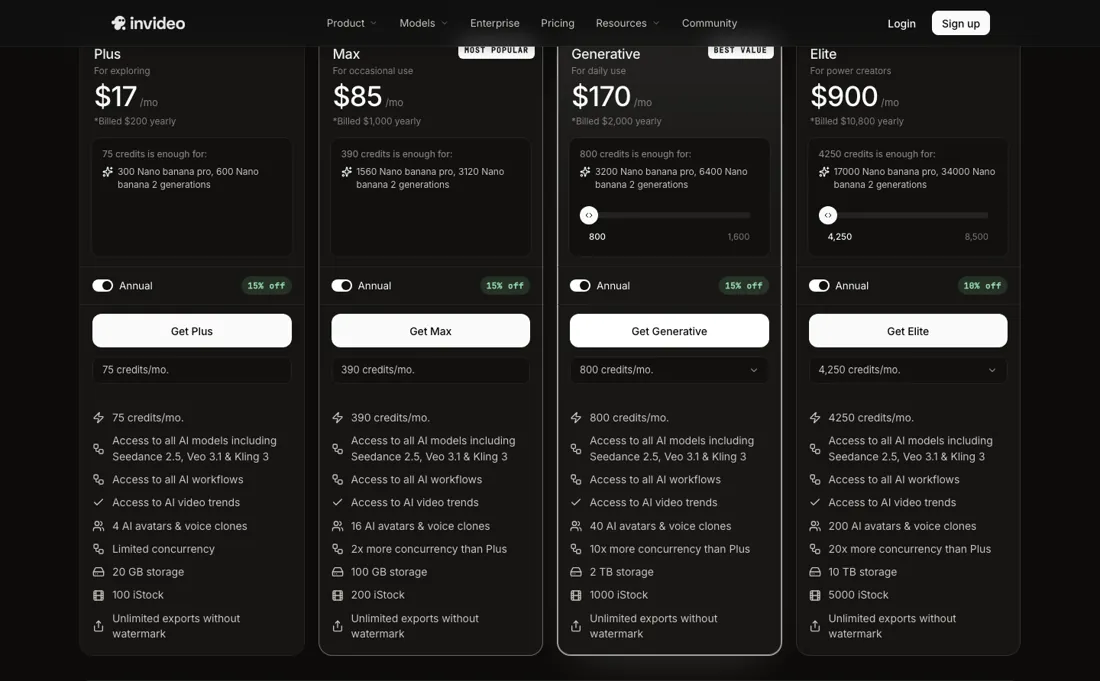
There is also no free way in any more: on 31 August 2026 the pricing page published no free tier at all, and on 24 September 2026 the cheapest route to trying it was Starter at $20 a seat a month, with 400 credits. AI video is fast but generic by default: templated output needs real editing and brand direction to not look like everyone else's. Treat it as a first-draft engine, not a finished-studio replacement.
What InVideo does
Turns a prompt or script into a first-draft video with AI voiceover, templates and stock footage. The pricing page no longer lists a free tier, so Plus is the cheapest way in.

What buyers report about InVideo
Recurring themes from the buyer-review sites listed at the foot of this page, read in August 2026. We have not run InVideo ourselves, so this is other buyers' experience rather than ours. We summarise it here because the complaints are usually the part a vendor page leaves out.
- • Prompt to finished video with stock, voiceover and captions in one pass — for social content at volume that is genuinely fast.
- • Reviewers who work within the credit allowance report solid output.
- • The 7-day money-back guarantee is effectively unusable: refunds are refused once credits have been consumed, including after same-day testing. Read that before you buy.
- • Credits burn on bad output with no refund. About one in four editing commands needs a retry, and every retry costs.
- • "Create videos without limit" is not what the credit system does. One reviewer spent over $100 on extra credits during a single video and got no usable result.
- • The AI generation is credit-metered, so the monthly figure only tells you half of what you will spend. Reviewers report support quality declining compared with a couple of years ago.
When the paid plan is worth it
Since the watermarked free tier disappeared from the pricing page (checked 31 August 2026), the question is no longer whether to pay but which allowance to buy: every published plan exports without a watermark, so what separates the tiers is credits, storage, seats and model access rather than the right to ship the video: read 24 September 2026, Starter gives 400 credits a seat and 200 GB, Plus 2,000 credits and 600 GB and unlocks Seedance 2.5 and 4K Seedance 2.0, Max 5,000 credits and 2,000 GB.
Where the calculus breaks is the credit model. InVideo describes credits as internal currency that different AI models and settings consume at different rates, and its help center is explicit that unused credits and iStock allowance do not carry over — they reset only on your renewal date. A slow month wastes what you paid for, and a heavy month (long scripts, an AI avatar, repeated regenerations) can burn an allowance well before it renews.
Upgrading a tier does not fix a mismatched workflow. If one project spikes usage, the pricing FAQ points you to credit packs bought on top of the plan, or to a higher tier. So the real cost of a heavy edit season sits outside the sticker price advertised for the plan you're on.
How to actually use InVideo
You start from a single prompt box in the InVideo AI workspace, not the older Studio timeline. Sign in with Google, Apple, or email, then describe the video you want: topic, length, tone, and platform. The AI drafts a script, voiceover, stock footage, and subtitles together as a first cut you edit from there. No integrations or DNS work are required to begin; the only setup is the account itself.
That free-account route is no longer published: read on 31 August 2026, the pricing page listed no free tier at all, so the entry point is the cheapest paid plan (Starter, $20 a seat a month on 24 September 2026) rather than a watermarked free account.
Distilled from InVideo's own help center (help.invideo.io) support articles, plus the pricing page at https://invideo.io/pricing, read 24 September 2026. That page now serves its figures in the HTML (it rendered them client-side when we first read it): the three plan cards on the monthly and annual toggles, the compare table with credit costs per model (Seedance 2.0 Fast 720p about 30 credits per 5 seconds, Seedance 2.5 1080p about 50, Nano Banana Pro about 2.5 per image), and the FAQ on credits, rollover, upgrades, downgrades, cancellation, credit packs and seats.
Common InVideo setup mistakes
Where InVideo setups actually go wrong, and what it costs you when they do. Same sources as the setup notes above — not from a walkthrough we ran ourselves.
Where people get stuck in practice is credit consumption.
- InVideo's own support articles field repeated questions about credits and iStock footage running out mid-project, because the platform charges per generation rather than per finished video; per the pricing page read 24 September 2026, timeline editing and downloads use no credits, so it is regenerating AI clips that drains the allowance.
- There's a dedicated Usage page users are pointed to specifically so they can see where an allowance went.
InVideo vs Synthesia, side by side
Both columns come from the same place: each vendor’s own published pricing, read on the date shown in the sources at the foot of this page. We do not average them into a score.
Both names above are affiliate links: we may earn a commission if you sign up, at no extra cost to you. Neither changes what this table says: both columns come straight from the vendors’ own pricing pages.
The natural comparison is Pictory or Synthesia — Pictory is a close text-to-video peer; Synthesia leans avatar/presenter video — pick by whether you need a talking head.
Frequently asked questions
How many videos do InVideo's 400 Starter credits actually buy?
Fewer finished videos than the word 'credits' suggests. The compare table on invideo.io/pricing, read 24 September 2026, prices Seedance 2.0 Fast at 720p at about 30 credits per 5 seconds of video, which it translates into 13 clips a month on Starter, 66 on Plus and 166 on Max. Starter cannot use Seedance 2.0 at 1080p or Seedance 2.5 at all; those start on Plus. Images are cheaper: Nano Banana Pro is about 2.5 credits an image, so 160 a month on Starter. Timeline editing uses no credits, so cutting your own footage is effectively unmetered; it is generation that runs the allowance down. InVideo also reserves the right to change credit costs without notice.
Do unused InVideo credits carry over, and what happens if I cancel?
They carry over only in one direction: up. Per the pricing FAQ, read 24 September 2026, the allowance resets at the start of each billing cycle, counted from the day you subscribed, and unused credits do not roll over. If you upgrade to a higher plan, unused credits move to the new plan. If you downgrade or cancel, the subscription runs to the end of the current cycle, then the account drops to the Free plan and unused paid credits expire. When you run short mid-cycle you can buy credit packs, which are added instantly, instead of changing plan. So spend the balance before a downgrade takes effect.
How does InVideo charge a team?
Per seat, and credits scale with seats. The FAQ, read 24 September 2026, counts every teammate added to your workspace as a seat. The plan caps differ: up to 5 seats on Starter, 10 on Plus and 20 on Max. Each seat brings its own allowance, so three Starter seats show as 1,200 credits a month and $720 paid up front for a year ($20 x 3 x 12). Plus is $50 a seat on annual billing against $60 monthly, and Max $100 against $150. The page does not publish a price for Business plans or larger credit sizes, so beyond 20 seats or 5,000 credits a seat you are in a sales conversation.
What should I weigh before buying Operations & Workflow software?
Usually it sits on top rather than replacing everything. Tools in this class tend to become the layer where work is tracked and handed off, while your existing systems stay the source of truth for their own data. Before you buy, map which tools it would replace outright and which it would merely sync with. If the answer is that it syncs with all of them, you are adding a layer rather than removing one.
Is this a hands-on review of InVideo?
This is a researched assessment, not a hands-on test — where we've used a tool ourselves, we say so explicitly. We name what each tool is good and bad at, and we earn a commission only if you sign up, at no cost to you.
- Buyer reviews on Capterra and practitioner reviews, read August 2026.
- InVideo’s own published pricing page.
- A dated screenshot of that pricing page, kept on this site as the receipt.
Others in this category
Reviewed operations & workflow tools that share ground with InVideo — comparable in what they do, not drop-in swaps:
New reviews, price changes we recorded, and the cost conditions we found. No sponsored placements. Unsubscribe anytime.
This is our researched assessment — not a paid placement. The “Visit” links on this page are affiliate links: we may earn a commission if you sign up, at no extra cost to you, and it never changes our take. How we review →