 Atto Review (2026)
Simple and honest pricing — the real conversation with any field-team tracker is the human one: GPS tracking of employees needs transparency and often consent (rules differ by country), and adoption dies the day the crew feels surveilled rather than served.
Visit Atto → Affiliate link — we may earn a commission if you sign up; it does not change what this page says.
Watch the 2-minute review
The video version of this review, from our YouTube channel.
⚡ Short on time? Watch the 30-second verdict Short.
Pricing (2026)
✓ Pricing re-verified 24 Sep 2026
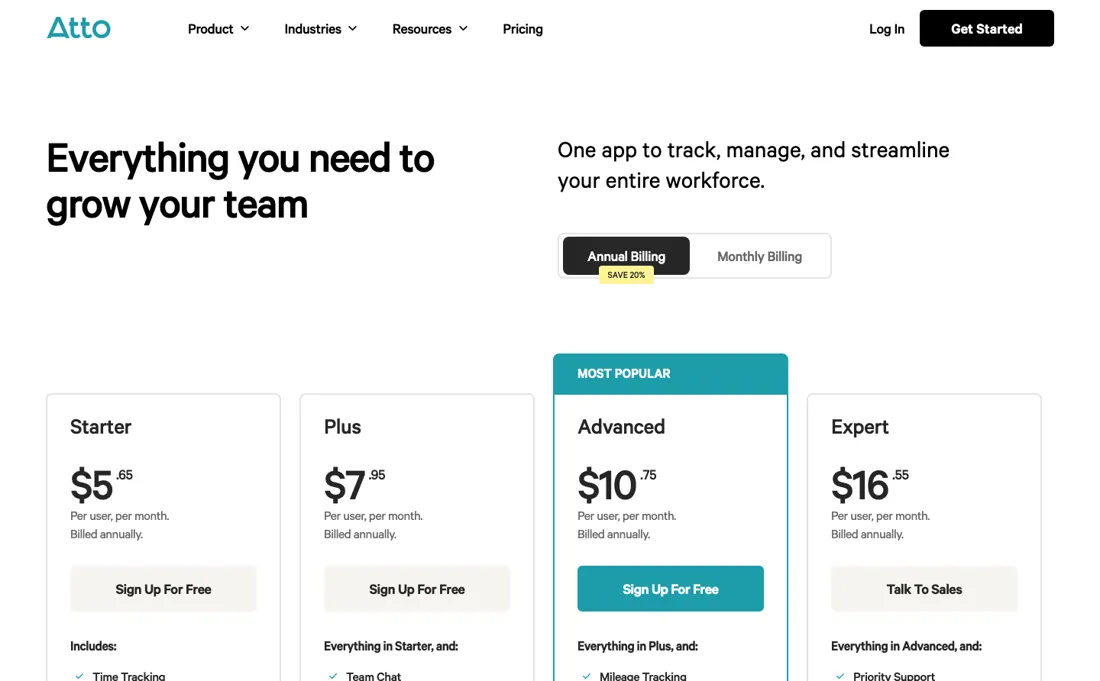
Per user per month, billed annually: Starter $5.65, Plus $7.95 (job codes, breaks and notes), Advanced $10.75 (job costing), Expert $16.55 (talk to sales). Billed monthly the same tiers are $6.95, $9.95, $12.95 and $19.95, so annual billing saves about 19% on Starter, 20% on Plus and 17% on Advanced and Expert. Payroll processing is an add-on at $5.95 per payroll user a month plus a $39.95 monthly base fee, with unlimited payroll runs, and is available to US-based businesses only.
No base price and no setup fee on the plans themselves, unlimited jobs and locations, and a free sign-up to start: a 14-day trial without a credit card, after which nothing is charged unless you choose to subscribe. The pricing FAQ says there are no hidden charges or usage limits; the bill is the number of users. History: our earlier read put Starter at about $6.95 and the top tier at $19.95; the current ladder is lower on every rung. Plans change — always verify the live price on their site.
What the pricing page doesn’t say
Roll it out as 'accurate paychecks and fewer timesheet fights', involve the team, and the tool pays for itself; roll it out as surveillance and no feature list saves it.
What Atto does
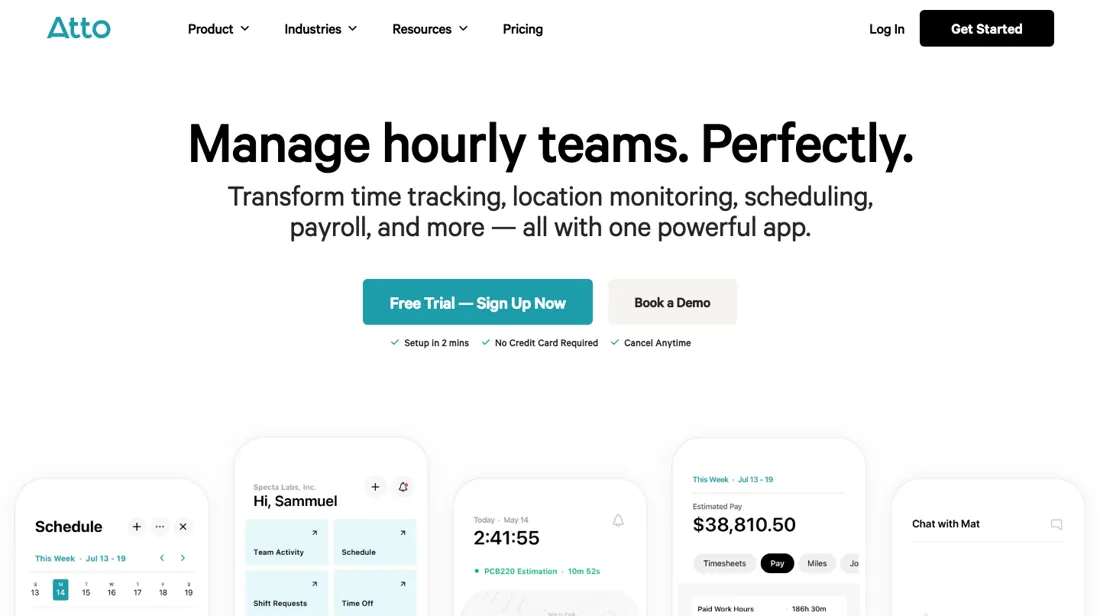
Time tracking and timesheets for hourly and mobile teams. Track hours, breaks and locations with GPS and turn timesheets into payroll-ready reports.
What buyers report about Atto
Recurring themes from the buyer-review sites listed at the foot of this page, read in August 2026. We have not run Atto ourselves, so this is other buyers' experience rather than ours. We summarise it here because the complaints are usually the part a vendor page leaves out.
- • Field teams get their hours in without confusion, and reviewers name the absence of pay disputes as the concrete result.
- • From $6.95 per user per month, cheaper per head than most of the category.
- • You are billed per user even for a manager who only views hours and never tracks their own. Reviewers use the word greedy about it — count your seats accordingly.
- • GPS location tracking is unreliable unless an iPhone is present and unlocked, which is a real limitation for the job it is sold for.
- • The app freezes while generating reports.
- • Support is email-only and reviewers want it faster. There is no free plan.
When the paid plan is worth it
Atto has no free tier: after the trial you pick from a paid ladder, and the gate that matters is GPS. Starter, $6.95 per user/month billed monthly or $5.65 billed annually, covers clock-in/out, job codes and basic overtime, and records where people clock in and out, but not real-time location tracking or a location history. That starts on Plus, $9.95 monthly or $7.95 annually. If you came to Atto for GPS-verified timesheets, which is the reason most field crews look at it, Starter is not the product you had in mind and Plus is the honest entry price.
Advanced at $12.95 monthly, $10.75 annually, adds the tablet Kiosk, mileage tracking and job-specific pay rates. Expert at $19.95 monthly, $16.55 annually, is mostly service — priority support, personalized onboarding — plus API access, so it only pays back if you actually need to push data somewhere Atto does not already export to. Upgrading fixes none of the things that break rollouts: every phone still needs continuous location permission, and the crew still has to accept being located. Annual billing saves about 20% on Plus but only 17% on Advanced and Expert.
How to actually use Atto
Sign up at dashboard.attotime.com, fill in name, company, industry and password, and the 14-day free trial starts at signup with no card. The documented order is: invite the team from Settings > Invite New Members, by email or by sharing the account link. Then set company settings for location tracking, workweek and overtime rules, breaks and mileage, and assign Admin, Manager or Employee roles and pay rates under Settings > Manage Team.
Atto says you can invite first and tune the rest later, so a crew can be clocking in the same day.
Distilled from Vendor documentation only, all from Atto's own Zendesk help centre (help.attotime.com). Specifically: the "Atto Pricing Plans" article (tier names, prices, per-tier feature lists) for the paid ladder; the "Getting Started" category, in particular the "Initial Setup Guide", for the signup-to-first-clock-in sequence and the 14-day trial; "Common Atto Clock-In Issues and Solutions" for the iOS/Android location-permission wording, the Job Code requirement and the job-site boundary block; "Why 'Location Permissions OFF' Appears in Team Activity & How to Solve It" for the manager-side symptom; "Setting Up the Atto Kiosk" for the iPad/Android tablet requirement; "Downloading Timesheet Reports (Web and Mobile)" for PDF/CSV export. The marketing pricing page at attotime.com/pricing is client-side rendered and returned no readable content, so every price here is read off the help-centre pricing article instead. No independent walkthrough was found. The review-style pages that surface for Atto are a competitor's blog (ontheclock.com), a competitor's review section (connecteam.com/reviews), and affiliate or comparison sites (work-management.org, softwarefinder.com, saasworthy.com, brainsensei.com); none of those are independent and none were used as a source. Re-read 24 September 2026: attotime.com/pricing still renders client-side, but its prices, monthly and annual rates per tier, per-tier feature lists, the payroll add-on terms and the pricing FAQ are all in the page's own JavaScript bundle (/_next/static/chunks/, fetched from attotime.com), which is where every figure in this dossier was checked on that date. That reading corrected an annual Starter rate of $5.95 to $5.65 and a flat 20% annual saving to 17-20% depending on the tier.
Common Atto setup mistakes
Where Atto setups actually go wrong, and what it costs you when they do. Same sources as the setup notes above — not from a walkthrough we ran ourselves.
The friction is on the phone, not the dashboard.
- Atto's clock-in troubleshooting lists the permissions each phone needs: on iOS, Always or While Using the App with precise location on; on Android, Allow all the time or while-in-use.
- Which one depends on whether your account runs continuous or clock-in-only tracking.
- Miss it and managers just see Location Permissions OFF in Team Activity.
- Other quiet blockers: an account can require a Job Code before clock-in, and job-site boundaries will refuse a clock-in from outside the perimeter.
Atto vs Connecteam, side by side
Both columns come from the same place: each vendor’s own published pricing, read on the date shown in the sources at the foot of this page. We do not average them into a score.
Both names above are affiliate links: we may earn a commission if you sign up, at no extra cost to you. Neither changes what this table says: both columns come straight from the vendors’ own pricing pages.
The natural comparison is Connecteam or Hubstaff — field-workforce rivals — Connecteam bundles ops features, Hubstaff leans monitoring; Atto wins on simplicity per dollar.
Frequently asked questions
Does Atto's cheapest plan show where my crew is during the shift?
No, only where they clocked in and out. Read 24 September 2026 from the plan data behind attotime.com/pricing, Starter ($5.65 per user a month billed annually, $6.95 monthly) includes clock-in and clock-out locations and job-site clock-in restrictions, which stop someone clocking in from outside a site's boundary. Real-time location tracking and the location history report start on Plus, at $7.95 annually or $9.95 monthly. Automatic mileage tracking and the tablet time clock kiosk start one tier higher, on Advanced ($10.75 or $12.95). So if the question is whether people arrived on site, Starter answers it; if it is where they went during the day, you need Plus.
What does Atto's payroll add-on cost on top of the plan?
$5.95 per payroll user a month plus a $39.95 monthly base fee, read 24 September 2026 on Atto's pricing page, with unlimited payroll runs - and only for US-based businesses. The base fee is what makes it expensive for small crews. For 10 people the add-on is $59.50 plus $39.95, or $99.45 a month, on top of the time-tracking plan; on Plus billed annually that plan is another $79.50, so about $179 a month in total. Outside the US the add-on is not available at all.
Will Atto charge me when the 14-day trial ends?
Not unless you choose to subscribe. Read 24 September 2026, the pricing FAQ says the trial needs no credit card, and after 14 days you are asked to buy a subscription to keep using Atto rather than being charged automatically. The same FAQ says there are no hidden charges or usage limits: you pay per user in the account. That makes the choice mainly monthly against annual. Annual billing saves about 19% on Starter, 20% on Plus and 17% on Advanced and Expert, and Expert ($16.55 annually, $19.95 monthly) is booked through a sales call rather than a checkout.
What should I weigh before buying Operations & Workflow software?
Usually it sits on top rather than replacing everything. Tools in this class tend to become the layer where work is tracked and handed off, while your existing systems stay the source of truth for their own data. Before you buy, map which tools it would replace outright and which it would merely sync with. If the answer is that it syncs with all of them, you are adding a layer rather than removing one.
Is this a hands-on review of Atto?
This is a researched assessment, not a hands-on test — where we've used a tool ourselves, we say so explicitly. We name what each tool is good and bad at, and we earn a commission only if you sign up, at no cost to you.
- Buyer reviews on Capterra, GetApp, G2 and Software Advice, read August 2026.
- Re-read 2026-09-24 from the plan data behind attotime.com/pricing; amounts unchanged since 5 Sep.
- A dated screenshot of that pricing page, kept on this site as the receipt.
Others in this category
Reviewed operations & workflow tools that share ground with Atto — comparable in what they do, not drop-in swaps:
New reviews, price changes we recorded, and the cost conditions we found. No sponsored placements. Unsubscribe anytime.
This is our researched assessment — not a paid placement. The “Visit” links on this page are affiliate links: we may earn a commission if you sign up, at no extra cost to you, and it never changes our take. How we review →