Connecteam Review (2026)
 By Daan Haket · Tested hands-on · written with an AI assistant · who does what
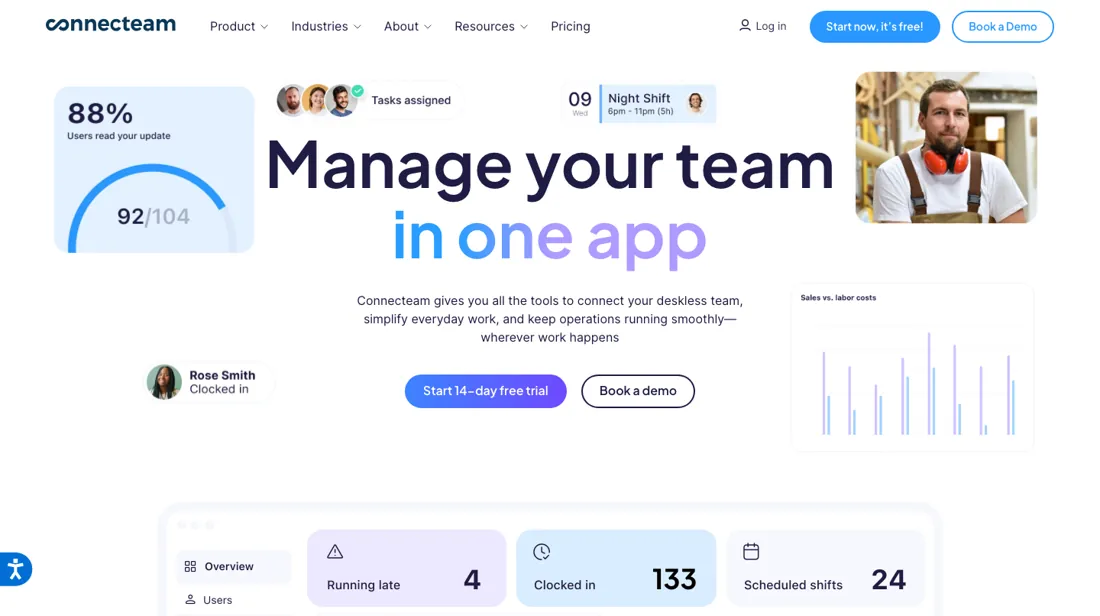
The free-for-10 plan is one of the most generous in the category, but the three-hub structure means costs can stack if you need all of them: price the specific hubs you'll actually use, not the full bundle.
- Best for Shift crews of up to ten people
From $29 · per month billed yearly ($35 monthly), covers first 30 users · read 2026-10-22
Try Connecteam free →Affiliate link: we may earn a commission if you sign up, at no extra cost to you. It never changes our verdict.
Is Connecteam right for you?
Your pain“Shift changes go out by text, and at month end I can't say who actually worked.”
Does Connecteam solve it?YesOur test (29 Oct 2026): signup landed on the free Small Business plan, described as free for life, and no card was asked.
Your planSmall Business plan, free for up to 10 users
Try Connecteam →
Your pain“We just hired our eleventh person, and I fear the free plan turns into a per-seat bill.”
Does Connecteam solve it?YesPricing page, read 22 Oct 2026: each hub has a flat base price for the first 30 users, with a per-user surcharge only from user 31.
Your planBasic, $29 a month per hub billed yearly
Try Connecteam →
Your pain“We need rotas, team chat and onboarding, and I can't tell what all three will cost together.”
Does Connecteam solve it?PartlyPricing page, read 22 Oct 2026: the three hubs are sold separately, so costs stack once you switch on more than one.
Your planAdvanced, $49 per hub a month billed yearly
Try Connecteam →
- your whole team sits at desks with email and Slack: this is built for the frontline, and a general PM tool fits an office better.
The “Try” buttons are affiliate links: we may earn a commission if you sign up, at no extra cost to you, and it never changes our verdict.
Compared side by side: Connecteam vs Deputy
Transparency: the “Visit” links on this page are affiliate links: we may earn a commission if you sign up, at no extra cost to you. No vendor can pay for a better review or verdict. How we make money →
Which Connecteam plan do you need?
2 plans, 2 questions, no signup.
Answer two quick questions to see your plan.
Your plan
Small Business Plan
$0 for life
Up to 10 users, all hubs and features
Your plan
Basic
$29/mo per hub billed yearly, or $35 monthly
Flat price covers the first 30 users of each hub
Prices as we read them on 2026-10-22; check the checkout before you pay. The plan button is an affiliate link: we may earn a commission, at no extra cost to you.
What Connecteam costs at your size
What each plan costs a month on annual billing (monthly billing below it), per user from Connecteam’s own pricing page. The cheapest plan at each size is marked. On annual billing the cheapest plan changes from Limited (one hub) to Basic (Operations Hub) between 25 and 50 users. Small Business Plan stops at 10 users; Limited (one hub) stops at 30 users.
| Users | Small Business Plan | Limited (one hub) | Basic (Operations Hub) | Advanced (Operations Hub) | Expert (Operations Hub) |
|---|---|---|---|---|---|
| 1 user | $0 | $0Best value at this size | $29 $35 monthly | $49 $59 monthly | $99 $119 monthly |
| 3 users | $0 | $0Best value at this size | $29 $35 monthly | $49 $59 monthly | $99 $119 monthly |
| 5 users | $0 | $0Best value at this size | $29 $35 monthly | $49 $59 monthly | $99 $119 monthly |
| 10 users | $0 | $0Best value at this size | $29 $35 monthly | $49 $59 monthly | $99 $119 monthly |
| 25 users | not available | $0Best value at this size | $29 $35 monthly | $49 $59 monthly | $99 $119 monthly |
| 50 users | not available | not available | $45Best value at this size | $99 | $183 |
Prices read 2026-10-22; tax excluded unless the vendor says otherwise. Calculated by our cost engine; the same numbers are in our open data.
See current prices on Connecteam →Exit test (measured 2026-10-29)
- Export route
- Quick Tasks > export icon
- Formats
- XLSX
- Attachments included
- Not tested
- Re-import tested
- No
- Lost on export
- Descriptions lose their newline without a replacement space. No native task ID is exported.
Formats describe this export route; offered formats may not have been inspected. Full exit test and scope ↓
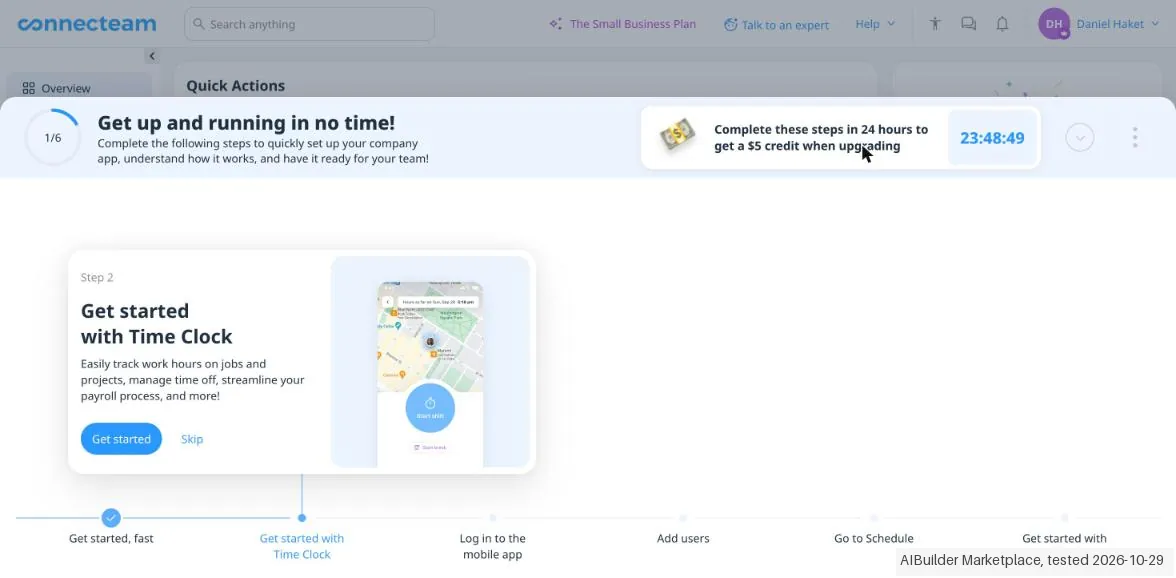
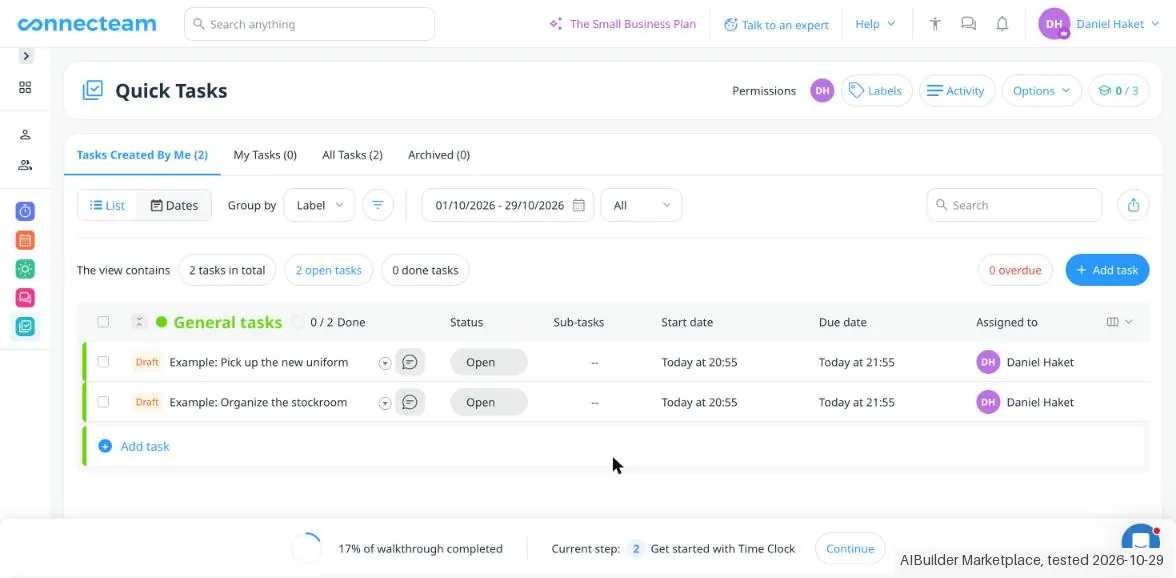
Tested by our team on 29 October 2026: Daan created the account and our AI assistant ran the test in Daan's browser. We switched on Quick Tasks, saved two made-up tasks with an attachment as drafts, exported the task list and looked at the plans.
How we tested
- Switched on Quick Tasks in our own workspace
- Saved two made-up tasks with an attachment as drafts
- Exported the task list and downloaded the attachments
- Looked at the hub plans and stopped before choosing one
- The pricing page offers a '14-day free trial', but our account landed on the Small Business plan instead: 'FREE for small businesses with up to 10 employees … Free for life'. No card was asked.
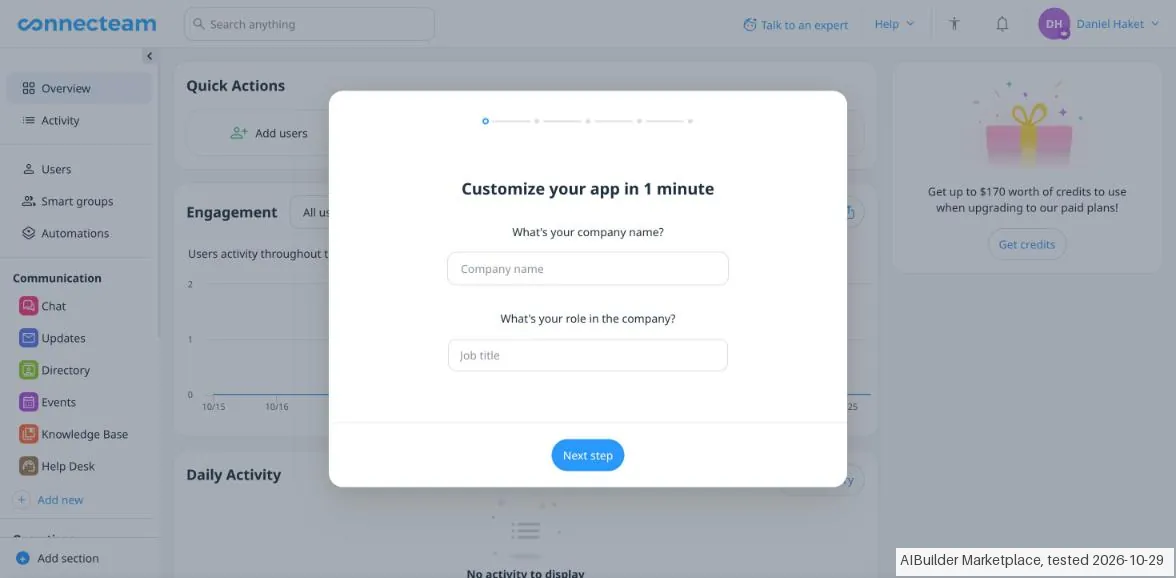
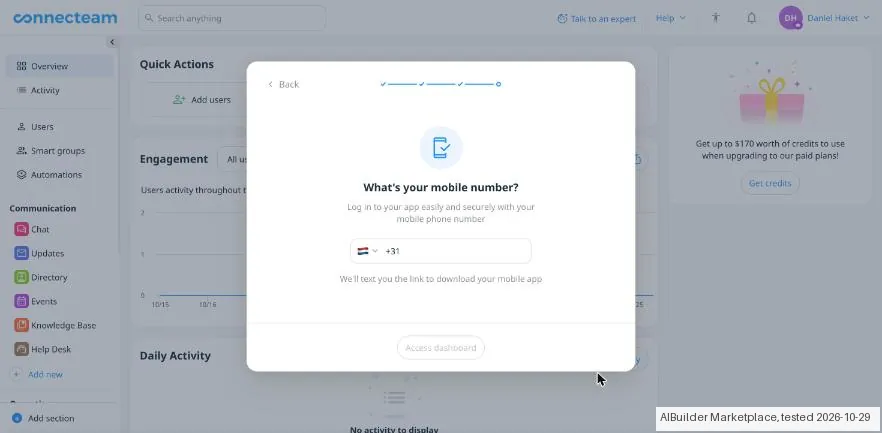
- Setup asks for company size and industry, then a mobile number; you cannot reach the dashboard without one. Your industry decides which tools appear: Quick Tasks was not in our menu until we added it.
- Connecteam adds two sample users ('Liz (sample)', 'Sam (sample)') and, when you switch on Quick Tasks, two example tasks. A task must be assigned to someone, even as a draft.
Pricing (2026)
✓ Pricing re-verified 22 Oct 2026
The free tier is real and not a trial: the Small Business Plan is $0 for life, covers up to 10 users and includes all hubs and features. Above that you buy per hub, Operations, Communications or HR & Skills, and each hub carries a flat base price covering the first 30 users, plus a per-user surcharge only from user 31 onward.
Billed yearly that base is $29/mo at Basic, $49 at Advanced and $99 at Expert; billed monthly it is $35, $59 and $119. The surcharge is where the hubs diverge: on the yearly plans Operations adds $0.80, $2.50 and $4.20 per extra user a month, while Communications and HR & Skills add $0.50, $1.50 and $3.00. Quoting only the per-user rate understates a small team's bill, because a shop of 30 or fewer pays the flat base either way.
Price it per hub you will actually switch on, not per user. Re-read on 3 October 2026 with every figure unchanged; the yearly toggle is now labelled "save 18%", and the 14-day trial still needs no credit card. Re-read on 22 October 2026 by plain fetch with every base price and surcharge unchanged. The page's FAQ adds two terms that change the free-tier picture: a team of 11 to 30 users does not have to pay after the trial, because it can move to the Limited plan, free for life on each hub but keeping only the essentials; and the time-clock comparison table marks payroll integration as not included in the Small Business Plan. Prices are in US dollars only. Plans change, so check the live price on their site before you buy.
Category context: Operations & Workflow. Across the 53 tools in this category that we researched with a public US-dollar price, the median entry price is $25 a month (lowest paid plan as listed, per seat where the vendor prices per seat). Connecteam’s entry price of $29 a month sits above that median. Compare pricing conditions in the Software Cost Atlas →
Correction after re-checking: Extra seats beyond 30 are billed per hub at rates that differ by hub, not at one flat rate. On Basic the pricing page lists $0.8 per month for each additional user on the Operations Hub, and $0.5 per month for each additional user on both the Communications Hub and the HR & Skills Hub. The generic "$0.8 per month per hub" figure from the seat-pricing help article overstates two of the three hubs by 60%. (re-verified 2026-08-04)
What the price did
We read Connecteam’s own pricing page on a schedule and keep every reading, so this is our record of the page. It is not a forecast, and not someone else’s summary. A change appears here only after we confirmed the new price on the page itself.
Connecteam's per-user ladder held steady over the summer. Our July and August 2026 captures carry exactly the same set of rates, $0, $0.50, $0.60, $0.80, $1.00, $1.50, $1.80, $2.50, $3.00, $3.60, $4.20 and $5.00, and the page returned the same structure on 17 August 2026. Re-read on 14 September and 3 October 2026: the same $29, $49 and $99 hub bases billed yearly ($35, $59 and $119 monthly) and the same per-user surcharges. Re-read on 22 October 2026: the same bases and surcharges for the fourth reading in a row.
What the pricing page doesn’t say
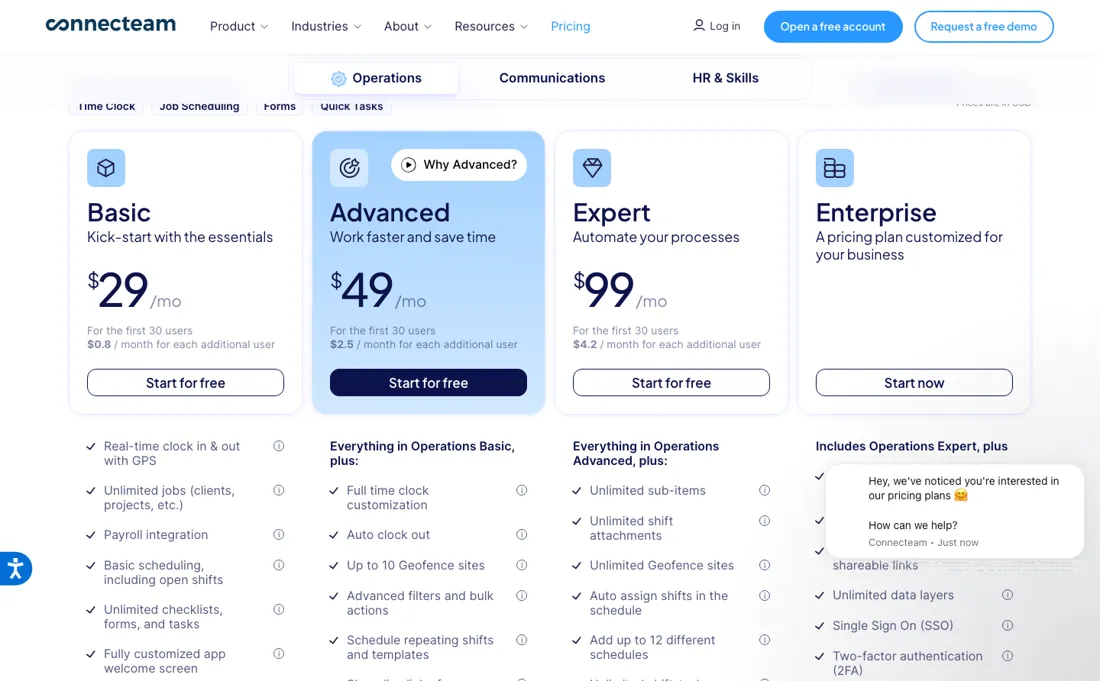
Read two terms before paying: a monthly plan can be cancelled at any time but prepaid amounts are not refunded, and an annual plan is refundable pro rata only within its first 30 days. Every price is in US dollars, with no other currency offered.
Watch the video review
The video version of this review, from our YouTube channel.
⚡ Short on time? Watch the 30-second verdict Short.
What Connecteam does
App for managing deskless teams. Scheduling, time clock, tasks, training and team chat for hourly and frontline workforces.
What buyers report about Connecteam
Hands-on: tested 2026-10-29Reported by buyers: G2, Capterra, Gartner Peer Insights and TrustRadius, read August 2026
Themes from the buyer-review sites listed at the foot of this page, read in August 2026. We tested Connecteam ourselves on 2026-10-29, but one test is a narrow sample, so here is what other buyers report. We summarise it here because the complaints are usually the part a vendor page leaves out.
- • Mobile-first in a way that deskless teams actually use: 4.6 on G2 across 3,500+ ratings, with scheduling and time tracking the named strengths.
- • Customisable, and support gets consistently good marks.
- • A July 2026 TrustRadius reviewer names the compliance feature that sells it to distributed teams: required acknowledgements on updates, so you can prove every employee received and read a notice.
- • The costing angle comes up too: time can be categorised (office, customer, field travel), which lets a service business see how much of a technician's day is travel rather than work, and certifications live in the same app.
- • The mobile app is reported as glitchy, and system alerts do not always fire on time. In a shift business a late alert is a missed shift.
- • Scheduling and timekeeping problems come up alongside the praise for the same features: worth testing your own rota pattern in the trial.
- • Advanced reporting and complex integrations are where it runs out.
- • The app feels cluttered once you switch several modules on.
- • Time-zone management across distributed teams is the gap named by the same reviewers who otherwise rate it at the top.
When the paid plan is worth it
Under 10 users there is no case for paying anything. Connecteam documents its Small Business Plan as free for life, with every feature in the platform and no expiry date, making the free tier unusually complete. Paid tiers become unavoidable at one point: the vendor states that once you add your 11th user you have to choose a plan. Pricing is then per hub, not per account. Operations, Communications and HR & Skills are sold separately, each carrying a fixed price for up to 30 users.
So a company that only needs scheduling and time tracking buys one hub, while one that also wants internal messaging and onboarding pays again for each hub it turns on. Past 30 users, extra seats are billed per hub, and the rate depends on which hub: on Basic the pricing page lists $0.8 per month for each additional user on the Operations Hub and $0.5 on the Communications and HR & Skills hubs.
Upgrading pointedly does not fix headcount hygiene: Connecteam states that archived or deleted users keep being billed until the seats are manually removed. A higher tier also buys no adoption; the rollout still depends on staff installing the app. The eleventh-user cliff is softer than that line suggests. The pricing FAQ read 22 October 2026 offers the Limited plan, free for life for up to 30 users on each hub, as the alternative to paying after the trial.
It keeps only the essentials, and Connecteam warns that it lacks some of what the trial showed: in the Operations comparison the Limited column has a single time clock and up to 5 custom jobs. So the real choice at user 11 is between a stripped-down free tier and $29 a month per hub on annual billing. The tiers buy different things on each hub. On Operations, Advanced ($49 yearly) adds auto clock-out, up to 10 geofence sites, repeating shifts and a shareable live schedule link, and Expert ($99) adds unlimited geofences, auto-assigned shifts, up to 12 schedules, API access and webhooks.
On Communications, Advanced adds anonymous surveys and scheduled chat messages, and Expert adds auto-translated feed updates, read confirmations and AI message translation. On HR & Skills, e-signatures are capped at 2 documents on Advanced, 10 on Expert and 30 on Enterprise. Single sign-on, two-factor authentication and a biometric app lock are Enterprise-only on all three hubs, a plan Connecteam recommends for 201 to 10,000 employees. Against Deputy, whose Lite plan is $5 per user a month on annual billing (read 19 September 2026), the per-hub model wins quickly once one hub is enough: 30 people on Connecteam's Operations Basic pay $29 a month against $150 on Deputy Lite, and 100 people pay $29 plus 70 × $0.80, or $85, against $500.
Our monthly capture read this vendor's pricing page every month from July 2026 to October 2026, and the amounts were the same all 4 times, including $0 from the pricing above. We keep watching, and the registry records what moves.
What we found running Connecteam ourselves
The first findings are at the top of this page. The rest:
- The task export (XLSX) included all four drafts. Our description lost its line break, and accents were kept. There is no task ID.
- The attachments came back as links to public.cdn.connecteam.com that open without logging in; the downloaded files were byte-for-byte the same as our uploads.
- 'Add multiple tasks' is a grid for new tasks, not a file import, so there is no way to update tasks by importing a file.
- Paid plans are priced per hub (Operations, Communications, HR & Skills): Basic $29, Advanced $49 and Expert $99 a month billed yearly, each up to 10 users.
Claim vs. what we measured
We set a claim from Connecteam's own pages next to what we saw in our test, on the plan named. The status says whether the two describe the same thing and match; it is not a verdict on the product. Confirmations are listed too.
| What the vendor says | What we measured | Status | What it means if you buy |
|---|---|---|---|
| 14-day free trialSource: connecteam.com, read 29 Oct 2026 | Measured 2026-10-29: The app instead shows Small Business FREE for up to 10 employees, Free for life, with no trial countdown.Our test, 29 Oct 2026; Small Business (Free for life) | ContradictedCompared on the account we got: the free Small Business plan, with no trial countdown anywhere in the app. | This account received ongoing free access rather than the advertised timed trial; paid hub terms were not tested. |
| $29Source: connecteam.com, read 29 Oct 2026The vendor's page no longer shows this wording (checked 2026-11-13), original claim: “$29” | Measured 2026-10-29: Basic shows $29 per month billed yearly per hub; no paid checkout opened.Our test, 29 Oct 2026; Small Business (Free for life) | Not testableBasic per hub, billed yearly, as listed in the app; no paid checkout was opened. | Final bundle, tax and payable total remain unknown. |
Exit test: can you take your data out?
Created two draft tasks and exported them alongside two supplier-created example tasks. Test date: 29 Oct 2026. We describe the friction rather than score it; this is one run with synthetic records, not a verdict on Connecteam.
| What we checked | What we saw |
|---|---|
| Came along in the export |
|
| Lost in the export |
|
| Awkward but not lost | The account uses the Small Business plan, free for life, instead of a timed trial. Onboarding requires a mobile number. Attachment links work without login. In the actual worksheet, image hyperlinks occupy the Location column while Attachments 1 is empty. |
| Export route | Quick Tasks > export icon; drafts are included. |
| Export format | XLSX with the two test drafts plus two example drafts. |
| Re-importing the export | Add multiple tasks is a new-task input grid; no file import or ID update is offered. |
| Cancelling | Free plan, no card or trial end. Actual cancellation and deletion were not tested. |
What the exit test does not show:
- Actual cancellation, expiry and deletion.
- Native-ID update execution.
- Unentered fields and complete signup screen count.
Kit check counts
Kit projects-tasks-feedback 1.0.0; run connecteam-2026-10-29; observed 2026-10-29.
- export / AIBM-001: Of 10 checks: 3 kept, 1 changed, 1 lost, 4 not offered, 1 not tested
- export / AIBM-002: Of 10 checks: 3 kept, 1 changed, 1 lost, 4 not offered, 1 not tested
- reimport / AIBM-001: Of 10 checks: 0 kept, 0 changed, 0 lost, 10 not offered, 0 not tested
- reimport / AIBM-002: Of 10 checks: 0 kept, 0 changed, 0 lost, 10 not offered, 0 not tested
Each record and phase uses this kit’s checks. Counts describe this run; they are not a score or a comparison between kits.
How this compares: across our exit tests of 102 tools, 57 gave us an export file. Connecteam gave us a file, but some of our test data was missing or changed in it. Report 08: can you get your data out?
Mail in the first 14 days
1 emails in the 14-day window; first email after signup: unknown (exact signup time not recorded); 0 with an explicit offer.
Retained inbox and junk only; removed or archived mail is outside this observation. Ambiguous supplier attribution is excluded. Day numbers use elapsed 24-hour periods since the recorded signup date at midnight Europe/Amsterdam; the signup hour is unknown. Offer flags quote literal subject/body text. Replies in our own correspondence (support tickets, our comment requests) are excluded; one-time codes, our own address, our account name and our name are replaced in brackets.
| Day | Time (UTC) | Sender | Literal subject | Folder | Offer evidence |
|---|---|---|---|---|---|
| Day 0 | 2026-10-29 19:54:01 UTC | Connecteam team / connecteam.com | Your employee app is ready! | inbox |
Screenshots from our test (click to enlarge)
What this test does not show:
- Time clock, scheduling and chat
- Assigning tasks to employees
- A paid checkout
- Contacting support
Most of our reviews are researched rather than run. How we review explains which is which, and why we do not pretend otherwise.
Questions we are still checking
Facts about Connecteam that would change a buying decision, and where we stand on each. An unanswered question does not mean the feature is missing; it means we have not confirmed it yet.
- Which features does Connecteam's free Limited plan keep on each hub? Still checking
Applies to: free for life for 11 to 30 users after the trial.
Why it matters: for a team of 11 to 30 the Limited plan is the free alternative to $29 a month per hub, and the page only says it keeps the essentials.
Checked: Connecteam pricing and FAQ (2026-10-22) - Does the free Small Business Plan cover 10 users or fewer than 10? Sources disagree
Applies to: Small Business Plan, $0 for life.
Why it matters: the tenth user decides whether a small team pays nothing or has to pick between Limited and a paid hub.
Answer: The plan card read 22 October 2026 says all hubs and features free for up to 10 users; the FAQ on the same page says the plan is for a small business with less than 10 employees.
Checked: Connecteam pricing and FAQ (2026-10-22)
Have a public source that answers one of these? How we review explains how we check and correct.
Work at Connecteam? Answer these on the record. A person reads each answer before it is published as a dated statement from your company.
How to actually use Connecteam
The fastest route to something usable is the 14-day free trial, which the pricing page says needs no credit card. Before touching features, open the account name in the top-right of the Admin Dashboard and go to Settings to fix time zone, time format and the company logo, since these shape what every employee later sees in the app. Then select "Let's Go" on the dashboard to run the 7-step tutorial, which switches on Time Clock, Job Scheduler, Chat and Directory.
Real value only arrives once employees are in the app, which the tutorial itself does not cover. Users are added under the Users tab via Add Users and +Add manually, where First Name, Last Name and Mobile Phone are mandatory, and the documentation warns to mark the right country code. The invite is an SMS carrying a download link, so a mistyped country code simply means it never lands. Skip the "Send an invite" checkbox and the invite has to be re-sent later from the Users or Overview page.
Watching a feature playlist adds a $5 account credit. Plan the trial around what you will lose afterwards. The 14-day trial runs on Expert, and a team of 11 to 30 that settles on the free Limited plan keeps only the essentials, so note which trial features your managers actually used (auto clock-out, geofences, repeating shifts, API access) and buy that tier on that hub only. If staff will use breadcrumb GPS, tell them in advance that the phone will ask for 'Always' location access; Connecteam says it records location only while someone is on the clock.
Sources for this review
- Connecteam pricing, comparison table and FAQ · read 22 Oct 2026: hub prices and surcharges on both toggles, tier features, Small Business and Limited plans, trial, refunds, prorated seats, breadcrumbs, USD only
Full research notes and reading history (92 words)
Connecteam pricing page and vendor help-centre articles on seat pricing, the Small Business Plan and admin-dashboard onboarding, read 4 August 2026; pricing page re-read 3 October 2026 (served HTML): Basic $29, Advanced $49 and Expert $99 per hub a month billed yearly ($35, $59, $119 monthly) for the first 30 users, with the same per-user surcharges per hub. Re-read 22 October 2026 by plain fetch: connecteam.com/pricing with the three hub cards on both toggles, the comparison table and the pricing FAQ (Limited plan, trial on Expert, refunds, prorated seats, breadcrumbs, USD only).
The natural comparison is When I Work or Homebase: other deskless-team scheduling apps.
Frequently asked questions
Can you export your data from Connecteam?
Exit check 2026-10-29; route excerpt: Quick Tasks > export icon; came along (excerpts): Both Unicode task titles survive; lost (excerpts): Descriptions lose their newline without a replacement space; re-import: not tested.
Is Connecteam really free for a small team?
Yes, and it is unusually generous: the Small Business Plan is $0 for life for up to 10 users and includes all hubs and all features, not a limited subset. The cliff is the eleventh user, at which point you are choosing hubs and paying per user. Read on 17 August 2026 and unchanged on 3 October 2026.
How does the per-hub pricing work?
You buy the hubs you need (Operations, Communications or HR) rather than one bundle, and each is priced to cover the first 30 users with a surcharge per user after that. The published per-user rates run from $0.50 to $5.00 a month depending on hub and tier. A team that only needs scheduling pays for one hub, which is what makes the entry price so low.
Why is it so much cheaper than the competition?
Because the unit is different. Most workforce tools charge per user for everything; Connecteam charges per hub with the first 30 users included, so a 30-person team using one hub pays a flat fee rather than 30 seats. The comparison flips once you need all three hubs for a large team: price the hubs you will actually switch on.
Can I get a refund if Connecteam does not work out?
Only on annual plans, and only early. The pricing FAQ (read 22 October 2026) says a monthly subscription can be cancelled at any time with no refund of prepaid amounts, and an annual subscription is refunded pro rata if cancelled within its first 30 days. Plans can be upgraded, downgraded or cancelled at any time. Seats added mid-cycle are charged by the day for the rest of the cycle and in full from the next one.
Do I have to go through Connecteam's 14-day trial?
Yes. Everyone starts with the trial, which runs on the Expert plan with no credit card. At the end you subscribe to a paid plan, move to the free Limited plan for up to 30 users, or, below 10 users, use the free Small Business Plan. If you do nothing, the FAQ says your information stays in place until you subscribe or ask for the account to be deleted.
Does Connecteam's GPS breadcrumb tracking follow staff off the clock?
Connecteam says no: breadcrumbs record location only while a user is on the clock, and it never processes or stores location when they are off it. The phone will still ask staff to set location access to 'Always', because the app tracks with the app closed in the background, so explain that before roll-out.
What does Connecteam's 'yearly save 18%' mean in dollars?
Yearly billing charges the equivalent of 10 months. Per hub and per month for the first 30 users that is $29 instead of $35 on Basic, $49 instead of $59 on Advanced and $99 instead of $119 on Expert. A company running all three hubs on Advanced pays $147 a month on annual billing, $1,764 a year, against $177 a month on monthly billing.
Is this a hands-on review of Connecteam?
Yes. We tested Connecteam ourselves on 2026-10-29; the section above says what we tested, what we found and what we did not test, and where a figure comes from the vendor's own documentation instead. Most of our reviews are researched rather than run; we say which is which. We name what each tool is good and bad at, and we earn a commission only if you sign up, at no cost to you.
- Buyer reviews on G2, Capterra, Gartner Peer Insights and TrustRadius, read August 2026.
- Re-verified 2026-10-03 on their own pricing page, USD.
- A dated screenshot of that pricing page, kept on this site as the receipt.
- Our own hands-on session with Connecteam (2026-10-29), written up in full further down this page.
Bottom line
Best for: shift crews of up to ten people.
The Try button is an affiliate link; we may earn a commission at no extra cost to you.
Others in this category
Reviewed operations & workflow tools that share ground with Connecteam. They are comparable in what they do, not drop-in swaps:
New reviews, price changes we recorded, and the cost conditions we found. No sponsored placements. Unsubscribe anytime.
This is our researched assessment, not a paid placement. The “Visit” links on this page are affiliate links: we may earn a commission if you sign up, at no extra cost to you, and it never changes our take. How we review →