 Bokun Review (2026)
Transparency: the “Visit” links on this page are affiliate links — we may earn a commission if you sign up, at no extra cost to you. No vendor can pay for a better review or verdict. How we make money →
Bokun is a Tripadvisor/Viator company, and that's both the draw and the lock-in.
Visit Bokun → Affiliate link — we may earn a commission if you sign up; it does not change what this page says.
Watch the 2-minute review
The video version of this review, from our YouTube channel.
⚡ Short on time? Watch the 30-second verdict Short.
Pricing (2026)
✓ Pricing re-verified 20 Sep 2026
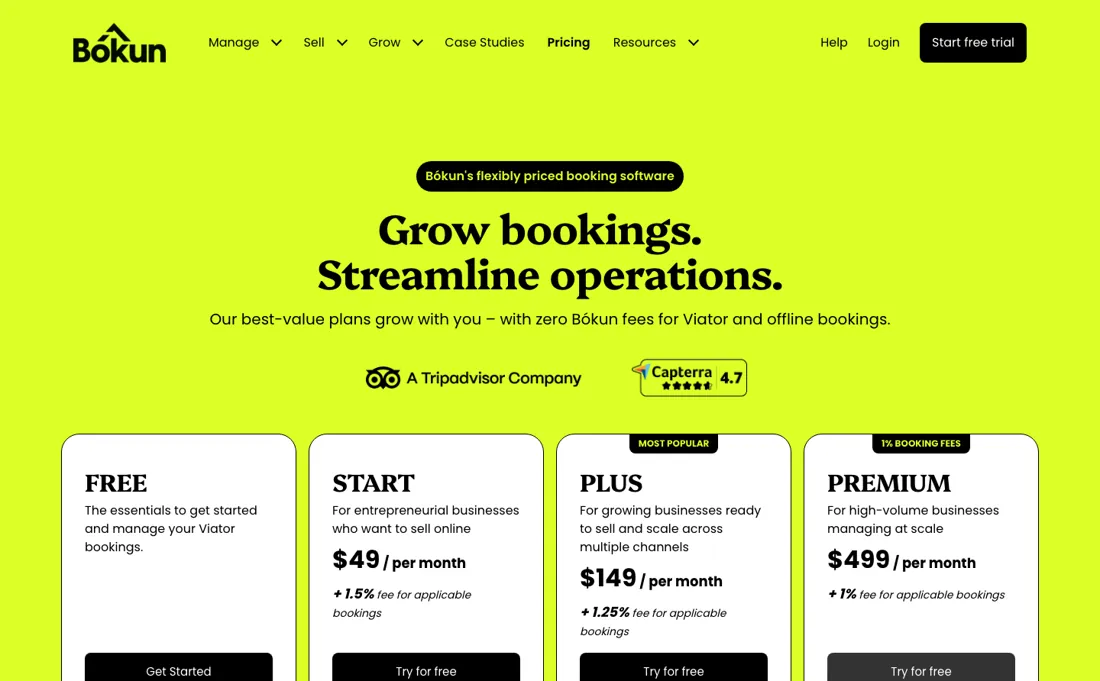
(2026) A free version (1 user) plus paid plans from $49/mo (Start, up to 5 users), $149 (Plus, up to 10) and $499 (Premium, unlimited). Service fee on applicable bookings varies by plan (1.5% Start, 1.25% Plus, 1% Premium), and any paid plan lets you pass that fee on to the guest. Crucially, zero Bokun booking fee on Viator and offline bookings — with one exception the tier table does not show: Channel Manager customers, who connect their own reservation system, are charged 0.5-1.5% on Viator reservations. 14-day free trial, no card, cancel anytime.
UNCHANGED SINCE 2026-09-11 on every amount. THE FREE PLAN IS THINNER THAN ITS CARD SUGGESTS: in the comparison table on the same page, FREE carries exactly two ticks — manage availability, and import products directly from Viator. The 'Book now' button, access to the Marketplace of OTAs and resellers, Google Things to do, the website builder, the mobile app, gift cards, payment links, pass-the-fee and point of sale are all marked absent on FREE and present from START.
TWO CONTRADICTIONS ON THE PAGE ITSELF, read 2026-09-20: (1) the FREE card lists 'Zero fees on Viator' under Includes, while the comparison table marks the row '0% booking fees on Viator bookings' blank on FREE and ticked on START, PLUS and PREMIUM; the page never resolves which is right. (2) 'Allocation Manager' appears twice in the comparison table with different marks — once ticked from PLUS, once ticked from START — and the PLUS card lists it as a PLUS addition.
ALLOWANCES THE TIER CARDS DO NOT SHOW: free Viator product submission checks, which the page calls compulsory for anyone listed on Viator, run 12 a year on START (a value the page puts at $348/yr), 24 on PLUS ($696/yr) and 48 on PREMIUM ($1,392/yr), with none on FREE — $29 a check by their own arithmetic. Automated reservation management emails are capped at 500 a month on START and unlimited on PLUS and PREMIUM.
Subvendors: 5 on PLUS, 15 on PREMIUM. Webhooks, Zapier, custom booking areas for agents, extra go-live support and the annual account review start at PLUS; priority support is PREMIUM only. Plans change — always verify the live price on their site.
Category context: Operations & Workflow. Across the 49 tools in this category that we researched with a public US-dollar price, the median entry price is $25 a month (lowest paid plan as listed, per seat where the vendor prices per seat). Bokun’s entry price of $49 a month sits above that median. Compare pricing conditions in the Software Cost Atlas →
What the pricing page doesn’t say
Distribution to Viator and 2,600+ resellers is excellent, but you're building your booking backbone inside one OTA's ecosystem, and the per-booking service fee on direct sales is a real cut on top of the subscription — although any paid plan lets you pass that fee to the guest instead of absorbing it. The zero-fee promise on Viator bookings has one exception the tier table does not show: Channel Manager customers pay 0.5-1.5% on Viator reservations.
If most of your business is direct, weigh that fee; if you live on OTA distribution, the Viator advantage is hard to beat.
What Bokun does
Booking management for tours and activities, by Tripadvisor. Manage availability, channel sales and online bookings in one place — built for experience businesses.
What buyers report about Bokun
Recurring themes from the buyer-review sites listed at the foot of this page, read in August 2026. We have not run Bokun ourselves, so this is other buyers' experience rather than ours. We summarise it here because the complaints are usually the part a vendor page leaves out.
- • 1.5% booking fees are the lowest in the category, Viator bookings carry none, and offline bookings are never charged. From $49/month.
- • It genuinely centralises bookings, availability, channel management and payments in one place.
- • It charges a service fee on cancelled bookings, on top of payment processing. On a high-cancellation product that is a real cost.
- • OTA synchronisation fails in ways that cost money — reviewers report Viator showing slots as unavailable when they were free, losing bookings.
- • Support response times are the most frequent complaint.
- • The interface and the pricing-catalogue setup are both described as time-consuming to learn.
- • Long-term users report pricing for new customers has doubled, narrowing the cost advantage.
When the paid plan is worth it
Bókun's pricing page lists FREE, START, PLUS and PREMIUM. FREE covers booking management and manual bookings and is capped at 1 user. START is $49 per month plus a 1.5% fee for applicable bookings, up to 5 users. PLUS is $149 per month plus 1.25%, up to 10 users. PREMIUM is $499 per month plus 1%, with unlimited users. The decisive step is FREE to START, because selling online via booking widgets, OTAs and the Marketplace only starts at START; if you take bookings on your own site, that first $49 is not optional.
The largest jump in the table is PLUS to PREMIUM, $149 to $499, and it buys the least visible return. The fee drops from 1.25% to 1%, subvendors go from 5 to 15, and free Viator submission checks from 24 a year to 48 — which the page values at $696 and $1,392, so $4,200 of extra annual subscription buys $696 of listed checks plus a quarter-point off your fee.
Upgrading does not make Bókun your merchant of record: the help center states Bókun does not process payments directly on the platform, and that you have to invoice OTAs and Marketplace resellers yourself to get paid.
Our monthly capture read this vendor's pricing page in July 2026 and again in August 2026, and the amounts were the same both times. We keep watching — the registry records what moves.
How to actually use Bokun
Bókun's own Beginners Course lays out the route in numbered sections, running from Section One: Getting Started through Section Two: Sales Channels, Section Three: Manage your Bookings and Section Four: Become a Reseller to Section Five: Advanced Tools.
Distilled from Everything above comes from Bókun's own material read in this session — the pricing page, the Beginners Course page, and the help-center articles on payment providers, connecting Viator and Bókun accounts, the Viator submission fee, how you get paid, and connecting your own domain; we found no independent walkthrough worth citing.
Common Bokun setup mistakes
Where Bokun setups actually go wrong, and what it costs you when they do. Same sources as the setup notes above — not from a walkthrough we ran ourselves.
The friction is elsewhere.
- Bókun does not process payments, so taking money online means registering separately with a supported provider such as Braintree, Stripe or PayPal.
- The help center adds that you do not need a payment provider at all if you accept payment upon arrival on one of your booking channels.
- Only one Viator account can be connected to one Bókun account, products in Viator must already be active and set to accept bookings instantly, and from initiation the docs say products are fully connected within 24 hours.
- New Viator listings still go through a Launch Assist evaluation with a non-refundable 29USD submission fee.
- Pointing your own domain at a Bókun website needs A records to 35.172.94.1 and 100.24.208.97 plus a www CNAME, and can take up to 48 hours.
The natural comparison is FareHarbor or Rezdy — close tour-booking peers — compare direct-booking fees and how much you rely on Viator/Tripadvisor distribution.
Frequently asked questions
Can I actually sell on the free plan?
Not in the ordinary sense. Read the comparison table rather than the FREE card: on 20 September 2026 the free plan carries two ticks in the whole table — manage availability, and import products directly from Viator. The 'Book now' button for direct online bookings, access to the Marketplace of OTAs and resellers, Google Things to do, the website builder, the mobile app, gift cards, payment links and point of sale are all marked absent on FREE. So the free plan is a back office for bookings that reach you through Viator, not a way to take a booking of your own. If you want a booking button on your site, the entry price is $49 a month plus 1.5%.
Does the free plan really carry zero Viator fees?
Bokun's own pricing page says both things on 20 September 2026 and does not reconcile them. The FREE card lists 'Zero fees on Viator' under what is included. Further down the same page the comparison row '0% booking fees on Viator bookings' is blank on FREE and ticked on START, PLUS and PREMIUM. The banner over the cards promises 'zero Bokun fees for Viator and offline bookings' in general, while the START card lists 'Zero fees on offline bookings' as something START adds over FREE. Get the answer in writing before you build a business on the free tier. And note the exception that is in none of these places: Channel Manager customers, who connect their own reservation system, pay 0.5-1.5% on Viator reservations.
Is the step up to a lower booking fee worth the higher subscription?
Only at real volume, and the page gives you everything you need to work it out. START is $49 a month plus 1.5% of applicable bookings; PLUS is $149 plus 1.25%. That is $100 more a month for a quarter of a percentage point, so the move pays for itself at $40,000 a month in applicable bookings and not before. PLUS to PREMIUM is $350 more for the same quarter point: $140,000 a month. Below those lines you are buying features, not a cheaper fee — Zapier, webhooks and the allocation manager at PLUS, unlimited users and priority support at PREMIUM. And any paid plan lets you pass the booking fee to the guest, which changes the arithmetic entirely. Prices read on bokun.io/pricing, 20 September 2026; the break-even figures are ours.
Is there anything in the paid plans with a published dollar value?
One row, and it is easy to miss. Viator product submission checks are compulsory once you are listed on Viator, and Bokun does not charge for them: 12 a year on START, 24 on PLUS, 48 on PREMIUM, none on FREE. The page prices those allowances itself — $348, $696 and $1,392 a year — which works out at $29 a check. If you submit a dozen products a year to Viator, that row alone covers more than half of START's $588 annual cost. Read on bokun.io/pricing, 20 September 2026.
What should I weigh before buying Operations & Workflow software?
Usually it sits on top rather than replacing everything. Tools in this class tend to become the layer where work is tracked and handed off, while your existing systems stay the source of truth for their own data. Before you buy, map which tools it would replace outright and which it would merely sync with. If the answer is that it syncs with all of them, you are adding a layer rather than removing one.
Is this a hands-on review of Bokun?
This is a researched assessment, not a hands-on test — where we've used a tool ourselves, we say so explicitly. We name what each tool is good and bad at, and we earn a commission only if you sign up, at no cost to you.
- Buyer reviews on Capterra, GetApp and Software Advice, read August 2026.
- Price re-verified 2026-09-20 on bokun.io/pricing, plan cards and the full comparison table.
- A dated screenshot of that pricing page, kept on this site as the receipt.
Others in this category
Reviewed operations & workflow tools that share ground with Bokun — comparable in what they do, not drop-in swaps:
New reviews, price changes we recorded, and the cost conditions we found. No sponsored placements. Unsubscribe anytime.
This is our researched assessment — not a paid placement. The “Visit” links on this page are affiliate links: we may earn a commission if you sign up, at no extra cost to you, and it never changes our take. How we review →