 Trainerize Review (2026)Add-Ons Cost More Than the Plan
The client-count ladder looks gentle, but most add-ons are flat and they land hardest on the smallest coach: at five seats a $23 Pro plan dressed with nutrition, payments and video is $63, while the same three turn the $225 two-hundred-client row into $290.
Visit Trainerize → Affiliate link — we may earn a commission if you sign up; it does not change what this page says.
Watch the 2-minute review
The video version of this review, from our YouTube channel.
⚡ Short on time? Watch the 30-second verdict Short.
Pricing (2026)
✓ Pricing re-verified 27 Sep 2026
Basic is free for 1 client. Grow is $9 a month billed annually or $10 month-to-month, for 2 clients. Pro is priced by client seats: 5, 15, 30, 50, 75, 100 and 200 seats cost $23, $45, $71, $122, $162, $203 and $225 a month billed annually, or $25, $50, $79, $135, $180, $225 and $250 month-to-month. Studio Plus is $248 a month per location billed annually ($275 monthly) for 500 client seats and $342 ($380) for 1,000; 5+ locations are quoted.
Annual billing saves 10% and there are no long-term contracts. Add-ons on Grow and Pro: Advanced Nutrition Coaching $20 a month on Grow, Pro 5 and Pro 15 and $45 from Pro 30 to Pro 200; Business $25; Stripe Integrated Payments $10; Video Coaching $10; and on Pro a Custom Branded App at a one-time $169, which also needs your own $99-a-year Apple Developer Account, charged by Apple.
Studio Plus includes all of them. FitMetrics is a separate add-on from $6 per client. A 30-day trial with unlimited clients needs no card; add-ons are not included in it. Plans change — always verify the live price on their site.
What the pricing page doesn’t say
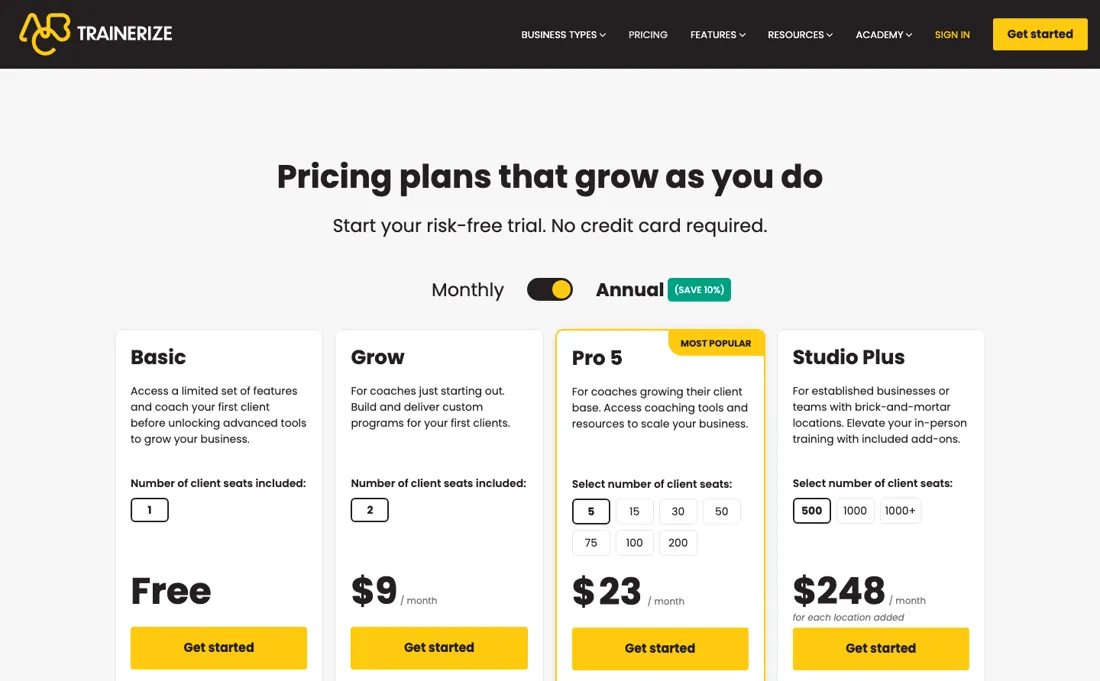
Price the stack you'll actually coach with, and note that the branded app is $169 to Trainerize plus a $99/year Apple Developer Account billed by Apple. That said, the client experience and ABC ecosystem are genuinely mature; churn-prone coaches lose more to a clunky app than to a fair subscription.
What Trainerize does
Personal training and fitness-coaching platform. Deliver workout and nutrition plans, message clients and take payments from one branded app, so trainers can coach more clients online.

What buyers report about Trainerize
Recurring themes from the buyer-review sites listed at the foot of this page, read in August 2026. We have not run Trainerize ourselves, so this is other buyers' experience rather than ours. We summarise it here because the complaints are usually the part a vendor page leaves out.
- • The most well-rounded coaching platform in the category — AI workout builder, meal planner and video coaching in one place.
- • Clients get an app that looks like a real product rather than a spreadsheet.
- • The $23 headline is not what solo coaches pay. Real setups land at $100-$200 a month once custom branding ($169 one-off on Pro), Stripe Payments ($10/month) and Advanced Nutrition ($20-45) are added.
- • Price increases trigger automatically when you cross a client threshold — growth costs you before it pays you.
- • Building and editing workouts is confusing and slow, and the exercise library is thin with some outdated or unsafe entries.
- • Crashes and glitches are reported.
The add-ons weigh most on the smallest coach
The client ladder looks gentle: free for one client, Grow $9 a month for two, and Pro from $23 at five seats to $225 at two hundred, all billed annually; month-to-month is about 10% more ($10, and $25 to $250). Studio Plus is $248 a month per location for 500 client seats. Prices are in USD before tax. A correction first. We earlier put the 200-client end of Pro at $275 and nutrition at a flat $45 on every Pro plan.
Operating each seat selector in both billing modes, Pro 200 is $225 annually or $250 monthly; $275 is Studio Plus billed monthly. And nutrition is now $20 a month on Grow, Pro 5 and Pro 15, rising to $45 only from Pro 30. The add-ons are still where the real bill lives. Business is $25 a month, Stripe payments $10 and video coaching $10, the same at five clients as at two hundred; the branded app is a one-time $169 plus your own $99-a-year Apple Developer Account.
At five seats, $23 plus nutrition, payments and video is $63: $40 of add-ons on a $23 plan. At two hundred the same three turn $225 into $290, about 29% more. Watch the step between 15 and 30 clients: the plan goes from $45 to $71 and nutrition from $20 to $45, so that stack jumps from $85 to $136. Measure it against what you bill. A coach charging $100 a month per client bills $500 at five clients and pays $63, about 13%; at two hundred the $290 sits inside $20,000, under 2%.
Early on, run without the add-ons you do not yet charge for. What no upgrade changes: add-ons are not included in the 30-day trial, and there are no refunds for the unused part of a subscription, so a year paid up front is spent. Studio Plus is the one tier where all add-ons are included.
How to actually use Trainerize
Price the stack, not the tier. The plan scales with client count, but most add-ons are flat: Business $25, payments $10 and video $10 a month cost the same at five clients as at two hundred, and nutrition is $20 up to 15 clients and $45 from 30. At five seats a $23 plan with nutrition, payments and video on it is $63, nearly three times the sticker. Turn on only what you charge for.
If nutrition planning is not part of your package yet, do not subscribe to it; add each module the month it starts appearing on a client invoice. That single discipline is the difference between about 13% of revenue and a few per cent. Use the free single-client tier or Grow to test the part that actually keeps clients: the app they see. Put one real client through a full week — programme, check-in, message, progress photo — and watch it from their phone.
Leave the branded app until the numbers justify $169 to Trainerize plus the $99-a-year Apple Developer Account it requires, which Apple bills you for directly.
Distilled from www.trainerize.com/pricing read on 9 September 2026 — the four plan cards with their client-seat selectors and the ADD-ONS block of the 'Compare all plans and features' table, which prices each add-on per tier — together with www.trainerize.com/features/custom-branded-fitness-apps, whose FAQ states that the $99/year Apple Developer Account is charged by Apple and that the Pro-level branded app is a one-time $169 on top of the subscription. www.trainerize.com/llms.txt returned 404. Re-read 26 and 27 September 2026: the served HTML of www.trainerize.com/pricing by plain fetch (add-on rows, the pricing FAQ) and the rendered page in the browser pane on 27 September with the billing switch in both positions and each client-seat button pressed in turn. Annual: Grow $9, Pro 5/15/30/50/75/100/200 at $23/$45/$71/$122/$162/$203/$225, Studio Plus $248 (500) and $342 (1,000) per location. Monthly: Grow $10, Pro $25/$50/$79/$135/$180/$225/$250, Studio Plus $275 and $380. The comparison table's header figures ($10, $79 for up to 30 clients, $275 for up to 500) are monthly rates; our earlier '$275 at the 200-client end' read Studio Plus as Pro and is corrected. Advanced Nutrition Coaching is now '$20 USD/mo (Grow, Pro 5, 15)' and '$45 USD/mo (Pro 30 to Pro 200)'. The FAQ gives the 30-day trial (unlimited clients, no card, reverts to the free plan, add-ons excluded), upgrades immediate and downgrades at the end of the cycle, no refunds for unused portions, and Basic clients that do not count against the seat limit.
The natural comparison is TrueCoach or Everfit — the coaching-platform peer set — all use client-tiers plus add-ons; compare your fully-dressed stack price, not entry rows.
Frequently asked questions
What happens when my Trainerize free trial ends?
Nothing is charged. The pricing FAQ (read 27 September 2026) says the 30-day trial, which has unlimited clients and needs no card, reverts automatically to the free plan with one coaching client, and you do not need to cancel. Add-ons are not included in the trial, so you cannot test nutrition, payments or video before paying; upgrading is possible at any time, before or after the trial ends.
Do clients who only book sessions count toward my Trainerize seats?
No. The FAQ (read 27 September 2026) distinguishes coaching clients, who get programs, tracking and messaging, from Basic clients, who can only book appointments and make purchases. Basic clients do not count against your plan's client limit, so every paid plan can carry an unlimited number of them; only coaching clients push you up the Pro ladder from $23 at five seats to $225 at two hundred, billed annually.
Can I get a refund if I downgrade or cancel Trainerize?
Not for time already paid. The FAQ (read 27 September 2026) says you can upgrade, downgrade or cancel at any time, but downgrades apply at the end of the current billing cycle and Trainerize does not refund unused portions of a subscription. Annual billing is about 10% cheaper - Pro 5 is $23 a month against $25 - so it pays only if you expect to stay on that seat count for the year.
What should I weigh before buying Operations & Workflow software?
Usually it sits on top rather than replacing everything. Tools in this class tend to become the layer where work is tracked and handed off, while your existing systems stay the source of truth for their own data. Before you buy, map which tools it would replace outright and which it would merely sync with. If the answer is that it syncs with all of them, you are adding a layer rather than removing one.
Is this a hands-on review of Trainerize?
This is a researched assessment, not a hands-on test — where we've used a tool ourselves, we say so explicitly. We name what each tool is good and bad at, and we earn a commission only if you sign up, at no cost to you.
- Buyer reviews on Capterra, GetApp and Software Advice, read August 2026.
- Re-verified 2026-09-27 on www.trainerize.com/pricing in the browser pane, both billing toggles and every seat selector operated; prices in USD and subject to applicable taxes, annual plans billed once a year.
- A dated screenshot of that pricing page, kept on this site as the receipt.
Others in this category
Reviewed operations & workflow tools that share ground with Trainerize — comparable in what they do, not drop-in swaps:
New reviews, price changes we recorded, and the cost conditions we found. No sponsored placements. Unsubscribe anytime.
This is our researched assessment — not a paid placement. The “Visit” links on this page are affiliate links: we may earn a commission if you sign up, at no extra cost to you, and it never changes our take. How we review →