 Tradify Review (2026)
Transparency: the “Visit” links on this page are affiliate links — we may earn a commission if you sign up, at no extra cost to you. No vendor can pay for a better review or verdict. How we make money →
Per-user pricing is honest and simple, but it means the cost scales linearly with headcount — a ten-person crew is a real monthly number, not the single-seat sticker.
Visit Tradify → Affiliate link — we may earn a commission if you sign up; it does not change what this page says.
Watch the 2-minute review
The video version of this review, from our YouTube channel.
⚡ Short on time? Watch the 30-second verdict Short.
Pricing (2026)
✓ Pricing re-verified 14 Sep 2026
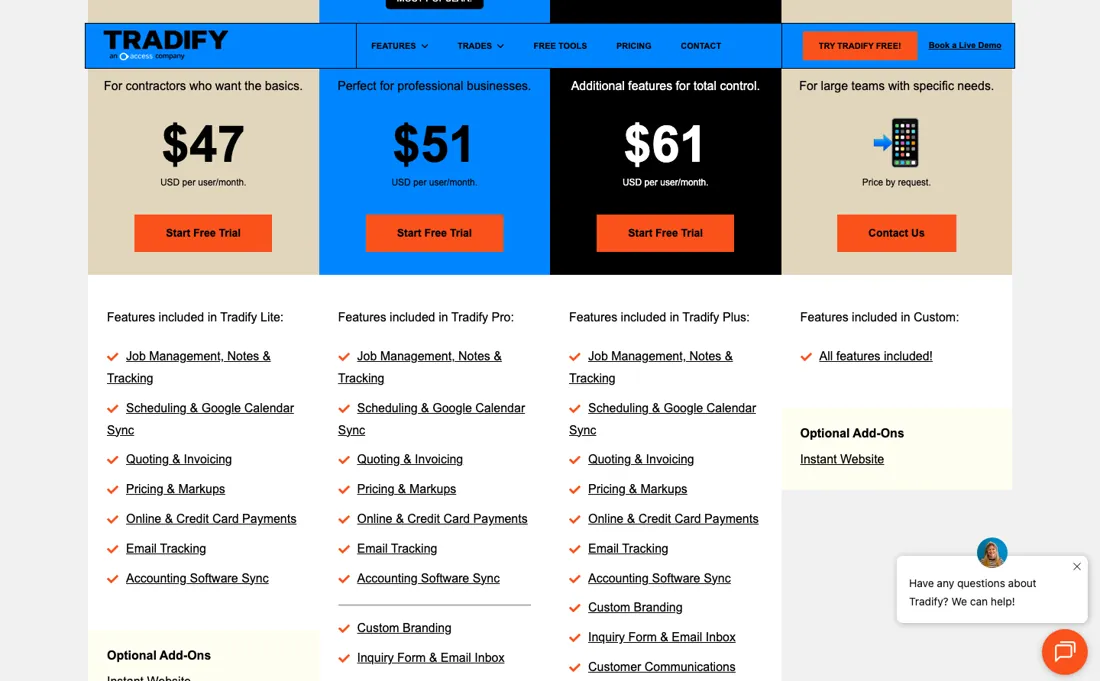
Per user, per month, quoted in USD on tradifyhq.com/pricing and re-verified 2026-09-14: Lite $47, Pro $51 and Plus $61 per user, plus a Custom tier for large teams that is priced on request. The 14-day free trial includes all features. The Instant Website add-on is $12 a month. There is no free plan and no volume ladder published on the page — the per-user rate is flat within a plan.
One thing to get right before you search: the product lives at tradifyhq.com. The shorter tradify.com is a parked holding page that reads "Launching Soon" and is not the vendor (checked 14 September 2026). Plans change — always verify the live price on their site.
Category context: Operations & Workflow. Across the 49 tools in this category that we researched with a public US-dollar price, the median entry price is $25 a month (lowest paid plan as listed, per seat where the vendor prices per seat). Tradify’s entry price of $47 a month sits above that median. Compare pricing conditions in the Software Cost Atlas →
What the price did
We capture Tradify’s own pricing page every month and keep the figures, so this is our record of the page — not a forecast, and not someone else’s summary.
Tradify's pricing page is the steadiest one we track. Our July and August 2026 captures are byte-for-byte identical — the same page fingerprint, the same $47, $51 and $61 per user a month and the same $12 Instant Website add-on — and re-reading it on 16 August 2026 returned those same figures again. Three readings, no movement.
What the pricing page doesn’t say
It's purpose-built for trades job management (quoting, scheduling, invoicing), so it's not a general project-management or accounting suite; you'll still run Xero or QuickBooks alongside it. For a trades business that's a feature, not a flaw.
What Tradify does
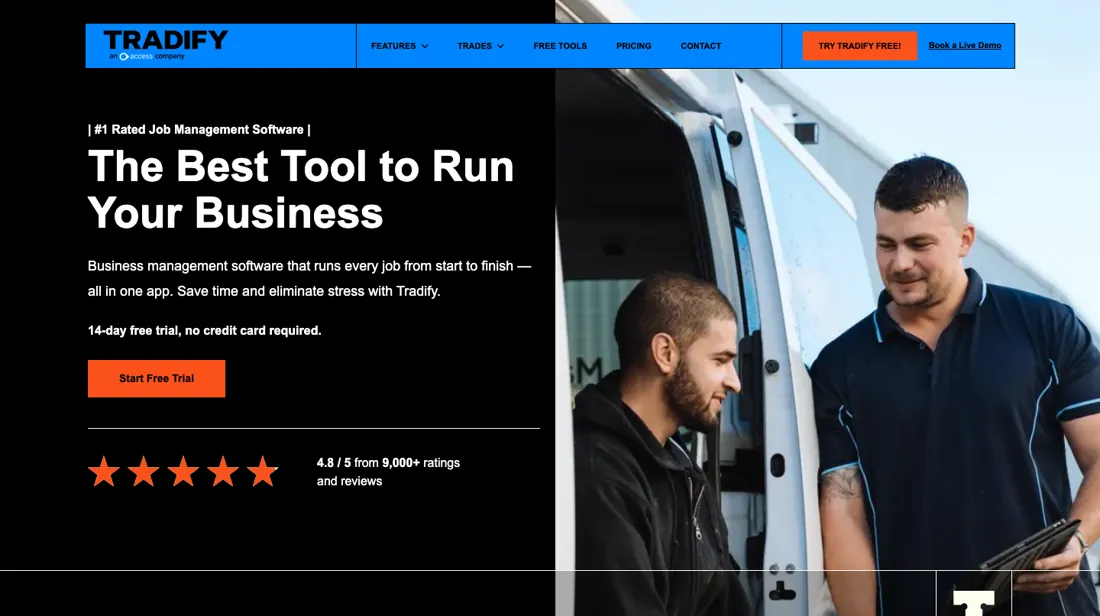
Specialized job management software for trade businesses. Handle quoting, scheduling, and invoicing from the field.
What buyers report about Tradify
Recurring themes from the buyer-review sites listed at the foot of this page, read in August 2026. We have not run Tradify ourselves, so this is other buyers' experience rather than ours. We summarise it here because the complaints are usually the part a vendor page leaves out.
- • Quoting speed is the standout — several reviewers report quotes going from 30-45 minutes to under 10. 4.6 on Capterra across 200+ reviews.
- • Field and office stay on the same page without anyone chasing paperwork.
- • On the Xero App Store, where every reviewer is a verified Xero user, the two-way sync is the single most-named benefit — reviewers describe it as the reason they left a system that only pushed one way, and one notes their accountant sees the job and invoice data without seeing the diary.
- • Reporting does not slice the data the way owners need it at quarter-end or tax time.
- • Custom fields and flexible job workflows run out for anyone with complex service agreements.
- • $47-$61 per user per month with no free plan and a 14-day trial only.
- • Larger multi-department businesses outgrow it, and a minority report teething problems connecting third-party payroll.
- • The accounting complaint that matters is specific: a bookkeeper reports that a customer deposit lands in Xero as two invoices, one for the payment and one for the balance, which makes a single purchase order for the job awkward. Test that with a deposit during the trial if you take them.
- • The recurring reservation from larger operators is reporting: one reviewer with a maintenance business calls the financial and site reporting too limited and the customisation minimal, and another in April 2026 says plainly that it does not suit mid-size to large businesses.
- • Regional support has burned at least one long-term subscriber, whose Xero invoice and purchase-order feed broke and who was told their region was not supported.
Where the ratings disagree. The Xero store is the friendliest room Tradify has, and that is worth knowing in both directions: the sample is people who already run Xero, which is the setup Tradify is built for, so the integration praise is real but self-selected. Tradify replies publicly to the critical reviews there, which is more than most platforms show you.
When the paid plan is worth it
There is no free tier, only a 14-day trial, so the real question is which of three plans. Read on their own pricing page on 2 August 2026, per user per month in USD: Lite $47, Pro $51, Plus $61, plus a quote-only Custom tier. The $4 step from Lite to Pro is the one almost everyone should take. Lite covers job management, scheduling, quoting, invoicing and accounting sync — and stops there.
Pro adds job photos, recurring jobs, templates, appointment reminders, progress invoicing, job costing, timesheets and subcontractor scheduling. If you run more than one person or bill in stages, Lite will not do it, and you are arguing over the price of a coffee. The $10 step to Plus is the one to think about. It buys purchase orders, bulk invoicing, kit bundles, job service reports, service reminders and the SmartRead and SmartWrite AI tools.
That earns its keep on materials-heavy trades with supplier bills to process; on a labour-only business it mostly does not. An Instant Website add-on runs $12 a month on any tier.
Our monthly capture read this vendor's pricing page in July 2026 and again in August 2026, and the amounts were the same both times. We keep watching — the registry records what moves.
How to actually use Tradify
Tradify's trial is 14 days with all features on, which means it starts you on the top plan — so judge the tier you will actually buy, not the one you are trialling. Note which features you lean on, then check them against the Lite and Pro lists before the trial ends. Connect the accounting package first. Lite already includes accounting sync, and the invoicing side is where the software either saves you an evening a week or does not.
Push one real invoice end to end before you migrate anything else. Then load a real job, not a test one. Quote it, schedule it, add the photos, invoice it. The features that separate the tiers — progress invoicing, job costing, timesheets — only show their value on a job with actual stages and actual labour against it. What Tradify's own partner one-pager (received 25 September 2026) adds to that list: native apps for iOS and Android alongside the desktop version, an instant website builder, sync with Xero, QuickBooks and Stripe, and free training and support.
Those are the vendor's words, not something we tested; the training is the one worth booking in the first week.
Distilled from Tradify's own pricing page and plan-comparison help articles, read 2 August 2026
Tradify vs ServiceM8, side by side
Both columns come from the same place: each vendor’s own published pricing, read on the date shown in the sources at the foot of this page. We do not average them into a score.
The Tradify link above is an affiliate link — we may earn a commission if you sign up, at no extra cost to you — and the other column is a plain link. Neither changes what this table says: both columns come straight from the vendors’ own pricing pages.
The natural comparison is Jobber or ServiceM8 — close trades/field-service peers — compare on per-user cost and which accounting integrations you already run.
Vendor listing: Tradify on the AIBM Marketplace — information supplied by the vendor, kept separate from this review.
Frequently asked questions
Is the Tradify free trial really free, and what do you get?
Fourteen days with all features included, per their own pricing page on 16 August 2026, and no plan is free after it. One thing to know before you judge the trial: Tradify also issues a free Connect account for subcontractors, and that one only shows scheduling and appointments. Tradify's own reply to a reviewer on the Xero App Store confirms a Connect account cannot link to Xero until you start a trial or upgrade — which is what people who report ‘it will not connect’ have usually run into.
What does Tradify cost per user?
Lite $47, Pro $51 and Plus $61 per user a month in USD, with a Custom tier quoted on request for large teams, read 16 August 2026. The Instant Website add-on is $12 a month on top. We have found no published volume discount: within a plan the per-user rate is flat, so ten users cost ten times one.
Does it really work with Xero, or is that a checkbox?
The two-way Xero sync is what buyers on the Xero App Store single out most often, several of them saying it is why they switched from a system that only pushed one way. The reservation on the same platform is about accounting detail rather than connection: one bookkeeper describes a customer deposit arriving in Xero as two invoices — one for the payment, one for the balance — which makes a single purchase order for the job awkward. Worth testing with a deposit during the trial if you take them.
What should I weigh before buying Operations & Workflow software?
Usually it sits on top rather than replacing everything. Tools in this class tend to become the layer where work is tracked and handed off, while your existing systems stay the source of truth for their own data. Before you buy, map which tools it would replace outright and which it would merely sync with. If the answer is that it syncs with all of them, you are adding a layer rather than removing one.
Is this a hands-on review of Tradify?
This is a researched assessment, not a hands-on test — where we've used a tool ourselves, we say so explicitly. We name what each tool is good and bad at, and we earn a commission only if you sign up, at no cost to you.
- Buyer reviews on Capterra, GetApp, Software Advice and the Xero App Store, read August 2026.
- Tradify’s own published pricing page.
- A dated screenshot of that pricing page, kept on this site as the receipt.
Others in this category
Reviewed operations & workflow tools that share ground with Tradify — comparable in what they do, not drop-in swaps:
New reviews, price changes we recorded, and the cost conditions we found. No sponsored placements. Unsubscribe anytime.
This is our researched assessment — not a paid placement. The “Visit” links on this page are affiliate links: we may earn a commission if you sign up, at no extra cost to you, and it never changes our take. How we review →