Process Street Review (2026)No Public Price, Quote Only
 By Daan Haket · Tested hands-on · written with an AI assistant · who does what
Pricing is opaque and jumps steeply from Startup to Pro, with seat minimums that push the real cost above the headline per-member rate — you'll need a sales call to price it. Best once recurring checklists are core to how you operate.
Exit test (measured 2026-10-23)
- Export route
- An Export button in Reports with a choice of visible or all columns gives a CSV straight away
- Formats
- CSV
- Attachments included
- Not tested
- Re-import tested
- No
- Lost on export
- The form values we entered, such as the purchase ID and the amounts 10 and 20; Task content, comments and attachments
Formats describe this export route; offered formats may not have been inspected. Full exit test and scope ↓
operations-driven teams that run recurring, checklist-based processes and want them tracked and auditable.
you just need to write down a few SOPs — a doc or a cheaper tool captures them without the platform cost.
Transparency: the “Visit” links on this page are affiliate links — we may earn a commission if you sign up, at no extra cost to you. No vendor can pay for a better review or verdict. How we make money →
Tested by our team on 23 October 2026 during the Pro trial, without a card and without integrations: Daan created the account and our AI assistant ran the test in Daan's browser. We had the AI build a purchase-approval workflow (purchase ID and amount, a budget and a supplier check, manager approval, at most six steps), ran it twice with known amounts, completed one run with approval, left the other open, and exported the Reports views.
How we tested
- Completed the workflow trial onboarding
- Generated a purchase-approval workflow from instructions
- Started two runs and entered purchase IDs and amounts
- Completed and approved one run and checked Reports
- Downloaded active and completed run views with Export all columns
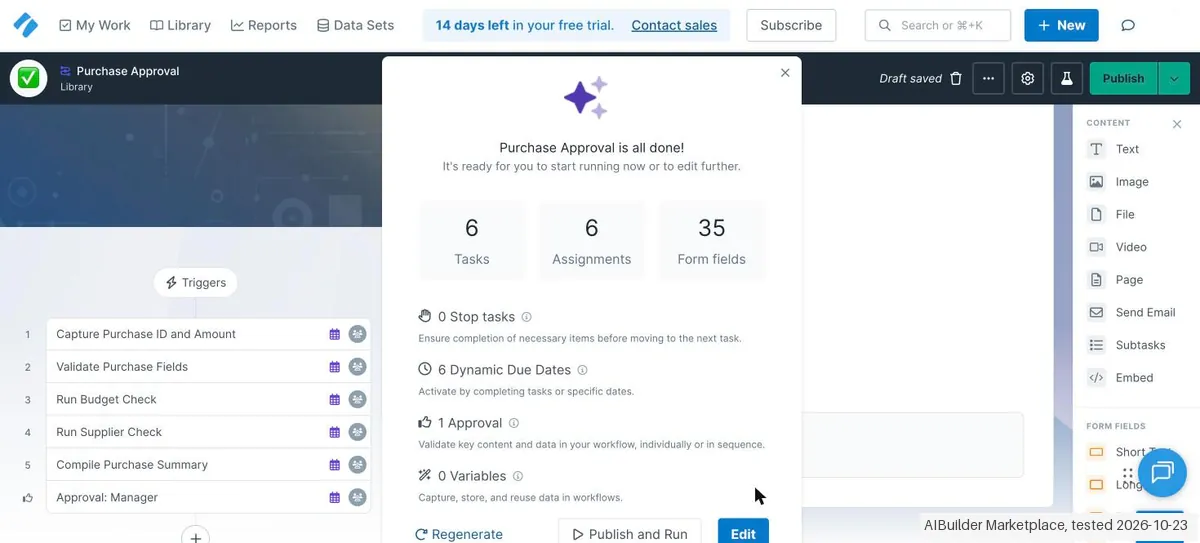
- Generate with AI (a name plus instructions) produced the workflow in about 30 seconds: exactly the six steps we asked for, with full task texts and checklists, 35 form fields, 6 dynamic due dates, 1 approval step and 0 stop tasks. Starting a run added a seventh task, 'Role assignments', with four roles the AI invented, such as procurement analyst and finance analyst. That is a lot of fields for a simple approval.
- Tasks could be ticked off while most of the 35 fields were still empty: no field was required. Values we entered were saved straight away, and completing a task gave the next one a due date automatically.
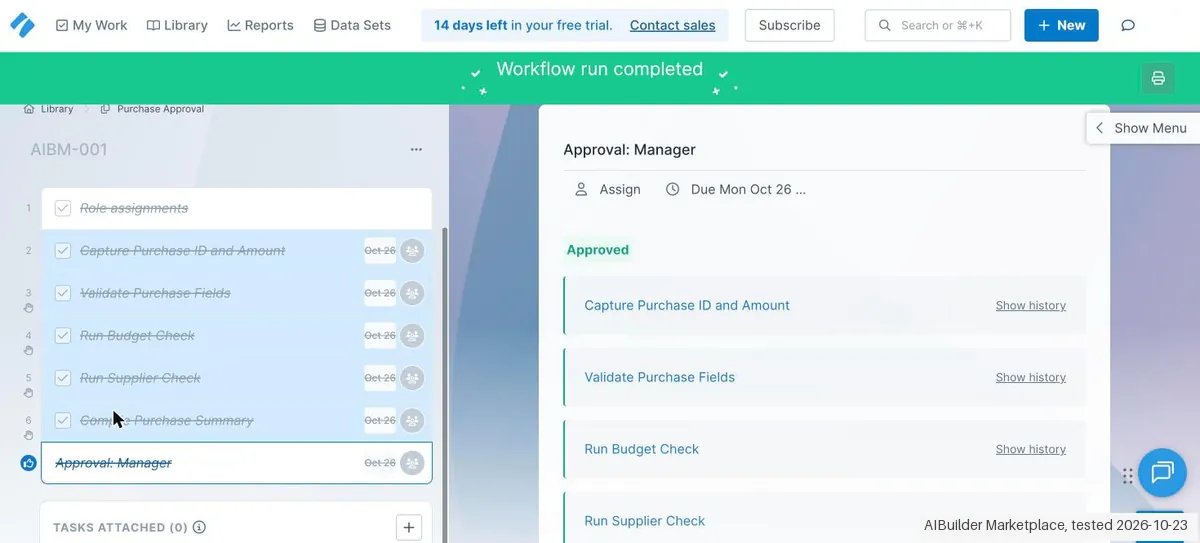
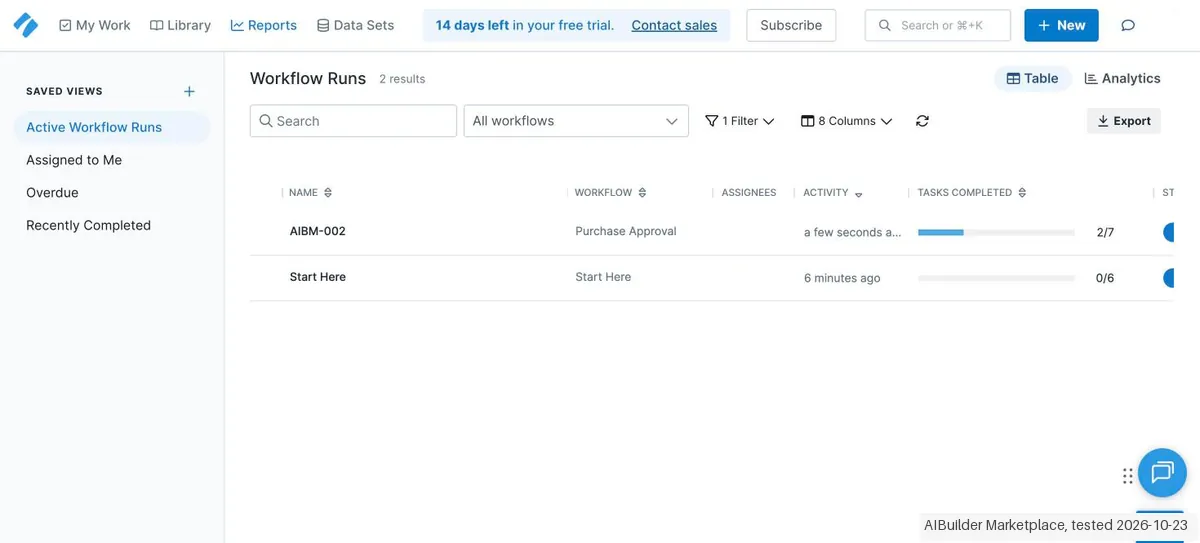
- The approval step listed every earlier task with 'Approve' and 'Approve with comments'; after approving, the run showed 'Workflow run completed'. Reports showed the open run under Active Workflow Runs (2 of 7 tasks, on track) and the finished one under Recently Completed. The sample 'Start Here' workflow also counts as a run.
Pricing (2026)
✓ Pricing re-verified 6 Oct 2026
| Plan | Price | What you get |
|---|---|---|
| Startup | Contact sales | 5 users, 10 guests, 5,000 Data Set records, 10 automation apps, 100 actions/month, API 50 calls/month |
| Pro | Contact sales | 14-day free trial, no credit card needed |
Summarised from the pricing notes below; the notes carry the conditions.
Process Street publishes no prices. Re-verified 2026-08-17, 2026-09-30 and 2026-10-06: every tier on their pricing page, Startup included, shows Contact sales rather than a figure, and our monthly captures from July and August 2026 are byte-for-byte identical and contain no amount. What the page does publish are the limits. Startup is capped at 5 users and 10 guests, with 5,000 Data Set records, 10 automation apps, 100 automation actions a month and a public API limited to 50 calls a month.
The page describes it as a simplified Pro plan for startups. Pro comes with a 14-day free trial that needs no credit card. Figures quoted elsewhere — roughly $100 a month for Startup, the $1,500 range for Pro, per-member rates around $12.50 to $15 — do not come from Process Street and we could not verify any of them. The FAQ on the same page adds one lever the plan cards do not show: discounts for registered non-profits, arranged through sales. Plans change — always verify the live price on their site.
Category context: Operations & Workflow. Across the 53 tools in this category that we researched with a public US-dollar price, the median entry price is $29 a month (lowest paid plan as listed, per seat where the vendor prices per seat). Compare pricing conditions in the Software Cost Atlas →
What the price did
We capture Process Street’s own pricing page every month and keep the figures, so this is our record of the page — not a forecast, and not someone else’s summary.
There is no series to show, and that is itself the record. Our July and August 2026 captures of the pricing page share one fingerprint and contain no amount between them. The only sentence our reader could extract is the eligibility line for the Startup plan: businesses with fewer than 15 employees and under $2 million in revenue. On 17 August 2026 the page still showed Contact sales on every tier. Re-read on 30 September 2026: still Contact sales on Startup, Pro and Enterprise, with the same limits (5 users, 10 guests, 5,000 Data Set records, 100 automation actions, 50 API calls) and the same eligibility line.
⚡ Short on time? Watch the 30-second verdict Short.
What Process Street does
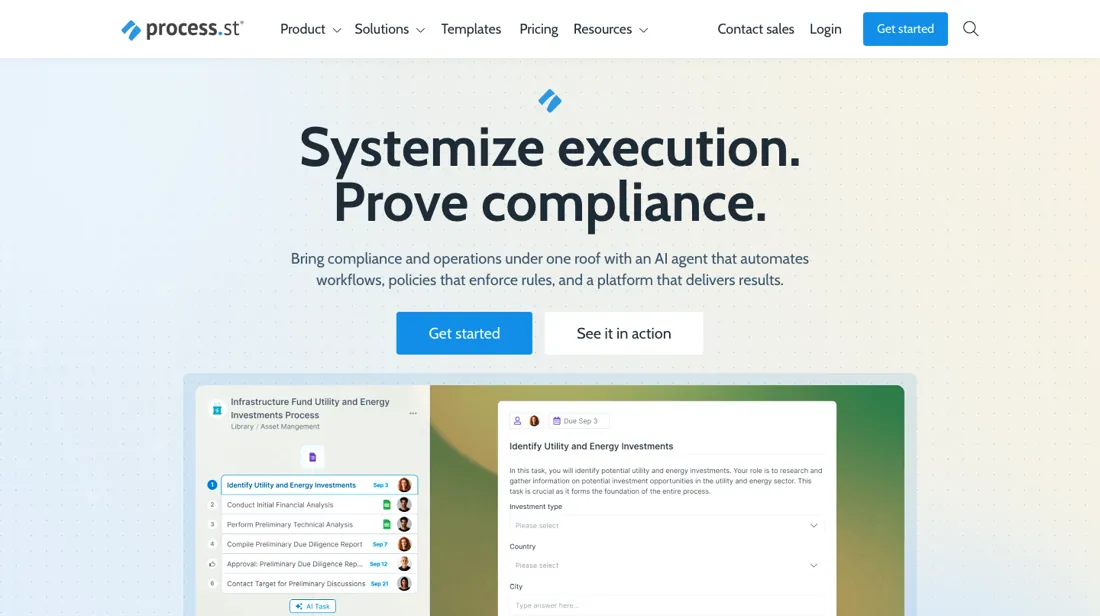
Recurring work as trackable checklists and SOPs, with approvals and conditional logic.
What buyers report about Process Street
Hands-on: tested 2026-10-23Reported by buyers: G2, Capterra and TrustRadius, read August 2026
Themes from the buyer-review sites listed at the foot of this page, read in August 2026. We tested Process Street ourselves on 2026-10-23, but one test is a narrow sample, so here is what other buyers report. We summarise it here because the complaints are usually the part a vendor page leaves out.
- • It is the tool people reach for to turn SOPs into workflows that actually get followed — 4.6 on G2 across 460 reviews, over 90% would recommend.
- • Onboarding, compliance and operations teams use it daily, which is a stronger signal than a high score alone.
- • TrustRadius reviewers describe the same use case over and over, and it is narrower than 'project management': anything the business does repeatedly. Recurring work, checklists with accountability, and a reporting dashboard that shows where a process stalls.
- • There is no public per-seat price. You get a 14-day trial and a sales quote, and a 2025 change made every active user billable on new accounts — so headcount growth changes the bill in ways you cannot model up front.
- • The price figures circulating on aggregator sites appear to be package totals rather than per-user rates, and are unconfirmed. Do not budget from them.
- • For a team that only wants simple checklists, some reviewers find the depth gets in the way.
- • The one gripe that repeats on TrustRadius is native integrations — reviewers who otherwise rate it top marks want more apps connected without going through an automation layer.
Where the ratings disagree. Read TrustRadius with the sample in mind: its Process Street reviews cluster in November 2023, nearly all carry an 'Incentivized' label, and one of them is written by an account executive at Process Street itself. It is useful for what people use the tool for, not for how it is rated.
When the paid plan is worth it
You cannot weigh this on price: every tier reads Contact sales. What it publishes are the ceilings, and those are the upgrade. Startup gives you 5 users, 10 guests, 5,000 Data Set records, 10 automation apps, 100 automation actions a month, 50 API calls a month and a 5 MB cap per file. Pro raises the file cap to 100 MB, doubles Data Set records to 10,000, opens all automation apps, and turns users, actions and API calls into custom numbers. Enterprise repeats that with unlimited API calls. Two of those bite first. Fifty API calls a month is a test allowance, not an integration, and 100 automation actions is about three a day — the first workflow you genuinely automate spends it. Startup is also gated by who you are: "businesses that have less than 15 employees and under $2 million in revenue."
What upgrading does not fix is the missing number: Pro's limits are custom, so moving up trades published ceilings for negotiated ones and you still leave without a figure. Use the 14-day Pro trial, no card needed, to measure your real action and API volume — the only thing you can carry into the sales call.
Our monthly capture read this vendor's pricing page every month from July 2026 to October 2026, and the amounts were the same all 4 times. We keep watching — the registry records what moves.
What we found running Process Street ourselves
The first findings are at the top of this page. The rest:
- The CSV export from Reports has 13 run-level columns even with 'Export all columns', with times in UTC, but none of the form values we entered (purchase ID, amounts 10 and 20). Active and completed runs are separate exports.
- The trial bar said '14 days left in your free trial' on the day of sign-up, and no card was asked. The organisation name we entered during onboarding was not used: the workspace was named after the account holder instead.
- On the first attempt the 'Workflow Name' field stayed empty after the AI filled in the rest; typing the name worked.
Claim vs. what we measured
We set a claim from Process Street's own pages next to what we saw in our test, on the plan named. The status says whether the two describe the same thing and match; it is not a verdict on the product. Confirmations are listed too.
| What the vendor says | What we measured | Status | What it means if you buy |
|---|---|---|---|
| "14-day free trial"Source: process.st, read 23 Oct 2026 | Measured 2026-10-23: On the day of sign-up the app showed '14 days left in your free trial'; no card was asked.Our test, 23 Oct 2026; Pro trial, no integrations | ConfirmedSame quantity: trial length shown on day one. | You get the full 14 days to test without a card. |
Exit test: can you take your data out?
On 23 October 2026, in the trial account from this test, we exported the Reports views for active and completed workflow runs (two runs of our own, one completed with amount 10 and one left open with amount 20) and checked what the files contain. We did not re-import them. Test date: 23 Oct 2026. We describe the friction rather than score it; this is one run with synthetic records, not a verdict on Process Street.
| What we checked | What we saw |
|---|---|
| Came along in the export |
|
| Lost in the export |
|
| Awkward but not lost | Active and completed runs are separate exports, so one export does not give you all runs. |
| Export route | An Export button in Reports with a choice of visible or all columns gives a CSV straight away. |
| Export format | CSV at run level; form values are not in the standard export (adding field columns to the view was not tested). |
| Re-importing the export | Not tested; we found no documented way to re-import runs. |
| Cancelling | Not tested. |
What the exit test does not show:
- Adding field columns to a Reports view
- PDF export of a workflow or run
- Data Sets export
- Re-importing the export
Screenshots from our test (click to enlarge)
What this test does not show:
- PDF export and attachments
- Automations, integrations and email tasks
- Multiple users and a real role split
- What remains after the trial
Most of our reviews are researched rather than run — how we review explains which is which, and why we do not pretend otherwise.
See it in use

Video by Phylux Express, not by us · published May 2025 · shows: An independent tutorial that sets up a Process Street workspace and runs a workflow, ticking off tasks and filling in form fields along the way. The video loads from YouTube only after you click; watch it on YouTube.
Questions we are still checking
Facts about Process Street that would change a buying decision, and where we stand on each. An unanswered question does not mean the feature is missing; it means we have not confirmed it yet.
- Is an external guest a paid seat? Still checking
Applies to: Startup lists 5 users and 10 guests; the Guest help article says guests are counted as a seat.
Why it matters: teams that run client or vendor checklists invite many guests; if each is a seat, the quote grows with every external collaborator.
Checked: Process Street Help: What is a Guest (External)? (2026-10-06); Process Street Help: What is a User? (2026-10-06); Process Street pricing page (Startup: 5 users, 10 guests) (2026-10-06)
Have a public source that answers one of these? How we review explains how we check and correct.
How to actually use Process Street
The shortest route to real value is the AI Document Importer. Process Street's help docs describe clicking + New in the top right corner, choosing Workflow, then Import Document, dropping in an existing SOP and clicking Generate Workflow. The importer accepts PDF, DOCX, HTML, CSV and image files, with a file size limit of 25 MB and an image limit of 20 MB, and returns tasks with form fields, approvals, stop tasks and role assignments rather than a flat checklist.
Every new account starts on a complimentary 14-day trial of the Pro plan with no credit card, so the sensible move is to import a process people run and push a live run through it inside that window. The vendor's own starter lesson budgets 10 minutes to create a workflow. The usual stall is seats and permissions. Invitations sit under the profile menu at Settings, Users & Guests. The Startup tier includes 5 users and 10 guests, and the docs state that once a limit is reached each extra person is billed pro-rata at the moment of invitation.
Where this section comes from: our research notes (114 words)
Process Street pricing page and vendor help documentation (AI Document Importer, getting-started lesson, invitations), read 4 August 2026. Pricing re-read 30 September 2026 on process.st/pricing (plan cards, feature table and FAQ); process.st/llms.txt carries no pricing and /pricing.md returns a 404. Re-verified 6 October 2026: process.st/pricing served HTML (still Contact sales on every tier, limits unchanged) and these help articles: What is a User? https://www.process.st/help/docs/what-is-a-guest-internal/ (billing by organisation creation date); What is a Guest (External)?
https://www.process.st/help/docs/guest-external/; What is a Builder? https://www.process.st/help/docs/what-is-a-member/; How Do I Delete My Account or Cancel My Subscription? https://www.process.st/help/docs/how-do-i-delete-my-account-or-cancel-my-subscription/; What Happens When My Free Trial Finishes? https://www.process.st/help/docs/end-of-trial/; How To Change Your Plan https://www.process.st/help/docs/change-plan/; How Do I Export Workflows and/or Workflow Runs? https://www.process.st/help/docs/export/.
Process Street vs Trainual, side by side
Where a vendor publishes a price, its column shows the entry price we read and when; where it does not, the column says so rather than filling in a figure from elsewhere. We do not average them into a score.
Both names above are affiliate links: we may earn a commission if you sign up, at no extra cost to you. Neither changes what this table says.
The natural comparison is Trainual or a wiki — cheaper process-documentation tools.
Frequently asked questions
Does Process Street's trial require a credit card?
Sign-up check 2026-10-23: card not requested in this account; trial length confirmed: 14 days.
What does Process Street cost?
They do not say. Every tier reads Contact sales, and two monthly captures plus our own reads on 17 August and 30 September 2026 found no amount on the page. The numbers circulating elsewhere are third-party estimates, so treat a quote as the only real figure and ask for it per member and per month.
Who qualifies for the Startup plan?
Process Street describes it as a simplified Pro plan and states the eligibility on the page: businesses with fewer than 15 employees and under $2 million in revenue. The hard limits that come with it are 5 users and 10 guests, 5,000 Data Set records, 10 automation apps, 100 automation actions a month and 50 public API calls a month.
Can I try it before talking to sales?
Yes, on Pro: a 14-day free trial with no credit card required, per their pricing page on 17 August 2026. That is the practical route to a number, since the trial lets you size the users and automation volume you actually need before the sales conversation prices them.
Who counts as a paid seat?
More roles than the plan cards suggest. Process Street's help article What is a User? (updated 28 April 2026, read 6 October 2026) says that in organisations created on or after 1 August 2025, Users are billable alongside Admins and Builders, and all three count toward your seat total; in older organisations only Admins and Builders are billed. The Guest article (updated 4 September 2026) notes that guests are counted as a seat in your subscription and that promoting one partway through the billing cycle is charged pro rata. The Startup card, by contrast, lists 10 guests next to its 5 users, so whether an external guest is a paid seat is something to settle in the quote: not confirmed. Plan changes go through support, and only an Administrator can request one.
What happens to my workflows if I cancel, and what can I export?
Cancelling keeps your data. The help article on deleting an account or cancelling (updated 15 September 2026, read 6 October 2026) says you cancel from the billing page under Manage subscription, and your workflows and workflow runs remain in the account so you can subscribe again later; deleting the organisation is a separate step, scheduled 14 days out and reversible within that window. A trial is cancelled through support. For export, the documentation describes workflows and workflow runs as PDF and the data from all runs of a workflow as a CSV file. An export route for Pages or Data Sets is not described there: not confirmed. Neither article states a refund policy.
Is this a hands-on review of Process Street?
Yes. We tested Process Street ourselves on 2026-10-23; the section above says what we tested, what we found and what we did not test, and where a figure comes from the vendor's own documentation instead. Most of our reviews are researched rather than run; we say which is which. We name what each tool is good and bad at, and we earn a commission only if you sign up, at no cost to you.
- Buyer reviews on G2, Capterra and TrustRadius, read August 2026.
- Process Street’s own published pricing page.
- Our own hands-on session with Process Street (2026-10-23), written up in full further down this page.
Others in this category
Reviewed operations & workflow tools that share ground with Process Street — comparable in what they do, not drop-in swaps:
Also in operations & workflow, for browsing rather than as an alternative:
New reviews, price changes we recorded, and the cost conditions we found. No sponsored placements. Unsubscribe anytime.
This is our researched assessment — not a paid placement. The “Visit” links on this page are affiliate links: we may earn a commission if you sign up, at no extra cost to you, and it never changes our take. How we review →