Browse.ai Review (2026)$19/mo Only If Billed Yearly
 By Daan Haket · Researched and written with an AI assistant · who does what
Credits burn faster than expected: row counts, screenshots and 'premium' sites all multiply the meter, so monitor a big site daily and do the math first.
ops, research and growth teams that want to monitor competitors, prices or listings and pipe structured web data into sheets without writing scrapers.
you need one-off extractions (free tools or a VA are cheaper), or mission-critical pipelines where you'd rather own the code than rent the robot.
Transparency: the “Visit” links on this page are affiliate links — we may earn a commission if you sign up, at no extra cost to you. No vendor can pay for a better review or verdict. How we make money →
Pricing (2026)
✓ Pricing re-verified 21 Sep 2026
| Plan | Price | What you get |
|---|---|---|
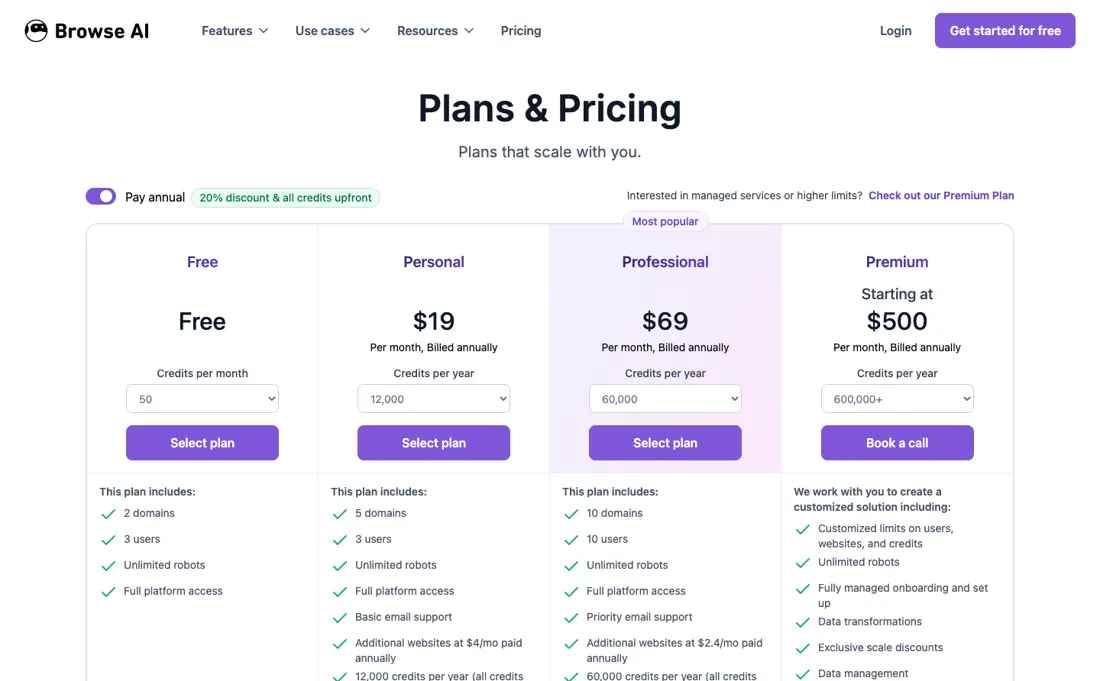
| Free | $0 | 50 credits a month, 2 websites, 3 users |
| Personal | $19 a month billed annually | 12,000 credits a year, 5 websites, 3 users |
| Professional | $69 a month billed annually | 60,000 credits a year, 10 websites, 10 users |
| Premium | Starting at $500 per month, billed annually | 600,000+ credits a year, managed onboarding |
Summarised from the pricing notes below; the notes carry the conditions.
Credit-metered, prices in USD. Free is $0 with 50 credits a month, 2 websites and 3 users. Personal is $19 a month billed annually, for 12,000 credits a year, 5 websites and 3 users. Professional is $69 a month billed annually, for 60,000 credits a year, 10 websites and 10 users. The annual column advertises “20% discount & all credits upfront”. Premium is the one that changed: it no longer reads simply “custom” but “Starting at $500 per month, billed annually” for 600,000+ credits a year with managed onboarding, and llms.txt puts the same floor in plain words — “Minimum investment: $500 per month with annual contracts”.
So the managed tier now has a published entry price, which is the number to budget against rather than a quote. A credit is roughly 10 extracted rows, and premium sites cost more credits; the comparison table now prices them directly at $0.024 per credit on Personal and $0.017 down to $0.013 on Professional, both on annual plans. The monthly column is a different ladder rather than the same one divided by twelve: Personal is $48 a month for 2,000 credits a month, Professional is $87 a month for 5,000 credits a month, and the credit buckets there run 5,000, 10,000, 20,000 and 30,000.
Full pricing notes (3 more paragraphs)
Extra websites are $4 a month on Personal and $2.40 on Professional when you pay annually, and $5 and $3 when you pay monthly. Credits reset at the end of the billing cycle and do not carry over unless you upgrade first; data retention is 90 days on all three self-serve plans, and the shortest monitor interval is hourly on Free against 5 minutes on the paid plans.
Bigger credit buckets are sold inside a plan rather than by upgrading — Personal 24,000 credits a year at $38/mo, Professional 120,000 at $129, 240,000 at $239 and 360,000 at $319 — but those figures carry their own date: they sit behind a selector this re-verification could not operate, so they stand as read on 14 September 2026 and not as re-checked.
One vendor-side inconsistency is still there: browse.ai/llms.txt, the file AI assistants are pointed at, lists Starter $49, Professional $149 and Team $399 plans that appear nowhere on the pricing page (read 21 September 2026).
Plans change — always verify the live price on their site.
Category context: IT & Productivity. Across the 39 tools in this category that we researched with a public US-dollar price, the median entry price is $15 a month (lowest paid plan as listed, per seat where the vendor prices per seat). Browse.ai’s entry price of $19 a month sits above that median. Compare pricing conditions in the Software Cost Atlas →
Correction after re-checking: Premium is no longer listed as purely custom pricing: the pricing page now shows "Starting at $500" per month billed annually for 600,000+ credits per year (re-verified 2026-07-29).
What the price did
We capture Browse.ai’s own pricing page every month and keep the figures, so this is our record of the page — not a forecast, and not someone else’s summary.
Our July and August 2026 captures of browse.ai/pricing are byte-for-byte identical: the same 18,413 characters and the same twenty-one price lines, down to the punctuation. Reading the page again by hand on 15 August 2026 returns the same figures a third time. Personal $19 a month billed annually against $48 month to month, Professional $69 against $87, Premium from $500, and additional websites at $4 and $2.40 on annual billing against $5 and $3 monthly. Over the five weeks we have measured, Browse.ai has not touched its pricing page at all.
What the pricing page doesn’t say
Scrapers break when sites redesign — robots need maintenance, which is your time even when the tool is no-code. Also check the terms of the sites you monitor; 'technically possible' and 'permitted' aren't the same thing.
Watch the video review
The video version of this review, from our YouTube channel.
What Browse.ai does
No-code web scraping and data extraction. Turn any website into an automated data pipeline or spreadsheet automatically.
What buyers report about Browse.ai
Hands-on: not tested by usReported by buyers: G2, Capterra, Trustpilot and the Chrome Web Store listing for their ex, read August 2026 (Chrome Web Store reviews dated June 2023 to February 2026)
Themes from the buyer-review sites listed at the foot of this page, read in August 2026 (Chrome Web Store reviews dated June 2023 to February 2026). We have not run Browse.ai ourselves, so this is other buyers' experience rather than ours. We summarise it here because the complaints are usually the part a vendor page leaves out.
- • You can have a working scraper without code in minutes — ease of setup and support are what the positive reviews are about. 4.7 on G2.
- • There is a real free plan: 50 credits a month across 2 sites.
- • Extension users describe it as genuinely point-and-click no-code scraping, used for things like enriching LinkedIn data (June 2024), and one reviewer runs a daily email and spreadsheet update from monitored sites that works even on very old-fashioned pages (June 2023).
- • When a target site redesigns, your robot breaks and needs retraining. This is the top recurring complaint and the hidden running cost of the whole category.
- • JavaScript-heavy sites cause timeouts and failures.
- • Credit-based pricing with no good way to estimate a job's cost before running it — reviewers describe watching credits drain and hitting overages mid-task.
- • Anyone expecting a set-and-forget data feed is the group that ends up frustrated.
- • Concrete breakage rather than general grumbling: one reviewer reports Skyscanner simply blocking it (February 2024), and another describes the studio breaking when used with his own cookies and login, with recordings failing to upload (June 2024).
- • Reliability of the robot itself is questioned by a July 2023 reviewer who says it worked properly about one time in ten and that the capture is not automatic — you still have to tell it what to pull.
- • Support gaps are visible in public: a July 2023 reviewer left for a competitor calling it overpriced and underwhelming, and the developer replied openly that technical support for free accounts had been paused while the user base grew. Later reviews suggest that improved but did not fully close.
Where the ratings disagree. The extension listing is harsher than the G2 and Capterra picture, and the reason is who writes there: people using the free tier through the browser, not teams who bought a plan and got onboarding. Read it as a good preview of what the free tier feels like unaided — which is exactly the tier most people try first.
Pages read (August 2026 (Chrome Web Store reviews dated June 2023 to February 2026)): Trustpilot
When the paid plan is worth it
The free tier gives 50 credits a month on 2 websites, enough to prove a robot works but not to run one on a schedule. Personal costs $19 per month billed annually for 12,000 credits a year and 5 websites; month to month it is $48 for 2,000 credits a month. Professional is $69 per month billed annually for 60,000 credits a year and 10 websites; month to month it is $87 for 5,000 credits a month.
Personal to Professional is the step most buyers will actually reach: five times the credits for 3.6 times the annual price. The biggest jump is Professional to Premium, starting at $500 per month billed annually for 600,000+ credits a year, so it only earns its keep at real volume or when the managed onboarding is the point. Upgrading does not fix compatibility. The vendor's own help pages say custom CAPTCHAs are not solved, that neither MFA nor 2FA is supported (though their own login guide contradicts this), and that heavily bot-protected sites may still fail.
No tier changes that. Credit burn follows job shape too: a 100-row list plus its 100 detail pages costs 110 credits on any plan.
Our monthly capture read this vendor's pricing page every month from July 2026 to October 2026, and the amounts were the same all 4 times, including $48, $69, $87 and $500 from the pricing above. We keep watching — the registry records what moves.
How to actually use Browse.ai
The documented route is short. From the dashboard you click Build New Robot, choose extraction or monitoring, enter the Origin URL, and click Start Training Robot. Robot Studio loads the live page and you point and click to capture data 'From a list' or as 'Just text', or take screenshots. You then set pagination, label columns, finish recording and approve the sample. Browse.ai says this takes under 10 minutes (their claim, not our measurement).
Distilled from Vendor material only: the Browse.ai pricing page plus help-center articles on building a first robot, Robot Studio training, credit calculation, scraping behind a login, cookie pop-up failures, robots that stop working and site compatibility; we found no independent walkthrough worth citing.
Common Browse.ai setup mistakes
Where Browse.ai setups actually go wrong, and what it costs you when they do. Same sources as the setup notes above — not from a walkthrough we ran ourselves.
The friction comes afterwards.
- For login-protected pages you must already be signed in in your own browser before handing over session cookies, and the docs recommend refreshing them monthly and after any password change.
- Cookie consent banners are a documented breakage cause, because the robot replays your training clicks and the banner varies by region or A/B test.
- Layout changes break robots too; the docs say to contact support if retraining is needed more than once a month.
- The docs also contradict themselves on 2FA.
The natural comparison is Octoparse or Apify — close scraping platforms — Apify is more developer-oriented; compare credit math on YOUR row volumes and site list.
Frequently asked questions
What does Browse.ai actually cost to run a robot on a schedule?
The free tier is a proof of concept rather than a plan: 50 credits a month across 2 websites, which shows a robot works but will not keep one running. Personal is $19 a month billed annually, or $48 month to month, for 5 websites. Professional is $69 annually or $87 monthly for 10 websites. Read on their pricing page on 15 August 2026. The figure to model is credits rather than seats: a 100-row list plus its 100 detail pages costs 110 credits, whatever plan you are on.
Has Browse.ai changed its prices recently?
Not by a character. Our monthly captures of browse.ai/pricing from July and August 2026 are byte-for-byte identical, the same 18,413 characters, and reading the page again on 15 August returns the same figures. If you priced it a month ago, that quote stands.
Does a bigger plan fix robots that keep breaking?
No, and this is the thing to weigh before upgrading. Browse.ai's own help pages say custom CAPTCHAs are not solved and that heavily bot-protected sites may still fail, and no tier changes either. Cookie banners and layout changes break robots on every plan; what you buy with a bigger plan is credits, websites and support speed, not compatibility. If a site needs retraining more than once a month, the vendor's own advice is to contact support rather than to pay more.
Is this a hands-on review of Browse.ai?
This is a researched assessment, not a hands-on test — where we've used a tool ourselves, we say so explicitly. We name what each tool is good and bad at, and we earn a commission only if you sign up, at no cost to you.
- Buyer reviews on G2, Capterra, Trustpilot and the Chrome Web Store listing for their extension, read August 2026 (Chrome Web Store reviews dated June 2023 to February 2026).
- Price re-verified 2026-09-21 in a live browser on www.browse.ai/pricing, with browse.ai/llms.txt read alongside it.
- A dated screenshot of that pricing page, kept on this site as the receipt.
Others in this category
Reviewed it & productivity tools that share ground with Browse.ai — comparable in what they do, not drop-in swaps:
New reviews, price changes we recorded, and the cost conditions we found. No sponsored placements. Unsubscribe anytime.
This is our researched assessment — not a paid placement. The “Visit” links on this page are affiliate links: we may earn a commission if you sign up, at no extra cost to you, and it never changes our take. How we review →