 LearnWorlds Review (2026)$5 Per Enrollment on Starter
Transparency: the “Visit” links on this page are affiliate links — we may earn a commission if you sign up, at no extra cost to you. No vendor can pay for a better review or verdict. How we make money →
The detail most people miss is Starter's $5-per-paid-enrollment fee — at any real sales volume it quietly makes Starter more expensive than the flat Pro Trainer plan, so the "cheap" tier often isn't.
Visit LearnWorlds → Affiliate link — we may earn a commission if you sign up; it does not change what this page says.
Watch the 2-minute review
The video version of this review, from our YouTube channel.
⚡ Short on time? Watch the 30-second verdict Short.
Pricing (2026)
✓ Pricing re-verified 30 Sep 2026
- Starter — $24/mo billed annually1,000 learners, 1 admin — but $5 per paid enrollment
- Pro Trainer — $79/mo billed annually2,000 learners, 5 admins, no enrollment fees
- Learning Center — $249/mo billed annually2,000 learners, 25 admins, 1,000 AI credits
- Corporate — quotedmulti-school operations and high-volume programmes
Starter $29/mo (or $24 annually) but with a $5 fee per paid enrollment — still the single most important number in this ladder; Pro Trainer $99/mo, or $79 billed annually, with no enrollment fee; Learning Center $299/mo, or $249 annually; Corporate quoted. The High Volume tier we recorded in August is gone: the ladder is now Starter, Pro Trainer, Learning Center and Corporate.
Annual billing saves 20% and the trial is 30 days. Limits published alongside: 1,000 / 2,000 / 2,000 monthly active learners, 1 / 5 / 25 admins, 300 / 500 / 1,000 AI credits a month, email support 24/5 on Starter against 24/7 above it, and a 99.90% uptime commitment (99.95% on Corporate). All prices exclude VAT, which is added for EU customers unless a valid EU VAT number is given, and your payment gateway (Stripe at about 2.9% + $0.30) charges on top regardless of tier.
A branded mobile app is still a separate add-on, but the page now lists it as having multiple price options and prints no amount, so the roughly $149/mo we carried in August is no longer confirmable. Two reading notes: the page opens by asking which of four goals brings you there and recommends a plan on that basis — the figures above were read with the branded-academy goal selected — and the plan cards print their numbers with no currency symbol at all, the only dollar signs on the page sitting on the $5 enrollment fee and the Stripe example.
On 2026-09-30 every amount, limit and uptime figure above was unchanged. That day the page also ran a Q4 promotion, 15% off monthly billing for six months on Pro Trainer (84.15 instead of 99) and Learning Center (254.15 instead of 299), stated to end on 30 September 2026 at 11:59 PM PDT. On 2026-10-01 the pricing page moved that deadline to 5 October 2026 at 11:59 PM PDT; it is a short promotion, so do not budget on it. Plans change — always verify the live price on their site.
Category context: Growth & Revenue. Across the 82 tools in this category that we researched with a public US-dollar price, the median entry price is about $29 a month (lowest paid plan as listed, per seat where the vendor prices per seat). LearnWorlds’s entry price of $29 a month sits roughly at that median. Compare pricing conditions in the Software Cost Atlas →
What the pricing page doesn’t say
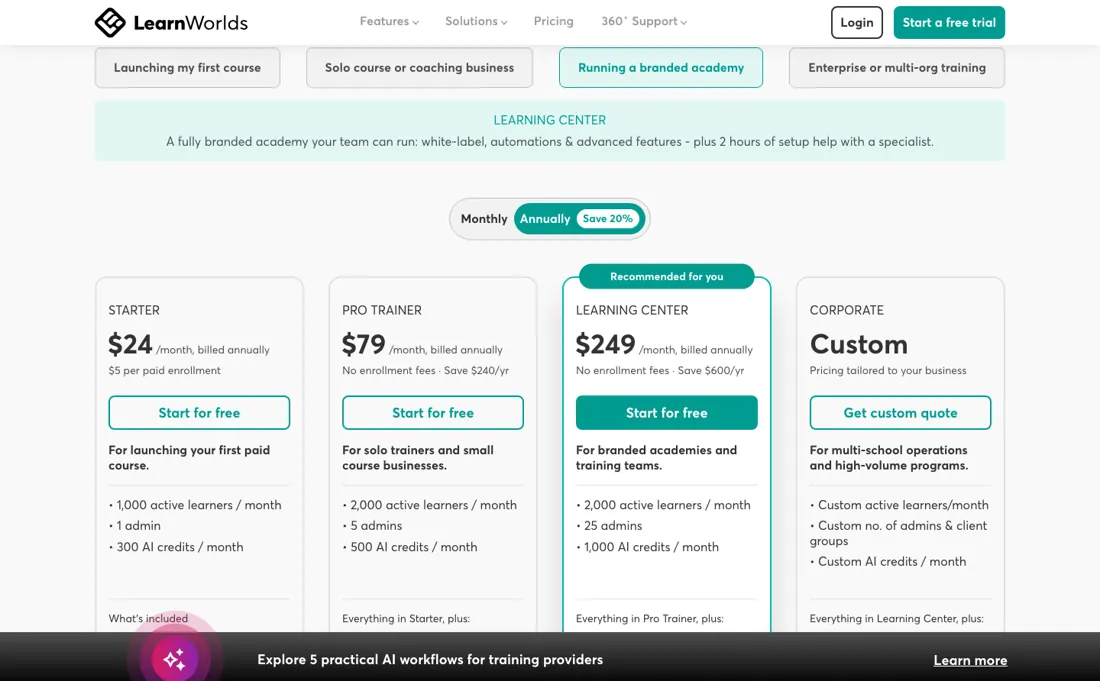
Starter also runs on a single admin seat and 24/5 email support against 24/7 above it, and the branded mobile app is a separate add-on whose price the pricing page no longer states. Price it against your expected enrollment volume, not the sticker.
What LearnWorlds does
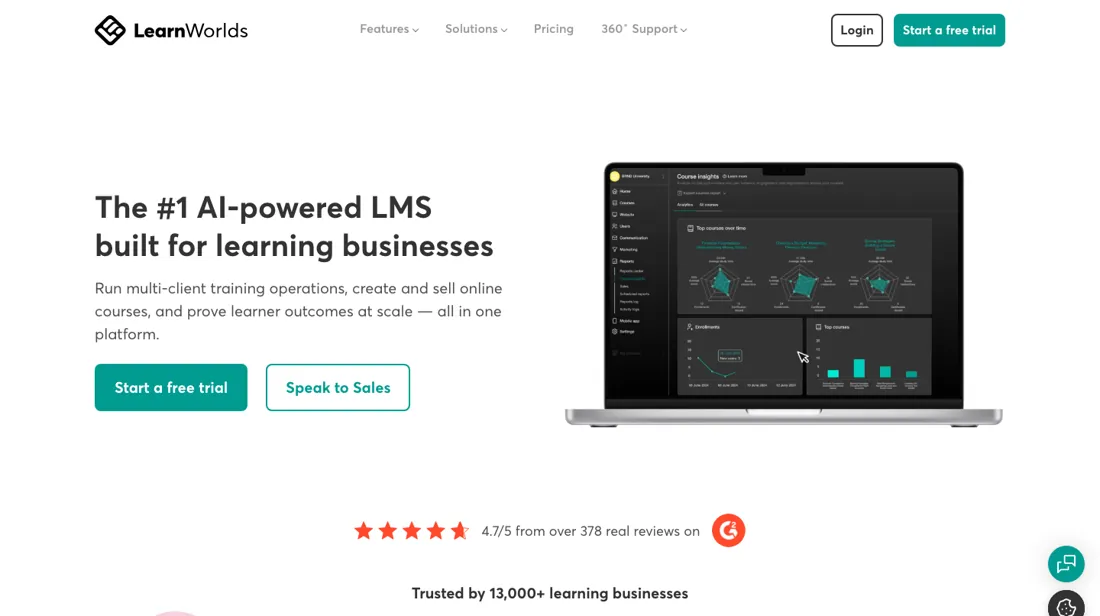
Create, sell and scale online courses. Build a branded school with interactive video, assessments, certificates and a built-in checkout.
What buyers report about LearnWorlds
Recurring themes from the buyer-review sites listed at the foot of this page, read in August 2026. We have not run LearnWorlds ourselves, so this is other buyers' experience rather than ours. We summarise it here because the complaints are usually the part a vendor page leaves out.
- • Interactive video — quizzes, annotations, hotspots and branching inside the video itself — is the standout, and few platforms offer anything comparable.
- • Pro Trainer at $79/month annually and above carry zero LearnWorlds transaction fees.
- • The $24 Starter plan charges $5 per enrolment as a flat fee, not a percentage. On a $20 course that is 25%; on a $100 course it is 5%. If you sell cheap courses, Starter is the expensive plan.
- • Stripe and PayPal still take roughly 2.9% + $0.30 on every plan regardless.
- • Advanced customisation needs technical knowledge or a developer.
- • Learning Center at $249 a month billed annually ($299 month to month) is where the features most creators eventually want live.
When the paid plan is worth it
One number decides this ladder and it is not a plan price: Starter is $29 a month ($24 annually) plus $5 for every paid enrollment, while Pro Trainer at $99 charges no enrollment fee at all. That makes the maths concrete. The gap between the two is $70, so fourteen paid enrollments a month is where they meet. Below fourteen, Starter is cheaper; above it, Starter is the more expensive plan and gets worse with every sale.
At thirty enrollments Starter costs $179 against Pro Trainer's $99. On annual billing the crossover comes earlier, at about eleven. Upgrading does not settle the rest of the bill. Every plan price excludes VAT, added for EU buyers without a valid EU VAT number, and your payment gateway charges on top on every tier — Stripe at about 2.9% plus $0.30, so roughly $6.10 on a $200 course before LearnWorlds takes anything.
The branded mobile app is a separate add-on that the page lists as having multiple price options, with no amount attached.
How to actually use LearnWorlds
Work out your monthly paid enrollments before you pick a tier, because Starter's $5-per-paid-enrollment fee is the number that decides this. Starter at $29 plus $5 a paid enrollment costs the same as Pro Trainer's flat $99 at fourteen a month — above that, the cheap tier is the expensive one. On annual billing the crossover falls to about eleven. Add two things to whatever you conclude. Your payment gateway charges on top regardless of tier, Stripe at roughly 2.9% plus $0.30, and every plan price excludes VAT, which is added for EU buyers unless a valid EU VAT number is given.
Ask for the branded mobile app's price rather than budgeting a figure for it: the page lists it as an add-on with multiple price options and prints no amount. Use the 30-day trial to build one real course end to end, checkout included. Build it on the tier you intend to buy rather than the one you are trialling, and check your admin count while you are there — Starter allows one.
Distilled from LearnWorlds' own pricing page (learnworlds.com/pricing), read 5 September 2026 in a browser because the plan prices render client-side — the four tier cards on both the monthly and the annual toggle, the side-by-side comparison table with its learner, admin, AI-credit, support and uptime rows, the add-on list, and the pricing FAQ, where the answers on extra fees, VAT and the trial period sit. Pricing re-read 30 September 2026 on learnworlds.com/pricing (plan cards on both toggles, the comparison table, the add-on list and the Q4 banner); learnworlds.com/llms.txt returns a 404.
The natural comparison is Teachable or Thinkific — close course-platform peers — LearnWorlds leads on interactivity and branding; compare transaction-fee structures at your volume.
Frequently asked questions
What does LearnWorlds cost?
$29 a month on Starter (or $24 annually), $99 on Pro Trainer and $299 on Learning Center, with a 30-day trial and 20% off annual billing. But read the enrollment fee before comparing: Starter charges $5 per enrollment and Pro Trainer charges none.
When does the $5 enrollment fee overtake the plan price?
At fourteen enrollments a month. Starter at $29 plus fourteen enrollments is $99 — exactly Pro Trainer, which has no transaction fee. So if you sell more than about a dozen course seats a month, the cheaper plan is the more expensive one.
What else is not included?
Two things that catch course creators: the branded mobile app is a separate add-on that LearnWorlds no longer prices publicly — their pricing page listed it with multiple price options and no amount when we read it on 5 September and again on 30 September 2026, so ask for the figure rather than budgeting the roughly $149 a month we recorded in August — and your payment gateway takes its own cut — Stripe at about 2.9% plus $0.30 per transaction — on every plan including the ones advertising no transaction fee. The 'no fee' refers to LearnWorlds, not to the whole chain.
What should I weigh before buying Growth & Revenue software?
It depends on whether you have the bottleneck it solves. Small teams get the most out of this category when one clear problem is already costing real hours or revenue; buying ahead of that just adds cost and another login. Price it against the hours or lost deals it removes, not against its feature list, and start on the smallest plan that covers the job.
Is this a hands-on review of LearnWorlds?
This is a researched assessment, not a hands-on test — where we've used a tool ourselves, we say so explicitly. We name what each tool is good and bad at, and we earn a commission only if you sign up, at no cost to you.
- Buyer reviews on Research.com, Tekpon and course-creator reviews, read August 2026.
- Re-verified 2026-09-05 and again 2026-09-30 on their own pricing page.
- A dated screenshot of that pricing page, kept on this site as the receipt.
Others in this category
Reviewed growth & revenue tools that share ground with LearnWorlds — comparable in what they do, not drop-in swaps:
New reviews, price changes we recorded, and the cost conditions we found. No sponsored placements. Unsubscribe anytime.
This is our researched assessment — not a paid placement. The “Visit” links on this page are affiliate links: we may earn a commission if you sign up, at no extra cost to you, and it never changes our take. How we review →