 WhatConverts Review (2026)The Usage Rate Is Not Published
The meter is honest and only half of it is printed: every phone number, call minute, text, form, chat, appointment, email, event and transaction is charged against a monthly credit.
Visit WhatConverts → Affiliate link — we may earn a commission if you sign up; it does not change what this page says.
Watch the 2-minute review
The video version of this review, from our YouTube channel.
⚡ Short on time? Watch the 30-second verdict Short.
Pricing (2026)
✓ Pricing re-verified 25 Sep 2026
Two ladders behind one toggle, and the page opens on the single-account one. Single account: Call Tracking $30 a month, Plus $60 (forms, chat, ecommerce), Pro $100 (HIPAA, call flows, report builder), Elite $160 (customer journey, multi-click attribution) — each including $30 of monthly usage credit. Agency, on the second tab, is three plans rather than one, all with unlimited accounts: Plus $500 a month with $250 of credit, Pro $800 with $300, Elite $1,250 with $400.
Every tier carries a 14-day free trial. Past the included credit, the comparison table on the same page prints the usage rates: on the single-account plans additional local numbers $2.50 each, local minutes 4.5 cents each, toll-free numbers $3.50 each and toll-free minutes 6.5 cents each, dropping on the agency plans to $1.75, 4 cents, $3.00 and 6 cents; inbound texts are 3 cents, call transcription 2 cents a minute and white label $50 a month on every tier.
The same table puts the included allowance at up to 148 phone call leads on each single-account plan and up to 300 forms, chats and transactions on Plus, Pro and Elite (none on Call Tracking), and at 1,908, 2,325 and 3,158 calls and 2,500, 3,000 and 4,000 other leads on the three agency plans. The billing FAQ adds that minutes are rounded up to the full minute and that a busy or no-answer call still counts once it connected to the tracking number. Plans change — always verify the live price on their site.
What the pricing page doesn’t say
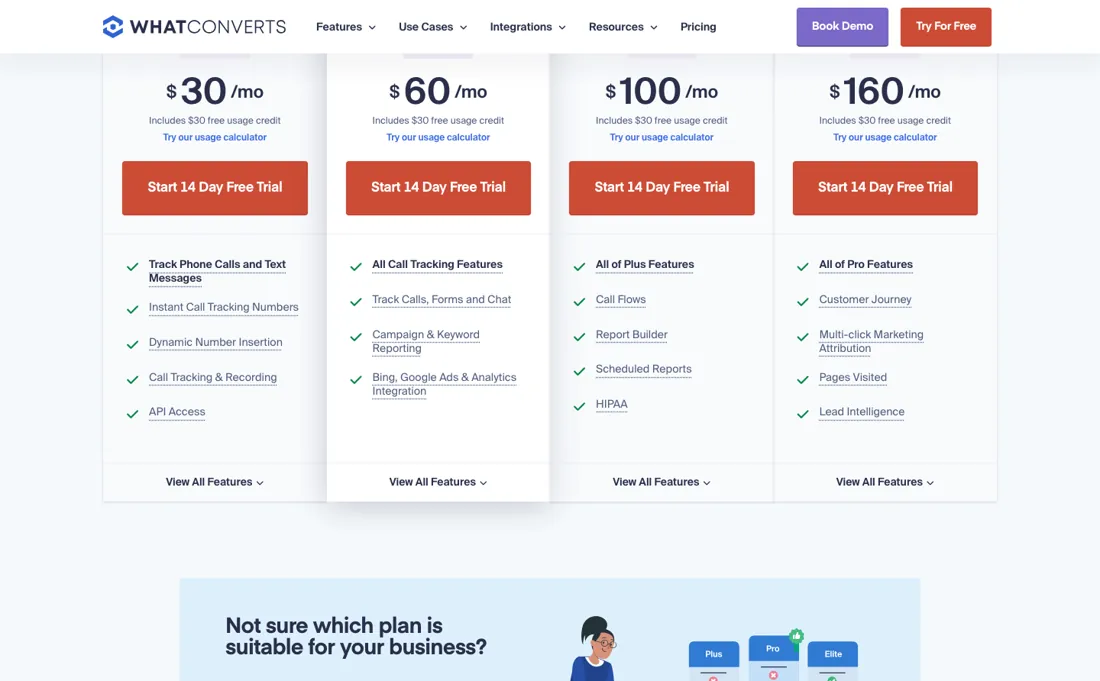
The comparison table on the pricing page prints the phone rates past that credit — $2.50 a local number, 4.5 cents a local minute, 3 cents a text on the single-account plans — but for forms, chats and transactions it prints only the included allowance (up to 300 on Plus, Pro and Elite) and no rate beyond it. You can still model the bill: the calculator on the pricing page turns a monthly volume into a usage figure, and on 10 September 2026 it put the $30 Call Tracking plan at no extra usage for 50 calls and 100 forms, $47 at 500 of each and $250 at 2,000 of each.
Its genuine strength versus bigger attribution suites is capturing EVERY lead type (not just calls) at a fair price; the flip side is you still need someone to read the reports and reallocate budget, or it's measurement theater.
What WhatConverts does
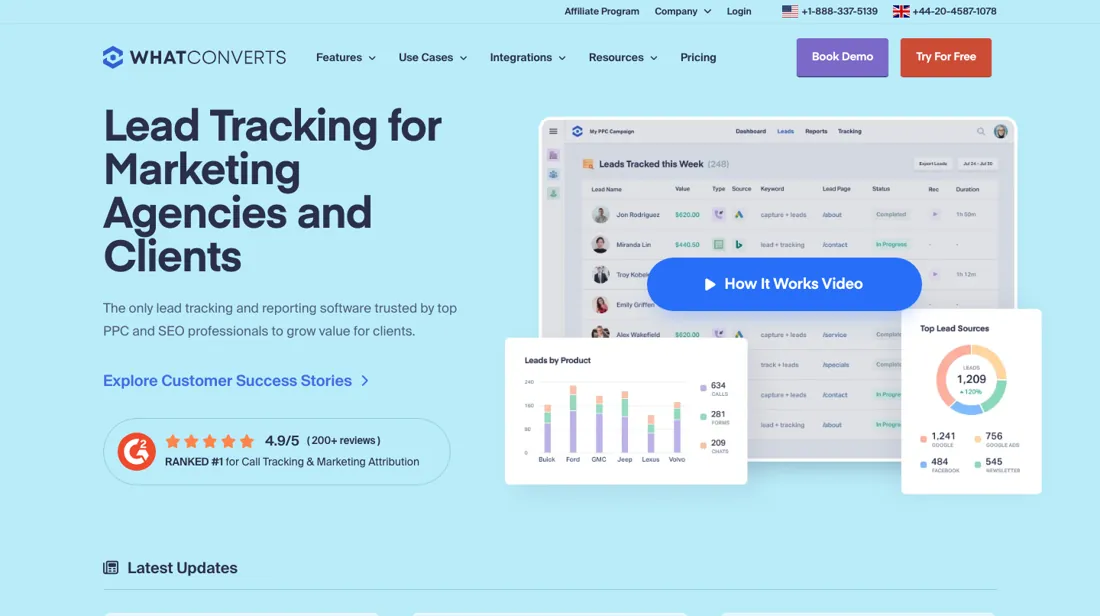
Lead tracking and marketing attribution. Capture calls, forms and chats and tie every lead back to the campaign that drove it, for clear ROI.
What buyers report about WhatConverts
Recurring themes from the buyer-review sites listed at the foot of this page, read in August 2026. We have not run WhatConverts ourselves, so this is other buyers' experience rather than ours. We summarise it here because the complaints are usually the part a vendor page leaves out.
- • 4.9 on G2 across 294 reviews, and support is repeatedly named as fast, knowledgeable and thorough.
- • It ties multi-channel lead attribution to revenue and feeds that back to the ad platforms — that loop is what agencies pay for.
- • Expensive and missing features are the two most common G2 complaint tags. The entry tier is affordable, but the higher single-account tiers and the agency ladder climb steeply above it.
- • One reviewer reports several calls with sales and still not getting conversions, traffic sources or keywords tracking correctly. Validate your own attribution during the trial rather than after.
The credit is published, the rate that eats it is not
Single-account plans run Call Tracking at $30 a month, Plus at $60 adding forms, chat and ecommerce, Pro at $100 with HIPAA support and API access, and Elite at $160 for full journey attribution, and every one of them includes $30 of usage credit. Agencies get their own tab and their own ladder: Plus at $500 a month with $250 of credit, Pro at $800 with $300 and Elite at $1,250 with $400, all with unlimited accounts (price re-verified 2026-09-05 against whatconverts.com/pricing).
The subscription is one half of the price; usage is the other, and it is published in the comparison table further down the same page: $2.50 for each additional local number, 4.5 cents per local minute, $3.50 per toll-free number and 6.5 cents per toll-free minute on the single-account plans, dropping to $1.75, 4 cents, $3.00 and 6 cents on the agency ones. Each plan comes with a monthly credit — $30 on every single-account tier, $250, $300 or $400 on the agency ones — and that credit is spent on phone numbers (including disabled ones), incoming call minutes, text messages, and every other lead type the platform counts: forms, appointments, chats, emails, events and transactions.
So the meter is real and itemised; do the arithmetic on your call volume before you assume the $30 credit covers it. Two details in the billing FAQ are worth knowing before the first invoice. Call minutes are rounded up to the full minute, so an 85-second call bills as two. And busy or no-answer calls still count if they connected to the tracking number, which means a bad week of missed calls is a billable week.
Our monthly capture read this vendor's pricing page in July 2026 and again in August 2026, and the amounts were the same both times. We keep watching — the registry records what moves.
How to actually use WhatConverts
Put your own volume through the calculator on their pricing page before you sign anything, because usage is the half of the bill that moves. Every tier includes a monthly usage credit — $30 on the single-account plans, $250 to $400 on the agency ones — and past it WhatConverts publishes no unit price; the billing FAQ points to a Rates page inside the account. The calculator is the way round that.
Read on 10 September 2026 it put the $30 Call Tracking plan at no extra usage for 50 calls and 100 forms a month, $7 at 200 of each, $47 at 500, $115 at 1,000 and $250 at 2,000 — so at volume the usage line is the larger half, not a rounding error. Count every form, chat, call, text and tracked event you expect, run it through, and check whether the tier below plus usage beats the tier above.
Name the person who will read the reports, and put an hour a week in their calendar before the account goes live. Attribution changes nothing by itself: the return comes entirely from moving budget between channels because of what it shows. Without that hour, this is instrumentation that changes no decisions. If you run client accounts, count them. Agency Plus at $500 a month with unlimited accounts beats nine single Plus accounts or six single Pro accounts, so the crossover is well-defined — buy single accounts below it and the agency licence above.
The steps above it, Pro at $800 and Elite at $1,250, do not buy more accounts; all three are unlimited already. They buy call flows, report building and HIPAA on Pro, and customer-journey and multi-click attribution on Elite.
Distilled from WhatConverts' own pricing page (whatconverts.com/pricing) and the pricing calculator on it, driven through all five of its volume steps on 10 September 2026 — the two plan ladders, the usage credit included per tier, and the usage figure the calculator returns at each volume. Re-read 25 September 2026 (plain HTML): both ladders and credits unchanged, and the comparison table's included allowances (up to 148 call leads and up to 300 forms, chats and transactions per single-account plan; 1,908-3,158 calls and 2,500-4,000 other leads on the agency plans) and unit rates, which are lower on the agency plans.
WhatConverts vs CallRail, side by side
Both columns come from the same place: each vendor’s own published pricing, read on the date shown in the sources at the foot of this page. We do not average them into a score.
Both names above are affiliate links: we may earn a commission if you sign up, at no extra cost to you. Neither changes what this table says: both columns come straight from the vendors’ own pricing pages.
The natural comparison is CallRail or Ruler Analytics — the attribution peer group — CallRail is the call-first incumbent; WhatConverts wins on multi-lead-type breadth per dollar.
Frequently asked questions
How many calls does the $30 plan actually include?
Up to 148 phone call leads a month, according to the plan comparison on the pricing page (read 25 September 2026). The figure is the same on all four single-account plans because each carries the same $30 usage credit, so paying $60, $100 or $160 buys features rather than volume. The Call Tracking plan includes no forms, chats or transactions at all ('N/A'), while Plus, Pro and Elite include up to 300 of those. Past the allowance you pay usage, for example 4.5 cents per local minute and $2.50 per extra local number.
Is an agency plan cheaper per lead?
Per unit, yes. On the three agency plans (read 25 September 2026) an extra local number is $1.75 instead of $2.50, a local minute 4 cents instead of 4.5, a toll-free number $3.00 instead of $3.50 and a toll-free minute 6 cents instead of 6.5. The included credit is larger too: $250, $300 and $400 on the $500, $800 and $1,250 plans, covering up to 1,908, 2,325 and 3,158 call leads. The catch is the floor: $500 a month before the first call, which only makes sense if you actually run several client accounts.
What else can show up on the bill besides the plan?
Four usage lines, all printed in the comparison table (read 25 September 2026): extra tracking numbers, call minutes, inbound texts at 3 cents each and call transcription at 2 cents a minute. White-label branding is listed separately as another $50 a month on any plan. The page describes the included credit as used for tracking leads, so a small account can stay inside it; check in the trial whether your number count already exceeds it.
What should I weigh before buying Growth & Revenue software?
It depends on whether you have the bottleneck it solves. Small teams get the most out of this category when one clear problem is already costing real hours or revenue; buying ahead of that just adds cost and another login. Price it against the hours or lost deals it removes, not against its feature list, and start on the smallest plan that covers the job.
Is this a hands-on review of WhatConverts?
This is a researched assessment, not a hands-on test — where we've used a tool ourselves, we say so explicitly. We name what each tool is good and bad at, and we earn a commission only if you sign up, at no cost to you.
- Buyer reviews on G2, Capterra, GetApp and Software Advice, read August 2026.
- Re-verified 25 September 2026 on whatconverts.com/pricing.
- A dated screenshot of that pricing page, kept on this site as the receipt.
Others in this category
Reviewed growth & revenue tools that share ground with WhatConverts — comparable in what they do, not drop-in swaps:
New reviews, price changes we recorded, and the cost conditions we found. No sponsored placements. Unsubscribe anytime.
This is our researched assessment — not a paid placement. The “Visit” links on this page are affiliate links: we may earn a commission if you sign up, at no extra cost to you, and it never changes our take. How we review →