AWeber Review (2026)
 By Daan Haket · Tested hands-on · written with an AI assistant · who does what
The free and low tiers are generous, but Lite and Plus prices climb with your subscriber count, so budget for growth. It's a dependable, no-frills veteran — just not the most modern automation on the market.
small businesses and creators who want reliable, simple email marketing with a genuinely usable free tier.
you need advanced, behaviour-driven automation — newer tools go deeper for the money.
Transparency: the “Visit” links on this page are affiliate links — we may earn a commission if you sign up, at no extra cost to you. No vendor can pay for a better review or verdict. How we make money →
Exit test (measured 2026-10-29)
- Export route
- Export CSV is visible but was not used because neither test record was imported
- Formats
- Not tested
- Attachments included
- Not tested
- Re-import tested
- With our own file, not the standard kit (see below)
- Lost on export
- Not tested
Formats describe this export route; offered formats may not have been inspected. Full exit test and scope ↓
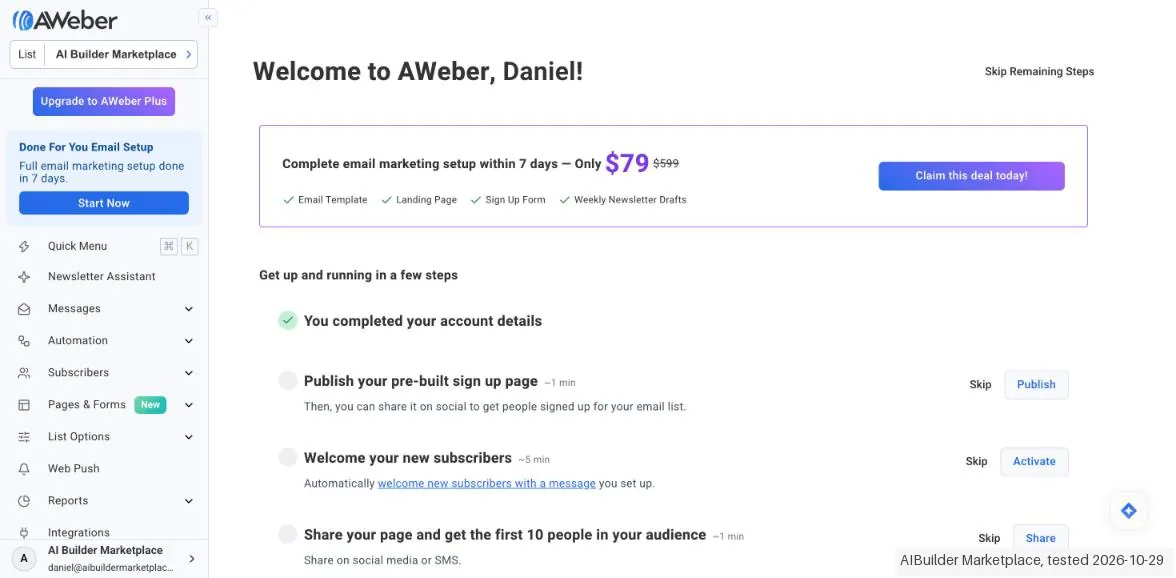
Tested by our team on 29 October 2026 on AWeber Free: Daan created the account and our AI assistant ran the test in Daan's browser. We tried to import two made-up subscribers from a CSV and opened the Lite trial checkout without paying. AWeber refused both test addresses, so we stopped there.
How we tested
- Tried to import two made-up subscribers from a CSV
- Checked the list confirmation settings
- Opened the Lite trial checkout and stopped before entering a card
- AWeber rejected both of our made-up addresses (on the reserved test domain example.com) as 'Blocked or invalid email format', so 0 of 2 were added. Following our test plan, we did not swap in real addresses; export and re-import were therefore not tested.
- Before the import, AWeber asks how the subscribers joined your list (website, in person, bought a product, purchased the list or other) and whether they come from another provider. The 'Other' answer needs a written explanation.
- Confirmation emails for imports are off by default, and the import itself defaults to 'No, they do not need to confirm'. Confirmation for subscribers added through the API is locked on; only AWeber Plus can ask to switch it off.
Pricing (2026)
✓ Pricing re-verified 9 Oct 2026
| Plan | Price | What you get |
|---|---|---|
| Free | $0 | up to 500 subscribers |
| Lite | $12.50/mo at 500 subscribers | annual billing; the price scales with your list size |
| Plus | $20/mo at 500 subscribers | annual billing; also scales by subscriber count |
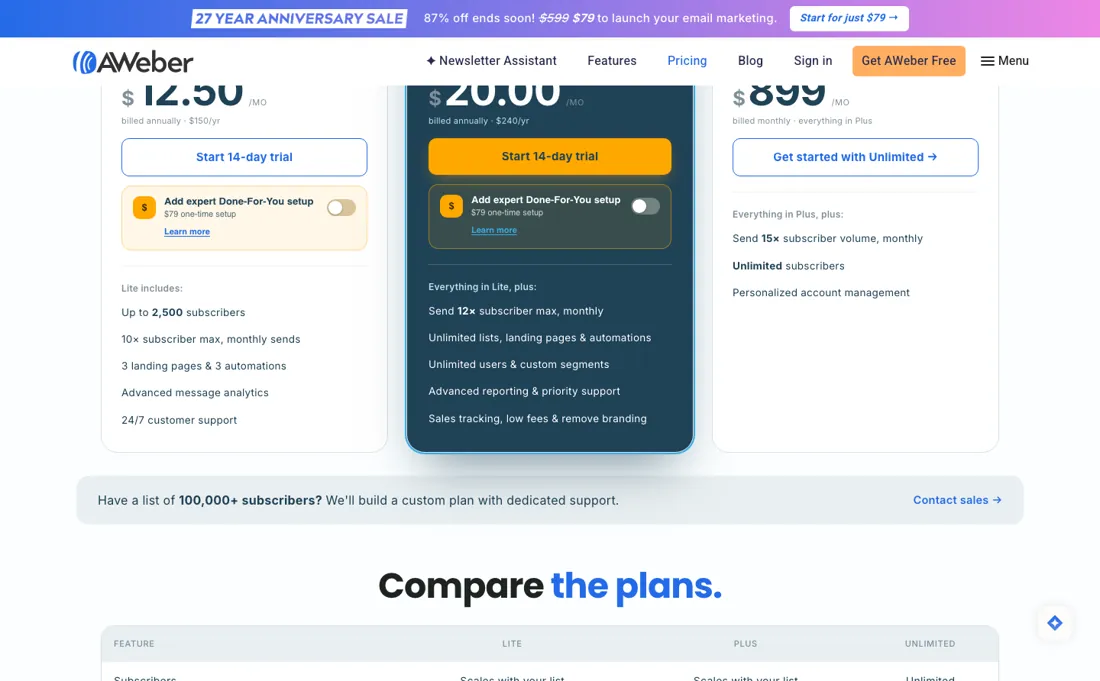
A free plan still exists (up to 500 subscribers, 3,000 emails a month) but it is reached through the separate free-signup page, not the pricing page; Lite shows $12.49/mo and Plus $19.99/mo at 500 subs (annual billing; both scale by subscriber count). The ~$899 flat Unlimited tier is served to about one visitor in eighteen rather than withdrawn: on 5 Sep 2026 we loaded the pricing page 18 times in fresh cookie-less browsers, 17 returned Lite and Plus with no flat tier and one returned a three-card variant with “Go Unlimited” at $899/mo for unlimited subscribers, so it exists but you cannot count on seeing it.
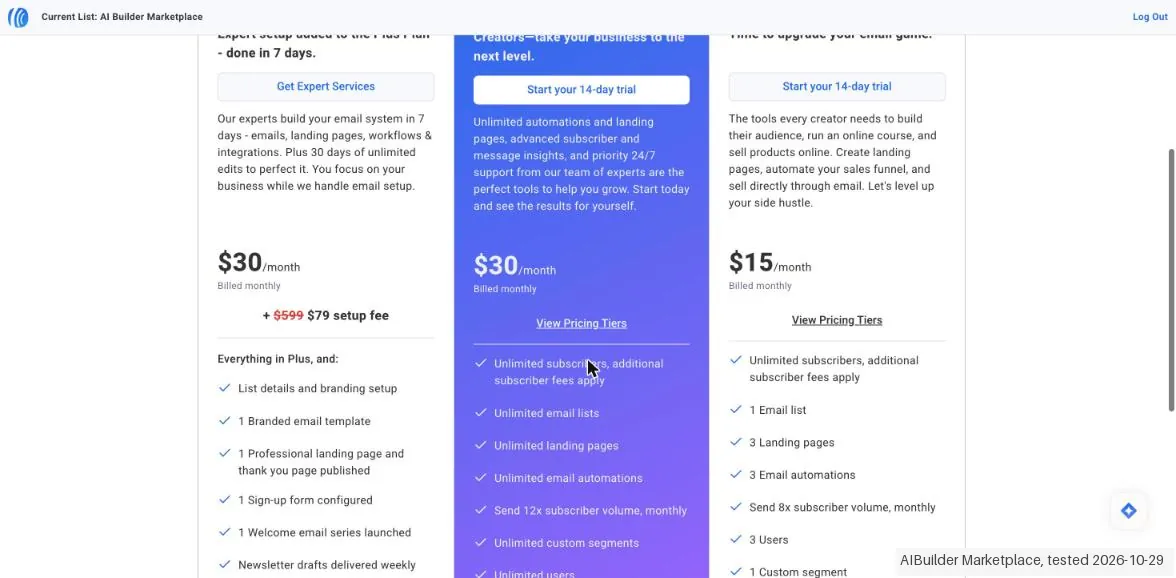
AWeber runs aggressive limited-time launch promos (an ‘87% off’ banner striking $599 to $79 at research time) — treat banner prices as promos, not list prices. AWeber's own affiliate newsletter of 5 September 2026 describes a single paid plan, 'AWeber Pro', starting at $16.15 a month billed annually, and does not name Lite or Plus at all; the pricing page served us Lite and Plus the same day, so the plan names appear to be mid-change.
Full pricing notes (3 more paragraphs)
Check the live page before quoting a tier name. Re-checked 6 September 2026 in twelve cookie-less loads: the pricing page named Free, Lite, Plus and Unlimited on all six of its loads, so the flat Unlimited tier that showed once in eighteen loads the day before was served every time; the free-email-marketing page named only Free. No load carried a plan called Pro and the newsletter figure of $16.15 appeared nowhere; the entry amounts read $12.50 and $20.00.
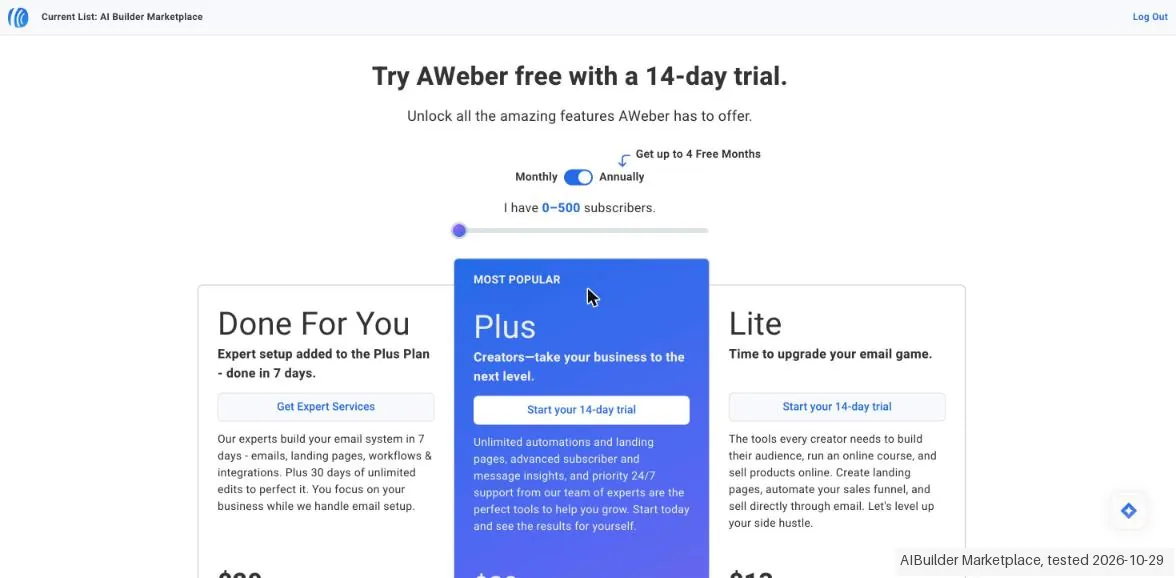
Read again on 9 October 2026: the pricing page shows Lite and Plus, plus 'Done For You' (Plus with a setup fee shown as $599 struck to $79), with a Monthly/Annually switch and a subscriber slider. Lite billed monthly: $15 up to 500, $25 up to 1,000, $35 up to 2,500, $60 up to 5,000, $85 up to 7,500, $100 up to 10,000, $150 up to 15,000, $185 up to 20,000, $210 up to 25,000, $275 up to 35,000, $375 up to 50,000, $500 up to 75,000, $600 up to 100,000, $920 up to 150,000 subscribers; billed annually, per month: $12.50, $20.83, $29.17, $50.00, $70.83, $83.33, $125.00, $154.17, $175.00, $229.17, $312.50, $416.67, $500.00, $766.67.
Plus billed monthly: $30, $45, $55, $90, $120, $135, $180, $215, $250, $350, $400, $600, $750, $1,050; billed annually, per month: $20.00, $37.50, $45.83, $75.00, $100.00, $112.50, $150.00, $179.17, $208.33, $291.67, $333.33, $500.00, $625.00, $875.00.
Plans change — always verify the live price on their site.
Category context: Growth & Revenue. Across the 84 tools in this category that we researched with a public US-dollar price, the median entry price is about $30 a month (lowest paid plan as listed, per seat where the vendor prices per seat). AWeber’s entry price of $12.50 a month sits below that median. Compare pricing conditions in the Software Cost Atlas →
Correction after re-checking: The free plan (up to 500 subscribers, 3,000 emails per month) still exists, but it is no longer listed on the pricing page — that page now leads with a 14-day trial and you reach the free tier via the separate free signup page. At 0-500 subscribers Lite is $12.49/month and Plus $19.99/month billed annually ($15.00 and $30.00 month-to-month); both still scale with subscriber count. A Done For You tier is listed at $20.00/month billed annually plus a one-time setup fee. That setup fee is where the promotion sits, not the platform price, and on 11 Aug 2026 the page showed two versions of it at the same time: a banner striking $599 to $1 above a plan card still reading $599 struck to $79. The flat Unlimited tier is not simply gone, and this is a correction to what we published before. aweber.com/pricing.htm does not serve every visitor the same plans. Across 18 loads on 5 September 2026, each in a fresh cookie-less browser and rendered rather than fetched, 17 returned a line-up without a flat tier and one returned a three-card variant carrying “Go Unlimited” at $899/mo billed monthly for unlimited subscribers, with the annual totals spelled out beside the monthly rates and a full feature comparison grid the common variant does not show. Roughly one visitor in eighteen sees it, so treat it as a rare variant you cannot count on reaching rather than a retired plan. Re-checked 11 September 2026: the page served Done For You at $20.00/month billed annually plus a $79 setup fee, Plus at $19.99 and Lite at $12.49, with no Free card and no flat Unlimited card. Ten cookie-less fetches that morning all returned a byte-identical 91,448-byte document, so that is one cached variant rather than ten independent samples and it says nothing new about how often the Unlimited variant is served. The promotion still contradicts itself in the same two places it did in August: a banner striking $599 to $1 above a plan card striking the same $599 to $79. (re-verified 11 Sep 2026) Re-checked 1 October 2026: the same cards (Done For You $20.00 billed annually plus a setup fee, Plus $19.99 and Lite $12.49 in the served page, $20.00 and $12.50 once rendered), the same subscriber grid ($15.00 and $30.00 month to month at 500, up to $1,050.00), no Free card and no flat Unlimited card. The promotion no longer contradicts itself: banner and card both strike $599 to $79. (re-verified 1 Oct 2026)
What the price did
We capture AWeber’s own pricing page every month and keep the figures, so this is our record of the page — not a forecast, and not someone else’s summary.
The 7 July and 2 August 2026 captures of aweber.com/pricing.htm returned the same sixty amounts, the whole subscriber grid included: $30.00 a month or $240.00 a year at 500 subscribers, rising to $1,050.00 a month at the top of the published table. What moves on this page is the promotion, not the plans. Both captures showed the setup fee struck from $599 to $79; on 11 August 2026 the page carried two offers at once, a banner striking $599 to $1 above a plan card still reading $79. On 1 October 2026 the plan amounts and grid were unchanged again, and for the first time in our readings banner and card agreed: both struck the $599 setup fee to $79.
AWeber’s pricing page, as we read it
Watch the video review
The video version of this review, from our YouTube channel.
⚡ Short on time? Watch the 30-second verdict Short.
What AWeber does
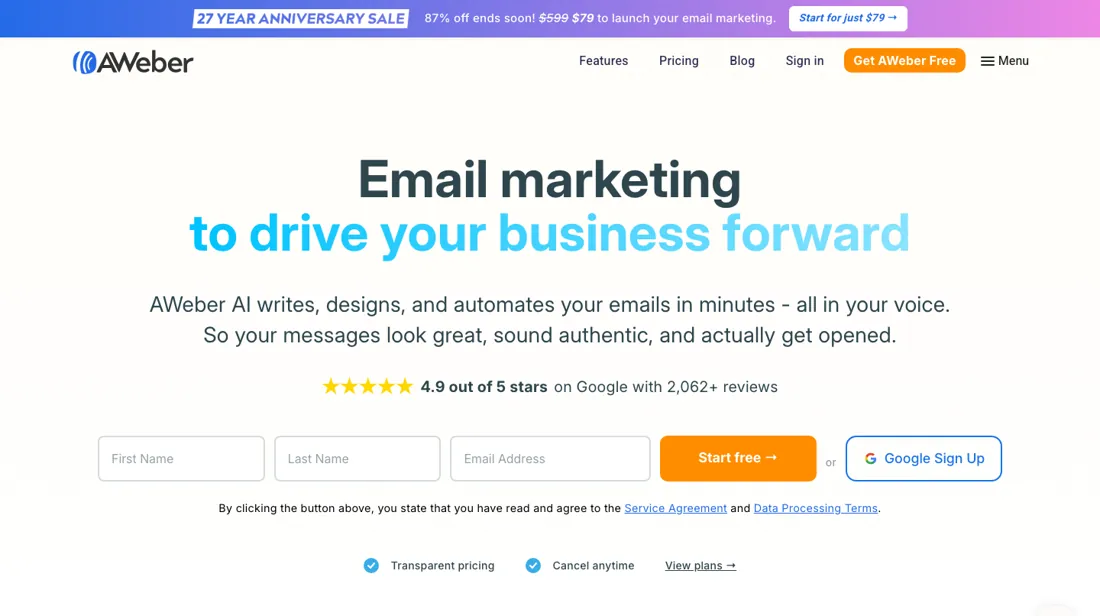
Email marketing and automation for small businesses and creators: drag-and-drop newsletters, prompt-built landing pages, autoresponders and sign-up forms, AI writing help, and since August 2026 a ChatGPT plugin and Claude connector that read a whole automation back with its engagement numbers.
What buyers report about AWeber
Hands-on: tested 2026-10-29Documented by the vendor: 2 features, read 2026-10-07Reported by buyers: G2, GetApp, TrustRadius and Software Advice, read August 2026
Themes from the buyer-review sites listed at the foot of this page, read in August 2026. We tested AWeber ourselves on 2026-10-29, but one test is a narrow sample, so here is what other buyers report. We summarise it here because the complaints are usually the part a vendor page leaves out.
- • Deliverability. Twenty-five years of ISP relationships is the one thing reviewers say newer competitors cannot copy.
- • It permits affiliate content in emails, with consent and within guidelines — which several competitors do not. If that is your model, it narrows the field fast.
- • 4.3 out of 5 across 176 Trustpilot reviews (read 24 August 2026), with the interface repeatedly called easy to learn.
- • The interface feels dated, and automation is behind newer tools.
- • The landing page builder is thin on customisation — a theme in the reviews read in August 2026. AWeber's COO wrote to us on 8 September 2026 that this predates their AI Page Builder, and that builder's own page (aweber.com/ai/landing-page-builder.htm, read 9 September 2026) advertises conversational editing, scroll and hover effects, and embedded interactive tools such as calculators and quizzes. That is AWeber's description of it; we have not built a page with it ourselves.
- • Advanced segmentation is limited — if you segment deeply, check it against your list first.
- • Mobile rendering is not always optimised.
When the paid plan is worth it
AWeber still has a free tier, but it is no longer shown on the pricing page; you reach it through the separate free signup page, which documents "Up to 500 subscribers" and "3,000 emails per month". Those are the only two allowance figures that page prints, and neither is expressed as a multiple of your list. The paid cards, by contrast, promise sends of 10x your subscriber maximum on Lite and 12x on Plus.
Lite ($12.49/month billed annually, $15.00 month-to-month at 500 subscribers) holds you to 1 email list, 3 landing pages, 3 email automations, 3 users and 1 custom segment. Plus ($19.99/month annually, $30.00 monthly at 500) removes those caps and cuts the ecommerce transaction fee from 1.0% to 0.6%. Behavioural automation, webpage tracking and the free migration service are marked as excluded from Lite in AWeber's own comparison table, so if automation is the reason you are paying, Lite is the wrong stop.
Upgrading does not decouple price from list size: at 25,000 subscribers the month-to-month cost is $210.00 for Lite and $250.00 for Plus.
What we found running AWeber ourselves
The first findings are at the top of this page. The rest:
- Custom fields are plain text only, up to 25. The import also offers 'Add new and update existing' and 'Only update existing', with 'Only add new subscribers' preselected.
- Our own address was put on our list as a subscriber automatically at signup, and every list needs a postal address, which is printed under your emails.
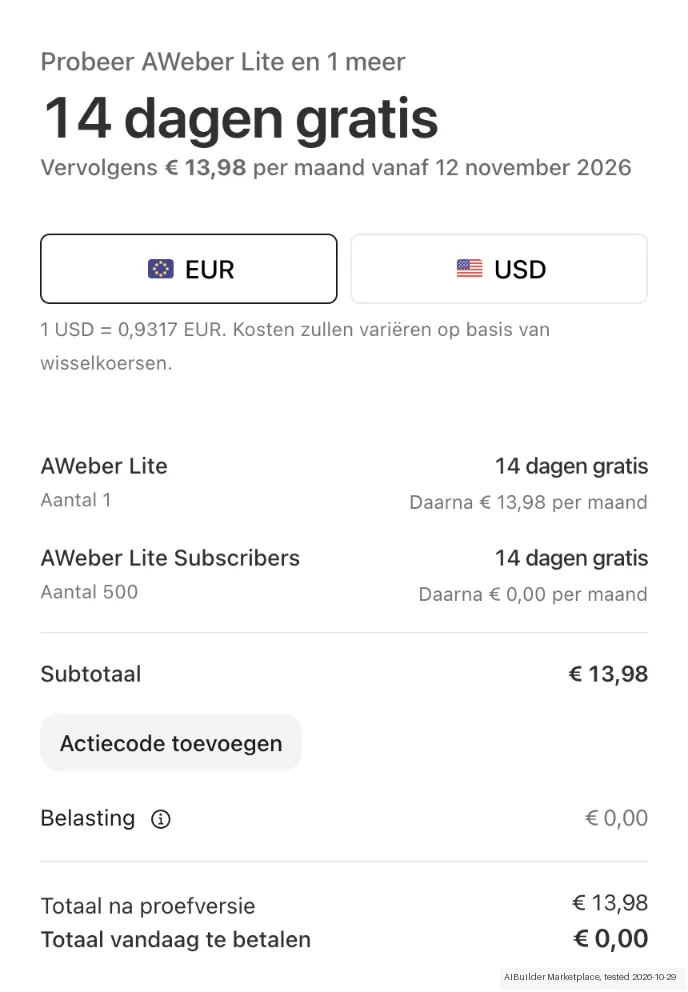
- On Free, 'Invite a user' is disabled ('Upgrade your account to invite more users'). The Lite '14-day trial' goes to a Stripe checkout that asks for a card first: € 13,98 a month from 12 November, nothing due today.
- Prices in the app: Lite $15 and Plus $30 a month billed monthly, or $13 and $20 a month billed yearly, which is the preselected option.
Claim vs. what we measured
We set a claim from AWeber's own pages next to what we saw in our test, on the plan named. The status says whether the two describe the same thing and match; it is not a verdict on the product. Confirmations are listed too.
| What the vendor says | What we measured | Status | What it means if you buy |
|---|---|---|---|
| get started for freeSource: aweber.com, read 29 Oct 2026 | Measured 2026-10-29: Free is available without a card; extra-user invitation is locked. The Lite paid trial separately requires a card.Our test, 29 Oct 2026; Free | ConfirmedCompared on AWeber Free as we used it; the paid Lite trial is a separate route with its own card step. | Free access does not include additional users or the same terms as the paid trial. |
| $15/monthSource: aweber.com, read 29 Oct 2026 | Measured 2026-10-29: Lite monthly price $15 converts at the displayed 0.9317 EUR per USD to €13.98. Stripe shows 14 free days, €0 today and €13.98 monthly from 12 November 2026; card required and tax zero before address.Our test, 29 Oct 2026; Free | ConfirmedLite, billed monthly, 0-500 subscribers; the checkout converted USD to EUR and showed tax before an address was entered. | Displayed conversion matches; paid trial requires a card and final tax depends on billing details. |
Exit test: can you take your data out?
Attempted to import the two fictional newsletter records; both reserved email addresses were rejected. Test date: 29 Oct 2026. We describe the friction rather than score it; this is one run with synthetic records, not a verdict on AWeber.
| What we checked | What we saw |
|---|---|
| Fields offered by the export dialog | |
| Not offered in the field selector | None noted. |
| The exported file | We did not inspect the file, so data retention and loss remain unverified. |
| Awkward but not lost | Import history reports two submitted and none imported: Blocked or invalid email format. The test stopped as planned. Import confirmation is off by default; API confirmation can only be disabled by request on Plus. The import requires a subscriber-origin explanation. |
| Export route | Export CSV is visible but was not used because neither test record was imported. |
| Export format | No test-record export was downloaded. |
| Re-importing the export | Reimport was not tested because the core import was blocked. |
| Cancelling | Free has no card or trial expiry. The paid Lite trial requires a card; it was not started. |
What the exit test does not show:
- Actual cancellation, expiry and deletion.
- Native-ID update execution.
- Unentered fields and complete signup screen count.
Kit check counts
Kit email-nieuwsbrief 1.0.0; run aweber-2026-10-29; observed 2026-10-29.
- export / AIBM-001: Of 10 checks: 0 kept, 0 changed, 0 lost, 0 not offered, 10 not tested
- export / AIBM-002: Of 10 checks: 0 kept, 0 changed, 0 lost, 0 not offered, 10 not tested
- reimport / AIBM-001: Of 10 checks: 0 kept, 0 changed, 0 lost, 0 not offered, 10 not tested
- reimport / AIBM-002: Of 10 checks: 0 kept, 0 changed, 0 lost, 0 not offered, 10 not tested
Each record and phase uses this kit’s checks. Counts describe this run; they are not a score or a comparison between kits.
Mail in the first 14 days
Measurement running until 2026-11-11T23:00:00Z (last observed 2026-10-31T02:18:02.201141Z).
5 emails in the 14-day window so far; first email after signup: unknown (exact signup time not recorded); 0 with an explicit offer.
Retained inbox and junk only; removed or archived mail is outside this observation. Ambiguous supplier attribution is excluded. Day numbers use elapsed 24-hour periods since the recorded signup date at midnight Europe/Amsterdam; the signup hour is unknown. Offer flags quote literal subject/body text. Replies in our own correspondence (support tickets, our comment requests) are excluded; one-time codes, our own address, our account name and our name are replaced in brackets.
| Day | Time (UTC) | Sender | Literal subject | Folder | Offer evidence |
|---|---|---|---|---|---|
| Day 0 | 2026-10-29 19:04:34 UTC | AWeber team / aweber.com | Confirm your AWeber Account | inbox | |
| Day 0 | 2026-10-29 19:06:00 UTC | AWeber team / aweber.com | [our account] ([our address]) was added to "AI Builder Marketplace" | inbox | |
| Day 0 | 2026-10-29 19:20:22 UTC | AWeber team / aweber.com | Start growing your email list today. | inbox | |
| Day 1 | 2026-10-30 15:41:06 UTC | AWeber team / aweber.com | We're moving a WordPress site off PHP today, live at noon | inbox | |
| Day 1 | 2026-10-30 19:21:15 UTC | AWeber team / aweber.com | Your automation runs while you work, sleep, and take days off. | inbox |
Screenshots from our test (click to enlarge)
What this test does not show:
- Importing or exporting subscribers
- Re-importing an export
- Sending a broadcast or automation
- Contacting support
Most of our reviews are researched rather than run — how we review explains which is which, and why we do not pretend otherwise.
How to actually use AWeber
Signup collects your company name, website, industry and a postal address (AWeber notes this is required by CAN-SPAM), then asks whether you have subscribers to migrate. The real work is under Domains & Addresses: add a sending address and click the link in AWeber's verification email, then select it as your From address under List Settings. The docs warn against a generic address such as name@gmail.com. Next, authenticate the domain — CNAME records for DKIM plus a TXT record for DMARC.
AWeber offers automatic setup for over 40 domain providers; otherwise you paste records into your DNS by hand and, per the docs, allow up to 48 hours for the records to propagate. This step bites later: AWeber re-checks sender authentication at send time, and a broadcast whose domain no longer validates is returned to Draft status. Second snag if you are migrating: imports run through a permission check and can be pulled for manual review.
AWeber says such imports are typically reviewed within 1 business day (their claim, not our timing) — until then nothing sends.
Where this section comes from: our research notes (156 words)
Vendor sources only, all fetched this session: aweber.com/pricing.htm (plan cards, the Lite and Plus subscriber pricing tables and the "Differing Features" comparison grid), aweber.com/free-email-marketing.htm for the free-tier limits, and the AWeber docs site — the "Getting Started with AWeber" collection, specifically "Set Up Your Account" (the signup fields and the CAN-SPAM note), "Configure Your Sending Email Address" (its steps 2 and 4: add and verify the address under Domains and Addresses, set the From address under List Settings) and the sub-page "Authenticate Your Email Domain with DKIM and DMARC", plus the Subscriber Management article "Why is my import being manually reviewed?".
No independent walkthrough was found. Searching surfaced only YouTube "AWeber tutorial" videos, an affiliate-marketing forum thread, and blog guides on affiliate-monetised sites — none of those are independent, so none are cited. The buyer reports elsewhere on this page are not vendor sources: they come from G2, GetApp, TrustRadius and Software Advice, read August 2026.
The natural comparison is Mailchimp or MailerLite — other beginner-friendly email tools.
Frequently asked questions
Can you export your data from AWeber?
Exit check 2026-10-29; route excerpt: Export CSV is visible but was not used because neither test record was imported; came along (excerpts): not_tested; lost (excerpts): not_tested; re-import: not tested.
Is AWeber's free plan still available?
Yes, but not from the pricing page, which now leads with a 14-day trial. The free tier lives on AWeber's separate free-signup page and documents two limits: up to 500 subscribers and 3,000 emails per month. Both were still there on 1 October 2026. Neither figure is expressed as a multiple of your list, unlike the paid cards, which promise sends of 10x your subscriber maximum on Lite and 12x on Plus.
What will AWeber cost as the list grows?
Price tracks subscriber count on every paid tier. At 500 subscribers Lite is $12.49 and Plus $19.99 per month billed annually; the published grid runs up to $1,050.00 a month, and at 25,000 subscribers the month-to-month cost is $210.00 for Lite and $250.00 for Plus. Upgrading does not decouple the price from the list; it removes caps. Lite holds you to 1 list, 3 landing pages, 3 automations, 3 users and 1 custom segment, and AWeber's own comparison table excludes behavioural automation, webpage tracking and the free migration service from Lite.
What is the deliverability setup nobody warns you about?
Domain authentication, and it bites twice. You add CNAME records for DKIM and a TXT record for DMARC — AWeber automates this for over 40 domain providers, otherwise you paste them by hand and the docs say to allow up to 48 hours for propagation. The part that catches people later: AWeber re-checks sender authentication at send time, and a broadcast whose domain no longer validates is returned to Draft status. If you are migrating a list, the import also goes through a permission check that AWeber says is typically reviewed within 1 business day — their claim, not our timing — and nothing sends until it clears.
What do AWeber's AI tools actually cover?
Four of them are named on AWeber's own pricing page, read on 9 September 2026: an AI Page Builder for landing pages, an AI Signup Form Builder, an AI Writing Assistant for email copy and an AI Subject Line Assistant. They are presented as part of the product rather than as a separate paid add-on, and they sit alongside the ChatGPT plugin and Claude connector AWeber shipped in August 2026. Our 29 October 2026 test covered signup, import and the list, not these AI tools, so their output quality is not measured here — treat this as a list of what exists, not a verdict on how good it is. If you are choosing between AWeber and a cheaper sender on price alone, this is the part of the bundle that does not show up in a price comparison.
Is this a hands-on review of AWeber?
Yes. We tested AWeber ourselves on 2026-10-29; the section above says what we tested, what we found and what we did not test, and where a figure comes from the vendor's own documentation instead. Most of our reviews are researched rather than run; we say which is which. We name what each tool is good and bad at, and we earn a commission only if you sign up, at no cost to you.
- Buyer reviews on G2, GetApp, TrustRadius and Software Advice, read August 2026.
- Re-verified 1 Oct 2026.
- A dated screenshot of that pricing page, kept on this site as the receipt.
- Our own hands-on session with AWeber (2026-10-29), written up in full further down this page.
Others in this category
Reviewed growth & revenue tools that share ground with AWeber — comparable in what they do, not drop-in swaps:
New reviews, price changes we recorded, and the cost conditions we found. No sponsored placements. Unsubscribe anytime.
This is our researched assessment — not a paid placement. The “Visit” links on this page are affiliate links: we may earn a commission if you sign up, at no extra cost to you, and it never changes our take. How we review →