 SmartSuite Review (2026)$15 a Seat, Three-Seat Minimum
SmartSuite is a broad, do-everything work-management platform, so the power comes with a learning curve and a per-seat cost that adds up for bigger teams — a single source of truth if you commit, overkill if you just need a task list. Throughout this review we weigh it against Airtable.
Visit SmartSuite → Affiliate link — we may earn a commission if you sign up; it does not change what this page says.
Watch the 2-minute review
The video version of this review, from our YouTube channel.
⚡ Short on time? Watch the 30-second verdict Short.
Pricing (2026)
✓ Pricing re-verified 14 Sep 2026
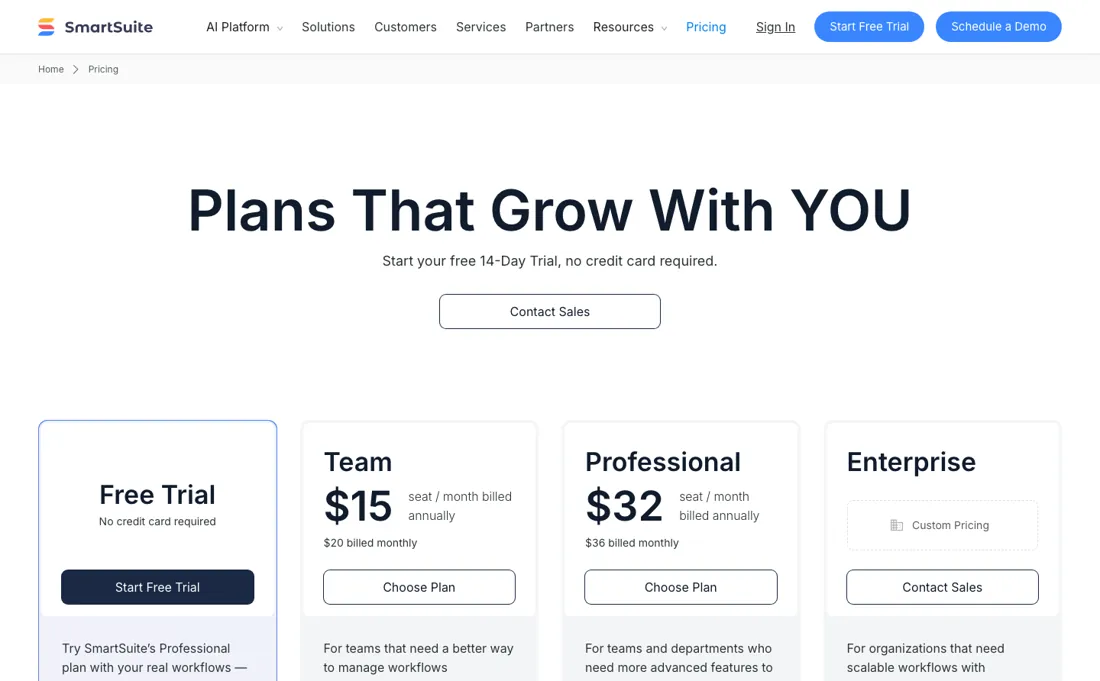
No free plan — a 14-day trial of Professional with no credit card, and the page states there is no auto-charge when it ends. Team is $15 per seat a month billed annually, or $20 billed monthly, with a minimum of 3 billable users, 5,000 records per solution, 50GB of storage and a 30-day recycle bin. Professional is $32 per seat annually, or $36 monthly, with a minimum of 5 billable users, 100,000 records, 100GB and 45 days.
Enterprise is quote-only and lifts those to 400,000 records, 500GB and 60 days, adding SSO, SCIM, audit logs, IP restrictions, data-loss prevention and European data residency; a further Signature plan sits above it, also on request. The minimums matter more than the rate: a three-person team on Team pays for three seats whether or not all three log in, and Professional cannot be bought for fewer than five, so the real entry price is $45 a month on Team and $160 on Professional rather than the per-seat figures on the cards. Plans change — always verify the live price on their site.
What the price did
We capture SmartSuite’s own pricing page every month and keep the figures, so this is our record of the page — not a forecast, and not someone else’s summary.
SmartSuite's price card is unchanged across every reading we have. The July and August 2026 captures are byte-for-byte identical and the 14 September 2026 re-read returns the same figures again: $15 and $20 for Team, $32 and $36 for Professional, with the same billable-user minimums of 3 and 5. The record ceilings on that page are 5,000 per solution on Team, 100,000 on Professional and 400,000 on Enterprise; the higher numbers quoted elsewhere in this review are automation runs a month, which is a different meter and is described under getting started.
SmartSuite’s pricing page, as we read it
What SmartSuite does
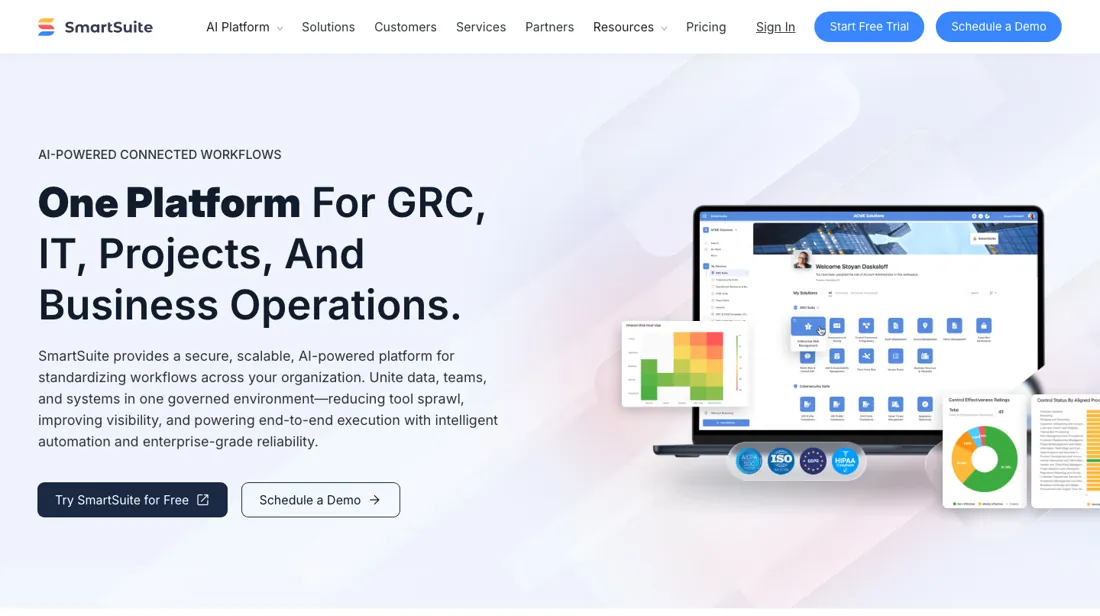
One flexible work management platform to plan, track and automate any process. Projects, CRM and operations side by side — replace a stack of scattered tools with a single source of truth.
What buyers report about SmartSuite
Recurring themes from the buyer-review sites listed at the foot of this page, read in August 2026. We have not run SmartSuite ourselves, so this is other buyers' experience rather than ours. We summarise it here because the complaints are usually the part a vendor page leaves out.
- • Quick to set up with genuinely flexible customisation, and built-in communication rather than bolted on.
- • A generous free plan and per-user pricing that does not force you to buy unused seats.
- • The integration library is thin next to the established competitors, and reviewers name it directly.
- • Performance drops on larger datasets.
- • Some advanced features are still in development, and the community is small enough that you will not always find an answer online.
- • The near-perfect scores rest on a small sample — around 26 Capterra reviews and a light G2 footprint. Treat that 4.8 as an enthusiastic early audience, not a verdict tested across thousands of teams.
When the paid plan is worth it
SmartSuite's pricing page contradicts itself on a free tier: it prices Team, Professional, Enterprise and a sales-only Signature plan, none of them free, while its FAQ says "If you are on SmartSuite's Free plan, all users are free." It offers a 14-day Professional trial, no credit card required, so the choice is Team ($15 per seat/month billed annually, $20 billed monthly, minimum 3 billable users) against Professional ($32 per seat/month billed annually, $36 billed monthly, minimum 5 billable users).
SmartSuite's limits page caps Team at 5,000 records per solution and 5,000 per table, with 30 linked-record fields, 30 lookup fields and 30 combined count/rollup/formula fields per application; Professional raises those to 100,000 records per solution, 50,000 per table and 50 of each field type. The pricing page puts Folders, Gmail and Outlook Integrations and Advanced Permissions in Professional's "Everything in Team, plus" block. Moving from Team to Professional or Enterprise does not lift the total-field ceiling: the limits page lists Max 700 fields per application on all three, Customizable on Signature.
SSO sits in Enterprise's "Everything in Professional, plus" block and the 1,095-day activity log starts at Enterprise, listed only as Custom Pricing, Contact Sales.
Our monthly capture read this vendor's pricing page in July 2026 and again in August 2026, and the amounts were the same both times. We keep watching — the registry records what moves.
How to actually use SmartSuite
SmartSuite's quickstart is template-first: click + on the home page, choose Start with a Template, then customise fields and status values before inviting anyone. Migrators should read the import limits first — the CSV/Excel importer caps files at 5 MB and 20,000 records per import, imports generate no notifications and trigger no automations, and linked records must be matched on their own primary field values or on record IDs. The help centre recommends exporting a CSV out of SmartSuite first to see the expected format.
On automation volume the vendor contradicts itself: SmartSuite's help centre puts the Team allowance at 5,000 automation actions a month, while the comparison table on its own pricing page lists 25,000 runs per month for the same plan. The help centre adds that automations pause at the limit unless the $15-per-1,000-run add-on is switched on. Trial workspaces can send only 100 emails a month from SmartSuite's default domains until Gmail or Outlook is connected.
SmartSuite's public feature board lists the request "conditional logic in automations" as in progress, with 232 votes.
Distilled from SmartSuite pricing page, https://www.smartsuite.com/pricing (vendor pricing page, read 2026-08-11); SmartSuite Limits, https://help.smartsuite.com/en/articles/4759983-smartsuite-limits (vendor help centre, article dated 11 March 2026, read 2026-08-11); Automation Limits, https://help.smartsuite.com/en/articles/4759982-automation-limits (vendor help centre, read 2026-08-11); CSV/Excel Data Import, https://help.smartsuite.com/en/articles/4817036-csv-excel-data-import (vendor help centre, read 2026-08-11); SmartSuite Quickstart Guide, https://help.smartsuite.com/en/articles/6398892-smartsuite-quickstart-guide (vendor help centre, read 2026-08-11); SmartSuite public feature-request board on Canny, https://feedback.smartsuite.com/feature-requests?sort=top (public user-submitted requests and vote counts, read 2026-08-11).
SmartSuite vs monday.com, side by side
Both columns come from the same place: each vendor’s own published pricing, read on the date shown in the sources at the foot of this page. We do not average them into a score.
Both names above are affiliate links: we may earn a commission if you sign up, at no extra cost to you. Neither changes what this table says: both columns come straight from the vendors’ own pricing pages.
The natural comparison is Airtable or monday.com — other flexible work-management platforms. Weigh it against Airtable on the job you actually need done.
Frequently asked questions
What does SmartSuite cost?
Team is $15 per seat a month billed annually ($20 monthly) and Professional $32 ($36 monthly), with Enterprise quoted. There is no free plan, only a 14-day trial of Professional that needs no card. Read on 17 August 2026.
What is the real minimum spend?
Higher than the seat price suggests, because of the user minimums: Team bills for at least 3 users and Professional for at least 5. So Team starts at $45 a month billed annually and Professional at $160, regardless of how many people actually use it.
What separates Team from Professional?
Scale rather than features you can name: 5,000 records per solution and 50 GB on Team against 100,000 records and 100 GB on Professional. If your solutions are small, Team is genuinely sufficient; the moment a single solution passes a few thousand records, the upgrade is forced rather than chosen.
What should I weigh before buying Operations & Workflow software?
Usually it sits on top rather than replacing everything. Tools in this class tend to become the layer where work is tracked and handed off, while your existing systems stay the source of truth for their own data. Before you buy, map which tools it would replace outright and which it would merely sync with. If the answer is that it syncs with all of them, you are adding a layer rather than removing one.
Is this a hands-on review of SmartSuite?
This is a researched assessment, not a hands-on test — where we've used a tool ourselves, we say so explicitly. We name what each tool is good and bad at, and we earn a commission only if you sign up, at no cost to you.
- Buyer reviews on G2, Capterra, TrustRadius and GetApp, read August 2026.
- Re-verified 2026-09-14 on their own pricing page, USD; unchanged since our August reading.
- A dated screenshot of that pricing page, kept on this site as the receipt.
Others in this category
Reviewed operations & workflow tools that share ground with SmartSuite — comparable in what they do, not drop-in swaps:
New reviews, price changes we recorded, and the cost conditions we found. No sponsored placements. Unsubscribe anytime.
This is our researched assessment — not a paid placement. The “Visit” links on this page are affiliate links: we may earn a commission if you sign up, at no extra cost to you, and it never changes our take. How we review →