Sunsama Review (2026)One Page, Two Prices
 By Daan Haket · Researched and written with an AI assistant · who does what
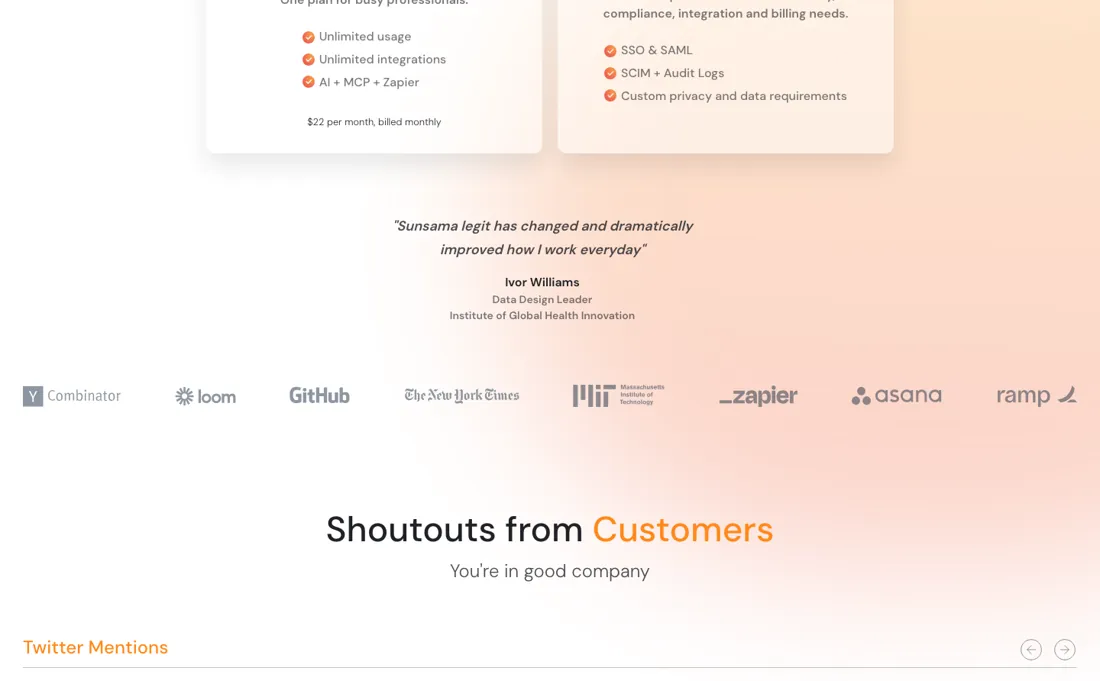
The pricing page contradicts itself: the plan card says $17 yearly and $22 monthly, the FAQ on the same page says $20 yearly and $25 monthly.
people whose problem is deciding what to do today rather than tracking what exists — it pulls from your existing tools and forces a daily plan, which is the whole product.
you already plan your day and just want a task list, because that is free everywhere; also skip it for a team, since there is no team pricing and the per-person cost multiplies straight through.
Transparency: we earn nothing from Sunsama; the links to it are plain links. How we make money →
Pricing (2026)
✓ Pricing re-verified 19 Sep 2026
(2026-08-30, re-read on their own pricing page from a US exit) The page gives two different numbers and it is worth knowing both. The plan card says $17 a month billed yearly, or $22 billed monthly, for the Pro plan, with unlimited usage and integrations; Enterprise is quote-only. The FAQ on the same page says Sunsama costs $25 a month per person, or $20 a month on yearly plans, and gives a worked example of $50 a month for two people.
There is a free trial with no card required. The page also explains, unprompted, that they price at $25.00 rather than $24.99 because they consider the latter 'deceitful psychological trickery'. Their own llms.txt, read the same day, lists Pro at $17 per person a month billed yearly and $22 billed monthly, plus a 14-day trial at $0 with no card required — so the machine-readable file agrees with the plan card and not with the FAQ. Plans change — always verify the live price on their site.
Category context: Operations & Workflow. Across the 52 tools in this category that we researched with a public US-dollar price, the median entry price is $27 a month (lowest paid plan as listed, per seat where the vendor prices per seat). Sunsama’s entry price of $17 a month sits below that median. Compare pricing conditions in the Software Cost Atlas →
What the pricing page doesn’t say
One of those is stale, and until you know which, treat $25 as the number you might actually be charged. That is an odd thing to have to say about a company that goes out of its way on that same page to explain why it refuses to use $24.99 pricing — the transparency is real and so is the inconsistency. The other thing to be clear about is that this is per person with no team discount mentioned: two people is two subscriptions, and their own example says $50.
Watch the video review
The video version of this review, from our YouTube channel.
⚡ Short on time? Watch the 30-second verdict Short.
What Sunsama does
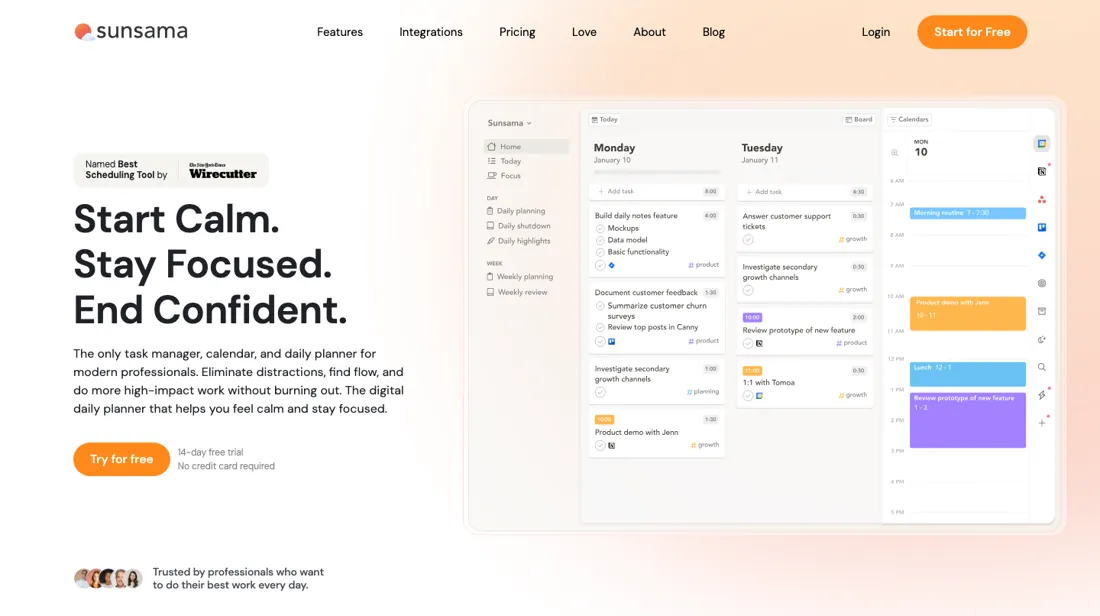
Daily planning that pulls tasks from your other tools into one deliberate schedule.
What buyers report about Sunsama
Hands-on: not tested by usReported by buyers: Product Hunt, Software Advice and practitioner reviews, read August 2026
Themes from the buyer-review sites listed at the foot of this page, read in August 2026. We have not run Sunsama ourselves, so this is other buyers' experience rather than ours. We summarise it here because the complaints are usually the part a vendor page leaves out.
- • The planning and shutdown rituals are the product, and reviewers say they genuinely change how a day goes — scattered work becomes a realistic plan.
- • Integrations with Jira, Asana, Todoist, Outlook and Google Calendar pull everything into one morning view.
- • $25 a month monthly, $20 on annual, and there is no free tier at all — Sunsama says deliberately so. Price is the most-named drawback.
- • The mobile app cannot do advanced planning or the daily review, so the ritual only works at a desk.
- • There is no AI layer at all in 2026 while every competitor has added scheduling and prioritisation.
- • Project tracking is limited and the interface is starting to look dated.
One page, two prices
The pricing page contradicts itself, and you should know both numbers before you sign up. The plan card says $17 a month billed yearly or $22 billed monthly for Pro, with unlimited usage and integrations. The FAQ on that same page says Sunsama costs $25 a month per person, or $20 on yearly plans, and works through an example of $50 a month for two people. Enterprise is quote-only (2026-08-30, re-read on their own pricing page from a US exit).
One of those is stale, and there is a third source that narrows it down: the machine-readable llms.txt on their own domain gives Pro as $17 a month billed yearly and $22 billed monthly, which is the plan card rather than the FAQ. That makes the FAQ the likelier stale half, but it does not settle what your card is charged — so budget on $25, the higher of the two, and check the number on the payment screen against the number that persuaded you.
There is an irony worth naming here rather than scoring points with. The stance is genuine and it is the kind of thing that tells you something real about a company. It also sits oddly beside two different prices on one page — and the second thing is the one that affects your card. The structural point is simpler: this is per person, with no team discount mentioned anywhere. Two people is two subscriptions, which their own FAQ confirms with the $50 example.
For a tool whose premise is daily planning and calendar integration, that is worth modelling across the whole team before anyone else asks for it. The free trial needs no card, which is the right way in. What you are testing is not features but whether the daily ritual — planning each day deliberately, in a tool, every morning — is one you keep doing after two weeks. That is a question about you rather than about the software, and no tier changes the answer.
Our monthly capture read this vendor's pricing page every month from August 2026 to October 2026, and the amounts were the same all 3 times, including $24.99, $25, $25.00 and $50 from the pricing above. We keep watching — the registry records what moves.
How to actually use Sunsama
Check the price on the payment screen against the price that persuaded you, because the pricing page gives two. The plan card says $17 a month billed yearly and $22 monthly; the FAQ on the same page says $20 yearly and $25 monthly, with a worked example of $50 for two people. Budget on $25 until you have seen which one your account is actually on. Then start the free trial — no card is needed — and treat it as a test of a habit rather than of a feature list.
The premise here is that you plan each day deliberately, every morning. What you need to know after two weeks is whether you still did it in week two, because that is the entire value and no tier affects it. Connect your real calendars and task sources on day one rather than trying it clean. Sunsama's argument is that it pulls everything into one daily plan, and that argument only becomes testable when everything is actually in there — including the sources that make your day messy.
If you are buying for a team, multiply properly: this is per person with no team discount mentioned, so their own example of $50 for two is the shape of it.
Distilled from Sunsama pricing page (sunsama.com/pricing), the machine-readable sunsama.com/llms.txt, and the Sunsama User Manual index (help.sunsama.com), read 30 August 2026 from a US exit — the two conflicting prices on the pricing page, the plan and trial lines in llms.txt, and the daily-planning, timeboxing and calendar-integration sequence the manual is organised around.
The natural comparison is Motion or Akiflow — the direct daily-planning peers — all three are per person, so compare on which one actually gets you to close the planning ritual each morning.
Frequently asked questions
Which number will my card actually be charged — $17, $20, $22 or $25?
Unresolved, and still contradictory on 19 September 2026. The plan card says $17 a month billed yearly and $22 billed monthly; the FAQ further down the same page says $25 a month per person, or $20 on yearly plans, and works an example of $50 for two. There is a tiebreaker on that page that we had not weighed before, and it points the other way from their llms.txt: the pricing manifesto states they give 20% off for paying a year up front. Twenty per cent off $25 is exactly $20. Twenty per cent off $22 is $17.60, not $17. The FAQ pair obeys their own stated discount rule and the plan card does not. Budget $25 and check the payment screen.
Is there a team price, or does each person pay full freight?
Each person pays full freight. The FAQ is explicit: adding someone to your workspace adds them to your plan and updates the bill automatically, prorated if they join mid-month, and two people is $50 a month. No volume break is mentioned at any headcount. Enterprise exists but is contact-only and buys governance rather than a discount — SSO and SAML, SCIM and audit logs, custom privacy and data requirements — with no price published. For a daily-planning tool that only works if the whole team adopts the ritual, model the full headcount before anyone champions it.
Is it worth waiting for a free tier or a Black Friday deal?
No, and unusually they commit to that in writing. The pricing manifesto on this page says there is no free-forever plan and none is planned, no lifetime deals, and no fake sales — naming Black Friday and Cyber Monday specifically — on the grounds that the product is worth the same all year. It also explains they price in whole dollars rather than $24.99 because they consider that psychological trickery. The only concessions on offer are the annual commitment and the 14-day trial, which needs no card and is followed by a cancel button rather than a support queue.
Is this a hands-on review of Sunsama?
This is a researched assessment, not a hands-on test — where we've used a tool ourselves, we say so explicitly. We name what each tool is good and bad at, and we have no affiliate relationship with Sunsama — we earn nothing whether you sign up or not.
- Buyer reviews on Product Hunt, Software Advice and practitioner reviews, read August 2026.
- 2026-08-30, re-read on their own pricing page from a US exit.
- A dated screenshot of that pricing page, kept on this site as the receipt.
Others in this category
Reviewed operations & workflow tools that share ground with Sunsama — comparable in what they do, not drop-in swaps:
New reviews, price changes we recorded, and the cost conditions we found. No sponsored placements. Unsubscribe anytime.
This is our researched assessment — not a paid placement. How we review →