Reclaim.ai Review (2026)$10 a Seat Plus Attendee Units
 By Daan Haket · Researched and written with an AI assistant · who does what
The magic only works on a calendar it can write to.
Google Calendar teams that want AI to auto-schedule tasks, habits and meetings around their priorities.
you run hosted or on-premise Exchange, which Reclaim's help centre lists as unsupported, or you don't overbook your calendar — the auto-scheduling has little to optimize.
Transparency: the “Visit” links on this page are affiliate links — we may earn a commission if you sign up, at no extra cost to you. No vendor can pay for a better review or verdict. How we make money →
Pricing (2026)
✓ Pricing re-verified 3 Oct 2026
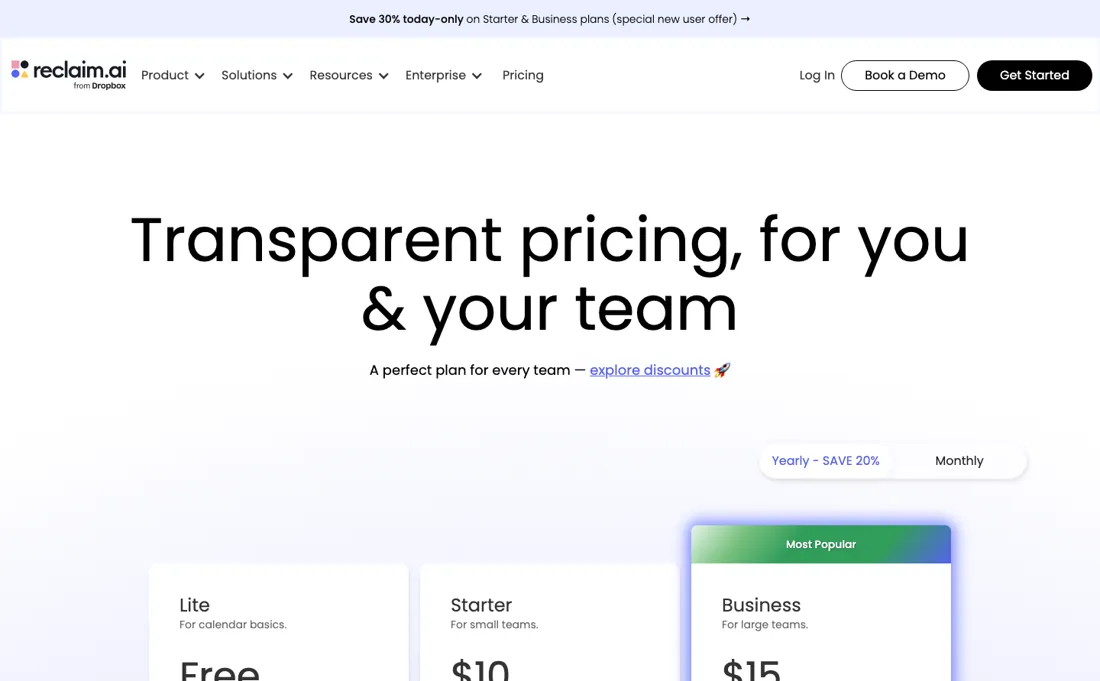
| Plan | Price | What you get |
|---|---|---|
| Lite | free forever | 1 user; AI-agent allowance 5 per seat |
| Starter | Billed yearly $10/seat/mo; billed monthly $12/seat/mo | Up to 10 seats; AI-agent allowance 10 per seat |
| Business | Billed yearly $15/seat/mo; billed monthly $18/seat/mo | Up to 100 seats; AI-agent allowance 100 per seat |
| Enterprise | Billed yearly $22/seat/mo; no monthly figure given | Over 100 seats; AI-agent allowance unlimited per seat |
Summarised from the pricing notes below; the notes carry the conditions.
Four levels, and the page keeps both billing terms in the markup rather than recomputing them. Lite is free forever for a single user. Billed yearly the seats are Starter $10, Business $15 and Enterprise $22 per seat a month; billed monthly Starter is $12 and Business $18, and the monthly column prints no Enterprise figure at all. Enterprise carrying a list price is new here — we described it as quote-only until this reading, and Business had no number in our dossier at all.
Seats are capped by tier rather than open: 1 user on Lite, up to 10 on Starter, up to 100 on Business and over 100 on Enterprise, with the AI-agent allowance per seat stepping 5, 10, 100 and unlimited beside them. The mechanism most reviews miss is Attendee Units, and it survives this redesign even though the plan cards no longer mention it.
Full pricing notes (3 more paragraphs)
AUs are attendees without a paid Reclaim seat in Smart Meetings of 3 or more people (two-person meetings do not need them), and they accumulate across a team account. Extra AUs are bought in packs on top of the seat, and the packs follow the same two terms. On yearly billing Starter packs run $8 for 3, $16 for 6, $24 for 9 and $32 for 12, and Business $12 for 6, $24 for 12, $36 for 18 and $48 for 24; billed monthly those become $10/$20/$30/$40 and $15/$30/$45/$60.
Enterprise packs are $18 for 10, $36 for 20, $54 for 30 and $72 for 40 on either term. Each extra pack also includes a free seat of the same tier to assign to a team member: a Starter seat with every 3-pack, a Business seat with every 6-pack and an Enterprise seat with every 10-pack. If you schedule across people who do not have seats, the AU packs rather than the seat price are what determines your bill.
One caveat on that arithmetic: the page still carries a launch-promo line saying AUs are 100% free through July 31st, a date that has passed, so confirm at checkout whether the packs are billing yet. Discount codes appear periodically; on 14 September a banner offered 30% off Starter and Business to new users, and on 3 October 2026 it read "20% off with code MEETINGS".
Plans change — always verify the live price on their site.
Category context: Operations & Workflow. Across the 53 tools in this category that we researched with a public US-dollar price, the median entry price is $29 a month (lowest paid plan as listed, per seat where the vendor prices per seat). Reclaim.ai’s entry price of $10 a month sits below that median. Compare pricing conditions in the Software Cost Atlas →
Correction after re-checking: Lite is free forever; Starter is $10 per seat/month billed yearly ($12 billed monthly), Business is $15 per seat/month yearly ($18 monthly), and Enterprise is $22 per seat/month on yearly billing only (not custom-quoted, and unavailable on monthly). The annual toggle is labelled SAVE 20%, not roughly 29%. Priced per seat. The vendor's own machine-readable pricing file carries the same four prices. (re-verified 2026-08-11)
What the price did
We capture Reclaim.ai’s own pricing page every month and keep the figures, so this is our record of the page — not a forecast, and not someone else’s summary.
The Attendee Unit ladder has been stable. Our July and August 2026 captures carry identical AU pricing — $8, $16, $24 and $32 on Starter, $12, $24, $36 and $48 on Business — and the same packs were on the page on 17 August 2026. What varies between readings is the promotional banner on top, which has advertised both a 30% new-user discount and a 20% code. Re-read on 14 September and 3 October 2026, the seat prices ($10/$15/$22 yearly, $12/$18 monthly) and every AU pack were unchanged; on 3 October the banner offered 20% off with the code MEETINGS, and the expired 'free through July 31st' promo line was still on the page.
What the pricing page doesn’t say
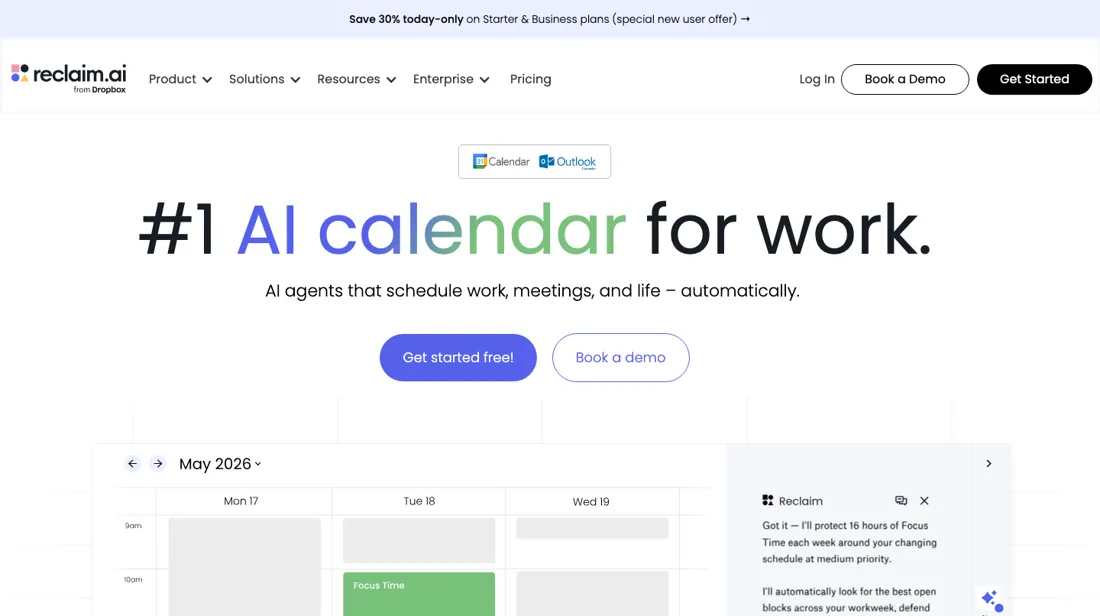
Google Calendar was first, but Microsoft 365, Outlook.com and Exchange-backed accounts are supported too (reclaim.ai/integrations/outlook-calendar, read 15 September 2026); Reclaim's own help centre still lists hosted and on-premise Exchange as unsupported. The free tier is quite limited. A genuine time-saver for the right setup, useless for the wrong one.
Watch the video review
The video version of this review, from our YouTube channel.
⚡ Short on time? Watch the 30-second verdict Short.
What Reclaim.ai does
Auto-schedules tasks, habits and meetings around your stated priorities. Google Calendar-first, so Outlook-heavy teams are out, and the free tier is limited.
What buyers report about Reclaim.ai
Hands-on: not tested by usReported by buyers: G2 and Trustpilot, read August 2026
Themes from the buyer-review sites listed at the foot of this page, read in August 2026. We have not run Reclaim.ai ourselves, so this is other buyers' experience rather than ours. We summarise it here because the complaints are usually the part a vendor page leaves out.
- • It defends focus time on your calendar automatically, and that is what earns 4.8 on G2 across 120+ reviews.
- • There is a real free tier, and paid starts at $10 per seat.
- • No native iOS app. It is on the public roadmap as In Planning and had not shipped as of July 2026 — the most-cited gap in G2 feedback.
- • The free Lite tier has shrunk over time, from 3 calendars and 16 habits down to 1 and 3. Long-time free users describe that as being squeezed toward paying.
- • Trustpilot sits at 2.7 across 14 reviews, mostly billing. Small sample, but the theme is consistent.
- • Several users report Reclaim being hard to fully remove from Google Calendar after deleting the account, with notifications persisting.
- • The team features that justify it organisationally — analytics, team OOO, delegated access — are all on Business or Enterprise, so the free tier does not show you what you would be buying.
Pages read (August 2026): Trustpilot
When the paid plan is worth it
Lite includes 5 AI Agents, Focus Time, Habits, Buffer Time and Smart Meetings, but the pricing page marks it 'Limited integrations', 'Limited' AI Memories, 'Limited' AI Assistant (LLM chat) and 'Default settings' for time blocking customization, against 'Full customization' on paid tiers. Lite caps you at 2 connected calendars, 1 scheduling link, 5 AI agents, a 1 week scheduling range and 1 user team. Starter, $10 per seat/month on yearly billing ($12 monthly), lists an 8 week range, unlimited connected calendars, unlimited integrations, 3 scheduling links and 10 AI agents per seat.
Business at $15 yearly ($18 monthly) shows 12 weeks, unlimited scheduling links, 100 agents per seat, webhooks support, and up to 100 seats against Starter's 10. The vendor's machine-readable pricing file lists Team OOO Calendar and Delegated Access as 'No' on Lite and Starter, 'Yes' from Business. Enterprise is $22 per seat/month on yearly billing only. Upgrading does not close the documented Outlook gaps. Hosted or on-premise Exchange account holders 'will not be able to create accounts or add calendars', and the vendor says it won't add that support 'for the foreseeable future'.
Reclaim's own hashtags also do not work in the RSVP note of a Microsoft event.
Our monthly capture read this vendor's pricing page every month from July 2026 to October 2026, and the amounts were the same all 4 times, including $48, $54, $60 and $72 from the pricing above. We keep watching — the registry records what moves.
How to actually use Reclaim.ai
The 2.0 FAQ argues for restraint. The vendor files it under 'Beta features > Reclaim 2.0' and sends 1.0 users to support for 'early access'. A good starting setup is your working hours, one Focus goal, 1-3 Habits, one Scheduling Link and any task or collaboration integrations you use regularly. On Agents it says 'Start small'. The 2.0 overview calls it 'currently in private beta and actively evolving.' Focus best practices: 'Start with a modest weekly target, then tune it after a week' and 'Protect 2+ hour blocks when possible'.
The FAQ lists five reasons 'An Agent may not schedule'. On a Scheduling Link where you're a co-organizer or main organizer, the booking page carries a 'Troubleshoot availability' toggle, which requires being logged in to Reclaim and shows why a given time isn't available. After the 14-day trial the account 'will be automatically switched to our free forever Lite plan' unless you upgrade; only 'if you're using features outside of the free Lite plan limit' does it 'roll into a free overage period for 28 days'.
Where this section comes from: our research notes (237 words)
Vendor pricing page https://reclaim.ai/pricing (read 2026-08-11; raw HTML, both sides of the yearly/monthly toggle) plus the vendor's own machine-readable pricing file, linked from that page as 'Are you an AI agent? View our machine-readable pricing.', at https://cdn.prod.website-files.com/67859049c02d67b2cfcceebf/6a511b43e3d83c8bdf8c6549_pricing.md (read 2026-08-11; header 'Last updated: 2026-07-09'). Vendor help centre, all five articles read 2026-08-11, each with the collection the vendor itself files it under: Reclaim 2.0 FAQ https://help.reclaim.ai/en/articles/15280604-reclaim-2-0-faq (collection 'Beta features > Reclaim 2.0'; banner 'This article refers to Reclaim 2.0 features and workflows'; carries 'Still on Reclaim 1.0?
Contact [support] to request early access to Reclaim 2.0.'), Reclaim.ai 2.0 overview https://help.reclaim.ai/en/articles/14846468-reclaim-ai-2-0-overview (same collection, same banner, same early-access line), what happens at the end of a free trial https://help.reclaim.ai/en/articles/6405151-what-happens-at-the-end-of-a-free-trial (collection 'Billing > Billing and Account Administration'; no version banner), Microsoft Outlook integration overview and updates https://help.reclaim.ai/en/articles/9590707-microsoft-outlook-integration-overview-updates (collection 'Beta features'; no version banner; the article itself states 'Outlook support is officially available to all Reclaim users'), troubleshooting your availability on scheduling links https://help.reclaim.ai/en/articles/8823063-troubleshooting-your-availability-on-scheduling-links (collection 'Scheduling Links > Troubleshooting'; no version banner).
All of these are vendor-published documentation, not independent reviews. No claim in this text rests on an article carrying the vendor banner 'This article refers to Reclaim 1.0 features and workflows'; none of the five carries it. reclaim.ai/pricing re-read 3 October 2026 (served HTML, both billing terms in the markup): prices and AU packs unchanged, free seat per extra AU pack, banner '20% off with code MEETINGS'; reclaim.ai/pricing.md returns 404.
The natural comparison is Motion or Clockwise — other AI-scheduling tools.
Frequently asked questions
What does Reclaim.ai cost per seat?
Starter is $10 per seat a month with Business above it, yearly billing saving 20%, and a free tier below. But the seat is only half the price — see the attendee units below. Read on 17 August 2026 and unchanged on 3 October 2026.
What are Attendee Units and will I need them?
AUs cover attendees who do not have a paid Reclaim seat in Smart Meetings of three or more people; two-person meetings do not consume them, and they are cumulative across a team account. Extra packs cost $8 for 3 up to $32 for 12 on Starter, and $12 for 6 up to $48 for 24 on Business (yearly billing), and each extra pack includes a free seat of that tier. If you schedule mostly with people outside your subscription, budget the packs alongside the seats.
Are there discount codes?
Reclaim runs them openly rather than hiding them: over our readings the page has carried both a 30% new-user offer and a 20% code, and on 3 October 2026 the banner read "20% off with code MEETINGS". Because those rotate, it is worth loading the pricing page before signing up rather than going straight to checkout from an app link.
Is this a hands-on review of Reclaim.ai?
This is a researched assessment, not a hands-on test — where we've used a tool ourselves, we say so explicitly. We name what each tool is good and bad at, and we earn a commission only if you sign up, at no cost to you.
- Buyer reviews on G2 and Trustpilot, read August 2026.
- Re-verified 2026-10-03 on their own pricing page, USD.
- A dated screenshot of that pricing page, kept on this site as the receipt.
Others in this category
Reviewed operations & workflow tools that share ground with Reclaim.ai — comparable in what they do, not drop-in swaps:
New reviews, price changes we recorded, and the cost conditions we found. No sponsored placements. Unsubscribe anytime.
This is our researched assessment — not a paid placement. The “Visit” links on this page are affiliate links: we may earn a commission if you sign up, at no extra cost to you, and it never changes our take. How we review →