 SurveySparrow Review (2026)No Monthly Billing, Only Quarterly
The conversational-survey UX is the draw, but response limits on lower tiers and the 'contact sales' wall on advanced features (API, higher volume) make budgeting fiddly — and there's no true monthly billing. Throughout this review we weigh it against SurveyMonkey.
Visit SurveySparrow → Affiliate link — we may earn a commission if you sign up; it does not change what this page says.
Watch the 2-minute review
The video version of this review, from our YouTube channel.
⚡ Short on time? Watch the 30-second verdict Short.
Pricing (2026)
✓ Pricing re-verified 20 Sep 2026
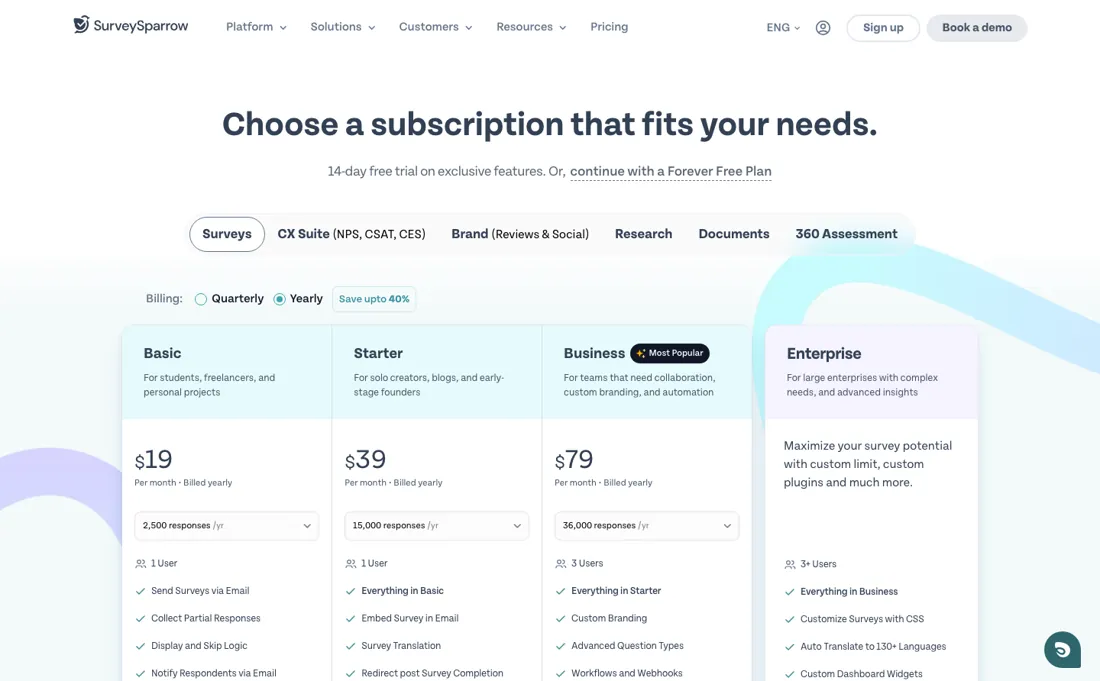
SurveySparrow bills quarterly or yearly — there is no monthly option — and the two differ far more than the wording suggests. On yearly billing the survey line runs Basic $19, Starter $39 and Business $79 a month, above a forever-free plan (75 responses a quarter, 3 active surveys, 10 questions each) and below a custom-priced Enterprise tier. On quarterly billing those same three plans are $39, $59 and $149 a month — roughly double — and they carry fewer responses a year rather than more: Basic goes from 2,500 a year to 600 a quarter, Starter from 15,000 to 3,600, while Business's 9,000 a quarter matches its 36,000.
Users are 1, 1 and 3 respectively, with extra users $49 each a month. The currency question is settled. Read from New York the page shows the identical digits with a dollar sign, so a European is quoted €19/€39/€79 where an American is quoted $19/$39/$79. That is the same number rather than a conversion, which makes the euro ladder the dearer of the two in real terms.
There are separate product lines for CX, brand, research, documents and 360 assessment, each with its own ladder. Discounts: yearly saves up to 40%, students and education 50%, nonprofits 15%, and a startup programme offers $2,000 of credit for $500. Plans change — always verify the live price on their site.
Correction after re-checking: Under the pricing page's yearly billing option the plan data lists 19 with 2,500 responses (Basic), 39 with 15,000 (Starter) and 79 with 36,000 (Business), the last two carrying a sale flag; a browser reading from Europe on 14 September 2026 showed those three as euro amounts. Under quarterly billing the same page lists 39 with 600 responses, 59 with 3,600 and 149 with 9,000, in the currency the page picks for the visitor. The page's sticky header separately lists Basic $19, Starter $49 and Business $99 with no billing period attached, so no per-month or annual-commitment rate should be asserted from those figures. Add-ons: extra users 49 per user per month, additional responses and API calls quote-only, Market Research from 125 a month on Business or higher; read on 15 September 2026 neither add-on carries a separate euro or sterling rate in the plan data, so those two figures hold in both columns. Free plan: 75 responses per quarter, 3 active surveys, 10 questions per survey. (re-verified 2026-08-04)
SurveySparrow’s pricing page, as we read it
What SurveySparrow does
Conversational surveys and NPS with a polished respondent experience.
What buyers report about SurveySparrow
Recurring themes from the buyer-review sites listed at the foot of this page, read in August 2026. We have not run SurveySparrow ourselves, so this is other buyers' experience rather than ours. We summarise it here because the complaints are usually the part a vendor page leaves out.
- • The conversational survey format measurably lifts response rates — that is the reason reviewers choose it over a standard form builder.
- • Easy to pick up and use without training.
- • One practical trick surfaces on TrustRadius that the marketing pages bury: variables let a single survey serve several clients by swapping the name rather than duplicating the whole thing, and surveys can be copied outright. For an agency running the same questionnaire across accounts that is the time saving.
- • Distribution is the other repeated point — links that work over WhatsApp and email rather than a web form alone, plus Zapier and webhook integrations and NPS reporting out of the box.
- • White-labelling, custom CSS, HIPAA compliance and the Salesforce integration all sit on higher tiers. If any of those is why you are looking, price the tier that has it, not the $19 entry.
- • Reporting is repeatedly called limited — "poor reporting" and "limited reporting" are both recurring G2 tags.
- • From $19 to $249 a month, and reviewers from small organisations, nonprofits and occasional users consistently call it steep.
- • Read that platform for mechanics rather than for balance: its SurveySparrow reviews are few and cluster in 2019 to 2022, and several list no cons at all, which is not the same as there being none.
When the paid plan is worth it
The forever-free tier is 75 responses a quarter, 3 active surveys and 10 questions each: enough to prove the conversational format works, not enough to run a programme. Twenty-plus question types sit on every plan, so the free ceiling is volume and automation rather than question design — display and skip logic, web embeds and QR codes all begin at Basic. The choice that costs most is the billing term, not the tier.
Quarterly runs $39, $59 and $149 a month against $19, $39 and $79 on yearly, and on the two lower plans it buys fewer responses a year as well. Committing for a year is close to half price. Upgrading does not fix seats or overruns. Extra users are $49 each a month, Business includes three, and additional responses and API calls are “Contact us” items rather than self-serve top-ups. Market research is a separate add-on from $125 a month, on Business or higher.
Read 20 September 2026; the euro page carries the same digits with a euro sign.
Our monthly capture read this vendor's pricing page in July 2026 and again in August 2026, and the amounts were the same both times. We keep watching — the registry records what moves.
How to actually use SurveySparrow
The shortest route to value is short on paper. After signing up without a credit card, the Home page carries a New survey button; browse the classic templates or start from scratch, enter the Survey Title, choose the survey type and pick a folder, then click Create Survey to land in the builder. Changes are saved automatically, so the only real step left is sharing.
Distilled from surveysparrow.com/pricing, read in a live browser on 20 September 2026 from a NordVPN exit in New York (ipinfo: 187.14.49.157, US), with both billing tabs opened in turn: yearly gives Basic $19, Starter $39 and Business $79 a month with 2,500, 15,000 and 36,000 responses a year and 1, 1 and 3 users; quarterly gives $39, $59 and $149 with 600, 3,600 and 9,000 responses a quarter. Enterprise is quote-only. The euro reading of 14 September 2026 from Europe (€19/€39/€79 yearly) is what establishes that the two currencies carry the same digits. METHOD NOTE for whoever re-verifies this: the page does not price on the live IP but on a cookie, ipapi_data, which caches the country of an earlier visit — ours still read [“Netherlands”, …, “EUR”, “Eerbeek”] and kept serving euros with the VPN already on. Delete that one cookie and reload; it rewrites itself from the current exit. There is no currency selector on the page. Earlier support documentation on creating surveys and on using a custom email address was read 4 August 2026.
Common SurveySparrow setup mistakes
Where SurveySparrow setups actually go wrong, and what it costs you when they do. Same sources as the setup notes above — not from a walkthrough we ran ourselves.
The friction sits in delivery rather than building.
- A survey link works on every plan, but web embeds and QR codes are marked unavailable on the free plan.
- Sending from your own address means Settings, then Email Settings, then Email: add the DNS records SurveySparrow generates at your domain host, return and click Verify against the address.
- The vendor documentation warns that domain verification may take up to 24 hours from the time of the request, and that deleting those records afterwards prevents emails from triggering.
- Anyone with a launch date should book that day in advance, and remember the trial caps collection at 50 responses.
SurveySparrow vs SurveyMonkey, side by side
Both columns come from the same place: each vendor’s own published pricing, read on the date shown in the sources at the foot of this page. We do not average them into a score.
Both names above are affiliate links: we may earn a commission if you sign up, at no extra cost to you. Neither changes what this table says: both columns come straight from the vendors’ own pricing pages.
The natural comparison is Typeform or SurveyMonkey — other survey tools. Weigh it against SurveyMonkey on the job you actually need done.
Frequently asked questions
What does SurveySparrow cost?
Read from Europe on 14 September 2026, the survey line runs €19, €39 and €79 a month on Basic, Starter and Business under yearly billing, carrying 2,500, 15,000 and 36,000 responses a year, above a forever-free plan and below a quote-only Enterprise tier. The catch is the currency rather than the ladder: the page prices by the visitor's IP and we have not yet managed to read it from a US address. Our earlier answer here said the page published no price at all and put Business near 149 a month; both were wrong — 149 is the quarterly Business figure, and the plan prices do render once the selector loads.
Are there discounts worth asking for?
More than most tools publish. Yearly billing is advertised at up to 40% off, students and education get 50%, nonprofits 15%, and there is a startup programme offering $2,000 of credit for $500. If you fall into any of those categories the list price is not your price.
Is it billed monthly?
Not on the standard plans: SurveySparrow bills quarterly or annually, which is the detail that catches people expecting a monthly subscription they can cancel at the end of a month. Check the term before you commit to a survey project with a fixed end date.
What should I weigh before buying Growth & Revenue software?
It depends on whether you have the bottleneck it solves. Small teams get the most out of this category when one clear problem is already costing real hours or revenue; buying ahead of that just adds cost and another login. Price it against the hours or lost deals it removes, not against its feature list, and start on the smallest plan that covers the job.
Is this a hands-on review of SurveySparrow?
This is a researched assessment, not a hands-on test — where we've used a tool ourselves, we say so explicitly. We name what each tool is good and bad at, and we earn a commission only if you sign up, at no cost to you.
- Buyer reviews on G2, Software Advice, TrustRadius and Gartner Peer Insights, read August 2026.
- Re-verified 20 September 2026 from a US exit in New York; the euro ladder was read 14 September 2026 from Europe.
- A dated screenshot of that pricing page, kept on this site as the receipt.
Others in this category
Reviewed growth & revenue tools that share ground with SurveySparrow — comparable in what they do, not drop-in swaps:
New reviews, price changes we recorded, and the cost conditions we found. No sponsored placements. Unsubscribe anytime.
This is our researched assessment — not a paid placement. The “Visit” links on this page are affiliate links: we may earn a commission if you sign up, at no extra cost to you, and it never changes our take. How we review →