 Databox Review (2026)
The pricing model bites, just not where it used to.
We opened a new Databox account through the 'Get started' button under the Free plan on databox.com/pricing, connected Google Analytics 4 and Google Search Console for our own site, asked Genie two questions about that data, let Genie try to build a dashboard, and read the credit meter under Settings → Billing after every step. One account, one evening, our own traffic data — not a month of team use.
- The Free button does not give you Free. The account opened as a 14-day trial of Team Core at $249 a month, billed monthly. Free was listed in the app as a 'Downgrade'. Databox's own FAQ says that if no payment details are added by the end of the trial, syncing stops and reports pause, so anyone who wanted Free has to downgrade by hand before day 14.
- The downgrade was blocked until we deleted Databox's own sample data. The message: 'You have 1 connected Spreadsheets, but the Free plan is limited to 0.' That one spreadsheet was the Sample dataset Databox adds at sign-up. Free allows no spreadsheets at all: Excel and Google Sheets both open an 'Upgrade to Analyst' wall at $89 a month, something the pricing page does not say.
- Your one free dashboard is already taken. Databox's own Sample Dashboard stays after the downgrade and fills the plan's single dashboard slot. 'Create New Databoard' opened the $89 upgrade wall, and so did the button that would hang the sample dashboard on your own data.
Visit Databox → Affiliate link — we may earn a commission if you sign up; it does not change what this page says.
Watch the 2-minute review
The video version of this review, from our YouTube channel.
⚡ Short on time? Watch the 30-second verdict Short.
Pricing (2026)
✓ Pricing re-verified 12 Sep 2026
Databox renamed and repriced its whole ladder since our August reading, so the Analyst/Pro/Growth tiers we described are gone. Free is $0 forever: 1 user, 3 data sources, 1 dashboard, 10 custom metrics, 50 AI credits a month, daily sync. Billed annually: Analyst $71/mo (1 user, 5 sources, unlimited dashboards and reports, 150 credits, hourly sync), Team Core $199/mo (3 users, 10 sources, 500 credits), Team Scale $319/mo (10 users, 30 sources, 1,000 credits, sub-accounts) and Agency from $79/mo (unlimited users, 20 sources, 300 credits), plus a quoted Custom tier.
Monthly those read $249, $399 and from $99; annual billing is 20% off. Databox states it does not charge per seat. Extra data sources no longer carry a per-source fee: each plan includes a fixed number and more means moving up a tier, except on Agency, which adds client packs of 1 client, 5 sources and 50 credits for $20/mo annually ($25 monthly).
Add-ons are priced separately: branding and white-labeling $200/mo, advanced security management $80/mo, OKRs $160/mo, fiscal calendar $40/mo, 15-minute sync $14/mo per source, and flexible AI credit top-ups. Plans change — always verify the live price on their site.
Correction after re-checking: (re-verified 2026-09-12) Databox restructured its pricing between our 13 August and 12 September 2026 readings and every plan name in our earlier text is gone. Analyst rose from $64 to $71 a month on annual billing. Pro at $159 and Growth at $399 were replaced by Team Core at $199 and Team Scale at $319 annually ($249 and $399 monthly), and a new Agency plan starts at $79 annually. Two mechanisms we described no longer exist. The $5.60 per additional data source is gone: extra sources now force a tier jump, and only Agency can self-serve capacity, through $20-a-month client packs. And 15-minute sync is no longer included at the top of the ladder but sold as a $14 per-source add-on, with hourly the fastest sync on every paid plan. Analyst's credit allowance is also lower than the 500 we recorded: 150 a month. We have dropped the '11 months of history' figure from our free-plan description because it no longer appears on the page.
What the price did
We capture Databox’s own pricing page every month and keep the figures, so this is our record of the page — not a forecast, and not someone else’s summary.
We captured databox.com/pricing on 7 July and 2 August 2026 and read it by hand on 29 July, 13 August and again on 12 September 2026. Through mid-August nothing moved: Analyst $64, Pro $159 and Growth $399 a month on annual billing, and $5.60 per extra data source, identical five weeks apart. Between 13 August and 12 September the page was rebuilt. The ladder is now Free, Analyst $71, Team Core $199, Team Scale $319 and Agency from $79 a month on annual billing, the per-source fee has gone, and 15-minute sync has moved into a $14 per-source add-on. Only one figure is a like-for-like comparison: Analyst, up from $64 to $71, about 11%. The tier that replaced Pro costs $199 against $159, but includes 10 data sources where Pro included 3, so that one is a repackaging rather than a straight rise.
What the pricing page doesn’t say
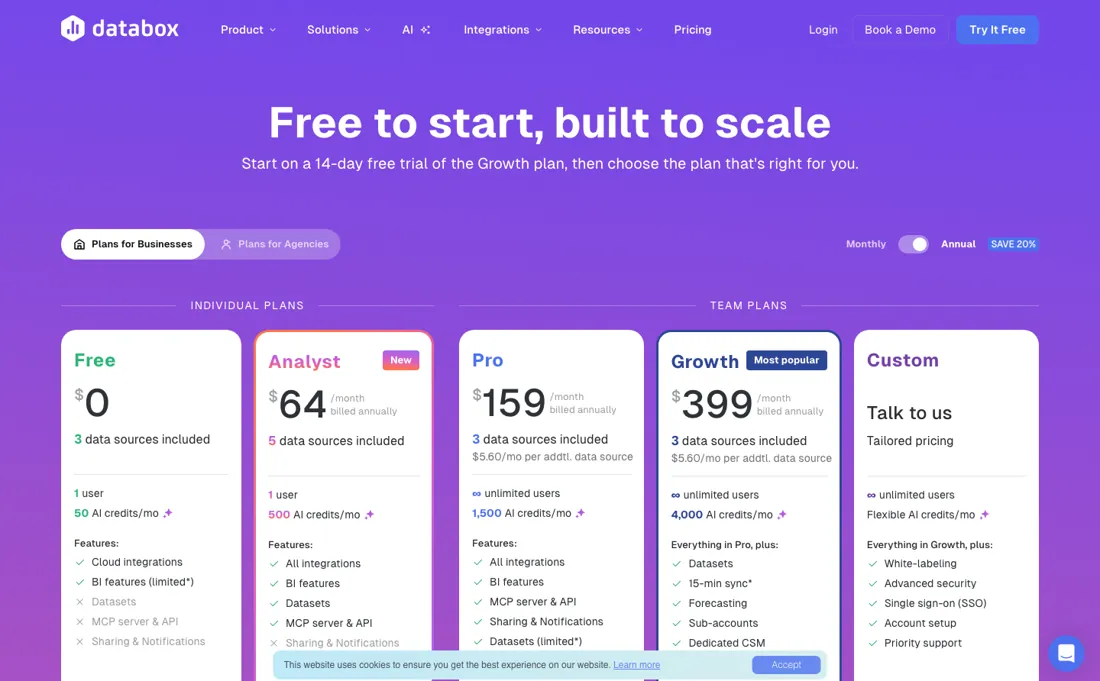
The per-source fee is gone, and for some buyers that is worse rather than better: each plan includes a fixed number of data sources and going over means moving up a whole tier, so one extra integration can mean the $199 Team Core to $319 Team Scale step rather than $5.60. Only the Agency plan sells capacity piecemeal, in $20 client packs. AI credits are a shared monthly pool for Genie and the MCP server, so heavy AI use moves you up a tier as fast as data does, and 15-minute sync — once part of the top plan — is now a $14 per-source add-on on top of the subscription.
Power users may also find the custom-metric and data-modelling depth limited next to a full BI tool.
What Databox does
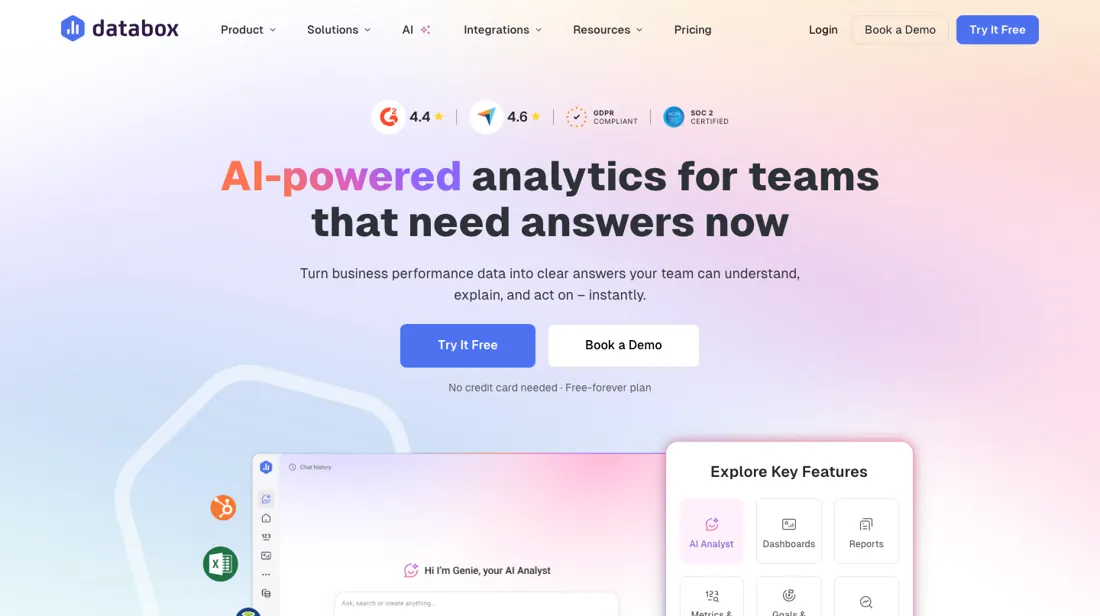
Centralized KPI dashboards. Pull data from all your software tools into one clean interface to monitor your business health. A free Skills Marketplace adds guided analyses on top: the paid-ads skill standardizes every ad channel into one efficiency table with CPA gauges against your own targets, judged per funnel role. A native MCP server (mcp.databox.com) puts those metrics inside ChatGPT or Claude — ingest data and query it in plain language. It runs on every paid plan, not on Free, and its queries spend from the same monthly AI-credit pool as Genie.
What buyers report about Databox
Recurring themes from the buyer-review sites listed at the foot of this page, read in August 2026 (Product Hunt read 13 August 2026). We use Databox ourselves, but a single account is a narrow sample, so here is what other buyers report. We summarise it here because the complaints are usually the part a vendor page leaves out.
- • Connecting several data sources is genuinely quick, and reviewers who compared visualisation tools call it the smoothest of them.
- • Priced competitively for small and midsize teams, with straightforward onboarding.
- • On Product Hunt (4.5 across 4 reviews — a small sample, so treat it as colour rather than weight) the comparison reviewers reach for is Looker Studio, and they call Databox the easier of the two to set up. One singles out the MCP server for letting an AI assistant pull live metrics instead of pasting screenshots.
- • Granular data modelling and advanced custom metrics are where it runs out. If you need those, check before you commit.
- • Reviewers report templates breaking and individual metrics quietly stopping.
- • Dashboards do not always refresh promptly.
- • Report customisation is repeatedly named as the thing that could be better.
- • Product Hunt reviewers report refresh latency on the entry-level tiers, and say part of it traces back to the upstream provider's rate limits rather than to Databox itself — which matches Databox's own troubleshooting documentation.
- • The MCP server is read-only: the same reviewers want to generate reports programmatically and cannot.
- • Feeding it unconventional JSON means reshaping the data before ingestion.
When the paid plan is worth it
Databox's free tier is unusually workable for one person: the pricing page lists 1 user, 3 data sources, 1 dashboard, 10 custom metrics, 50 AI credits a month and daily sync. That covers a freelancer who checks a handful of channels daily. Analyst, at $71 a month on annual billing, adds a fifth data source, 150 AI credits and hourly sync, but it is still a single seat, so it is a solo analyst's upgrade rather than a team's.
Team Core at $199 is where collaboration starts, with 3 users and 10 sources, and Team Scale at $319 buys 10 users, 30 sources and sub-accounts. Databox does not charge per seat, so the ladder is about sources and credits, not headcount. Upgrading pointedly does not fix data freshness that comes from the source side. Databox's own troubleshooting documentation states that data sources do not sync independently and only pull when metrics are actively in use, and that provider limits and account activity shape the real refresh rate.
No paid tier includes 15-minute sync either: hourly is the fastest, and faster costs $14 per source. A higher plan also does not retroactively manufacture history that was never collected.
Our monthly capture read this vendor's pricing page in July 2026 and again in August 2026, and the amounts were the same both times. We keep watching — the registry records what moves.
What we found running Databox ourselves
The first findings are at the top of this page. The rest:
- What a Genie question costs: 3.7 credits for a simple one ('which pages got the most views in August'), 3.8 for a heavier week-by-week comparison. On Free's 50 a month that is about thirteen questions. The onboarding had already spent 1.9 credits by sending our four setup answers to Genie as a first question we never asked, and the app showed 'Buy more to keep Genie running' at 48 left.
- Genie spends credits on things the plan will not allow. It offered to build a dashboard, tried three times, reported that Databox 'rejected the request as invalid' without naming the one-dashboard limit, and charged 5.2 credits for nothing. After one hour we had used 14.6 of the month's 50 credits.
- Genie's diagnoses need checking. It called a half-finished Search Console connection 'broken' because 'the login expires' (the data manager said 'Unfinished connection'), and it flagged one of our real review URLs as a typo. The traffic figures themselves came back fast and were usefully broken down, including pages counted twice because of query strings.
- What held up: connecting a data source cost no credits, the unfinished connection still counted against the three-source limit, and the plan prices inside the app matched the public pricing page ($89 / $249 / $399 monthly; $71 / $199 / $319 billed annually).
What this test does not show: We did not add a fourth data source past the limit, did not build our own dashboard after deleting the sample one, and could not check how fresh each source's data is: the app shows sync frequency but no last-synced time.
Most of our reviews are researched rather than run — how we review explains which is which, and why we do not pretend otherwise.
How to actually use Databox
The shortest route to something useful is sign-up, then one connection, then a template. Databox's help center points new accounts to Data Manager > Available Integrations or Data Manager > Data Sources, where the integration is chosen and the user grants consent for Databox to access the data. From there, importing a pre-built Databoard and editing it in the Designer beats assembling Datablocks by hand. Two things reliably stall people.
The first is access: the person setting up Databox often lacks admin rights on the upstream tool, and the documented workaround is sending a colleague a connect request by email from the link at the bottom of the new connection dialog. The second is empty tiles after a successful connection, because metrics are scheduled only once they are first used in the app, so a brand-new metric can look blank before its first pull lands.
You can start free or trial any plan for 14 days without a card; if no payment details are added by the end of the trial, Databox says syncing stops and scheduled reports pause.
Distilled from Databox pricing page and Databox Help Center onboarding and troubleshooting documentation, read 4 August 2026.
The natural comparison is Google Looker Studio — the free-but-manual dashboard alternative.
Frequently asked questions
Is the free plan usable, or is it really a trial?
Both exist, separately. Read on 12 September 2026: Free is $0 forever with 1 user, 3 data sources, 1 dashboard, 10 custom metrics, 50 AI credits a month and daily sync — workable for one person watching a handful of channels. Separately you can trial any paid plan for 14 days without a card. Do not assume the trial lapses quietly into Free: Databox's own FAQ says that if no payment details are added by the end of the trial, your data stops syncing and scheduled reports and notifications are paused.
What will it cost with our actual tool stack?
Count sources, not seats — Databox states it does not charge per seat. Read on 12 September 2026, on annual billing: Analyst $71 a month covers 1 user and 5 sources; Team Core $199 covers 3 users and 10 sources; Team Scale $319 covers 10 users and 30 sources. Going past your source count means moving up a tier rather than paying per source, because the $5.60-per-source line we recorded in August is gone. The exception is Agency, from $79 a month with unlimited users and 20 sources, where client packs add 1 client, 5 sources and 50 credits for $20 a month each.
Will a higher plan make the data fresher?
Barely, and less than it used to. Sync is daily on Free and hourly on every paid plan, so the 15-minute interval that came with the old Growth tier is no longer something a plan buys: it is a $14 per-source add-on. Databox's own troubleshooting documentation also says data sources do not sync independently and only pull when metrics are actively in use, and that upstream provider limits shape the real refresh rate. Upgrading cannot backfill history that was never collected. Read 12 September 2026.
What should I weigh before buying Operations & Workflow software?
Usually it sits on top rather than replacing everything. Tools in this class tend to become the layer where work is tracked and handed off, while your existing systems stay the source of truth for their own data. Before you buy, map which tools it would replace outright and which it would merely sync with. If the answer is that it syncs with all of them, you are adding a layer rather than removing one.
Is this a hands-on review of Databox?
Yes. We used Databox ourselves on 2026-09-25; the section above reports what we measured in the product, and says where a figure comes from the vendor's own documentation instead. Most of our reviews are researched rather than run; we say which is which. We name what each tool is good and bad at, and we earn a commission only if you sign up, at no cost to you.
- Buyer reviews on G2, Capterra, agency write-ups and Product Hunt, read August 2026 (Product Hunt read 13 August 2026).
- Re-verified 2026-09-12, read on their own pricing page.
- A dated screenshot of that pricing page, kept on this site as the receipt.
- Our own hands-on session with Databox (2026-09-25), written up in full further down this page.
Others in this category
Reviewed operations & workflow tools that share ground with Databox — comparable in what they do, not drop-in swaps:
New reviews, price changes we recorded, and the cost conditions we found. No sponsored placements. Unsubscribe anytime.
This is our researched assessment — not a paid placement. The “Visit” links on this page are affiliate links: we may earn a commission if you sign up, at no extra cost to you, and it never changes our take. How we review →