 Switcher Studio Review (2026)$35 Event Pass or $45 a Month
The app runs on Mac and iOS only — Android phones can join as cameras, but there is no Windows version — so the machine doing the switching has to be an Apple one.
Visit Switcher Studio → Affiliate link — we may earn a commission if you sign up; it does not change what this page says.
Watch the 2-minute review
The video version of this review, from our YouTube channel.
⚡ Short on time? Watch the 30-second verdict Short.
Pricing (2026)
✓ Pricing re-verified 26 Sep 2026
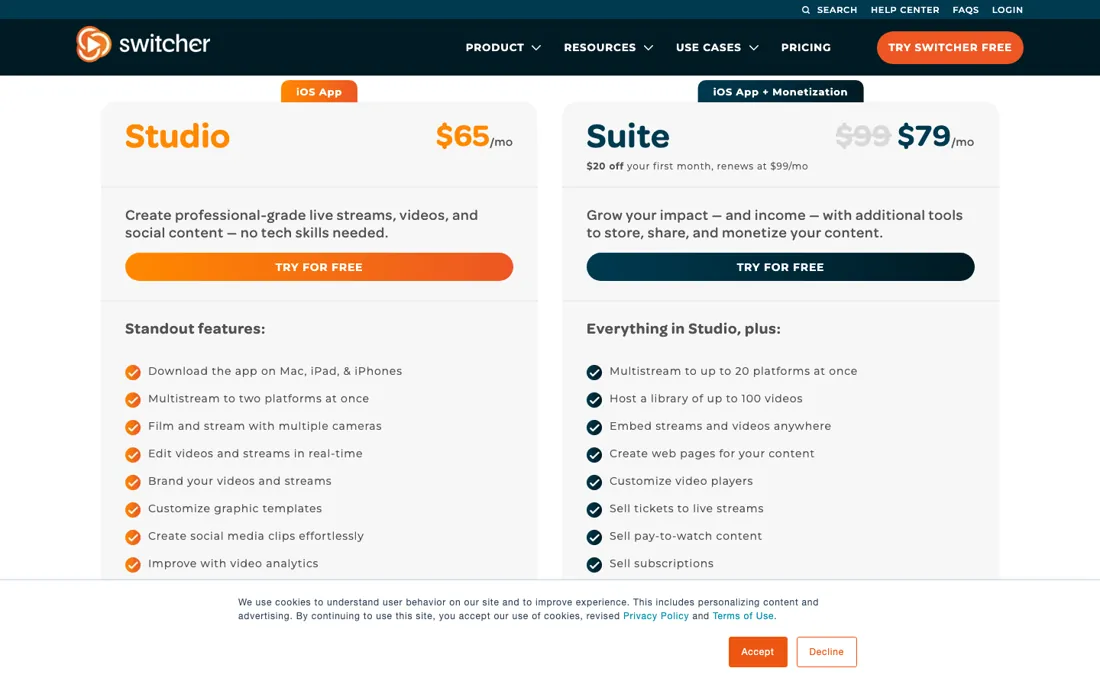
Studio is $65 a month month-to-month and $45 on annual billing ('Up to 30% Off'). Suite is $99 month-to-month and $79 annually, and both Suite rates carry a limited-time promotion: $79 for the first month ($20 off, renewing at $99) or $71 a month for the first year ($95 off, renewing at $948 a year). The Studio Seasonal tier we read on 8 September ($55 a month on a three-month commitment) is no longer on the page; in its place is a Studio 7-Day Pass, $35 one-time, with all Studio features for a single event.
Fourteen-day trial, no free plan. Subscriptions renew automatically unless cancelled at least 24 hours before the cycle ends, and payments for a previous period are nonrefundable. Monetisation carries no revenue share but $0.99 per transaction. The app runs on Mac and iOS; Android phones can be used as cameras, and there is no Windows version. Plans change — always verify the live price on their site.
What the pricing page doesn’t say
And wireless multi-cam is only as reliable as your venue's Wi-Fi; a shaky connection is the failure mode nobody markets. The monetization features (pay-per-view, subscriptions) are genuinely strong, but only matter if you're actually selling access.
What Switcher Studio does
Multi-camera live production and streaming from iPhones and iPads you already own, with overlays and pay-per-view monetisation.
What buyers report about Switcher Studio
Recurring themes from the buyer-review sites listed at the foot of this page, read in August 2026. We have not run Switcher Studio ourselves, so this is other buyers' experience rather than ours. We summarise it here because the complaints are usually the part a vendor page leaves out.
- • It turns iPhones and iPads into a coordinated wireless multi-camera studio over Wi-Fi — churches, sports clubs and creators get broadcast-looking output without broadcast gear. 4.6 across 1,300+ App Store ratings.
- • Scene building and camera switching become intuitive quickly once it is set up.
- • iOS only. If your devices are Android, this is not a product you can use.
- • From $65/month against Ecamm Live at around $20 and StreamYard at $25. Reviewers from small churches and solo creators say the price is hard to justify.
- • One reviewer makes the comparison directly: about $500 a year, for which you could buy a laptop and run Streamlabs OBS free.
Seasonal beats annual unless you stream all year
Studio is $45 a month on annual billing and $65 month-to-month; Suite is $79 annually and $99 month-to-month (read 26 September 2026 on switcherstudio.com/pricing). Both Suite rates carry a promotion: $71 a month in the first year ($95 off, renewing at $948 a year) or $79 for the first month, then $99. Fourteen-day trial, no free plan. A correction first. On 8 September we built this section on a Studio Seasonal tier - $55 a month on a three-month commitment - and argued it beat the annual plan for anyone streaming fewer than about ten months a year.
That tier is gone from the page. What replaced it is a Studio 7-Day Pass: $35 once, all Studio features, for a single event. That changes the maths for occasional users. Studio annually is $540 a year; fifteen separate events on 7-Day Passes cost $525, sixteen cost $560. So the pass wins up to fifteen events a year, and a weekly stream belongs on the annual plan. Within a single month, two passes ($70) already cost more than a month of Studio at $65.
Month-to-month is otherwise steep: $65 against $45 is a 44% surcharge on Studio, and $99 against the $79 renewal rate is 25% on Suite. Payments for a past period are not refunded, and cancelling has to happen at least 24 hours before renewal. What Suite adds is distribution and selling, not production: 20 multistream destinations instead of 2, a library of up to 100 videos, embeddable players and web pages, ticketed streams, pay-to-watch and subscriptions at $0.99 a transaction with no revenue share, and 1,000 cloud assets instead of 250.
If selling access is not part of your plan, none of that is a reason to pay $34 a month more. What no plan fixes: the app switches only on Mac and iOS - Android phones can join as cameras, Windows has no route in - and wireless multi-cam, up to nine cameras, is exactly as reliable as the venue's Wi-Fi. Every extra angle is another device to buy, and the rehearsal that matters is on site with every camera connected.
Our monthly capture read this vendor's pricing page in July 2026 and again in August 2026, and the amounts were the same both times. We keep watching — the registry records what moves.
How to actually use Switcher Studio
Test on the venue's Wi-Fi, not on yours. Wireless multi-cam is only as good as the network it runs on, and a hall full of guests is a different network from an empty one — so the rehearsal that matters is on site, with every camera connected, at something close to real conditions. This is the failure mode that ruins live events and it is not a software problem. Count the devices you already own before you count anything else.
The app runs on Mac and iOS, and Android phones can join as cameras, so the rig is less locked to Apple than it was — but each angle is still another device, and that hardware cost will be larger than the subscription. Windows is the one platform with no route in. Then pick the billing shape from how often you will actually stream. A single event is a $35 Studio 7-Day Pass; up to fifteen separate events a year, passes cost less than Studio annually at $540; a regular weekly stream belongs on the annual plan, since month-to-month carries a 44% surcharge. Cancel at least 24 hours before renewal, because past periods are not refunded.
Distilled from switcherstudio.com/pricing and switcherstudio.com, both read on 8 September 2026. The plan prices come from the visible pricing cards with their monthly and annual toggle, and the platform support from four separate statements across those two pages. Two things a later reader should know about this source. First, the page carries three Product JSON-LD blocks naming a Studio plan at $49, a Business plan at $99 and a Merchant plan at $149 — a plan structure that does not match the Studio and Suite cards the page actually renders, so the structured data is stale and the visible cards were used. Second, the Suite annual figure is promotional: the card shows $71 a month struck against $79 and states in its own words that $95 comes off the first year, which then renews at $948 a year. switcherstudio.com/pricing.md and switcherstudio.com/llms.txt both return 404, and support.switcherstudio.com carries no platform-requirements article we could open, so the platform claim rests on the vendor's own marketing copy on the two pages named above. Re-read 26 September 2026 by plain fetch of switcherstudio.com/pricing, whose served HTML carries both toggle states: Studio $65/$45, Suite $99/$79 with the first-month ($20 off, renews at $99) and first-year ($95 off, renews at $948) promotions, and 'Annual Billing (Up to 30% Off)'. The Studio Seasonal tier is gone - the word no longer appears in any plan on the page - and a 'Studio 7-Day Pass' at $35 one-time sits below the cards. The feature table gives Studio 2 and Suite 20 multistream destinations, 250 against 1,000 cloud assets, up to nine wireless cameras and 5 remote guests on both; the FAQ gives the 24-hour cancellation rule, nonrefundable past periods and App Store purchases managed by Apple. Everything above about Seasonal, dated 8 September 2026, is superseded by this reading.
The natural comparison is OBS Studio or Ecamm Live — OBS is free but desktop and technical; Switcher trades that for wireless iPhone simplicity at a subscription price.
Frequently asked questions
Can I pay for Switcher for just one event?
Yes. The pricing page (read 26 September 2026) sells a Studio 7-Day Pass for $35 one-time, with all Studio features, aimed at a single event you need to stream. Against Studio's annual plan at $540 a year, passes stay cheaper up to fifteen separate events; within one month, two passes cost more than a month of Studio at $65. There is also a 14-day free trial to rehearse before the event.
Can I get a refund if I cancel Switcher?
Not for time already paid. The FAQ (read 26 September 2026) says subscriptions renew automatically unless you cancel at least 24 hours before the end of the billing cycle, that payments for a previous period are nonrefundable, and that you keep access until the cycle ends. If you subscribed inside the app, the purchase went through the Apple App Store and has to be cancelled there; Switcher's support cannot do it for you.
Does Switcher take a cut of ticket or pay-per-view sales?
No revenue share, but a per-transaction fee: the pricing page (read 26 September 2026) says you pay just $0.99 per transaction. Selling tickets to live streams, pay-to-watch content and subscriptions are listed only on Suite, at $79 a month on annual billing or $99 monthly, so a Studio subscriber cannot sell access at all. On a $5 ticket the fee is about a fifth of the price; on a $30 ticket it is closer to 3%.
What should I weigh before buying Operations & Workflow software?
Usually it sits on top rather than replacing everything. Tools in this class tend to become the layer where work is tracked and handed off, while your existing systems stay the source of truth for their own data. Before you buy, map which tools it would replace outright and which it would merely sync with. If the answer is that it syncs with all of them, you are adding a layer rather than removing one.
Is this a hands-on review of Switcher Studio?
This is a researched assessment, not a hands-on test — where we've used a tool ourselves, we say so explicitly. We name what each tool is good and bad at, and we earn a commission only if you sign up, at no cost to you.
- Buyer reviews on Capterra, GetApp, SourceForge and the App Store, read August 2026.
- Read 2026-09-26 on switcherstudio.com/pricing.
- A dated screenshot of that pricing page, kept on this site as the receipt.
Others in this category
Reviewed operations & workflow tools that share ground with Switcher Studio — comparable in what they do, not drop-in swaps:
New reviews, price changes we recorded, and the cost conditions we found. No sponsored placements. Unsubscribe anytime.
This is our researched assessment — not a paid placement. The “Visit” links on this page are affiliate links: we may earn a commission if you sign up, at no extra cost to you, and it never changes our take. How we review →