 Replit Review (2026)
Transparency: the “Visit” links on this page are affiliate links — we may earn a commission if you sign up, at no extra cost to you. No vendor can pay for a better review or verdict. How we make money →
The subscription price is fixed; the paid Agent work is not. Throughout this review we weigh it against GitHub Codespaces.
On 26 September 2026 we built the same class-booking web app in Lovable, Replit and Emergent from one identical prompt, each on its free plan, and checked every result against 18 tests we wrote down before the first build. We changed no code: the builder only got our prompt and, where a test failed, a repair prompt in fixed words. Replit ran on a new Starter account, separate from the paid account Daan uses for his own project.
- The Agent built a separate API and web app on PostgreSQL in 8 minutes of work by its own count, ran its own functional test and reported everything as passing. It did not publish by itself: publishing is a manual click, and on Starter the deployment is labelled temporary and will expire.
- Its own test booked one person at a time. When we sent ten bookings for an empty eight-spot class at the same moment, all ten were accepted, after which the class list returned an error and the public page showed 'No classes on the calendar yet.' until two bookings were cancelled.
- Given that exact description, the Agent added a database lock per class in two minutes; the same ten simultaneous bookings then gave exactly eight. The same repair stopped it accepting a name made only of spaces.
Visit Replit → Affiliate link — we may earn a commission if you sign up; it does not change what this page says.
Watch the 2-minute review
The video version of this review, from our YouTube channel.
⚡ Short on time? Watch the 30-second verdict Short.
Pricing (2026)
✓ Pricing re-verified 26 Sep 2026
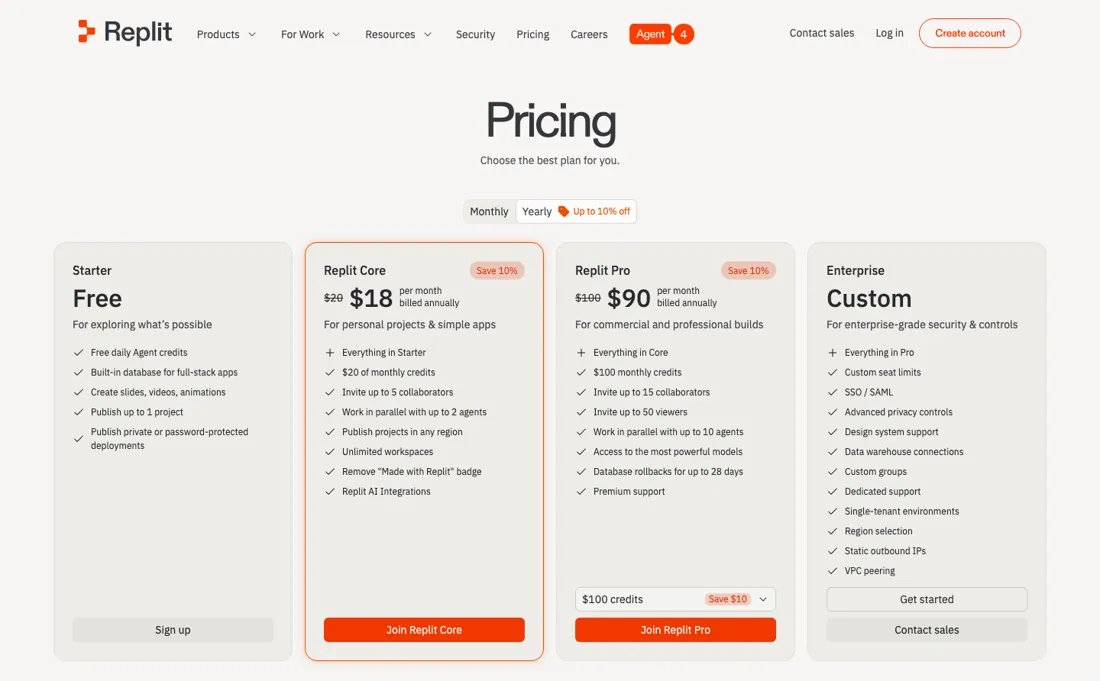
The pricing page now lists Core, Pro and Enterprise. The free Starter plan is no longer shown there but still exists in Replit's documentation: daily Agent credits up to a monthly cap, Free Mode with a daily cap (the experience Replit used to call Lite build), no Full build (that needs Core or Pro), one published app that goes down after 30 days, and a 'Made with Replit' badge on it.
Core is $20/month, or $18/month billed annually, and includes $20 towards the most powerful models, up to 30 hours of chat and up to 60 projects on Free Mode, Plan mode and unlimited workspaces. Pro starts at $100/month, or $90/month billed annually, with $100 of credits, 10 parallel agents, up to 15 collaborators, up to 50 viewers and a 28-day database recovery window (point-in-time restore; seven days is the standard window); a dropdown raises Pro to $225, $440, $850 or $2,050 a month ($215, $425, $825 or $2,000 billed annually) for more credits.
Enterprise is quote-only. The number to watch is not the seat but the credits: Free Mode covers everyday Agent work at no extra cost within an allowance, and paid requests are priced by effort, so the monthly credit allowance is a starting balance rather than a budget. Replit asks before each paid request starts and lets you set a budget. Plans change — always verify the live price on their site.
Category context: IT & Productivity. Across the 35 tools in this category that we researched with a public US-dollar price, the median entry price is $15 a month (lowest paid plan as listed, per seat where the vendor prices per seat). Replit’s entry price of $18 a month sits above that median. Compare pricing conditions in the Software Cost Atlas →
Correction after re-checking: (re-verified 2026-09-26) Since our 2 September reading: Core moved from $17 to $18/month billed annually ($20 monthly unchanged), Pro from $95 to $90/month billed annually ($100 monthly), Pro gained credit tiers up to $2,050/month, and the free Starter plan disappeared from the pricing page. It is still described in Replit's documentation, limited to Lite build and one published app.
What the price did
We capture Replit’s own pricing page every month and keep the figures, so this is our record of the page — not a forecast, and not someone else’s summary.
Replit's published prices have been stable this summer even though what a credit buys has not. Our July and August 2026 captures both read $25 and $20 for Core and $100 and $95 for Pro, with the same $25 and $100 monthly credit allowances, and the page returned those same figures on 17 August 2026. Three readings, no movement in the sticker — which is precisely why the complaints are about consumption rather than about price rises. That stability ended between our 2 August and 1 September 2026 captures: Core now reads $17 a month billed annually against a struck-through $20, and the included credits went from $25 to $20 a month. Pro held at $95 annual and $100 monthly, but its credits line also changed, from '$100 monthly credits' to '$100 towards most powerful models'. A 15% cheaper plan with a 20% smaller allowance is a repackaging, not a cut.
What the pricing page doesn’t say
Everyday building can run in Free Mode at no extra cost, within an allowance that resets every five hours on Core and Pro and a daily cap on Starter, but anything past it is billed by effort, and only Pro's unused credits roll over. Replit asks before each paid request starts and lets you set a budget, so set one before long sessions. Great for learning and prototyping; watch the meter for production work.
What Replit does
Browser-based coding environment with instant deploys and an AI agent. Billing is effort-based: each plan includes monthly credits that the Agent draws down at a rate you do not set, the credits expire monthly, and a complex agent session burns them fast, which makes production costs hard to budget.
What buyers report about Replit
Recurring themes from the buyer-review sites listed at the foot of this page, read in August 2026. We use Replit ourselves, but a single account is a narrow sample, so here is what other buyers report. We summarise it here because the complaints are usually the part a vendor page leaves out.
- • From idea to a deployed app without touching infrastructure — averages sit between 4.3 and 4.6 across the major review sites.
- • The Agent genuinely builds working software from a prompt, and reviewers who scoped tightly report good results.
- • The most enthusiastic reviews we found anywhere are on TrustRadius in July 2026, from people who build at volume — one describes over 200 apps for their own company and a hundred more elsewhere, and rates it above every other vibe-coding platform they have tried.
- • Cost unpredictability is the most common complaint by a wide margin. In 2026 Replit moved to effort-based pricing: the Agent decides what a task costs and you find out after it finishes. That reached existing Core and Teams subscribers from 1 July 2026 — if you were on an older plan, check what you are on now.
- • Reviewers report burning a third of a monthly budget in one night, and projects costing up to 4x what they used to. One reviewer was charged roughly $9,600 in Agent fees across June and July 2026.
- • The Agent's fixes break other parts of the app, and it overrides intent or changes code without asking.
- • It often needs several iterations to follow a specific instruction, and every iteration costs.
- • Even the enthusiasts ask for the same fix, and it is a cost fix: let the platform pick a cheaper model for simple tasks so fewer tokens are spent. That is the credit-burn complaint arriving from the friendliest possible direction.
- • Two structural gaps named there: there is no good way to search through hundreds of apps you have created, and apps cannot easily be linked into one ecosystem or remixed out of an enterprise account.
- • A September 2025 reviewer who trialled it for a web app rates it 1 out of 10 and says it is not production-ready — the opposite pole from the July 2026 reviews, and worth reading alongside them.
Pages read (August 2026): Trustpilot
When the paid plan is worth it
Starter is free with limited daily Agent credits and one published project, and it is enough to learn whether the Agent suits how you work. Beyond that the plan fee is the smaller half of the bill, so "is the paid plan worth it" is really "do I understand what the Agent costs". Read on their own pricing page on 26 September 2026: Core is $20 a month, or $18 billed annually, and includes $20 towards the most powerful models, up to 30 hours of chat and up to 60 projects.
Pro is $100 a month, or $90 billed annually, with $100 of credits, 10 parallel agents, up to 15 collaborators and up to 50 viewers; it launched in February 2026 and replaced the old Teams plan. Enterprise is custom. Our 2 September reading ($17 and $95 billed annually) is in the price history on this page. Then the part nobody quotes. Documented bills show $0.25 per Agent checkpoint and $0.05 per Assistant checkpoint — one recorded period ran 632 Agent checkpoints and 965 Assistant checkpoints, $206.25 in checkpoints on top of the plan.
At $0.25 a checkpoint your $20 of Core credits is about 80 Agent checkpoints a month. Budget against checkpoints, not against the $18, and note that effort-based billing reached existing Core and Teams subscribers on 1 July 2026 — check which basis you are on.
Our monthly capture read this pricing page in August 2026 and again in September 2026. The price history below explains what changed.
What we found running Replit ourselves
The first findings are at the top of this page. The rest:
- On Starter the usage page is closed ('You must have an active subscription to view your own usage'), so you cannot see what a request cost, and the daily allowance was gone after the build and one repair.
What this test does not show: One run on one day, on the free plan's agent mode; Core may behave differently. Not a security audit or a load test. The code export was run from the project zip: it built and ran outside Replit on our own database, and carried the admin password in plain text.
Most of our reviews are researched rather than run — how we review explains which is which, and why we do not pretend otherwise.
How to actually use Replit
Start in Free Mode, which Replit added on 21 August 2026: everyday Agent work costs nothing extra within your plan's allowance, which resets every five hours on Core and Pro and is a daily cap on Starter. Paid work only begins when you approve it. Replit asks for confirmation before a paid request in Power or Max mode starts, and that approval covers the one request. Paid requests are priced by effort, one checkpoint per request, so a bug fix typically costs less than a full feature and there is no fixed rate per checkpoint to budget against.
Set a usage limit and a budget under Account, Billing before a long session, and hover the usage icon in the Agent tab to see what each checkpoint cost. Starter is for trying the loop, not for measuring cost: it has Free Mode with a daily cap but no Full build, its usage page stays closed without a subscription, and its one published app goes down after 30 days. In our own test on 26 September 2026 the daily allowance was gone after one build and one repair. If your work runs longer than that, Core is the plan to trial.
Distilled from replit.com/pricing (read 26 September 2026) and Replit's documentation: help/free-agent-mode, billing/ai-billing, billing/plans/starter-plan, billing/plans/replit-pro, help/pricing-and-plans and the 21 August 2026 changelog, read 29 September 2026
Try it on your own work first. The free Software Test Drive for an AI app builder gives you six tests with fictional data, a place to record what worked and a decision sheet you can print. There are no Replit-specific steps yet, so the general tests apply. Build a test plan →
The natural comparison is GitHub Codespaces or a local IDE — other cloud dev environments. Weigh it against GitHub Codespaces on the job you actually need done.
Frequently asked questions
What does Replit actually cost per month?
Core is $20 a month, or $18 billed annually, and includes $20 towards the most powerful models; Pro is $100 a month, or $90 billed annually, with $100 of credits. Starter remains free with daily Agent credits; it is in Replit's documentation rather than on the pricing page. That is the pricing page as read on 26 September 2026. Earlier figures ($17 and $95 billed annually on 2 September, $25 and $20 for Core in the summer) are in the price history on this page.
Why do people say the bill is unpredictable when the price is fixed?
Because the subscription and the Agent work are billed differently. Everyday Agent work can run in Free Mode at no extra cost within an allowance, but paid requests in Power or Max mode are priced by effort: a complex feature costs more than a bug fix, and there is no fixed rate to budget against. Replit asks for confirmation before each paid request, and you can set a budget and usage alerts under Account, Billing. Reviewers describe burning a third of a monthly budget in a night; treat the credits as the real meter and set a cap before a long session.
What are the alternatives people move to?
That is the most-searched question about Replit on our pages, and the honest framing is what you are optimising for. If you want the same prompt-to-deployed-app loop the alternatives are other agentic builders; if the trigger is cost unpredictability, a conventional editor plus your own hosting removes the meter entirely at the cost of doing the plumbing yourself. Reviewers on TrustRadius who stay describe wanting the opposite of a switch: better model selection to spend fewer tokens on simple tasks, and a way to link apps into one ecosystem.
What should I weigh before buying IT & Productivity software?
Judge it on evidence rather than adjectives. Look for a published security page, single sign-on and role controls on the plan you would actually buy (they are often gated to higher tiers), a status page with real incident history, and a clear answer on where your data is stored. If the tool will hold anything sensitive, those four answers matter more than any feature comparison.
Is this a hands-on review of Replit?
Yes. We used Replit ourselves on 2026-09-26; the section above reports what we measured in the product, and says where a figure comes from the vendor's own documentation instead. Most of our reviews are researched rather than run; we say which is which. We name what each tool is good and bad at, and we earn a commission only if you sign up, at no cost to you.
- Buyer reviews on G2, Capterra, Trustpilot and TrustRadius, read August 2026.
- Re-verified 2026-09-26 on replit.com/pricing and docs.replit.com/billing/plans/starter-plan.
- A dated screenshot of that pricing page, kept on this site as the receipt.
- Our own hands-on session with Replit (2026-09-26), written up in full further down this page.
Others in this category
Reviewed it & productivity tools that share ground with Replit — comparable in what they do, not drop-in swaps:
New reviews, price changes we recorded, and the cost conditions we found. No sponsored placements. Unsubscribe anytime.
This is our researched assessment — not a paid placement. The “Visit” links on this page are affiliate links: we may earn a commission if you sign up, at no extra cost to you, and it never changes our take. How we review →