 Getscreen Review (2026)
AnyDesk tends to feel faster and lower-latency, and TeamViewer carries the heavier security/compliance certifications (HIPAA, SOC 2). Throughout this review we weigh it against TeamViewer.
Visit Getscreen → Affiliate link — we may earn a commission if you sign up; it does not change what this page says.
Watch the 2-minute review
The video version of this review, from our YouTube channel.
⚡ Short on time? Watch the 30-second verdict Short.
Pricing (2026)
✓ Pricing re-verified 23 Sep 2026
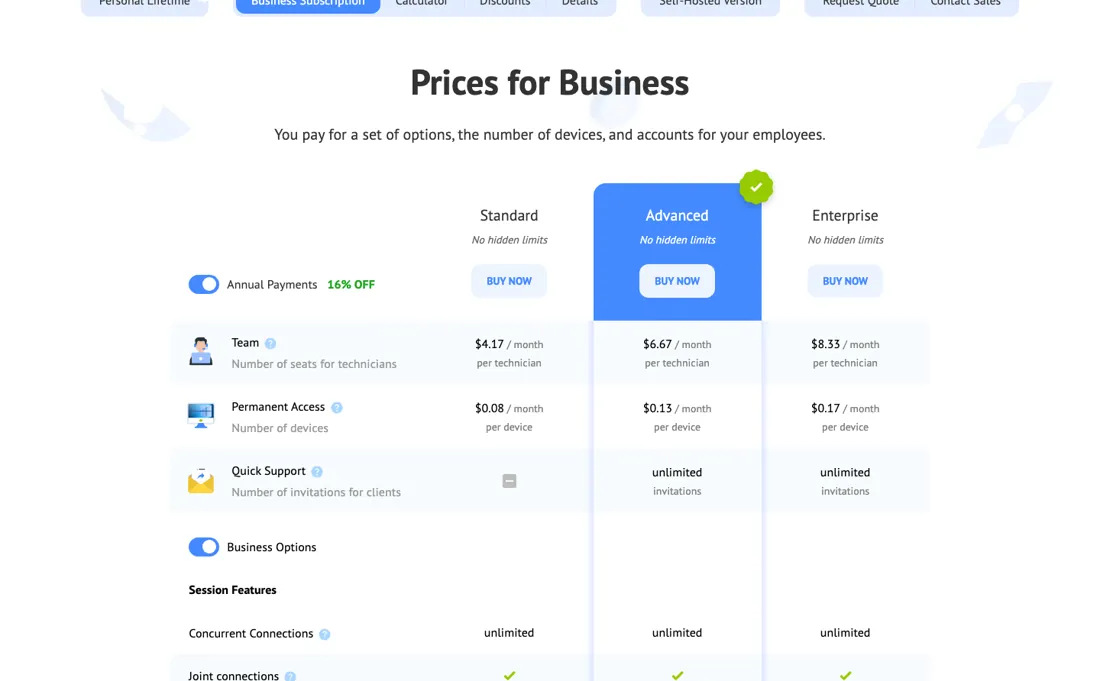
- Standard — $4.17 per technician/moplus $0.08 per device; annual payment, marked 16% off
- Advanced — $6.67 per technician/moplus $0.13 per device; unlimited client invitations
- Enterprise — $8.33 per technician/moplus $0.17 per device; white-label and mass device management
Business rates on getscreen.me/en/pricing/plans/ are quoted on annual payment, which the page marks 16% off. The figures were first read over a US connection on 2026-08-26 as dollars and have not moved since; from a Dutch connection the same numerals print as euros, so the currency symbol follows the visitor region rather than the price. The business subscription bills on two meters at once, and quoting only the first understates it: Standard is $4.17 per technician a month plus $0.08 per device, Advanced $6.67 plus $0.13, and Enterprise $8.33 plus $0.17.
Advanced and Enterprise add unlimited client invitations. Free plan (2 devices); paid tiers add one-time quick connections (Advanced) and white-label, roles and mass-device management (Enterprise) — plus a one-time Personal Lifetime Deal at $149 in the page as served, which a browser on a European connection re-renders as EUR 139 (a different number, not just a different symbol, unlike the business rates), and which sidesteps the recurring fees of rivals like TeamViewer (~$50/mo).
Without annual payment the business rates are 5.00 / 8.00 / 10.00 per technician and 0.10 / 0.15 / 0.20 per device a month (Standard / Advanced / Enterprise). The HTTP API is absent on Standard and limited to 100 requests per hour per device on Advanced and 1,000 on Enterprise; video recording storage is 1 GB, 2 GB and 5 GB per technician. Plans change — always verify the live price on their site.
What the pricing page doesn’t say
Getscreen's real edge is being fully browser-based — nothing to install on the other person's machine — and cheaper, especially with the lifetime deal.
What Getscreen does
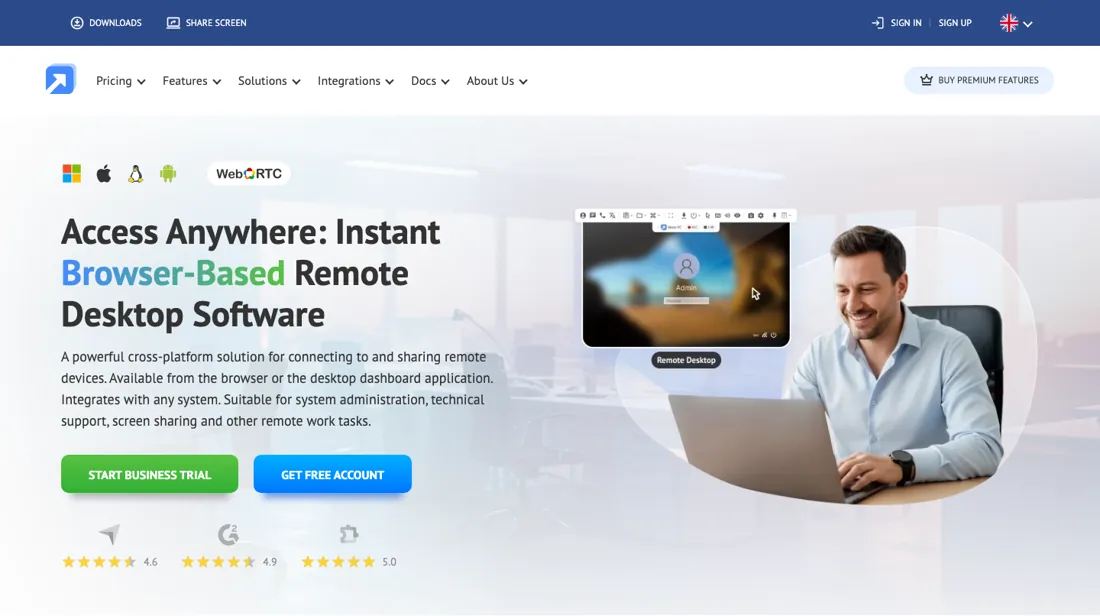
Browser-based remote desktop and remote-support software: connect to any computer with no client install, share one-click access links, transfer files and record sessions — for IT teams, MSPs and remote support.
What buyers report about Getscreen
Recurring themes from the buyer-review sites listed at the foot of this page, read in August 2026. We have not run Getscreen ourselves, so this is other buyers' experience rather than ours. We summarise it here because the complaints are usually the part a vendor page leaves out.
- • Browser-based, so nothing to install on the machine you are helping — 4.8 across 156 reviews, with 152 positive.
- • Commercial use is allowed even on the free plan, which most competitors forbid. From $5/month, with a $149 lifetime option.
- • It leans hard on connection quality — reviewers report occasional drops and minor bugs when the line is not stable.
- • The review base is small and heavily positive, so treat 4.8 as a modest sample rather than a broad verdict.
When the paid plan is worth it
Free covers exactly two devices with a 50MB per-file limit, which works for a single side gig but breaks down the moment you manage a third machine or need to move a file bigger than that. The paid tiers price on two separate axes. There is a per-technician seat fee ($5.00/month per technician on Standard, dropping to $4.17/month when billed annually), and a separate per-device access fee ($0.10/month per device on Standard, $0.08/month annually).
So a small team supporting many devices pays for both the seats and the devices, not one flat number. Annual billing saves 16%, but the total still climbs with headcount and fleet size, which is where the payback math gets real for anyone scaling past a couple of technicians. Standard also skips quick-support invitations entirely, unlimited only from Advanced up, and caps file transfer at 4GB while video-recording storage stays at 1GB one tier above free.
None of that metering resets with a subscription upgrade, it keeps compounding every month. The $149 Personal Lifetime deal sidesteps that math altogether: 50 devices forever and 10 invitations a day for a one-time payment, but it is scoped to individual use rather than the technician-seat model teams actually need.
How to actually use Getscreen
Signup is free and needs no card, and business users can trial every feature free for 14 days, also with no card required. Getting to core value differs by use case. For a one-off support session, you send the other person a browser link, nothing to install on their side, since browser-based delivery is the whole pitch. For unattended access to a device you control, you install the agent app instead, available for Windows, macOS, Linux, and Android.
Then add the device to your list and set up technician access rights if you are working as a team. In practice the friction shows up during that install. On Mac, the remote screen stays blank until you manually grant Screen Recording and Accessibility permissions; on Windows, antivirus and firewall software commonly blocks the agent executable outright; and on Android the app needs security restrictions loosened to run at all.
Distilled from official pricing/personal/plans pages, docs.getscreen.me user guides, and community/user reports on installation issues. Note for anyone re-checking: the plan table carries no prices in the served HTML and only fills in once a browser runs the page, so it has to be read rendered rather than fetched Re-read 23 September 2026 in the browser pane: getscreen.me/en/pricing/plans/ with the annual toggle on and off (EUR numerals from a Dutch connection), and getscreen.me/en/pricing/personal/, whose served HTML (fetched from the Mac and from a German server) says $149 while the rendered page in the Netherlands says EUR 139.
The natural comparison is AnyDesk or TeamViewer — the faster and the more enterprise-secure rivals. Weigh it against TeamViewer on the job you actually need done.
Frequently asked questions
What does Getscreen cost for two technicians and 40 computers?
Both meters apply, so work it out per line. Read 23 September 2026 on getscreen.me/en/pricing/plans/, Standard on annual payment is 4.17 per technician and 0.08 per device a month: 2 x 4.17 plus 40 x 0.08 comes to 11.54 a month, about 138 a year. Advanced at 6.67 and 0.13 gives 18.54 a month; Enterprise at 8.33 and 0.17 gives 23.46. Without the annual discount Standard is 5.00 and 0.10, so 14.00 a month. The page prints these numerals in euros to a European visitor and in dollars to a US one. The step up to Advanced is not about scale: it is what you pay for unlimited client invitations, since Standard has no quick-support invitations at all, and for unlimited file size instead of 4 GB.
Is the Getscreen lifetime deal $149 or EUR 139?
Both, depending on where you open the page. Read 23 September 2026, the page as served from the server says $149, and a browser on a European connection replaces that with EUR 139. That is different from the business plans, where the same numerals simply switch symbol. For the money you get one personal licence with 50 devices permanently and 10 quick-support invitations a day, file transfers up to 4 GB and up to 1 GB of session recording. It is sold for single personal use, so it is not a way around the per-technician seat model if more than one person needs to connect.
Do I need Advanced to use the Getscreen API?
Yes. Read 23 September 2026, the comparison table leaves the HTTP API row empty for Standard and gives Advanced 100 requests per hour per device and Enterprise 1,000. The same step decides quick support, which Standard lacks entirely, and file transfers, capped at 4 GB on Standard and unlimited above it. So if your plan is to hook remote sessions into a helpdesk or RMM script, price Advanced from the start: 6.67 per technician plus 0.13 per device a month on annual payment, against 4.17 and 0.08 on Standard. Whether 100 requests per device per hour is enough depends on how often your integration polls, which the page cannot tell you; test it on the 14-day business trial, which needs no card.
What should I weigh before buying IT & Productivity software?
Judge it on evidence rather than adjectives. Look for a published security page, single sign-on and role controls on the plan you would actually buy (they are often gated to higher tiers), a status page with real incident history, and a clear answer on where your data is stored. If the tool will hold anything sensitive, those four answers matter more than any feature comparison.
Is this a hands-on review of Getscreen?
This is a researched assessment, not a hands-on test — where we've used a tool ourselves, we say so explicitly. We name what each tool is good and bad at, and we earn a commission only if you sign up, at no cost to you.
- Buyer reviews on Capterra, GetApp and Software Advice, read August 2026.
- Price re-verified 2026-09-23.
- A dated screenshot of that pricing page, kept on this site as the receipt.
Others in this category
Reviewed it & productivity tools that share ground with Getscreen — comparable in what they do, not drop-in swaps:
New reviews, price changes we recorded, and the cost conditions we found. No sponsored placements. Unsubscribe anytime.
This is our researched assessment — not a paid placement. The “Visit” links on this page are affiliate links: we may earn a commission if you sign up, at no extra cost to you, and it never changes our take. How we review →