 Passpack Review (2026)Cheap Under Twenty Seats, Mobile Is New
The honest trade-off is maturity, not security. Throughout this review we weigh it against 1Password.
Visit Passpack → Affiliate link — we may earn a commission if you sign up; it does not change what this page says.
Watch the 2-minute review
The video version of this review, from our YouTube channel.
⚡ Short on time? Watch the 30-second verdict Short.
Pricing (2026)
✓ Pricing re-verified 6 Sep 2026
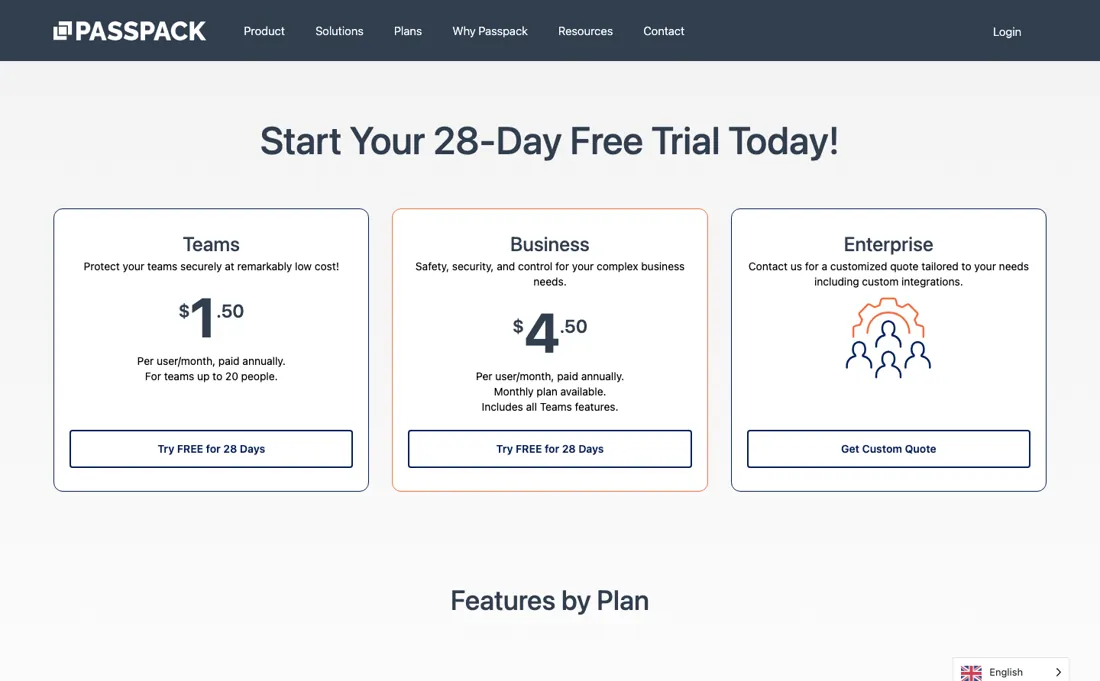
Teams is $20 per user per year, paid annually, for teams of up to 20 people. Business is $4.50 per user per month, paid annually, includes everything in Teams and has a monthly option. Enterprise is a custom quote, and both paid plans carry a 28-day free trial. The gap between those two matters more than either number: Teams works out at about $1.67 a user a month, while Business at $4.50 sits inside the $3 to $8 range the mainstream managers charge.
The saving is real on Teams and largely gone above twenty people. What changed between 3 and 6 September 2026 is the feature table rather than the price: the plans page now lists TOTP and 'Mobile app for iOS' under Admin & User Functionality, the section that carries no plan exclusions, so both apply to all three plans. Plans change — always verify the live price on their site.
What the price did
We capture Passpack’s own pricing page every month and keep the figures, so this is our record of the page — not a forecast, and not someone else’s summary.
Four matching readings so far. Our July and early-August 2026 readings retrieved no amount at all; the figures above were read on 25 August 2026, again on 2 September, on 3 September and on 6 September 2026. Every comparable reading shows the same two amounts. What moved in that window was the feature table rather than the price: TOTP and 'Mobile app for iOS' appeared on the plans page between 3 and 6 September 2026.
What the pricing page doesn’t say
The interface is plain, the mobile side is very new, and some users report slow support and billing hiccups. You are trading polish and a settled mobile experience for price and solid zero-knowledge encryption. Android is the concrete form of that trade. The iOS app arrived on 10 August 2026; twenty-seven days later, on 6 September 2026, there was still no Android app. Passpack's own Downloads menu offered only iOS and the browser extension, and a Google Play search for 'passpack' that day returned thirteen apps, all of them rival password managers and none of them this one.
If your team is on Android, plan as though the app does not exist, because it does not. Their own pages lag their announcements, too, though less than they did. Passpack told partners on 2 September 2026 that TOTP now works on every plan, and on 3 September the word appeared on neither the plans nor the key-features page; by 6 September the plans comparison table lists both TOTP and 'Mobile app for iOS', in the section that carries no plan exclusions.
The key-features page has not caught up: on 6 September it still listed 'Mobile & Browser Extensions' under New Features Coming Soon, four weeks after iOS shipped and with the extensions already sold on the plans page. Read the plans table rather than the newsletter, and confirm stored TOTP codes inside the 28-day trial.
What Passpack does
Team password manager for small businesses and MSPs. Store, share and organize credentials with zero-knowledge encryption, role-based access, MFA, device registration, full audit trails and shared team vaults — at a low per-user price. An iOS app arrived in August 2026; Android is announced but not yet out.
What buyers report about Passpack
Recurring themes from the buyer-review sites listed at the foot of this page, read in August 2026. We have not run Passpack ourselves, so this is other buyers' experience rather than ours. We summarise it here because the complaints are usually the part a vendor page leaves out.
- • At $7.99 per user a month, 1Password Business costs several times more than Passpack's small-team tier — and Passpack brings zero-knowledge AES-256, role-based access and multi-admin support that competes several tiers above its price.
- • SOC2 reports, enforced password policies, and February 2026 brought Active Directory integration for Google Workspace and Microsoft Entra ID plus just-in-time provisioning.
- • The reviews come overwhelmingly from small businesses rather than enterprise security teams, which is the audience this praise reflects.
- • Support is the weak point — reviewers report slow replies and being pointed at forum articles instead of getting an answer.
- • Billing and cancellation frustrations come up.
- • Login customisation is limited, so sites that use more than a standard username and password field are awkward to store.
When the paid plan is worth it
Teams is $20 per user per year, paid annually, for up to twenty people, and Business is $4.50 per user per month. Re-read on 2 September 2026 on their own pricing page, unchanged from our August reading. Teams works out at about $1.67 a user a month, which is genuinely a fraction of the mainstream managers where $3 to $8 a seat is normal — for a twenty-person team that is on the order of a thousand dollars a year.
The saving sits almost entirely in that one plan, though, and it is worth knowing before you grow into the next one. Business at $4.50 a seat is inside the normal range rather than under it, so past twenty people the price stops being the reason to choose this and the trade-offs below start doing all the work. What you trade for the price is maturity rather than security, and that trade is worth taking seriously.
The interface is plain, and the mobile side is brand new: the iOS app appeared on the App Store on 10 August 2026, and when the vendor wrote to us on 2 September 2026 the Android version was still described as coming very soon. For a password manager that is not a cosmetic detail, because the tool only protects you if people actually use it, and friction on mobile is where team adoption quietly fails.
A cheaper licence that half the team routes around is more expensive than a polished one they use. So the honest test during the 28-day trial is not the feature list but adoption: put the iOS app on the phones of the two least patient people on your team and see whether they still use it in week four. If they do, the saving is real. If your team is on Android, wait until the app has actually shipped before you decide — an announced release is not a released one.
How to actually use Passpack
Work out first whether you are under or over twenty people, because that is where the economics change. Teams is $20 per user per year for up to twenty; Business is $4.50 per user per month. That is a step of roughly 2.7 times per seat, so a team of eighteen and a team of twenty-two are looking at quite different propositions. Then spend the 28-day trial on the phone, because that is the part of this product that changed most recently.
The iOS app was published on 10 August 2026 and was already on version 1.0.1 by the 15th, with a handful of ratings behind it; the Android version was still unreleased when we checked again on 6 September 2026, twenty-seven days later, with no Play Store listing and no Android build in Passpack's own Downloads menu. So the question is no longer whether mobile exists but whether a first-generation app holds up: give it to the least technical person on your team and have them do a week of real logins from their handset before you commit anyone else.
If your team runs on Android, that test cannot be run at all yet. Be clear about the trade you are making. You are buying solid zero-knowledge security at a fraction of the mainstream managers' price, and paying for it in maturity: a plain interface, mobile apps that are weeks rather than years old, and reports of slow support and billing hiccups. For a team where cost matters more than convenience that can be exactly right — but it is a trade rather than a bargain, and the trial is where you find out which side you are on.
Plan the migration and the offboarding before you start. Check the import path from wherever your passwords live now, and check what happens to shared vaults when someone leaves — that second one is the reason teams buy a password manager in the first place.
Distilled from Plans, features and the mobile position read on 6 September 2026 from a Netherlands exit. passpack.com/plans/ for the two amounts, the 28-day trial and the full comparison table, whose structure matters when reading it: the Admin & User Functionality section carries no plan exclusions, and that is where TOTP, Browser Extensions and 'Mobile app for iOS' sit, while the Premium Features section below it is where the x-marks against Teams and Business begin. passpack.com/llms.txt repeats the same two amounts and the trial. passpack.com/key-features/ is the source for the 'New Features Coming Soon' list that still names mobile and browser extensions, and the site's own Downloads menu lists iOS and the browser extension and no Android build. Android was checked separately that day with a Google Play search for 'passpack', which returned thirteen apps, none of them this one.
Passpack vs 1Password, side by side
Both columns come from the same place: each vendor’s own published pricing, read on the date shown in the sources at the foot of this page. We do not average them into a score.
Both names above are affiliate links: we may earn a commission if you sign up, at no extra cost to you. Neither changes what this table says: both columns come straight from the vendors’ own pricing pages.
The natural comparison is 1Password or Bitwarden — the polished-but-pricier and the generous-free-tier rivals. Weigh it against 1Password on the job you actually need done.
Frequently asked questions
What does Passpack cost?
$20 per user per year for Teams, up to twenty people, and $4.50 per user per month for Business — both paid annually, both with a 28-day trial, re-read on 3 September 2026 on their own plans page and unchanged since August. Enterprise is a custom quote.
Does Passpack have mobile apps?
On iPhone, yes, since 10 August 2026, when Passpack Inc published Passpack Password Manager on the App Store; it was on version 1.0.1 with a handful of ratings when we checked on 2 September 2026, and by 6 September the plans page lists 'Mobile app for iOS' as a feature on all three plans. Android is still announced rather than out. The vendor said on 2 September 2026 that it was coming very soon; on 6 September 2026 Passpack's own Downloads menu offered only iOS and the browser extension, and a Google Play search for 'passpack' returned thirteen rival password managers and nothing from Passpack. If your team is on Android, plan as if there is no app until there is one.
Is it really that much cheaper than the big password managers?
On Teams, yes: about $1.67 a user a month against the $3 to $8 a seat the mainstream business managers charge. On Business at $4.50 that gap largely closes, so the answer depends on which plan your headcount puts you in. What you weigh against that is the smaller ecosystem: fewer integrations and a smaller support organisation. For a team that mainly needs shared credentials with proper access control, that trade is often fine.
What should I test in the trial?
Twenty-eight days is generous, so use it on the three things that decide adoption: how credentials are shared and revoked when someone leaves, whether the browser extension behaves on the sites your team actually uses, and whether the new iOS app survives a week of real logins. Password managers fail on those details rather than on features.
Does Passpack support TOTP codes, and are the browser extensions being improved?
Both are on the plans page now, and TOTP arrived there between our readings. Passpack told its partners on 2 September 2026 that time-based one-time passwords are supported on all plans, and that a next generation of browser extensions is on the way with faster autofill and warnings about unsafe login pages. On 3 September the plans page listed Browser Extensions but not TOTP; on 6 September 2026 it lists both TOTP and 'Mobile app for iOS', in the Admin & User Functionality section, which carries no plan exclusions and therefore covers all three plans. Note this is a different row from Two-factor authentication under Security, which sits beside emergency access codes and YubiKey support and covers signing in to Passpack rather than storing one-time codes for your own logins. The key-features page still lags: on 6 September it listed 'Mobile & Browser Extensions' under New Features Coming Soon. If stored TOTP codes are why you are buying, confirm the behaviour inside the 28-day trial rather than reading it off a table.
What should I weigh before buying IT & Productivity software?
Judge it on evidence rather than adjectives. Look for a published security page, single sign-on and role controls on the plan you would actually buy (they are often gated to higher tiers), a status page with real incident history, and a clear answer on where your data is stored. If the tool will hold anything sensitive, those four answers matter more than any feature comparison.
Is this a hands-on review of Passpack?
This is a researched assessment, not a hands-on test — where we've used a tool ourselves, we say so explicitly. We name what each tool is good and bad at, and we earn a commission only if you sign up, at no cost to you.
- Buyer reviews on Capterra, Software Advice, SoftwareReviews and Tekpon, read August 2026.
- Re-verified 6 September 2026 on passpack.com/plans/ and passpack.com/llms.txt, which agree; unchanged since our 25 August, 2 September and 3 September readings.
- A dated screenshot of that pricing page, kept on this site as the receipt.
Others in this category
Reviewed it & productivity tools that share ground with Passpack — comparable in what they do, not drop-in swaps:
New reviews, price changes we recorded, and the cost conditions we found. No sponsored placements. Unsubscribe anytime.
This is our researched assessment — not a paid placement. The “Visit” links on this page are affiliate links: we may earn a commission if you sign up, at no extra cost to you, and it never changes our take. How we review →