 Tresorit Review (2026)From €16/user, No Server-Side Search
You pay the Swiss-E2EE premium — noticeably above mainstream clouds and above Proton Drive per GB — and the encryption trade-offs are inherent: no server-side content search, more deliberate sharing flows, and credential/recovery discipline is on you. For regulated teams that's exactly the deal; for casual storage it's over-engineering. Throughout this review we weigh it against Dropbox.
Visit Tresorit → Affiliate link — the rest of this page is the honest version, including who should skip it.
Pricing (2026)
✓ Pricing re-verified 5 Sep 2026
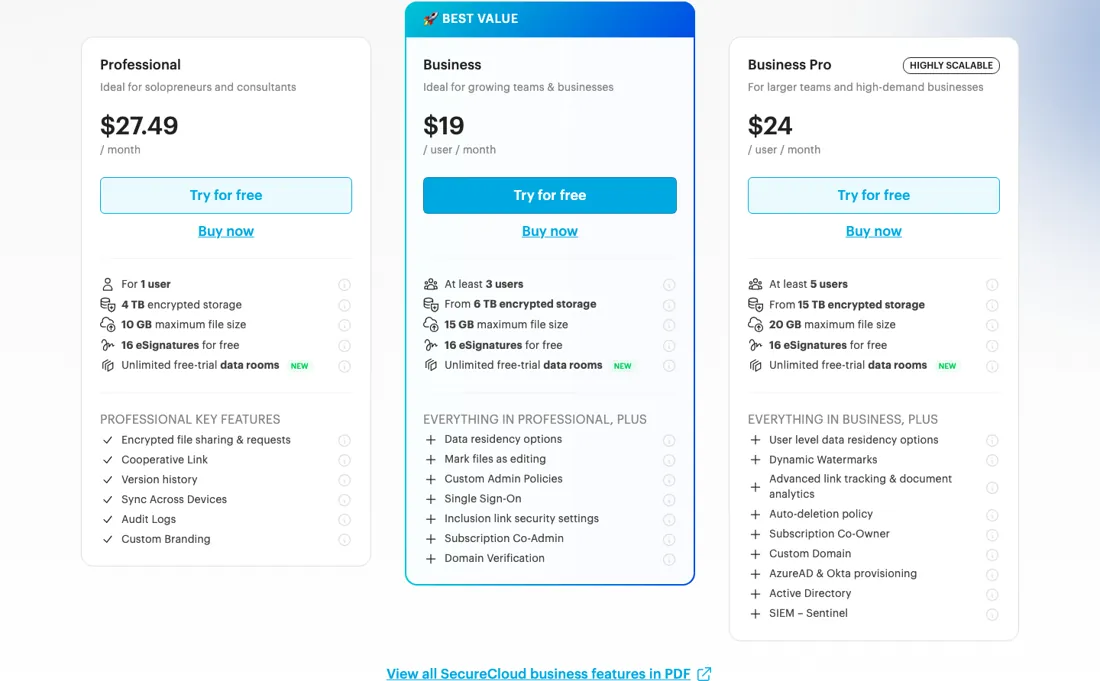
There are three business plans: Professional for 1 user, Business from 3 users and Business Pro from 5 users. Priced from our location in euros, they run €29.99, €20 and €25 per user per month on monthly billing, and €23.99, €16 and €20 on yearly — which the page badges as 20% off. Personal runs a permanent free Basic tier plus Lite, Essential and Pro (€4.99, €11.99 and €29.99 a month from here).
Our dollar reading of the same plans on 4 August 2026 gave Professional $33.99, Business $24 and Business Pro $30 per user per month. Storage runs 4 TB on Professional, from 6 TB on Business and from 15 TB on Business Pro, with maximum file sizes of 10, 15 and 20 GB. Every plan carries a 14-day trial with no feature limits, but Tresorit requires payment details up front to start it. Enterprise is quote-only. Plans change — always verify the live price on their site.
Correction after re-checking: Our earlier text still carried the old plan names Business Standard and Business Plus at about $18 and $24 per user per month. Those plans no longer exist under those names: the three tiers and the prices above are what the page sells today. One condition we had not recorded: the 14-day trial is free of feature limits but not of paperwork — Tresorit's own FAQ says payment information is required even during the trial period. (re-verified 2026-08-14)
Tresorit’s pricing page, as we read it
What Tresorit does
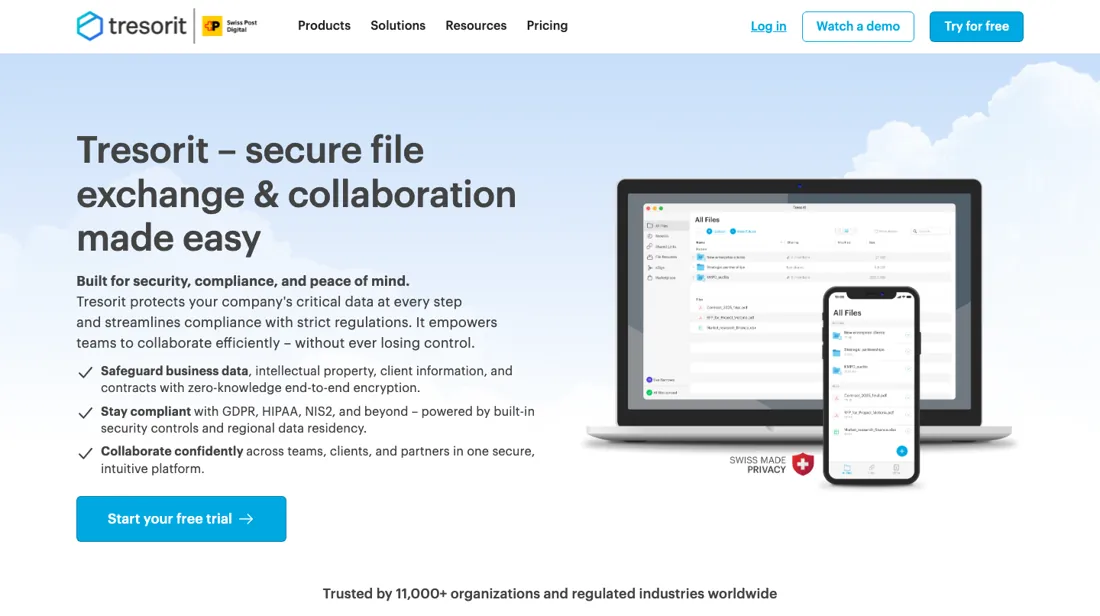
End-to-end encrypted cloud storage and secure file sharing. Protect sensitive business documents with zero-knowledge security and granular access controls.
What buyers report about Tresorit
Recurring themes from the buyer-review sites listed at the foot of this page, read in August 2026 (App Store reviews through July 2026, Capterra review text through April 2025). We have not run Tresorit ourselves, so this is other buyers' experience rather than ours. We summarise it here because the complaints are usually the part a vendor page leaves out.
- • End-to-end, zero-knowledge encryption that is actually implemented properly — the 2024 ETH Zurich study found real vulnerabilities in competitors' implementations and not in Tresorit's.
- • For regulated work in healthcare, legal or finance, reviewers treat it as the default choice.
- • App Store reviewers name client-side encryption before upload as the specific reason they put financial and estate documents here rather than on a service that only encrypts in transit, and Swiss and EU storage as the reason they left Dropbox, OneDrive or Proton Drive.
- • On Capterra, accountants, financial advisers and doctors describe letting clients without a Tresorit account receive files securely, with an audit trail of who opened what. A marketing consultant names GDPR compliance as the reason EU clients required it over Google Drive.
- • Price is the top complaint on G2 by a wide margin — the "expensive" tag appears dozens of times, including from reviewers who rate the security highly. Re-read on 14 August 2026, the business plans are Professional, Business and Business Pro, and from our location they price in euros: €23.99, €16 and €20 per user per month on yearly billing, with minimums of 1, 3 and 5 users.
- • Large files sync slowly and file size limits are low.
- • No real-time collaboration, so it will not replace your daily working drive.
- • No password recovery. That is the price of zero-knowledge, but it is a real operational risk — plan for it.
- • Two Capterra complaints are about money rather than encryption. A self-employed CEO paid €142 for an annual subscription, could not open the app on either Windows or iPhone, got no working fix in two months and was then refused a refund because the eight-day window had passed (April 2025). Another sole trader was billed for a full year after a free trial without advance notice and got no answer when escalating (December 2024).
- • Support is described on both platforms as slow or absent — one App Store reviewer waited weeks after a sync failure before switching away.
- • Practical friction on the Mac: one long-term Capterra reviewer says the Mac client does not sync as a real local drive the way the Windows one does, so files must be downloaded, edited and re-uploaded. Photo and video uploads are reported stalling or duplicating.
- • One App Store reviewer lost 90 GB of photos and video after a crash with no way to recover them, and another reports camera backup stopping without warning and not being restorable retroactively.
Where the ratings disagree. Capterra and the App Store surface a category of complaint that the security-focused reviews on G2 and Cloudwards do not: refused refunds, silent annual renewal and unanswered support tickets. The encryption is not what people complain about — the billing and the support are. Read the two sets together rather than choosing one: the product does what it claims, and the commercial relationship is where buyers report getting hurt.
When the paid plan is worth it
The free Basic account is permanent rather than a countdown, but its ceilings are low: 3 GB of encrypted storage, uploads capped at 500 MB per file, syncing across 2 devices, and no more than 10 encrypted share links a month. That covers a private archive of sensitive documents and little else. Paying starts to make sense the moment file size or sharing volume becomes the binding constraint — Personal Lite lists 50 GB for $57 a year and Personal Essential 1 TB for $143.88 a year.
The business tiers are a different purchase, bought for administrative control rather than for space. Business is $228 per user per year, or $24 per user per month, with a floor of 3 users, so a solo operator or a pair funds a seat nobody occupies. Upgrading also does not remove the per-file ceiling: it still stops at 20 GB on the highest self-serve tier. And it does not unlock dynamic watermarking or AzureAD and Okta provisioning for a team below 5 users, because those features sit in Business Pro.
How to actually use Tresorit
The shortest route to real value is the 14-day trial, which Tresorit offers on every plan without feature limitations. Personal, Professional and Business run through the vendor's own checkout and provision straight away. Business Pro does not: it is a lead form, and Tresorit states that its team enables the trial and reaches out by email once the workspace is set up, so expect a wait rather than an instant login.
Two details at the order screen matter. The card price is driven by a Monthly/Yearly toggle carrying a 20% OFF badge, so the headline figure changes depending on which side is selected. And seat minimums are enforced up front, 3 users on Business and 5 on Business Pro, so a smaller team has to overbuy. Plan changes afterwards live in the Admin Center/Account Portal, under Billing, then Modify plan, Plan type and Apply changes, ending on Upgrade. Cancelling in the same place downgrades the account to Basic instead of closing it.
Distilled from Tresorit's own pricing pages (personal, business and Basic free tier), the plan price table embedded in the tresorit.com site bundle, and Tresorit's on-page billing and trial FAQs, read 4 August 2026.
Tresorit vs Proton Drive, side by side
Both columns come from the same place: each vendor’s own published pricing, read on the date shown in the sources at the foot of this page. We do not average them into a score.
Both names above are affiliate links: we may earn a commission if you sign up, at no extra cost to you. Neither changes what this table says: both columns come straight from the vendors’ own pricing pages.
The natural comparison is Proton Drive or Google Drive — Proton is the value E2EE pick for individuals; Tresorit's edge is enterprise admin, compliance and data residency — priced accordingly. Weigh it against Dropbox on the job you actually need done.
More on Tresorit
Everything we publish about Tresorit links back here — the review stays the honest hub:
The ex-banker filter — the same yardstick on every review (how we review): My ex-banker filter is simple: does Tresorit remove a real cost — time, errors, missed revenue — bigger than what it charges?
Frequently asked questions
Dropbox vs Tresorit — what actually differs?
Not the storage, the key. Tresorit is end-to-end encrypted and zero-knowledge, which means Tresorit itself cannot read your files — and neither can a server-side search, so you give up content search, real-time co-editing and, most consequentially, password recovery. Dropbox keeps all three because it can read your data. Buy Tresorit when a confidentiality obligation makes that trade worth it, and write a credential-recovery procedure before you migrate, because there is nobody who can reset it for you.
Why is the Tresorit price I see different from the one quoted elsewhere?
Because the storefront prices in your local currency. On 4 August 2026 we read Professional, Business and Business Pro at $33.99, $24 and $30 per user per month; on 14 August 2026 the same pages served us €29.99, €20 and €25. Neither reading is wrong — check which currency your own checkout is in before you compare against anyone else's quote.
Can I trial Tresorit without handing over card details?
No. The trial runs 14 days on any plan with no feature limits, but Tresorit's own FAQ states that payment information is required even during the trial period, and Business Pro is not self-serve at all — that one is a form, and their team enables the workspace and emails you. Seat minimums apply from the start too: 3 users on Business, 5 on Business Pro.
What should I weigh before buying IT & Productivity software?
Judge it on evidence rather than adjectives. Look for a published security page, single sign-on and role controls on the plan you would actually buy (they are often gated to higher tiers), a status page with real incident history, and a clear answer on where your data is stored. If the tool will hold anything sensitive, those four answers matter more than any feature comparison.
Is this a hands-on review of Tresorit?
This is a researched assessment, not a hands-on test — where we've used a tool ourselves, we say so explicitly. We name what each tool is genuinely good and bad at, and we earn a commission only if you sign up, at no cost to you.
- Buyer reviews on G2, Cloudwards, Capterra and the Apple App Store, read August 2026 (App Store reviews through July 2026, Capterra review text through April 2025).
- Re-verified 2026-08-14, read on their own business and personal pricing pages.
- A dated screenshot of that pricing page, kept on this site as the receipt.
Others in this category
Reviewed it & productivity tools that share ground with Tresorit — comparable in what they do, not drop-in swaps:
New dossiers, cost-traps we found, and tools that earned a keep — no hype, no sponsored-disguised-as-advice. Unsubscribe anytime.
This is our researched assessment — not a paid placement. The “Visit” links on this page are affiliate links: we may earn a commission if you sign up, at no extra cost to you, and it never changes our take. How we review →