 AISQ Review (2026)
AISQ (the Squirrly family) evolves its pricing and product names often — the honest advice is to buy only what's currently priced in front of you, in small credit batches first, and judge output on YOUR niche keywords before committing to bundles.
Visit AISQ → Affiliate link — the rest of this page is the honest version, including who should skip it.
Pricing (2026)
✓ Pricing re-verified 30 Aug 2026
(2026-08-30, read on plugin.squirrly.co/wordpress-seo-pricing) Squirrly SEO is billed monthly and renews at the same price. Free $0. PRO $9.99/month: 5 sites, 50 keyword researches, 100 audit suite pages, 0 SERP checker credits. Web Dev Kit $51.20/month: 10 sites, 300 researches, 300 audit pages, 2000 SERP credits. Business $71.99/month: 7 sites, 300 researches, 300 audit pages, 3000 SERP credits. Focus pages per account run 1 / 25 / 70 / 70.
Extra SERP checker credits are $19.99 per 1,000 a month. No price is published for the AISQ Meteor agency offer: aisq.com/meteor/pricing and aisq.com/agencies/pricing both redirect to aisq.com/growth/pricing, which sells a done-for-you marketing service instead — $450 for 1 month, $1,235 for 3 months, $2,449 for 6 months, prices excluding VAT. Plans change — always verify the live price on their site.
What the pricing page doesn’t say
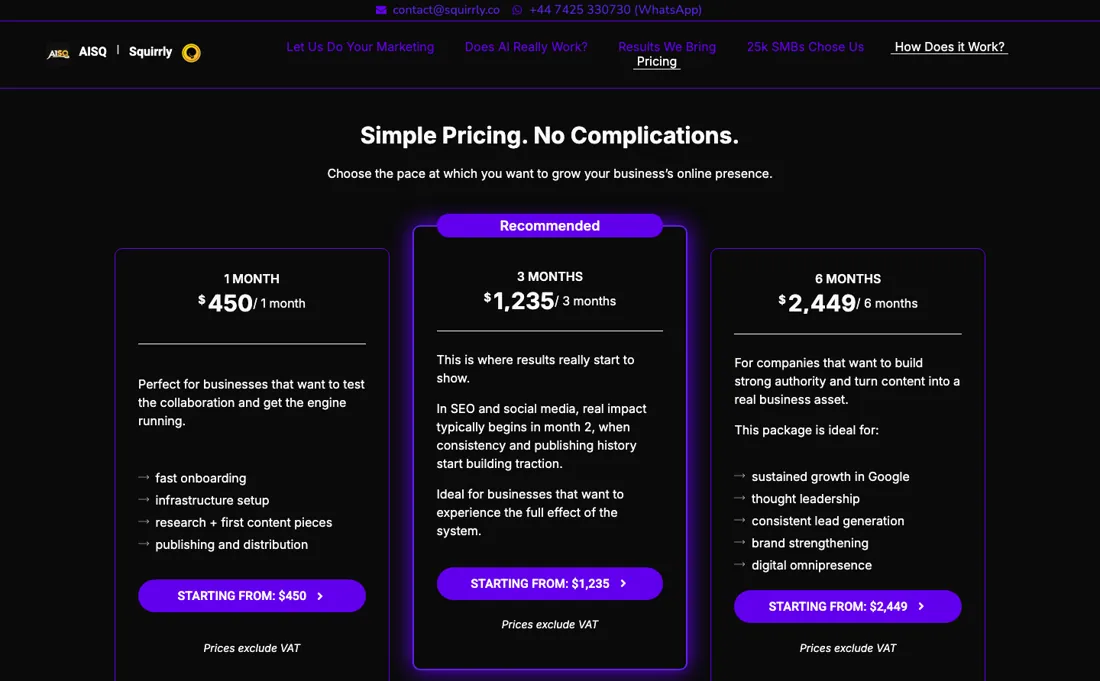
Marketing automation that promises to cut workload 90% still needs your strategy and editing; credits generate drafts, not customers.
What AISQ does
An autonomous marketing execution engine. Consolidates SEO, content distribution, and strategy into one automated workflow.

What buyers report about AISQ
Recurring themes from the buyer-review sites listed at the foot of this page, read in August 2026. We have not run AISQ ourselves, so this is other buyers' experience rather than ours. We summarise it here because the complaints are usually the part a vendor page leaves out.
- • Ten tools in one subscription — Squirrly SEO and Social, WP Ghost, Email Hero, ContentLook AI and the rest — with 40 client slots on the $400/month Meteor plan.
- • For an agency currently paying for several of those separately, the consolidation argument is real.
- • $400 a month with no trial. You commit before you can evaluate anything.
- • It carries a D-level assessment (40/100) with no SOC 2 compliance certification. If you handle client data, that is a procurement question you will have to answer.
- • Serious billing complaints are documented.
- • AISQ's claim that equivalent tools would cost $8,000+/month is their own comparison, not an independent one. Price it against what you actually use.
When the paid plan is worth it
AISQ's Squirrly SEO plugin uses a freemium split, billed monthly with no annual commitment. The Free plan ($0/month) caps you at 1 site, 5 keyword researches per month, and 1 audit suite page per month, which is enough to evaluate the plugin but not to run a live blog. PRO ($9.99/month) is where an active site crosses over: 5 sites, 50 keyword researches per month, and 100 audit suite pages per month.
The real upgrade trigger, though, is rank tracking. Both Free and PRO show 0 SERP checker credits, so position tracking starts on Web Dev Kit ($51.20/month, 2000 credits, 10 sites) or Business ($71.99/month, 3000 credits, 7 sites). Web Dev Kit costs less than Business and covers more sites, while Business carries more SERP credits — 3000 against 2000. Extra credits sell separately at $19.99 per 1,000 a month, but the same page says the SERP checker is not included on Free or PRO and never says whether that add-on lifts it, so ask before buying PRO for rank tracking.
What paying does not fix is the interface: upgrading buys quota and credits, not the clearer workflow that a WordPress.org reviewer found missing.
Our monthly capture read this vendor's pricing page in July 2026 and again in August 2026, and the amounts were the same both times. We keep watching — the registry records what moves.
How to actually use AISQ
First value runs through WordPress. Install Squirrly SEO from the plugin directory, activate it, then create and connect a free Squirrly Cloud account. That connection is mandatory, and it is what unlocks the audit, keyword research, and rank-tracking tools. You then pick recommended or expert mode and work through 5 configuration sections: social accounts, connecting Google Analytics and Search Console, webmaster verification, JSON-LD schema, and the XML sitemap.
Distilled from Squirrly SEO setup guide, https://howto12.squirrly.co/ht_kb/first-steps-to-setup-squirrly-seo-plugin/ (read 2026-08-30); Squirrly SEO pricing and plan comparison table, https://plugin.squirrly.co/wordpress-seo-pricing/ (read 2026-08-30); AISQ Growth pricing, https://aisq.com/growth/pricing/ (read 2026-08-30, reached by redirect from https://aisq.com/pricing/).
Common AISQ setup mistakes
Where AISQ setups actually go wrong, and what it costs you when they do. Same sources as the setup notes above — not from a walkthrough we ran ourselves.
The friction concentrates in two places.
- First, the multiple Google authentication flows plus a wall of settings marked "optional" leave beginners unsure what is actually required.
- Second, one WordPress.org reviewer reports the guided flow breaking: the review says the plugin "stops dead when a new blog post opens" and refers to "menus that are either hidden or don't exist," with that user abandoning it after 3 hours for a competitor.
- In that same thread, the vendor's reply points the stuck user to its "14 Days Journey to Better Rankings" course to learn the plugin step-by-step.
The natural comparison is Semrush or standalone AI writers — the established suites — pricier but stabler; AISQ's edge is cheap non-expiring credits for dabblers.
More on AISQ
Everything we publish about AISQ links back here — the review stays the honest hub:
The ex-banker filter — the same yardstick on every review (how we review): My ex-banker filter is simple: does AISQ remove a real cost — time, errors, missed revenue — bigger than what it charges?
Frequently asked questions
What should I weigh before buying Growth & Revenue software?
It depends on whether you have the bottleneck it solves. Small teams get the most out of this category when one clear problem is already costing real hours or revenue; buying ahead of that just adds cost and another login. Price it against the hours or lost deals it removes, not against its feature list, and start on the smallest plan that covers the job.
Is this a hands-on review of AISQ?
This is a researched assessment, not a hands-on test — where we've used a tool ourselves, we say so explicitly. We name what each tool is genuinely good and bad at, and we earn a commission only if you sign up, at no cost to you.
- Buyer reviews on G2 and platform assessments, read August 2026.
- 2026-08-30, read on plugin.squirrly.co/wordpress-seo-pricing.
- A dated screenshot of that pricing page, kept on this site as the receipt.
Others in this category
The growth & revenue tools closest to AISQ that we have also reviewed. They overlap rather than match:
New dossiers, cost-traps we found, and tools that earned a keep — no hype, no sponsored-disguised-as-advice. Unsubscribe anytime.
This is our researched assessment — not a paid placement. The “Visit” links on this page are affiliate links: we may earn a commission if you sign up, at no extra cost to you, and it never changes our take. How we review →