 VidPal Review (2026)
Credits don't carry over month to month, and a few users report slow support/account responses — so run the free plan through a full create-and-publish loop before you pay.
Visit VidPal → 🎟️ Code AIBUILDERMARKETPLACE — 10% off Affiliate link — we may earn a commission if you sign up; it does not change what this page says.
Watch the 2-minute review
The video version of this review, from our YouTube channel.
⚡ Short on time? Watch the 30-second verdict Short.
Pricing (2026)
✓ Pricing re-verified 20 Sep 2026
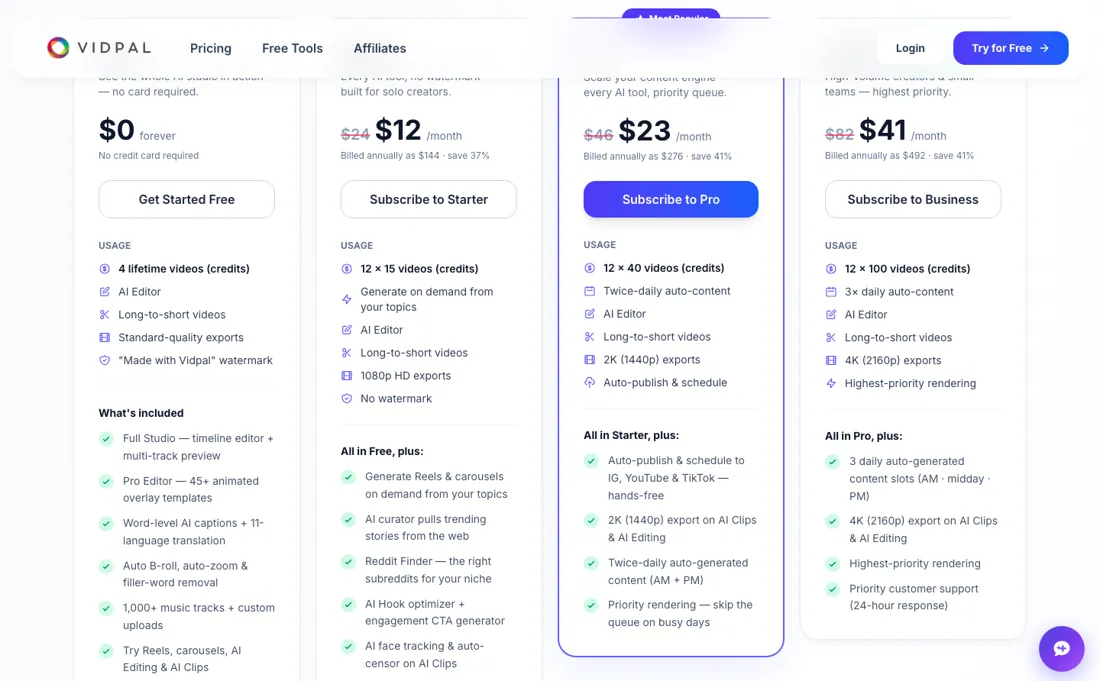
(2026) Free: 4 lifetime credits, standard-quality exports, "Made with Vidpal.ai" watermark, no card. Starter $12/mo billed annually ($144/yr) or $24 monthly, 15 credits/mo; Pro $23/mo annually ($276/yr) or $46 monthly, 40 credits, auto-publish and scheduling, 2K exports; Business $41/mo annually ($492/yr) or $82 monthly, 100 credits, 4K, three daily slots; Enterprise on quote. One credit is a Reel, a carousel, an editing upload or ten minutes of clip source; an AI Avatar or long-form video is five.
Monthly credits do not roll over, annual credits arrive as a yearly pool, and top-up packs expire after 60 days. Refunds cover the unused credit balance within 30 days. Plans change — always verify the live price on their site.
Correction after re-checking: The pricing page states two different month-to-month prices for every tier, and it still did on a re-read of 20 September 2026. The plan cards show $24, $46 and $82 struck through against the annual $12, $23 and $41, labelled "save 37%" on Starter and "save 41%" on Pro and Business; the FAQ lower down the same page says Starter drops from $19 to $12, Pro from $39 to $23 and Business from $69 to $41. The annual figures ($144, $276, $492) are consistent everywhere. Ask which monthly rate applies before you choose monthly billing. (re-verified 2026-09-20)
AIBUILDERMARKETPLACE — 10% off. The code has been in our records since July 2026, after we joined VidPal's partner programme on 28 June, but VidPal has not confirmed it to us in writing; we asked them to on 27 September 2026. Until they answer, we cannot say which plans it covers or when it ends, so check that the 10% shows at checkout before you pay. for referrals, verified in the partner dashboard. Claim the deal →VidPal’s pricing page, as we read it
What VidPal does
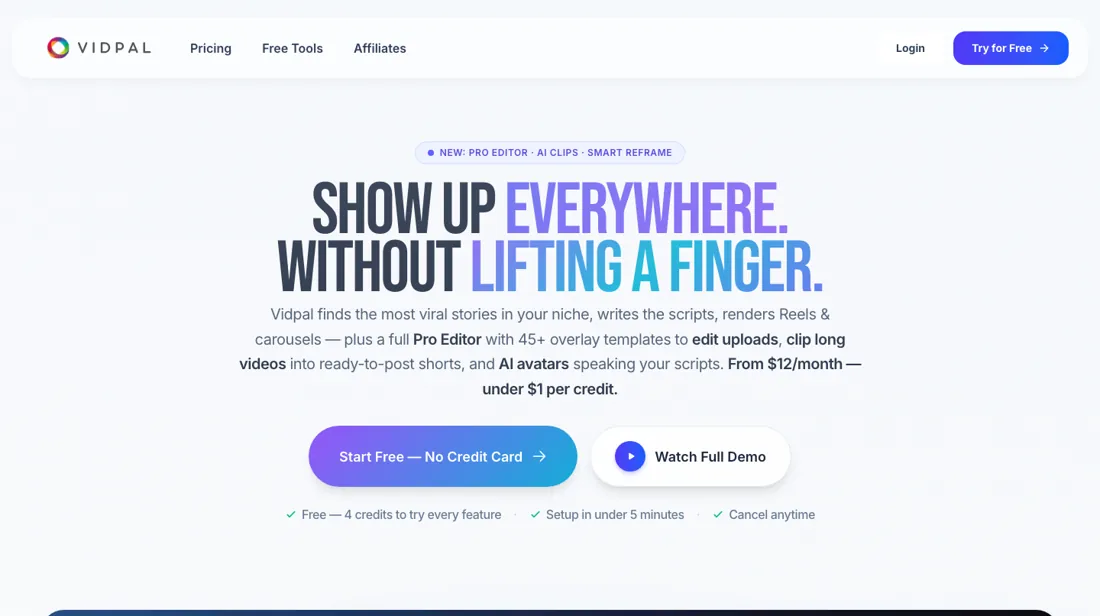
Autonomous content engine for faceless and topic-based channels: it discovers trending stories in your niche, auto-generates short-form videos and carousels with AI voiceovers, and auto-publishes them across Instagram, TikTok, YouTube and more.
What buyers report about VidPal
Recurring themes from the buyer-review sites listed at the foot of this page, read in August 2026. We have not run VidPal ourselves, so this is other buyers' experience rather than ours. We summarise it here because the complaints are usually the part a vendor page leaves out.
- • It runs the whole loop unattended: finds trending stories in your niche, writes the script, generates voiceover and visuals, burns in captions, renders 9:16 and publishes to Instagram, YouTube, TikTok and Facebook on schedule.
- • Approval is optional rather than a gate, which is the difference between an engine and an editor.
- • We found no independent user reviews and no published pricing detail. There is nothing outside the vendor's own material to judge it on.
- • Publishing without review is the feature and the risk. Anything the engine gets wrong about a trending story goes out under your name — decide whether you actually want approval off.
Pro's autopilot runs out on day 20
Vidpal's free plan is the trial: 4 lifetime credits, standard-quality exports and a "Made with Vidpal.ai" watermark, no card. On annual billing the paid tiers are Starter $12 a month ($144 a year, 15 credits), Pro $23 ($276, 40 credits), Business $41 ($492, 100 credits) and Enterprise on quote; month to month the cards read $24, $46 and $82 (price re-verified 2026-09-01 against the vendor's own pricing page). Auto-publish and scheduling start on Pro, so Starter will not post for you.
But Pro's own arithmetic undercuts its pitch. One credit buys a Reel, a carousel, an editing upload or ten minutes of clip source, and twice-daily autopilot spends its 40 credits in twenty days. Business is the first tier whose allowance survives a month: 100 credits against three slots a day is 33 days. Credits do not roll over on monthly billing; annual plans receive the year's credits as one pool, and top-up packs expire after 60 days.
What upgrading does not fix: the free plan cannot auto-publish at all, so hands-free posting — the thing you are actually buying — is the one thing you cannot test before you pay for it.
How to actually use VidPal
Vidpal's homepage promises setup in under 5 minutes; its own cross-posting guide budgets about 15 minutes once several platforms are involved, so plan for the longer figure. You pick niche topics, set a brand voice and connect a social account. The free plan's 4 credits need no card, so you can see output before paying — though free renders carry the "Made with Vidpal.ai" watermark. Check what your plan allows before you build a workflow around posting.
Manual sharing to Instagram, YouTube and TikTok starts at Starter; auto-publish and scheduling only at Pro.
Distilled from vendor sources only: vidpal.ai homepage, the pricing page and its FAQ (re-read 2026-09-01), the vendor cross-posting guide on the Vidpal blog, and the vendor use-cases page. No independent tutorials, forum threads or user reports found for vidpal.ai.
Common VidPal setup mistakes
Where VidPal setups actually go wrong, and what it costs you when they do. Same sources as the setup notes above — not from a walkthrough we ran ourselves.
The friction sits in the connections.
- The vendor guide says platforms are authorised via OAuth, with separate connect flows for YouTube and TikTok and Instagram running through the Graph API's three-step container flow.
- Facebook Reels is not part of the automation; the guide describes extending the workflow there by hand.
- On review controls the pricing FAQ is explicit: every Reel, carousel, avatar and clip lands in your Library first and nothing is shared until you approve it — auto-publish on Pro and Business is the exception you switch on deliberately.
The natural comparison is Hypernatural — another faceless-video generator.
Frequently asked questions
The page shows two different monthly prices — which one is real?
Both are on vidpal.ai/pricing and they still disagree, unchanged from our 1 September reading and re-read on 20 September 2026. The plan cards strike through $24, $46 and $82 against the annual $12, $23 and $41, labelled "save 37%" on Starter and "save 41%" on Pro and Business. The FAQ on the same page describes the same discount from a different base: Starter drops from $19 a month to $12, Pro from $39 to $23, Business from $69 to $41. The annual figures are consistent everywhere — $144, $276 and $492 a year — so annual billing is the one number you can act on without asking. If you want month to month, ask support which rate your card will be charged before you subscribe: on Pro the difference is $46 against $39, every month.
If I pay for the year, do I get all the credits up front?
Yes, and that is the main practical reason to choose annual. The plan table read 20 September 2026 states the annual allowance as 12 × 15, 12 × 40 and 12 × 100 videos — 180, 480 and 1,200 credits — and the FAQ confirms annual plans are billed up front with the credits delivered as a yearly pool you can spend unevenly across the twelve months. Monthly billing has no such flexibility: credits reset at the start of each cycle and do not carry over. Two expiry rules sit outside that pool. Credit packs bought on top of a plan are valid for 60 days from purchase. And the refund, per the same FAQ, covers the unused portion of your credits within 30 days of payment, by email to support@vidpal.ai — so an unspent annual pool is not a year of refundable balance. Upgrades take effect immediately with prorated billing; downgrades wait until the end of the period.
Which plan do I need for the export quality I want?
Export quality is a hard tier line, not a setting. Read on 20 September 2026, the comparison table runs Free at standard quality with a "Made with Vidpal" watermark, Starter at 1080p with the watermark gone, Pro at 2K (1440p) and Business at 4K (2160p), with the 2K and 4K limits stated specifically for AI Clips and AI Editing. So if you need 4K masters you are on the $41-a-month annual tier regardless of how few videos you make, and its 100 credits come along whether you use them or not. Two other things move with the same line: auto-publish and scheduling to Instagram, YouTube and TikTok start at Pro, and AI Avatar and long-form video are locked on Free entirely, at 5 credits each once unlocked. Payment runs through Dodo Payments as merchant of record rather than through Vidpal directly.
What should I weigh before buying Growth & Revenue software?
It depends on whether you have the bottleneck it solves. Small teams get the most out of this category when one clear problem is already costing real hours or revenue; buying ahead of that just adds cost and another login. Price it against the hours or lost deals it removes, not against its feature list, and start on the smallest plan that covers the job.
Is this a hands-on review of VidPal?
This is a researched assessment, not a hands-on test — where we've used a tool ourselves, we say so explicitly. We name what each tool is good and bad at, and we earn a commission only if you sign up, at no cost to you.
- Buyer reviews on product documentation and category comparisons, read August 2026.
- Price re-verified 2026-09-01 against the vendor's own pricing page.
- A dated screenshot of that pricing page, kept on this site as the receipt.
Others in this category
Reviewed growth & revenue tools that share ground with VidPal — comparable in what they do, not drop-in swaps:
New reviews, price changes we recorded, and the cost conditions we found. No sponsored placements. Unsubscribe anytime.
This is our researched assessment — not a paid placement. The “Visit” links on this page are affiliate links: we may earn a commission if you sign up, at no extra cost to you, and it never changes our take. How we review →