 AfterSell Review (2026)
Post-purchase upsells only move the needle with steady order volume and a sensible complementary-offer strategy — bolt it onto a store with little traffic and there's nothing to upsell. The no-rev-share model is a genuine plus over percentage-based rivals.
Visit AfterSell → Affiliate link — we may earn a commission if you sign up; it does not change what this page says.
Watch the 2-minute review
The video version of this review, from our YouTube channel.
⚡ Short on time? Watch the 30-second verdict Short.
Pricing (2026)
✓ Pricing re-verified 27 Sep 2026
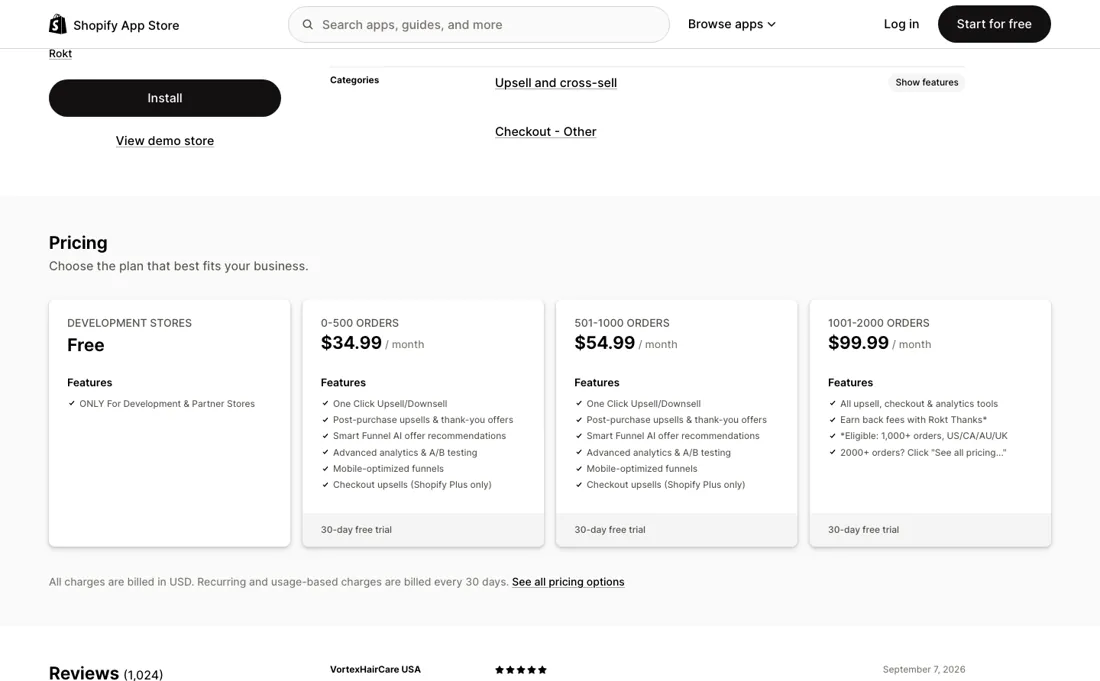
Three plans, each metered by monthly order volume, read on aftersell.com/pricing and on the Shopify App Store listing on 22 September 2026 (re-verified 22 September 2026 and again 27 September 2026). The entry prices: Post-Purchase $34.99 a month for 200 monthly orders, capped at $999.99; Pre-Purchase $59.99 for 200, capped at $599.99; Complete $79.99, capped at $1,359.99 - and on 27 September 2026 the Complete card quotes that $79.99 for 500 monthly orders, where on 22 September it read 200 like the other two.
The page does not say whether the Complete entry tier was widened or the card is wrong, so confirm the tier for your own volume in the app before you install. Complete is the other two together, which the vendor prices at 15% under buying them separately. Go over a volume tier and the fee steps up to the matching one on its own, with that cap as the ceiling.
Every plan carries a 30-day free trial, all charges are billed in USD, and the Free plan on the listing is for development and partner stores only. Checkout upsells are Shopify Plus only and now sit inside Post-Purchase and Complete rather than being billed separately. Rokt Thanks, the third-party offers on the confirmation page, is free with no minimum order volume and pays up to $0.80 per order; for stores above 1,000 monthly orders whose primary market is the US, Canada, Australia or the UK those earnings are credited against the subscription dollar for dollar.
Aftersell Max, for high-volume stores, is custom-priced and publishes no figure. The unexplained $19.99 we saw above the $79.99 on the Complete card on 22 September 2026 is no longer on the page on 27 September. This replaces the single order-volume ladder we recorded on 5 September 2026 ($34.99 for 0-500 orders, $54.99 for 501-1,000, $99.99 for 1,001-2,000); that ladder is on neither page any more. Plans change — always verify the live price on their site.
Correction after re-checking: (re-verified 22 September 2026) Aftersell has replaced the single order-volume ladder we recorded in July and September 2026 with three separately sold plans, each metered by order volume: Post-Purchase from $34.99 a month, Pre-Purchase from $59.99 and Complete from $79.99, quoted at 200 monthly orders and capped at $999.99, $599.99 and $1,359.99. The brackets we published ($54.99 at 501-1,000, $99.99 at 1,001-2,000, $149.99 plus $0.03 an order to a $799.99 ceiling) are on neither page any more. One charge has gone away: checkout upsells were billed separately at a flat $99 a month and are now included in Post-Purchase and Complete, still Shopify Plus only. The Shopify App Store listing shows only the three entry prices — not the volume scaling, not the caps and not the custom-priced Aftersell Max tier — so the listing on its own now understates what a busy store pays.
AfterSell’s pricing page, as we read it
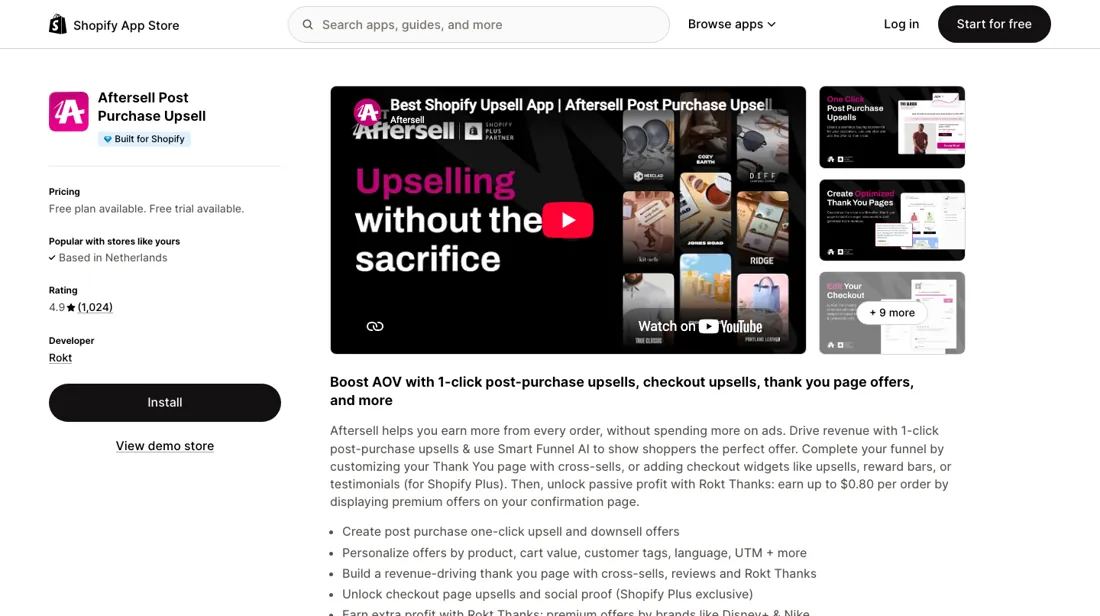
What AfterSell does
Post-purchase upsell and cross-sell app for Shopify (by Rokt): one-click upsells, downsells and thank-you-page offers plus checkout customization to lift average order value — no extra ad spend.
What buyers report about AfterSell
Recurring themes from the buyer-review sites listed at the foot of this page, read in August 2026. We have not run AfterSell ourselves, so this is other buyers' experience rather than ours. We summarise it here because the complaints are usually the part a vendor page leaves out.
- • 4.8 stars across 840+ Shopify App Store reviews, and merchants name the same three things: quick setup, a real lift in average order value, and support that answers.
- • Checkout and post-purchase upsells with A/B testing built in, plus a 30-day free trial on every paid plan. The free plan merchants mention is not one of them: the listing limits it to development and partner stores.
- • There are complaints of being charged during the trial period, and of customers being double-charged. Watch your first invoice.
- • Pricing is metered by monthly order volume rather than flat, so the bill climbs with the store and merchants warn each other to check which band they are in before the month they grow into the next one. The bands they were describing no longer exist: Aftersell restructured in September 2026 into three separately sold plans, each with its own ceiling. The complaint still holds, the figures behind it do not — read the pricing section above for what applies now.
- • A minority report occasional glitches and slower support.
Pages read (August 2026): Shopify App Store
When the paid plan is worth it
AfterSell has no free tier for a live store: the Free plan on its Shopify listing reads "ONLY For Development & Partner Stores". What the money buys is which half of the funnel you get, and how many orders you may run through it. Read 27 September 2026: Post-Purchase at $34.99 a month for 200 monthly orders covers the one-click offers after checkout, the thank-you page and Smart Funnels; Pre-Purchase at $59.99, also for 200, covers the cart — 18-plus drag-and-drop blocks, rewards bars, free gifts, product-page upsells and A/B testing; Complete at $79.99, which its card now quotes for 500 monthly orders, is both, at 15% under buying them apart.
All three climb with your order volume and stop at a stated ceiling — $999.99, $599.99 and $1,359.99 respectively — so the ceiling, not the entry price, is the number to plan against. Checkout upsells no longer carry a separate fee: they are inside Post-Purchase and Complete, and still Shopify Plus only. Rokt Thanks is free with no minimum volume and pays up to $0.80 per order; above 1,000 monthly orders in the US, Canada, Australia or the UK it is credited against your subscription dollar for dollar, which is the one route by which more orders can mean a smaller bill rather than a bigger one.
Upgrading buys order headroom, not reach. Regardless of plan, Shopify blocks one-click offers on BNPL, digital wallets, gift cards, COD and bank transfers, on non-default-currency checkouts, and on orders worth less than $0.50 — and caps you at three accepted post-purchase offers per order.
How to actually use AfterSell
Install the app, then do the step people skip: Shopify itself has to be pointed at it. Under Settings → Checkout, Aftersell must be selected as the active post-purchase page app, or nothing renders. In the app, open Post-purchase Funnels, start from a template or add a funnel manually, set trigger conditions (they combine with AND logic), add your offers, then activate. Thank-you-page widgets are a separate job: the docs say the blocks must be placed on both the thank you page and the order status page in the Shopify editor, or they will not display.
Two practical traps. First, a test order paid with Apple Pay, Klarna or a gift card will show no offer at all — that is Shopify's restriction, not a broken install, and the documented fallback is thank-you-page offers. Second, the editor preview does not match live rendering, so real test orders are recommended. The vendor's best-practice page advises waiting 2-4 weeks or 100-200 impressions per layout before drawing conclusions.
Distilled from vendor documentation only: the Aftersell quickstart, post-purchase best-practices and "why isn't my post-purchase offer displaying" pages on docs.aftersell.com; no independent walkthrough met the bar (the two candidates were agency posts, one promoting a different app). Pricing re-read 27 September 2026 by plain fetch of aftersell.com/pricing and apps.shopify.com/aftersell: Post-Purchase $34.99 and Pre-Purchase $59.99 'for 200 monthly order volume', Complete $79.99 'for 500 monthly order volume', caps $999.99, $599.99 and $1,359.99, 30-day free trial on each, Complete 'Save 15%'; Rokt Thanks 'Earn $0.30-0.80 in profit per order', credited dollar for dollar only for stores above 1,000 monthly orders with the US, Canada, Australia or the UK as primary market; the FAQ: a plan that exceeds its volume tier moves automatically to the matching tier up to the stated cap, the products can run side by side and are billed independently, checkout upsells are Shopify Plus only and inside Post-Purchase and Complete, Aftersell Max is custom-priced with a dedicated account manager, white glove support, custom development and MCP access; an offer banner: 'Recently upgraded to Shopify Plus? Receive free lifetime access to Aftersell's checkout functionality ($1200 annual value)', terms not printed. The Shopify listing: Free plan for development and partner stores only, the three entry prices, 30-day trials, charges in USD billed every 30 days. The $19.99 of 22 September is no longer on the Complete card.
The natural comparison is Zipify OneClickUpsell or ReConvert — other Shopify upsell apps.
Frequently asked questions
Does AfterSell charge more when my order volume grows?
Yes, automatically, up to a ceiling. The pricing FAQ (read 27 September 2026) says the fee moves to the matching volume tier on its own, and each plan stops at a stated cap: $999.99 a month for Post-Purchase, $599.99 for Pre-Purchase and $1,359.99 for Complete. The entry prices are $34.99 and $59.99 for 200 monthly orders, and $79.99 for Complete, whose card now says 500. Plan against the cap, not the entry price. Charges are in USD, billed every 30 days.
Can Rokt Thanks pay for my AfterSell subscription?
Only for larger stores in four markets. The pricing page (read 27 September 2026) says Rokt Thanks is free, puts third-party offers on the order confirmation page and earns $0.30 to $0.80 per order, and that the earnings are set dollar for dollar against the subscription only for stores above 1,000 monthly orders whose primary market is the US, Canada, Australia or the UK. Below that you can still run it, but the earnings do not reduce the AfterSell bill. The per-order figure is the vendor's range, not a guarantee.
Is there a deal for stores moving to Shopify Plus?
There is an offer, with unpublished terms. The pricing page (read 27 September 2026) says stores that recently upgraded to Shopify Plus get free lifetime access to AfterSell's checkout functionality, valued at $1,200 a year, and points to the sales team for the full suite. It covers checkout upsells, not the post-purchase or cart products, and the 'terms apply' are not on the page, so get them in writing.
What should I weigh before buying Growth & Revenue software?
It depends on whether you have the bottleneck it solves. Small teams get the most out of this category when one clear problem is already costing real hours or revenue; buying ahead of that just adds cost and another login. Price it against the hours or lost deals it removes, not against its feature list, and start on the smallest plan that covers the job.
Is this a hands-on review of AfterSell?
This is a researched assessment, not a hands-on test — where we've used a tool ourselves, we say so explicitly. We name what each tool is good and bad at, and we earn a commission only if you sign up, at no cost to you.
- Buyer reviews on the Shopify App Store and merchant comparisons, read August 2026.
- AfterSell’s own published pricing page.
- A dated screenshot of that pricing page, kept on this site as the receipt.
Others in this category
Reviewed growth & revenue tools that share ground with AfterSell — comparable in what they do, not drop-in swaps:
New reviews, price changes we recorded, and the cost conditions we found. No sponsored placements. Unsubscribe anytime.
This is our researched assessment — not a paid placement. The “Visit” links on this page are affiliate links: we may earn a commission if you sign up, at no extra cost to you, and it never changes our take. How we review →