Upsell.com Review (2026)The Listed Tiers Stop at 200 Orders
 By Daan Haket · Researched and written with an AI assistant · who does what
The ladder is public now, and that removes the complaint we had in September, but it leaves a cliff where the old one had a gap.
shopify merchants who want one funnel covering product page, cart, post-purchase and thank-you offers with AI recommendations and A/B testing, and who are either under 2,000 orders a month — where the whole feature set costs $9.99 — or well past it, where $199 buys priority support rather than more product.
you are close to 2,000 orders a month, because the next rung is $199 and there is nothing between the two — or you are not on Shopify Plus and were buying this for the checkout upsells, which stay closed to you.
Transparency: the “Visit” links on this page are affiliate links — we may earn a commission if you sign up, at no extra cost to you. No vendor can pay for a better review or verdict. How we make money →
Pricing (2026)
✓ Pricing re-verified 19 Sep 2026
| Plan | Price | What you get |
|---|---|---|
| Free | Free | up to 50 monthly store orders or $50 of upsell revenue |
| Growth | $9.99 a month | from 51 orders or $51 of upsell revenue, up to 2,000 |
| Scale | $199 a month, or $149 a month billed annually | up to 10,000 orders |
| Elite | $499 a month, or $399 a month billed annually | up to 20,000 orders |
| Enterprise | no published price | above 20,000 orders, one invoice across multiple stores |
Summarised from the pricing notes below; the notes carry the conditions.
| This tool | $9.99 | 15th cheapest of 52 |
| Cheapest | $2.99 | MX AI |
| Median | $15 | |
| Most expensive | $199 | Auware |
Lowest paid entry price per account a month, billed monthly, in USD, among the 52 e-commerce growth apps we have researched (read between 2026-08-19 and 2026-10-14). Only tools priced in the same unit and on the same billing are compared — not a market survey, and cheapest is not best.
Billed in USD. Every tier carries the same feature set — the vendor's own comparison says so in as many words, "Every feature is included on every plan. Tiers differ by order volume and support" — so you are buying volume and support, not features. Free: up to 50 monthly store orders or $50 of upsell revenue, whichever is hit first. Growth $9.99 a month: from 51 orders or $51 of upsell revenue, up to 2,000.
Scale $199 a month, or $149 a month billed annually, up to 10,000. Elite $499 a month, or $399 a month billed annually, up to 20,000. Enterprise is quote-only above 20,000 and adds one invoice across multiple stores. The annual saving is 25% on both paid tiers; the Shopify listing renders it as "$149/year and save 94%", which is its own arithmetic and not what the vendor's page says.
Two contradictions on upsell.com/pricing itself: the Scale card says "Billed monthly" while the comparison table one screen below says Scale is billed "Annual only", and the Growth card is labelled FREE above a volume list that runs to 2,000 orders, while the listing prices anything from the 51st order at $9.99. A 14-day free trial is offered on each paid tier. Checkout upsells remain Shopify Plus only. Plans change — always verify the live price on their site.
Category context: Growth & Revenue. Across the 82 tools in this category that we researched with a public US-dollar price, the median entry price is about $29 a month (lowest paid plan as listed, per seat where the vendor prices per seat). Upsell.com’s entry price of $9.99 a month sits below that median. Compare pricing conditions in the Software Cost Atlas →
What the pricing page doesn’t say
Growth covers you to 2,000 orders a month for $9.99. The next rung is Scale at $199. There is nothing in between, so the store that grows from 1,900 orders to 2,100 does not pay a little more — it pays twenty times more, for a feature set the vendor says is identical on every plan. What Scale actually buys at that price is priority chat, guided onboarding and earlier access to features.
The page also argues with itself in two places: the Scale card says billed monthly while the comparison table one screen below says Scale is annual only, and the Growth card is headed FREE above a volume list running to 2,000 orders while the Shopify listing charges $9.99 from the 51st. And checkout upsells are still Shopify Plus only, so on a standard Shopify plan the checkout stage of the funnel you are buying stays shut.
Watch the video review
The video version of this review, from our YouTube channel.
What Upsell.com does
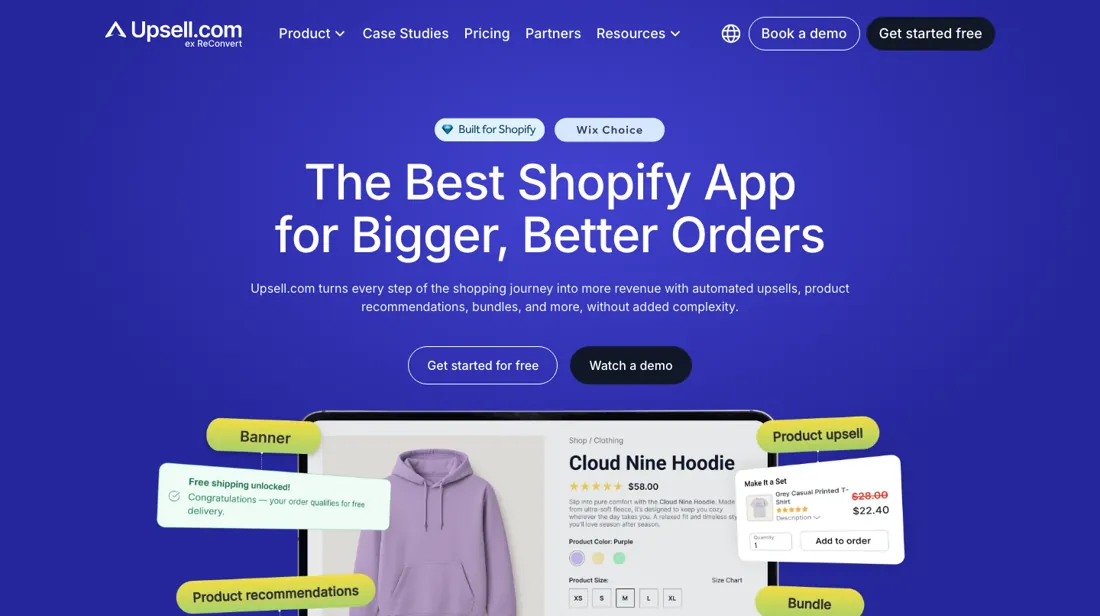
Shopify upsell app, formerly ReConvert: AI-driven cart, checkout and post-purchase upsell and cross-sell funnels, frequently-bought-together and product page recommendations, A/B testing and analytics with segmentation.
What buyers report about Upsell.com
Hands-on: not tested by usReported by buyers: the app's own Shopify App Store review section, read September 2026
Themes from the buyer-review sites listed at the foot of this page, read in September 2026. We have not run Upsell.com ourselves, so this is other buyers' experience rather than ours. We summarise it here because the complaints are usually the part a vendor page leaves out.
- • Concrete revenue claims from merchants running the A/B tests — one reports $17k of additional revenue in a month (August 2026).
- • Onboarding is repeatedly called easy, including by a merchant who describes themselves as bad with technology, and one whose installation was done for them by support.
- • Named support staff and real-time chat cover, including on a Saturday.
- • Billing above the published ladder, and it lands exactly where our pricing section says it would. A merchant reports being charged $39.99 after the trial on nearly 50 orders of which only one was an upsell order, and states there is "absolutely no pricing option under $20" (July 2026). The vendor replied acknowledging the billing surprise and offering to review the charges. $39.99 is above Upsell Business, the highest tier the listing publishes.
- • Language coverage: a Brazilian merchant asks for Portuguese.
Where the ratings disagree. The praise and the complaint are about different things and both are worth reading. Merchants describe the funnel builder and the support warmly and in detail; the sharpest complaint is not about the product at all but about a price the app page does not publish. That is the same gap the pricing section flags — the listed tiers stop at 200 orders — showing up in a merchant's invoice rather than in a table.
Pages read (September 2026): Shopify App Store
When the paid plan is worth it
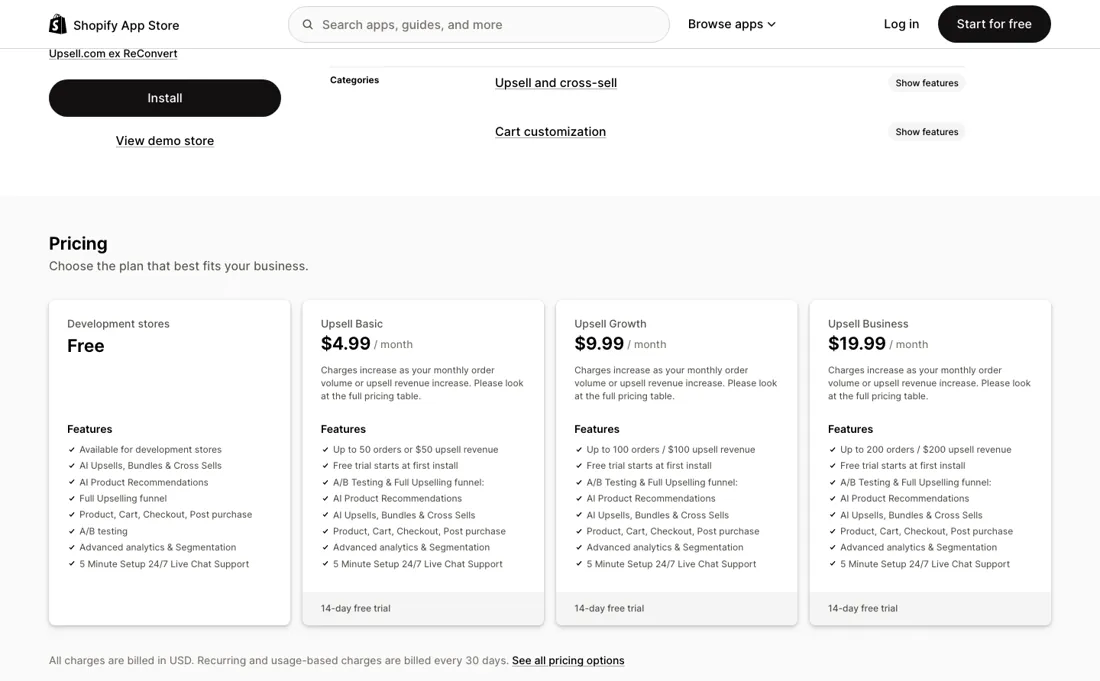
The three listed rungs are the same product at three volumes, and the arithmetic comes out flat: $4.99 for 50 orders, $9.99 for 100 and $19.99 for 200 all work out at about ten cents an order, whichever of the two meters — orders or upsell revenue — you reach first. On the published part of the ladder there is therefore nothing to weigh: buy the rung your volume needs and move on.
Two things more money will not fix. Checkout upsells are gated on Shopify Plus, which is a Shopify subscription and not an app tier, so no amount paid here opens that stage of the funnel for a standard plan. And the ladder stops being published above Business: the listing says charges rise with volume and points at a table it does not show, so the tier you will actually sit on once the app is working is the one whose price you cannot look up before you install it.
Our monthly capture read this pricing page in September 2026 and again in October 2026. Our 1 September capture showed a ladder starting at $3.99 a month on annual billing ($4.99 monthly), with higher-volume steps at $399.99 and $799.99. By our 19 September reading upsell.com and its Shopify listing showed a new ladder priced by order volume, with every feature on every plan: Free up to 50 orders, Growth at $9.99, Scale at $199 a month ($149 annually), Elite at $499 ($399 annually) and Enterprise on quote above 20,000 orders. The October capture carries the $199 and $499 figures.
How to actually use Upsell.com
Install on a development store first — that is the only place the free plan applies, and it is enough to learn the drag-and-drop editor without a bill. Then build one funnel rather than the whole journey. The app spans the product page, the cart, checkout and post-purchase, and switching all of it on at once leaves you with a conversion number nobody can attribute. Leave checkout for last whatever you do: the listing marks that stage Shopify Plus only, so on a standard plan it is not yours to switch on.
Set the A/B test when you set the offer, not afterwards, because retro-fitting a control costs you the first weeks of data. Then watch both meters, orders and upsell revenue, since whichever climbs faster is the one that decides your bill. The vendor runs a help centre at help.upsell.com, which is organised as Upsell.com for Shopify, Upsell.com for Wix and Integrations.
Distilled from the app's Shopify App Store listing (apps.shopify.com/reconvert-upsell-cross-sell) — highlights, plan table, funnel stages and linked resources — plus the help.upsell.com index, read 2 September 2026; no hands-on run
Upsell.com vs AfterSell, side by side
Each column shows the vendor’s own published entry price, read on the date shown. Entry prices can cover different services or units, so check what each one buys. We do not average them into a score.
Both names above are affiliate links: we may earn a commission if you sign up, at no extra cost to you. Neither changes what this table says.
The natural comparison is AfterSell — Both cover the post-purchase and checkout upsell ground on Shopify, and AfterSell publishes what it costs across its whole range. Upsell.com, formerly ReConvert, publishes only its bottom three rungs — $4.99, $9.99 and $19.99, stopping at 200 orders a month — and refers everything above that to a pricing table the app page does not show. On features the two are close enough that for a growing store the deciding factor is the one thing Upsell.com will not put on the page: what it charges once you are actually busy..
Frequently asked questions
What does it cost me once I pass 2,000 orders a month?
$199 a month, and there is no step between. Growth is $9.99 up to 2,000 monthly store orders or $2,000 of upsell revenue, whichever is hit first; the next tier, Scale, is $199 and runs to 10,000. So the bill can go up twentyfold for the order that crosses the line, and the vendor's own comparison says every feature is on every plan, so nothing new arrives with it — Scale adds priority chat, guided onboarding and earlier feature rollouts. If your volume sits anywhere near the boundary, price the year on Scale before you install, not on Growth.
Is the metering on orders or on the revenue the upsells make?
Both, and the one that trips first wins. Every tier is described as a ceiling on "monthly store orders or upsell revenue (higher of the two)", so a store doing 400 orders a month that earns $2,400 from upsells is charged on the $2,400. That detail matters most at the bottom: the free tier stops at 50 orders or $50 of upsell revenue, which a single successful offer can exhaust in a week. Read the ceiling as whichever number your shop hits first, not as an order count.
Is Scale billed monthly or annually?
The page says both, on the same screen, and we could not resolve it from the page. The Scale card reads "starting at $199/mo, Billed monthly"; toggle the page to Annual and it reads "$149/mo, Billed annually, $199 monthly", which is a clean 25% off. But the comparison table below the cards lists Scale's billing as "Annual only" while giving Growth "Monthly or annual". The Shopify listing adds its own version, "$199/month or $149/year and save 94%", which is neither. Ask which of the three applies before you commit to a year.
Can I run the checkout upsells on a standard Shopify plan?
No. Checkout upsells need Shopify Plus, which the app says plainly in its listing and the pricing page repeats twice — the checkout placement is marked "Checkout (Shopify Plus)", and Elite lists "Checkout upsells *for Plus stores" as one of the things it adds. Everything else in the funnel does work on a standard plan: product page, cart page and drawer, post-purchase one-click, thank-you page and order status page. So the gap is one stage of six, but it is the stage with the highest intent, and no tier of this app opens it for you.
Is this a hands-on review of Upsell.com?
This is a researched assessment, not a hands-on test — where we've used a tool ourselves, we say so explicitly. We name what each tool is good and bad at, and we earn a commission only if you sign up, at no cost to you.
- Buyer reviews on the app's own Shopify App Store review section, read September 2026.
- Prices re-verified 2026-09-19 on upsell.com/pricing and on the Shopify listing apps.shopify.com/reconvert-upsell-cross-sell; both now show the same ladder, which replaces the $4.99/$9.99/$19.99 tiers we recorded on 2 September.
- A dated screenshot of that pricing page, kept on this site as the receipt.
Others in this category
Reviewed growth & revenue tools that share ground with Upsell.com — comparable in what they do, not drop-in swaps:
New reviews, price changes we recorded, and the cost conditions we found. No sponsored placements. Unsubscribe anytime.
This is our researched assessment — not a paid placement. The “Visit” links on this page are affiliate links: we may earn a commission if you sign up, at no extra cost to you, and it never changes our take. How we review →