MX AI Review (2026)
 By Daan Haket · Researched and written with an AI assistant · who does what
The strongest argument against paying for this is one App Store search away.
Shopify merchants who want seasonal or ambient audio on the storefront, want a say in how the player looks and behaves, and would rather use the app's royalty-free tracks than sort out the licensing for a song of their own.
you only need a single uploaded MP3 looping in the background, because RoarTheme's free app covers exactly that; or your store competes on load speed and accessibility, where unexpected audio is a liability; or you have never measured whether sound moves your conversion rate, because the listing offers no evidence that it does.
Transparency: the “Visit” links on this page are affiliate links — we may earn a commission if you sign up, at no extra cost to you. No vendor can pay for a better review or verdict. How we make money →
Pricing (2026)
✓ Pricing re-verified 3 Oct 2026
| This tool | $2.99 | 1st cheapest of 59 |
| Cheapest | $2.99 | this one |
| Median | $15 | |
| Most expensive | $199 | Auware |
Lowest paid entry price per account a month, billed monthly, in USD, among the 59 e-commerce growth apps we have researched (read between 2026-08-19 and 2026-10-30). Only tools priced in the same unit and on the same billing are compared — not a market survey, and cheapest is not best.
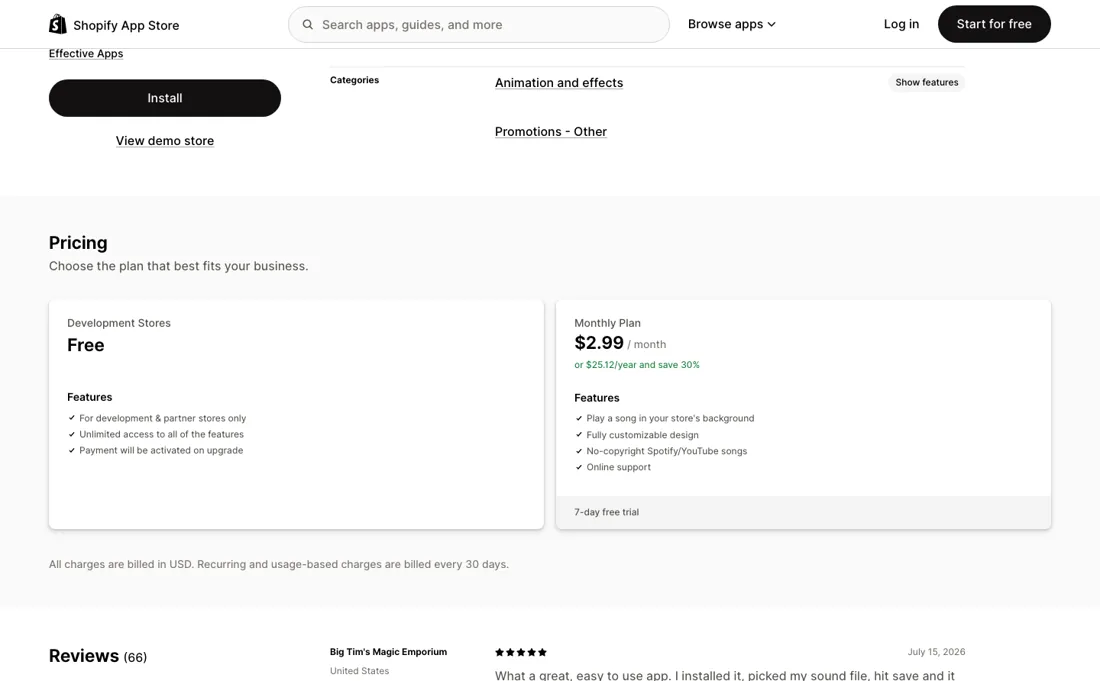
Two plans, and the free one is not for you. Development Stores is free with unlimited access to every feature, but the listing restricts it to development and partner stores and says payment is activated on upgrade. A live store runs on the Monthly Plan: $2.99 a month, or $25.12 a year paid up front, which the listing labels a 30% saving.
Both are billed in USD every 30 days, and the paid plan opens with a 7-day free trial. The pricing block lists nothing above the Monthly Plan — no traffic tier, no play-count tier, no second paid step — so $2.99 is the whole app whether the storefront sees ten visitors a day or ten thousand. Plans change — always verify the live price on their site.
What the price did
We capture MX AI’s own pricing page every month and keep the figures, so this is our record of the page — not a forecast, and not someone else’s summary.
Two dated readings, no movement. On 16 September and 3 October 2026 the listing showed the same two plans: Development Stores free for development and partner stores only, and the Monthly Plan at $2.99 a month or $25.12 a year with a 7-day trial, billed in USD; the rating stood at 4.8 from 66 reviews both times.
What the pricing page doesn’t say
RT: Background Music Player, from RoarTheme, does the core job — upload a media file, it plays in the background — and the listing prices it at Free, full stop. It sits at 4.8 stars over 72 reviews against this app's 4.8 over 66, and it has been on the store since 5 February 2021. What the $2.99 buys over free is real but narrow: control over the player's colour, size, position, volume, loop and autoplay, sources beyond an uploaded file, and a set of AI-generated royalty-free seasonal tracks.
If all you want is one MP3 looping on the homepage, you are paying for controls you will set once and never open again. Two smaller things worth knowing before you install. The "Free plan available" badge on the listing is for development and partner stores only — on a live store there is no free tier, so read that badge as a 7-day trial. And the pitch that background music "can enhance your interaction with customers and improve conversion rate & sales" arrives with no evidence: no study, no store data, no test.
Autoplay is not entirely yours to command either, because browsers block audio that starts without a user gesture, so the autoplay switch takes effect once the shopper has interacted with the page rather than on load. At $2.99 the cost of finding out whether sound helps your store is small — but find out, rather than assume.
Watch the video review
The video version of this review, from our YouTube channel.
What MX AI does
Shopify app that plays a track of your choice in the background of a storefront, with control over the player's colour, size, position, volume, loop and autoplay, and sources ranging from an uploaded MP3 to Spotify, SoundCloud, Apple Music and YouTube formats. Built for Shopify, live since January 2020.
What buyers report about MX AI
Hands-on: not tested by usReported by buyers: the Shopify App Store listing, read September 2026
Themes from the buyer-review sites listed at the foot of this page, read in September 2026. We have not run MX AI ourselves, so this is other buyers' experience rather than ours. We summarise it here because the complaints are usually the part a vendor page leaves out.
- • 4.8 over 66 reviews on the Shopify App Store, read 16 September 2026, with 85% at five stars and 11% at four.
- • Setup is the repeated compliment: one merchant describes installing it, picking a sound file, hitting save and being done.
- • Support gets named as quick by more than one merchant, including for handling the setup on their behalf.
- • The player icon can disappear into your own storefront: one merchant could not see it at all until support showed them how to change its colour so it no longer matched the background.
- • Read the time-in-use figures the listing prints beside each review. The three it surfaces first were written after 13 minutes, about 2 hours and about 20 hours of use — enthusiasm at install, not evidence that the app holds up over a season.
- • 2% of the 66 ratings sit at two stars and 3% at three, and the listing shows no reviewer explaining those, so the low end of the record is unexplained.
Pages read (September 2026): Shopify App Store
When the paid plan is worth it
The free plan is not a plan, it is a sandbox. Development Stores is free with every feature switched on, but the listing restricts it to development and partner stores and says payment is activated on upgrade. A live storefront runs on the Monthly Plan at $2.99, or $25.12 a year paid up front, which the listing labels a 30% saving. Nothing sits above it — no traffic tier, no play-count tier — so a shop with ten visitors a day and one with ten thousand pay the same.
What the $2.99 does not buy is the feature the plan advertises. Autoplay is sold as a paid control, but the developer's own help centre says Chrome, Edge, Firefox and Safari allow audio only after the visitor clicks, taps or scrolls, that no app can work around that, and that the remedy is to prompt visitors into interacting first. Paying does not license your music either: the vendor's upload guide makes the rights your responsibility.
And it does not buy evidence for the sales claim in the pitch, because the listing offers none.
How to actually use MX AI
The developer's own guide is blunter about the workflow than the listing is. To use a song from YouTube you open the video, copy the URL, run it through a third-party MP3 converter that the help centre links to while stating the tool is not affiliated with them, download the file, then open the app dashboard in your Shopify admin, upload the MP3 and save. The same guide opens by telling you that securing the rights and permissions for the song is your job.
An uploaded file is one route; the listing also accepts Spotify, SoundCloud, Apple Music, Tidal, Amazon Music and YouTube Music formats. After saving, the player is yours to style: colour, size, position, volume, loop and autoplay. If you cannot find it on the storefront afterwards, colour is the likeliest reason — one merchant on the listing needed support to recolour an icon that had blended into their background. Plan on prompting visitors to click before the music starts.
Where this section comes from: our research notes (185 words)
apps.shopify.com/custom-background-music, read 16 September 2026: the two plan cards (Development Stores free, restricted to development and partner stores, payment activated on upgrade; Monthly Plan $2.99 a month or $25.12 a year at a stated 30% saving), the line that all charges are billed in USD every 30 days, the 7-day free trial, the feature list and the accepted formats, the 22 January 2020 launch date, developer Effective Apps of Ashdod, Israel, and the 4.8 rating over 66 reviews with its per-star breakdown.
The setup steps come from the developer's help centre: 'How to upload a song from YouTube?' at effectify.help/en/article/how-to-upload-a-song-from-youtube-d0ujob/, updated 14 May 2026, for the converter workflow and the rights warning, and 'The Music Doesn't Autoplay In My Store' at effectify.help/en/article/the-music-doesnt-autoplay-in-my-store-uxg0qz/, updated 13 May 2026, for the browser autoplay limits and the advice to prompt interaction; both read 16 September 2026. The merchant remark about the player icon colour is from the App Store listing's own reviews, dated 15 July 2026.
Listing re-read 3 October 2026 (served HTML): same two plan cards, prices and trial; 4.8 from 66 reviews. RoarTheme's free app not re-read.
The natural comparison is RT: Background Music Player — Same job, and the competitor's price is zero. RoarTheme's RT: Background Music Player plays an uploaded media file in the background, lets you limit it to the homepage or run it on every public page, keeps working on mobile browsers, and resumes playback at the point the shopper left off — all on a plan the listing prices at Free. It rates 4.8 over 72 reviews and has been live since 5 February 2021, against MX AI's 4.8 over 66 and a January 2020 launch. The $2.99 a month buys three things RT does not list: control over the player's colour, size, position, volume, loop and autoplay; sources beyond an uploaded file, including Spotify, SoundCloud, Apple Music and YouTube formats; and a library of AI-generated royalty-free seasonal songs. Worth paying for if you will use the design controls or the track library. If not, start with the free one and keep the $36 a year..
Frequently asked questions
What does MX AI cost?
$2.99 a month for a live store, or $25.12 for a year paid up front, which the listing labels a 30% saving; all charges billed in USD every 30 days, with a 7-day free trial. Read on the Shopify App Store listing, 16 September 2026, and unchanged on 3 October 2026. There is nothing above that plan — no traffic tier, no play-count tier, no second paid step — so a storefront with ten visitors a day and one with ten thousand pay the same. Whether that is cheap depends on what you compare it with: RoarTheme's RT: Background Music Player does the core job of looping an uploaded file for free.
The listing says “Free plan available” — can I use it?
Not on a real store. The free plan is called Development Stores, and the listing restricts it to development and partner stores and says payment is activated on upgrade. On a live storefront there is no free tier at all, so read that badge as a 7-day trial rather than a plan. Read 16 September 2026. What the $2.99 buys over the free alternatives is narrow but real: control over the player's colour, size, position, volume, loop and autoplay, sources beyond an uploaded file, and a set of royalty-free seasonal tracks.
Will the music actually autoplay for visitors?
Not when the page loads, and no app can change that. The developer's own help centre states that Chrome, Edge, Firefox and Safari allow audio only after the visitor clicks, taps or scrolls, that no app can work around the restriction, and that the remedy is to prompt visitors into interacting first — read 16 September 2026. So autoplay is sold as a paid control but delivers a delayed start you have to design for. Two related things to know before you buy: the same help centre makes clearing the rights to any song you upload your responsibility, and the listing's claim that background music can “improve conversion rate & sales” arrives with no study, no store data and no test behind it.
Is this a hands-on review of MX AI?
This is a researched assessment, not a hands-on test — where we've used a tool ourselves, we say so explicitly. We name what each tool is good and bad at, and we earn a commission only if you sign up, at no cost to you.
- Buyer reviews on the Shopify App Store listing (apps.shopify.com/custom-background-music), read September 2026.
- Read 2026-09-16 and re-read unchanged on 2026-10-03 on apps.shopify.com/custom-background-music.
- A dated screenshot of that pricing page, kept on this site as the receipt.
Others in this category
Reviewed design & content tools that share ground with MX AI — comparable in what they do, not drop-in swaps:
New reviews, price changes we recorded, and the cost conditions we found. No sponsored placements. Unsubscribe anytime.
This is our researched assessment — not a paid placement. The “Visit” links on this page are affiliate links: we may earn a commission if you sign up, at no extra cost to you, and it never changes our take. How we review →