 Section Library Review (2026)
Transparency: the “Visit” links on this page are affiliate links — we may earn a commission if you sign up, at no extra cost to you. No vendor can pay for a better review or verdict. How we make money →
Almost three years on the App Store and one review.
Visit Section Library → Affiliate link — we may earn a commission if you sign up; it does not change what this page says.
Watch the 2-minute review
The video version of this review, from our YouTube channel.
Pricing (2026)
✓ Pricing re-verified 17 Sep 2026
| This tool | $9 | 9th cheapest of 46 |
| Cheapest | $2.99 | MX AI |
| Median | $15 | |
| Most expensive | $450 | Attribuly |
Lowest paid entry price per account a month, billed monthly, in USD, among the 46 e-commerce growth apps we have researched (read between 2026-08-19 and 2026-10-02). Only tools priced in the same unit and on the same billing are compared — not a market survey, and cheapest is not best.
Free plan: 8 credits a month, access to the free sections only, basic AI generation. Starter $9 a month: 25 credits, all sections accessible, AI section generation, email support. Pro $19 a month: 55 credits, all sections, priority support. Business $29 a month: 90 credits, all sections, priority support. All charges are billed in USD and recur every 30 days, and the listing shows no free trial on the paid tiers — the free plan is the trial.
One thing the pricing table still never states is what a credit actually buys. Whether one credit is one AI generation, one section added to a theme, or something else is defined nowhere on the listing — and the credit count is the only thing separating the four plans. The vendor’s own site is worse than priceless: sectionlibrary.com is itself a Shopify store and on 17 September 2026 it answered HTTP 402 with Shopify’s “Store unavailable” page instead of a site, so the App Store listing we link to is now the only public record of the product at all.
Developer Optify, 16 Rue Cuvier, Lyon, France; the app launched 10 October 2023. It still carries a 5.0 rating from exactly one App Store review, left in October 2023 by a merchant who had the app installed for four minutes. Plans change — always verify the live price on their site.
What the pricing page doesn’t say
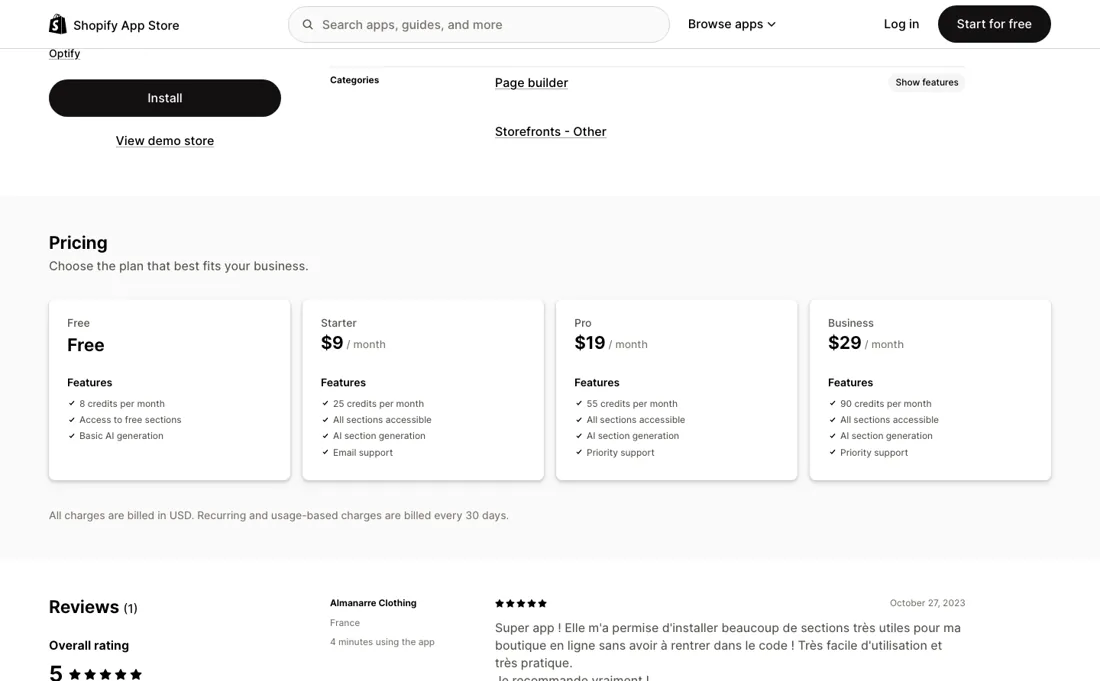
The app launched 10 October 2023 and, as of 17 September 2026, exactly one merchant has written about it: a five-star note from October 2023 by someone who had it installed for four minutes. That is not evidence of quality and not evidence of trouble — it is an absence of evidence, and on an app that writes sections into your live theme, that absence is the main thing to weigh.
On the same listing page Shopify shows Section Store with 2,929 reviews, also free to install, which is what a track record looks like in this category. And on 17 September 2026 the vendor’s own site, sectionlibrary.com, answered with Shopify’s “Store unavailable” page instead of a website. Second, the credit is undefined. Every plan is priced in credits and nothing on the listing says what one buys, so you cannot price your own usage before you commit.
Third, the AI half of the product is Google's. Sections are generated by Gemini 3.1 Pro, so output quality and consistency shift when Google ships a new model, which is outside the vendor's hands as much as yours. The library half — the 200+ pre-built sections — is the part that depends on nobody else, and it is the part worth judging the app on.
What Section Library does
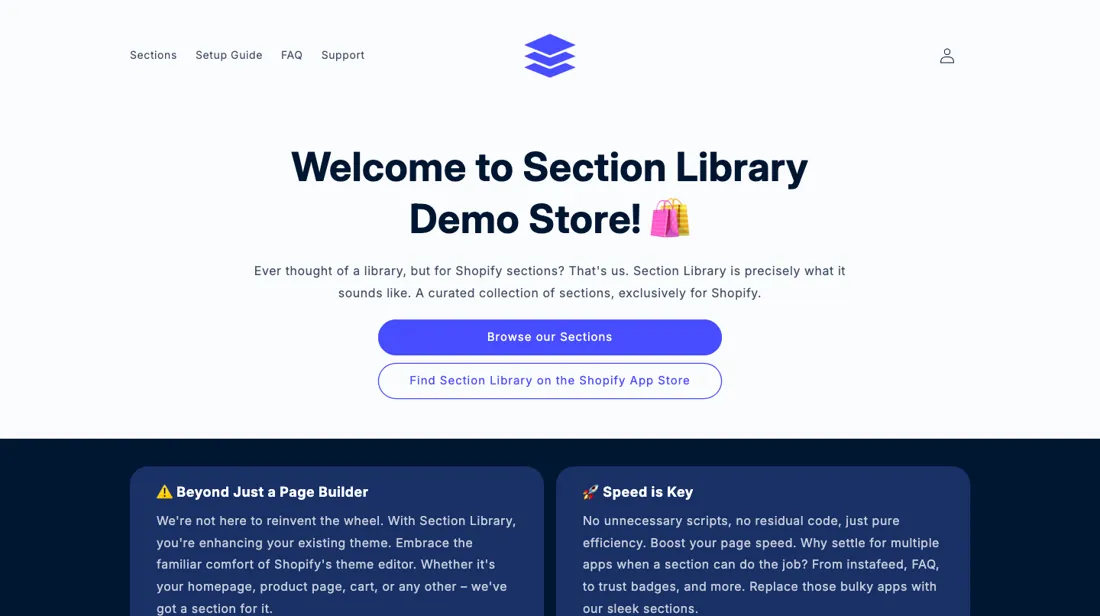
Shopify app that adds 200+ ready-made theme sections plus AI-generated custom ones (Gemini 3.1 Pro), all inside the native theme editor so layouts change without a developer. Live since October 2023 with a single App Store review.
What buyers report about Section Library
Recurring themes from the buyer-review sites listed at the foot of this page, read in August 2026. We have not run Section Library ourselves, so this is other buyers' experience rather than ours. We summarise it here because the complaints are usually the part a vendor page leaves out.
- • The single review, from a French clothing store in October 2023, says they could install many useful sections without entering code.
- • None have been written.
Where the ratings disagree. There is effectively no public record, and that is the finding. In almost three years the listing has collected exactly one review — five stars, October 2023, from a merchant who had had the app installed for four minutes. That records an install, not a use. Nobody has written publicly about what a credit actually buys, how the sections behave after a theme update, or whether support answers. Third-party app directories quote higher counts (one says eight reviews, another two); the official listing shows one, and directories are not places buyers write.
Pages read (August 2026): Shopify App Store
When the paid plan is worth it
The ladder is one number repeated four times: credits. 8 free, 25 at $9, 55 at $19, 90 at $29. Divide it out and there is a mild volume discount — about 36 cents a credit on Starter, 34.5 on Pro, 32 on Business — which is roughly a tenth off for triple the commitment, and not on its own a reason to climb. The one real gate sits between Free and Starter, and it has nothing to do with credits: the free plan reaches only the sections marked free, and every paid tier unlocks the full library.
If you want the 200+ sections that are the point of the app, the entry price is $9 and everything above it is allowance plus a support queue (email on Starter, priority on Pro and Business, identical to each other on paper). Which makes the pricing impossible to evaluate properly in advance, and that is worth saying plainly. Because the listing never defines a credit, you cannot work out how far 25 or 90 of them go: one elaborate AI-generated landing page and twenty small section installs could cost the same, or differ tenfold.
Start on the free plan, spend the 8 credits deliberately, and count what they bought before you pick a tier.
How to actually use Section Library
Spend the free plan's 8 credits before you pay for anything, and write down what each one bought — that is the only way to learn what a credit is, because the listing does not say. Install into a duplicated theme rather than your live one: these are theme sections, so the safe test is a copy you can throw away. Check what happens to a page built on these sections if you stop paying or uninstall, before you build a landing page on one.
And judge the library first — the 200+ ready-made sections are the part that does not depend on Google's model, while anything you one-shot with Gemini 3.1 Pro can come out different next month.
Distilled from apps.shopify.com/section-library and sectionlibrary.com, read 19 August 2026.
Frequently asked questions
What is a credit, and how far do 25 of them go?
The listing does not say, and that is the single most important gap in this price list. Read on apps.shopify.com/section-library on 17 September 2026: Free gives 8 credits a month, Starter $9 gives 25, Pro $19 gives 55 and Business $29 gives 90 — and the credit count is the only thing separating the four plans. Nowhere does the listing define whether one credit is one AI generation, one section added to a theme, or something else, so you cannot work out in advance whether 25 covers a month of work or an afternoon. One elaborate AI-generated landing page and twenty small section installs could cost the same, or differ tenfold. The only way to find out is to spend the free plan’s 8 credits deliberately and write down what each one bought. Do that before you pick a tier, not after.
What does $9 unlock that the free plan does not?
The library, which is the actual product. Read 17 September 2026: the free plan reaches only the sections marked free, and every paid tier unlocks all of them — the 200+ ready-made sections the app is sold on. That is the one real gate on the ladder and it sits between Free and Starter. Above it, the steps buy allowance and a support queue: Starter $9 for 25 credits with email support, Pro $19 for 55 with priority support, Business $29 for 90 with priority support — identical to Pro on paper. Divide it out and the volume discount is mild, roughly 36 cents a credit on Starter against 32 on Business, about a tenth off for triple the commitment. So pay the $9 to see the library, and climb only when you have measured what a credit costs you in practice. There is no trial on the paid tiers; the free plan is the trial.
How much of a track record does this app have?
Almost three years on the App Store and one review, and the vendor’s own site is now offline. Read 17 September 2026: the app launched 10 October 2023 and still carries exactly one review, a five-star note from October 2023 by a French merchant who had it installed for four minutes. That is not evidence of quality or of trouble — it is an absence of evidence, on an app that writes sections into your live theme. For scale, the same listing page shows Section Store at 4.9 from 2,929 reviews, also free to install. The second signal is fresher: sectionlibrary.com is itself a Shopify store, and on 17 September 2026 it answered with Shopify’s “Store unavailable” page rather than a website. Ask support what happens to pages built on these sections if you uninstall, and install into a duplicated theme rather than your live one.
What should I weigh before buying Design & Content software?
Up to a point, and that point is usually set by your plan. Check whether brand kits, custom fonts, colour locking and template controls sit on the tier you would actually buy, since these are common upsells. Test it with your own assets during the trial rather than the demo content, which is always chosen to flatter the output.
Is this a hands-on review of Section Library?
This is a researched assessment, not a hands-on test — where we've used a tool ourselves, we say so explicitly. We name what each tool is good and bad at, and we earn a commission only if you sign up, at no cost to you.
- Buyer reviews on the Shopify App Store listing, read August 2026.
- Re-read 2026-09-17 on apps.shopify.com/section-library, now listed as “Section Library: AI Sections”; every amount is unchanged since 19 August 2026.
- A dated screenshot of that pricing page, kept on this site as the receipt.
Others in this category
Reviewed design & content tools that share ground with Section Library — comparable in what they do, not drop-in swaps:
New reviews, price changes we recorded, and the cost conditions we found. No sponsored placements. Unsubscribe anytime.
This is our researched assessment — not a paid placement. The “Visit” links on this page are affiliate links: we may earn a commission if you sign up, at no extra cost to you, and it never changes our take. How we review →