 Gixo Review (2026)
Transparency: the “Visit” links on this page are affiliate links — we may earn a commission if you sign up, at no extra cost to you. No vendor can pay for a better review or verdict. How we make money →
The first is that seven products means seven subscriptions.
Visit Gixo → Affiliate link — we may earn a commission if you sign up; it does not change what this page says.
Watch the 2-minute review
The video version of this review, from our YouTube channel.
Pricing (2026)
✓ Pricing re-verified 17 Sep 2026
Gixo is not one product but seven, each sold separately, and the pricing page publishes only a floor for each. Quill (articles and content), Lumen (decks) and Prism (visuals and infographics) start at $10 a month. Business (briefs and decisions) and Folio (books and long-form) start at $19. Lex (legal and compliance) is from $29, and Arc (proposals from RFPs) from $49.
The page states prices are USD per month, billed monthly or annually, but publishes no annual rate and no tier ladder: it says the exact plan details sit on each product page, and the product pages read in August carried none, pointing instead at the plan list inside the app. The FAQ says a no-card 14-day trial with full generation, that continued generation after the trial needs a paid plan while existing work stays viewable, and that there is no standing unpaid tier.
The page contradicts itself on one product: the card grid labels Folio “Monthly book plans” while the comparison table below it lists Folio as “14-day trial, no card” like the other six. Quill, Lumen, Business, Arc and Lex can also be bought through Microsoft Azure Marketplace, and the page now states that private offers and multi-product bundles are handled through procurement review. Plans change — always verify the live price on their site.
What the pricing page doesn’t say
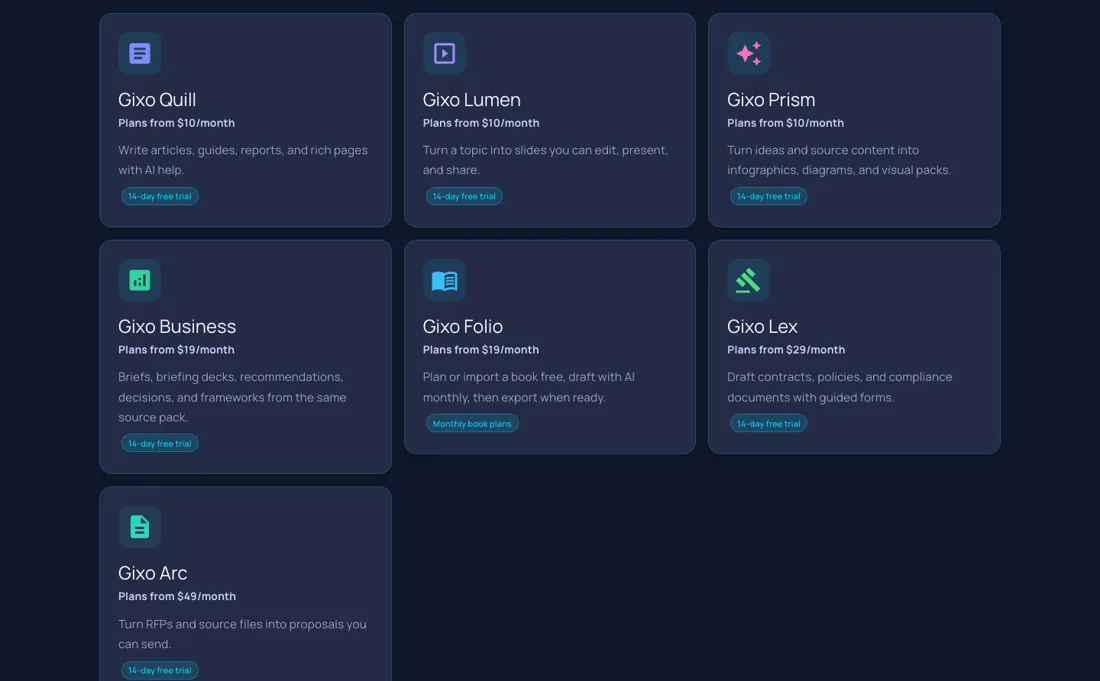
Gixo is priced per deliverable, not per company. So the moment a team needs decks and articles and a proposal it is buying Lumen plus Quill plus Arc — $10 + $10 + $49, or $828 a year at the published floors — rather than one plan. There is no published bundle price to fall back on; the only bundle route the page names is procurement, where it says private offers and multi-product bundles are handled through review.
Ask for that before you subscribe to the second product, not after. The second is that every number above is a floor and nothing else is public. “Plans from $10/month” is all Gixo publishes: what a higher tier costs, and what the entry tier actually allows in generations, seats or exports, is on neither the pricing page nor the product pages. You find that out inside the product. So run the 14-day trial at the volume you actually expect rather than on a sample, because the tier you land on is the price you will pay, and right now it is a guess.
What Gixo does
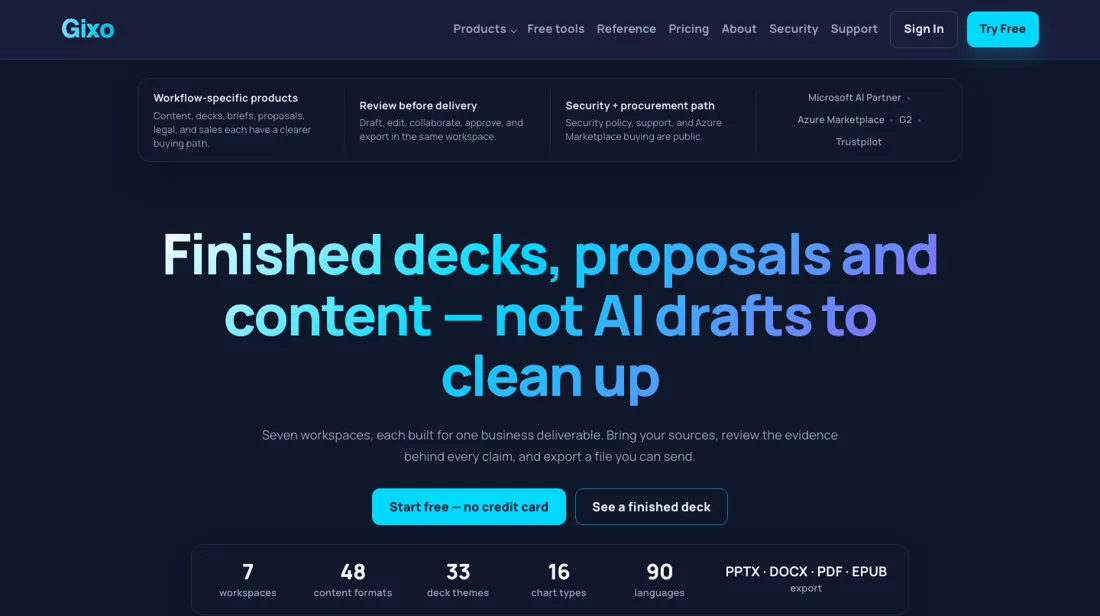
Seven separate AI workspaces — decks, articles, visuals, briefs, proposals, legal drafts and books — each sold on its own plan.
What buyers report about Gixo
Recurring themes from the buyer-review sites listed at the foot of this page, read in August 2026. We have not run Gixo ourselves, so this is other buyers' experience rather than ours. We summarise it here because the complaints are usually the part a vendor page leaves out.
- • The one public buyer review, a content writer on Capterra (February 2026), describes it as a quick way to get usable long-form content out and rates ease of use and features at the top of the scale.
- • That reviewer came from Writesonic and names the reason plainly: they wanted blogs, articles, presentations, listicles and guides from one place instead of paying for several narrow tools.
- • The same reviewer says the output needs manual editing to reach publishable quality, though they call the fixes minor — which is the ordinary AI-drafting caveat, not a product-specific fault.
- • The real gripe is the absence of a record. Product Hunt shows the makers' launch post and no user reviews at all, and there is no G2, TrustRadius or Trustpilot presence to read against it.
Where the ratings disagree. Treat this section as a warning about evidence rather than a verdict on the product. The entire public buyer record for Gixo is a single four-star review from February 2026; every other page that appears to review it is a directory listing or an affiliate roundup rehashing the vendor's own copy. That is not a reason to avoid it — plenty of good tools are too new to have a record — but it does mean nobody else's experience is available to lean on. It matters more here than usual, because the pricing model asks you to subscribe to several separate products at once: buy one of them for one month, test it on your real work, and let that be your evidence.
When the paid plan is worth it
There is no premium plan to weigh here, and that is the thing to understand before you compare Gixo to anything else. It is seven products sold separately: Quill for articles, Lumen for decks, Prism for visuals, Business for briefs, Folio for long-form, Lex for legal and Arc for proposals. The pricing page publishes only a floor for each -- from $10 for Quill, Lumen and Prism, from $19 for Business and Folio, from $29 for Lex and from $49 for Arc.
There is no published bundle price, so a team that wants articles, decks and visuals is looking at three subscriptions rather than one, and the from-prices add up before you have seen a single actual tier. The tiers themselves are not published anywhere readable. The pricing page says exact plan details sit on each product page; the product pages read in August carried none, pointing at the plan list inside the app.
So the honest position is that the real cost is unknown until you sign up, and the $10 is a starting point rather than a price. Upgrading does not fix that: nothing is published to upgrade to. What you can use without committing: a 14-day no-card trial with full generation, after which the FAQ says continued generation needs a paid plan while existing work stays viewable, and no standing unpaid tier.
Five of the seven are on Azure Marketplace, where the page says private offers and multi-product bundles go through procurement review -- the only bundle route it names.
How to actually use Gixo
The first decision is which Gixo you are buying. Seven products sit behind one brand; the support centre maps them by job: Quill for publishing, Lumen for decks, Prism for visuals, Business for document-grounded briefs, Arc for RFP work, Lex for drafting and compliance, Folio for long-form. Trials are per product, not per account: Quill, Lumen, Business, Arc, Lex and Prism each run a 14-day trial with no card, while Folio has none.
Upload your source files and brand rules on day one; the workflows are built around them, not a blank prompt. Buying through Azure Marketplace activates instantly and consolidates billing -- the cleaner route if three card subscriptions is what procurement will not pass.
Distilled from Gixo's own pricing page plus the Quill, Lumen and Arc product pages, all read in a live browser session on 19 August 2026
Common Gixo setup mistakes
Where Gixo setups actually go wrong, and what it costs you when they do. Same sources as the setup notes above — not from a walkthrough we ran ourselves.
The part teams underestimate is the clock.
- Evaluating three products means three trials on three timers, and when one ends, continued generation needs a paid plan.
- Support is email and in-app chat only, so a stalled job has no phone line, though Gixo retries provider timeouts and rate limits itself and releases the reserved capacity when it cannot.
Gixo vs Gamma, side by side
Each column shows the vendor’s own published entry price, read on the date shown. Entry prices can cover different services or units, so check what each one buys. We do not average them into a score.
Both names above are affiliate links: we may earn a commission if you sign up, at no extra cost to you. Neither changes what this table says.
The natural comparison is Gamma or Beautiful.ai — Gamma and Beautiful.ai do one job — turn a prompt into a presentable deck — and publish a single per-seat price you can multiply in your head. Gixo spreads the same AI drafting across seven separately priced products covering decks, content, visuals, briefs, proposals, legal work and books, so it reaches further and costs more to assemble. If decks are the whole job, the single-purpose tools are simpler and cheaper; if you want the same draft-review-export flow across several deliverables, that breadth is the thing Gixo actually sells. Verify all current price lists yourself; ours were read on 19 August 2026..
Frequently asked questions
What will Gixo actually cost me?
Nobody outside the product can tell you, and that is the most useful thing to know before you start. Read on gixo.ai/pricing on 17 September 2026, the page publishes a floor per product and nothing else: Quill, Lumen and Prism from $10 a month, Business and Folio from $19, Lex from $29, Arc from $49, in USD, billed monthly or annually. What a higher tier costs, and what the entry tier allows in generations, seats or exports, is on neither the pricing page nor the product pages — the page says the exact plan details sit on each product page, and those pages point at the plan list inside the app. No annual rate is published either, despite annual billing being offered. So treat the floor as an entry ticket, not a budget, and run the trial at the volume you actually expect rather than on a sample.
Can I buy more than one Gixo product on a single plan?
Not off the shelf. Each product is bought on its own plan and, as the FAQ put it on 17 September 2026, buying one product does not include the others. There is no published bundle price. The one route the page does name is procurement: Quill, Lumen, Business, Arc and Lex are listed on Microsoft Azure Marketplace, and the page says private offers and multi-product bundles are handled through procurement review. That is worth using rather than stacking card subscriptions, because the arithmetic gets ugly fast — a team that needs decks, articles and proposals is buying Lumen plus Quill plus Arc, $69 a month or $828 a year at the published floors, before anyone has seen a real tier. Ask about the bundle before you subscribe to the second product, not after.
Is there a free version, and what happens when the trial ends?
There is a trial and no free tier, and the FAQ is unusually direct about it. Read 17 September 2026: a no-card 14-day trial with full generation, after which continued generation needs a paid plan, though existing work stays viewable in your workspace. The same answer states there is no standing unpaid tier. One caveat on Folio, the books product: the page contradicts itself. The card grid labels it “Monthly book plans” rather than a trial, while the comparison table directly below lists Folio as “14-day trial, no card” like the other six. If books are what you came for, check which of the two applies before you plan an evaluation around it. And note the clock is per product: evaluating three products means three separate 14-day trials on three separate timers.
What should I weigh before buying Design & Content software?
Up to a point, and that point is usually set by your plan. Check whether brand kits, custom fonts, colour locking and template controls sit on the tier you would actually buy, since these are common upsells. Test it with your own assets during the trial rather than the demo content, which is always chosen to flatter the output.
Is this a hands-on review of Gixo?
This is a researched assessment, not a hands-on test — where we've used a tool ourselves, we say so explicitly. We name what each tool is good and bad at, and we earn a commission only if you sign up, at no cost to you.
- Buyer reviews on Capterra and Product Hunt, read August 2026.
- Re-read 2026-09-17 on gixo.ai/pricing; the floors are unchanged since 19 August 2026.
- A dated screenshot of that pricing page, kept on this site as the receipt.
Others in this category
Reviewed design & content tools that share ground with Gixo — comparable in what they do, not drop-in swaps:
Also in design & content, for browsing rather than as an alternative:
New reviews, price changes we recorded, and the cost conditions we found. No sponsored placements. Unsubscribe anytime.
This is our researched assessment — not a paid placement. The “Visit” links on this page are affiliate links: we may earn a commission if you sign up, at no extra cost to you, and it never changes our take. How we review →