Piktochart Review (2026)Free Plan Gives Two Downloads
 By Daan Haket · Tested hands-on · written with an AI assistant · who does what
The ladder here is not about how much you make, it is about which file you are allowed to hand over.
individuals and small teams who need infographics, data-heavy reports and posters to look designed without hiring a designer — and above all students, teachers and nonprofits, for whom $39.99 and $60 a member a year with PDF and PowerPoint export are the best-value doors on the page.
you mainly need slides, because tools built for presentations do that better for the money. Skip it too if you need PDF or PowerPoint export but were budgeting for Pro, since those formats only start at Business. And skip it if you were counting on a real free tier, because two downloads is a demo rather than a plan — or if your AI use is heavy, since the credit allowances are capped and the page never prices a top-up.
Transparency: the “Visit” links on this page are affiliate links — we may earn a commission if you sign up, at no extra cost to you. No vendor can pay for a better review or verdict. How we make money →
Tested by our team on 20 October 2026 on a new Free account (Daan created it and our AI assistant ran the test in his browser; nothing was paid and no card was entered): we made the same small infographic, titled TESTHAVEN with the figures 12, 8 and 20, once from a free template and once with the Pikto AI generator, changed its colour and font, and downloaded until the free downloads ran out.
How we tested
- Recorded the account plan and download allowance
- Requested a List infographic from Pikto AI using our reference data
- Replaced text in a free infographic template
- Adjusted the infographic styling
- Inspected the available download formats
- Downloaded two Normal PNGs
- Attempted a third infographic download
- Free gives 2 PNG downloads per account, not per design: the download panel went from '2 Downloads Left' to 1 and then 0 across two different designs. A third try opened 'You have run out of free downloads.' with 'Choose your plan', and no file came.
- PNG is the only free file format. PDF and PowerPoint carry a BUSINESS label, and choosing PDF opened an upgrade window straight away. Normal, Medium and High quality were all open on Free; a transparent background asked for an upgrade.
- The AI generator was not reliable for us. The button said 1 credit, two of our three attempts ended in an error ('Probeer later opnieuw', try again later), and the balance went from 60 to 57 for one finished infographic. Whether each failed attempt cost a credit or the one that worked cost three is not clear from what we saw.
Pricing (2026)
✓ Pricing re-verified 19 Sep 2026
| Plan | Price | What you get |
|---|---|---|
| Free | $0 | 2 PNG downloads total, 1 GB storage, 60 AI credits, free templates only, capped at four members |
| Pro | $15 per member per month billed monthly or $10 billed annually ($120 a year) | Unlimited PNG downloads, premium templates and icons, 500 AI credits, 100 GB |
| Business | $20 monthly or $17 billed annually ($204 a year) | Adds PDF and PowerPoint export, Brand Kit, 1,000 AI credits, 250 GB |
| Enterprise | quote-only from 101 members | SSO/SAML, workspace management, dedicated account manager, one-off hour of training |
| Education | $39.99 per member billed annually | 250 AI credits, limited Brand Kit, unlimited PNG, PDF and PowerPoint downloads; requires educational email |
| Campus | quote-only above 3,000 seats | — |
| Nonprofit | $60 per member billed annually | 250 AI credits, limited Brand Kit, unlimited PNG, PDF and PPT downloads |
Summarised from the pricing notes below; the notes carry the conditions.
Free is $0, Pro is $15 per member per month billed monthly or $10 billed annually ($120 a year), Business is $20 monthly or $17 billed annually ($204 a year), and Enterprise is quote-only from 101 members. Free stops at 2 PNG downloads — a flat total, not two a month — 1 GB of storage, 60 AI credits and free templates only, and is capped at four members (one owner plus three).
Pro adds unlimited PNG downloads, premium templates and icons, 500 AI credits and 100 GB, and the annual rate is what the page calls 33% off. Business, 15% off annually, adds PDF and PowerPoint export on top of PNG, the Brand Kit (unlimited brand colours, fonts and logos), 1,000 AI credits and 250 GB. Enterprise adds SSO/SAML, workspace management, a dedicated account manager and a one-off hour of training.
Full pricing notes (3 more paragraphs)
Three further cards on the same page price other audiences, and two of them beat Pro on both price and capability. Education is $39.99 per member billed annually — the card splits the cents into a separate element, which is why a careless reading gives $39; the FAQ prints the full figure — with 250 AI credits, a limited Brand Kit and unlimited PNG, PDF and PowerPoint downloads, and requires a valid educational email address.
Campus is quote-only above 3,000 seats. Nonprofit is $60 per member billed annually with the same 250 credits, limited Brand Kit and unlimited PNG, PDF and PPT downloads. The page's own FAQ calls those two 'a 76% discount' and 'a 64% discount' from its annual pricing, which works back to a list of about $167 a year — a figure that appears nowhere on the page, where annual Pro is $120 and monthly Pro annualises to $180.
The page can be switched between USD, GBP, EUR, SGD, MXN and INR. No free trial is offered on the paid tiers — the free plan is the trial — and you can cancel anytime, though the FAQ adds that refunds are generally not given under the Terms of Use and are reviewed case by case, and that purchases of $168 or more can be settled by bank deposit.
Plans change — always verify the live price on their site.
What the price did
We capture Piktochart’s own pricing page every month and keep the figures, so this is our record of the page — not a forecast, and not someone else’s summary.
Two readings a month apart with no movement in the plan prices: $15 monthly and $10 annually on Pro, $20 and $17 on Business, read on 6 August 2026 and again on 6 September 2026, with the same 33% and 15% annual discounts both times. What changed between them is our reading rather than the page. The Nonprofit tab we had not opened in August prices at $60 per member a year with the same export rights as Education, and the Education card's $39 is $39.99 once the separate cents element is read with it.
What the pricing page doesn’t say
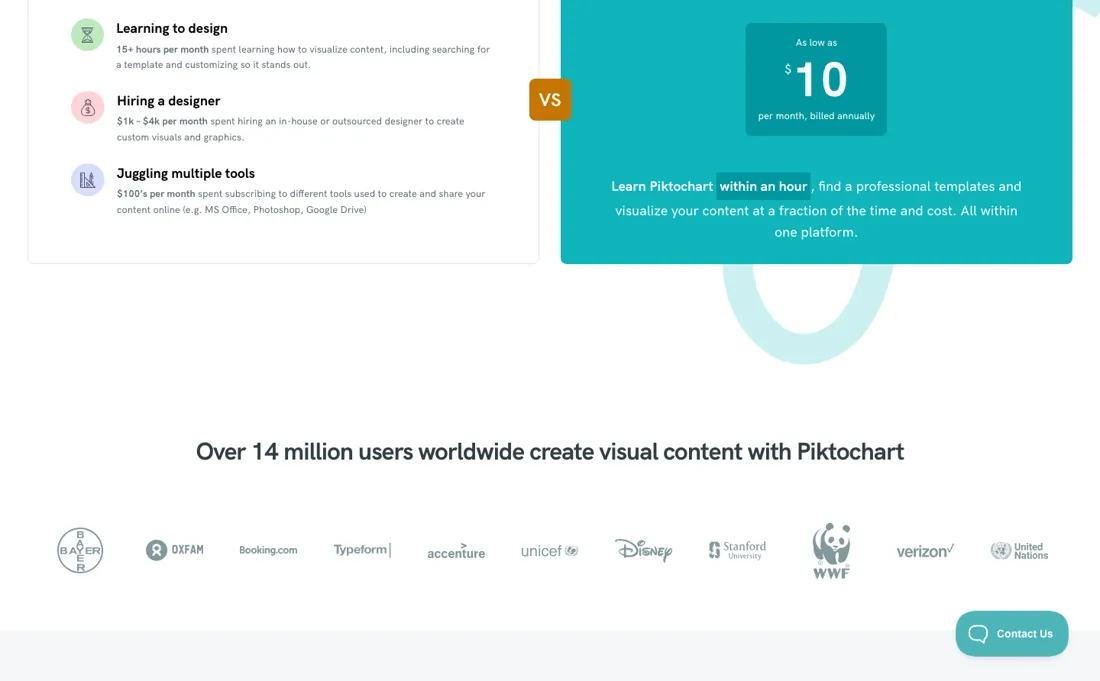
Pro — the tier the page marks most popular — exports PNG only. PDF and PowerPoint are Business features, which the full feature table confirms in a single row most people scroll past. So if the reason you want this is to email a PDF handout or drop slides into a deck, Pro at $10 a member a month is not a cheaper Piktochart — it is the wrong product.
Your real entry price is $17 a member a month on annual billing, or $20 monthly. The free plan reads as generous and is not. Unlimited projects, two downloads — and not two a month: the comparison table lists the number of downloads as a flat 2. In our test on 20 October 2026 that counter ran per account, not per design: 2, then 1, then 0 across two different designs, and the third try opened 'You have run out of free downloads.' That is enough to find out whether you like the editor, which is a fair trial, but it is not the working free tier some competitors in this category offer, so do not plan around it.
The third thing to price is the AI credits: 60 on Free, 500 on Pro, 1,000 on Business. The pricing page does not say what one credit buys or what happens when you run out. The app says more, but not all of it: in our test on 20 October 2026 the AI infographic button said 1 credit, yet the free balance went from 60 to 57 after two failed attempts and one that worked, and the app sold one-off top-up packs from $20 for 2,000 credits.
If AI generation is the reason you are buying, try it on Free first and watch the counter, because that meter can decide your bill. One last piece of arithmetic. The annual discount is 33% on Pro but only 15% on Business, so the saving shrinks exactly at the tier most teams that need PDF or PowerPoint end up on. And if you have an educational email address or nonprofit status the picture changes completely: Education is $39.99 per member for a whole year and Nonprofit is $60, against $120 for a year of Pro, and both include the PDF and PowerPoint exports that Pro does not.
Read the discount labels on those two with a squint, though. The FAQ calls them 76% and 64% off 'our annual pricing', which works back to about $167 a year — neither the $120 the same FAQ quotes for annual Pro nor the $180 that monthly Pro annualises to. The prices are real and cheap; the percentages are measured against a list price the page never shows you.
Watch the video review
The video version of this review, from our YouTube channel.
⚡ Short on time? Watch the 30-second verdict Short.
What Piktochart does
Infographic, report and poster maker with template libraries and AI credits. The free plan limits downloads, Pro is priced per member, and PDF and PowerPoint export start on the Business tier.
What buyers report about Piktochart
Hands-on: tested 2026-10-20Reported by buyers: Capterra and TrustRadius, read August 2026
Themes from the buyer-review sites listed at the foot of this page, read in August 2026. We tested Piktochart ourselves on 2026-10-20, but one test is a narrow sample, so here is what other buyers report. We summarise it here because the complaints are usually the part a vendor page leaves out.
- • Template categorisation is the recurring reason people pick it over Canva: reviewers who switched say deciding which template to start from is faster here than in tools with far bigger libraries.
- • Reviewers with no design background report producing infographics and reports that look professionally made, and the newer AI generation draws specific praise from people who came from Excel or Canva.
- • Chart control is the sharpest complaint: a data analyst two-plus years in reports labels overlapping with no good way to fix them, which bites in exactly the job the tool is sold for.
- • Lag on large or image-heavy designs, mentioned by several long-term users on tight deadlines.
- • Trial reviewers call the Pro price high against competitors and the free-tier layouts too thin for business presentations.
- • Accessibility, from a higher-education reviewer in May 2021: no accessibility checker, no proper way to add alt-text, hundreds of WAVE errors on templates, and charts and maps that screen readers could not read. It is the oldest gripe here and we could not confirm it still holds, but it lands on the education buyers this tool aims at.
Where the ratings disagree. Capterra shows 4.7 across 198 reviews and TrustRadius 7.7 out of 10 across 12, but the TrustRadius record is close to dormant: its most recent full review dates from 2021, so the lower score describes an older product rather than offering a second opinion on the current one. Read Capterra for the tool as it is now.
When the paid plan is worth it
The gate that decides this purchase is a file format, not a volume. Free and Pro both export PNG only -- Free stops at 2 downloads, Pro makes them unlimited -- and PDF and PowerPoint export do not appear until Business. So if your infographic has to land in a deck or go to a printer, the answer is Business at $17 a member billed annually, and no amount of Pro gets you there.
Establish which formats you need before comparing anything else; everything below is secondary to that. The annual discount is oddly uneven: Pro is $15 monthly against $10 annually, which the page calls 33% off, while Business is $20 against $17 -- only 15%. Paying yearly therefore narrows the gap between the tiers on a monthly basis ($5) and widens it annually ($7). Neither is large in absolute terms, which is another argument for choosing on export formats rather than on price.
Business also carries the Brand Kit -- brand colours, fonts and logos -- plus 1,000 AI credits against Pro’s 500 and 250 GB against 100 GB. Free is capped at 1 to 4 members, 1 GB and 60 AI credits. Two routes worth checking before paying business rates, because both carry the export formats Pro does not. Education is $39.99 per member billed annually and Nonprofit is $60, each with 250 AI credits, a limited Brand Kit and unlimited PNG, PDF and PowerPoint downloads.
That is Business's export capability for a fifth or a third of Business's $204, and each needs the matching credential -- a valid educational email address, or the vendor's nonprofit qualifications. Read the discount labels sceptically even so: the FAQ calls those two 76% and 64% off 'our annual pricing', which works back to a list of about $167 a year, while the same FAQ prices annual Pro at $120 and monthly Pro at $15.
The saving is real; the percentage is measured against a price the page does not sell. There is no free trial on the paid tiers -- the free plan is the trial -- and you can cancel anytime, though the FAQ also says refunds are generally not given and are reviewed case by case, which makes the annual commitment the thing to be sure about.
Our monthly capture read this vendor's pricing page every month from August 2026 to October 2026, and the amounts were the same all 3 times, including $60, $120, $168 and $204 from the pricing above. We keep watching — the registry records what moves.
What we found running Piktochart ourselves
The first findings are at the top of this page. The rest:
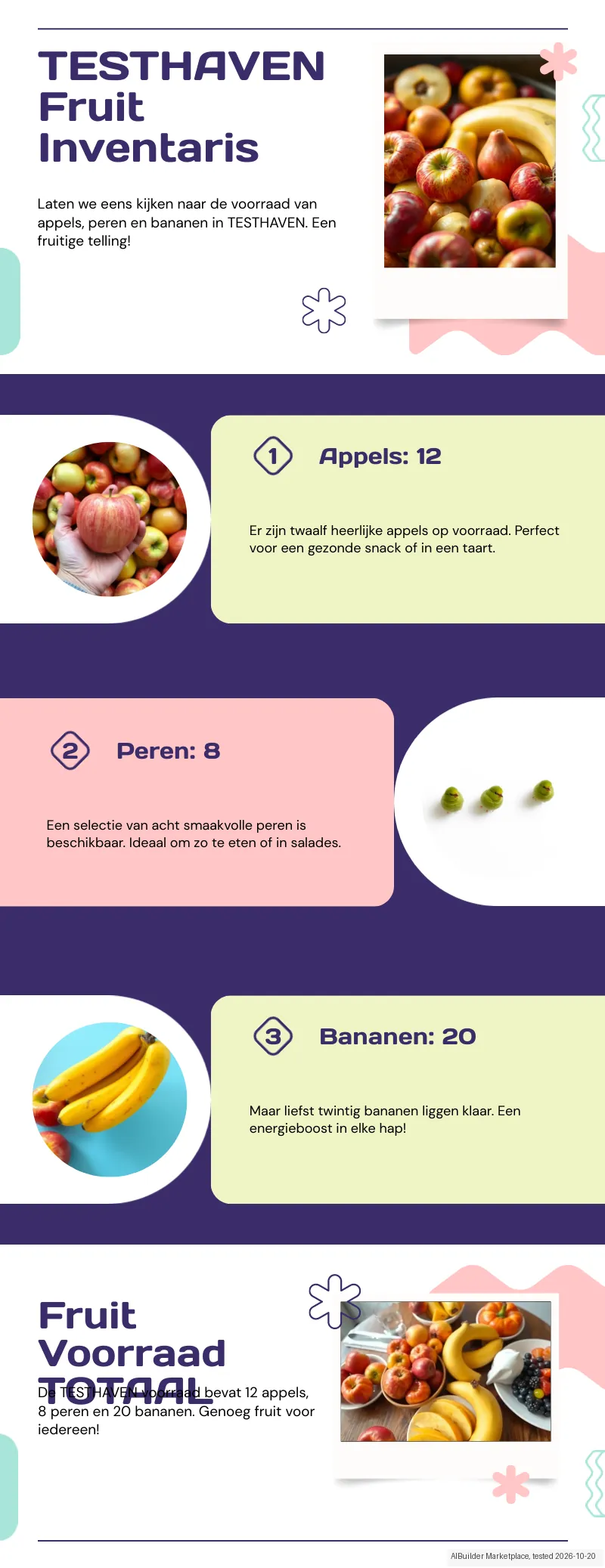
- The AI kept all three numbers ('Appels: 12', 'Peren: 8', 'Bananen: 20': apples, pears, bananas) but extended our title to 'TESTHAVEN Fruit Inventaris' and added sentences of its own ('Perfect voor een gezonde snack of in een taart', 'Perfect for a healthy snack or in a cake'). The app warns that AI content may be inaccurate.
- In the AI design's export the heading 'TOTAAL' in the closing block overlapped the paragraph below it, leaving part of it unreadable, and the photo next to 'Peren: 8' showed no pears.
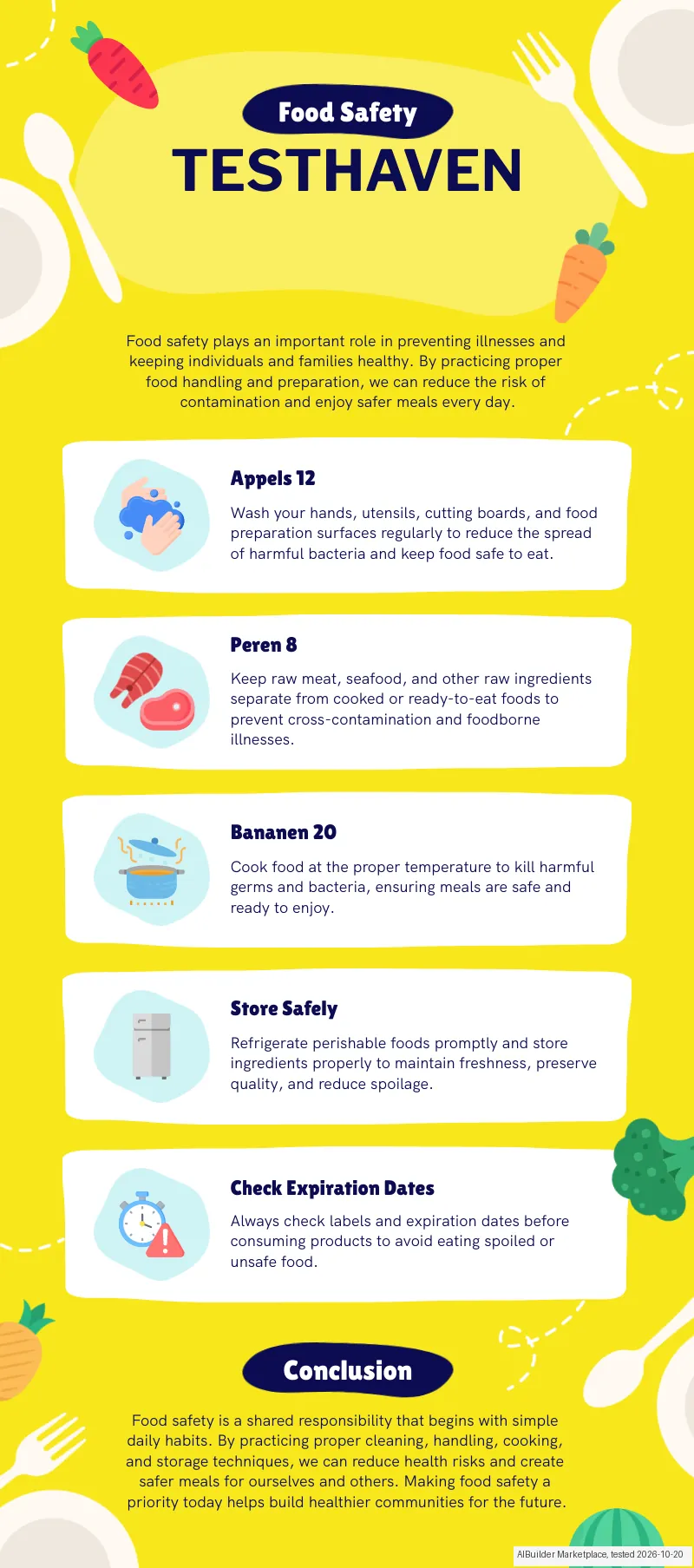
- Both downloads arrived as separate PNG files, not a ZIP: 800x1807 px (315 KB) for the template design and 800x2075 px (552 KB) for the AI design, each with our title and the three correct numbers.
- The free template we used ('Food Safety Starts With You') was quick to edit: double-click, select all, type, and it saved automatically. Its other sections and English paragraphs stay in the design until you delete them, and many other infographic templates carry a PREMIUM label.
- Changing the background colour (palette plus hex field) and the title font worked on Free; 'Create Brand Colors' and 'Upload Brand Font' asked for an upgrade. The app also sells one-off AI credit packs, from $20 for 2,000 credits to $200 for 25,000.
Mail in the first 14 days
Measurement running until 2026-11-02T23:00:00Z (last observed 2026-11-02T02:18:01.612935Z).
3 emails in the 14-day window so far; first email after signup: unknown (exact signup time not recorded); 0 with an explicit offer.
Retained inbox and junk only; removed or archived mail is outside this observation. Ambiguous supplier attribution is excluded. Day numbers use elapsed 24-hour periods since the recorded signup date at midnight Europe/Amsterdam; the signup hour is unknown. Offer flags quote literal subject/body text. Replies in our own correspondence (support tickets, our comment requests) are excluded; one-time codes, our own address, our account name and our name are replaced in brackets.
| Day | Time (UTC) | Sender | Literal subject | Folder | Offer evidence |
|---|---|---|---|---|---|
| Day 0 | 2026-10-20 15:54:04 UTC | Piktochart team / piktochart.com | Welcome to Piktochart | Confirm your email address | junk | |
| Day 0 | 2026-10-20 15:59:15 UTC | Piktochart team / piktochart.com | You just joined 34 million of the world's sharpest communicators | junk | |
| Day 7 | 2026-10-27 15:57:13 UTC | Piktochart team / piktochart.com | Two ways to make something great today | junk |
Screenshots from our test (click to enlarge)
What this test does not show:
- Whether 'Download as pages' gives a ZIP, and whether that costs one download or more
- When the 60 free AI credits reset
- The paid plans (Pro and Business), PDF and PowerPoint export, and the Brand Kit
- AI video, image generation and the AI image tools (upscaler, background remover)
- Moving layout blocks, and charts and maps in the editor
- Whether the AI generator is more stable with an English prompt
Most of our reviews are researched rather than run — how we review explains which is which, and why we do not pretend otherwise.
How to actually use Piktochart
Decide which file you need to hand over, because that is the real ladder here rather than volume or features. Pro exports PNG only; PDF and PowerPoint are Business features, confirmed in a single row of the comparison table that most people scroll past. It is the wrong product, and your entry price is $17 annually or $20 monthly. Do not plan around the free tier. Two downloads is a flat total, not two a month, and in our test on 20 October 2026 it counted per account across all your designs, so it is enough to decide whether you like the editor and nothing more.
That is a fair trial — and it is the only one, since there is no free trial on the paid tiers. Try the AI generator on Free before committing to a year. The allowances are 60, 500 and 1,000, and the pricing page does not say what one credit covers. In our test on 20 October 2026 the button said 1 credit per infographic, two of three attempts failed and the balance still went from 60 to 57; the app sells top-up packs from $20 for 2,000 credits.
Check every AI draft against your own figures too: ours kept the numbers but added a title and sentences we had not written. And check what you can prove about yourself, because it can change the price by a factor of three. Education is $39.99 per member for a whole year and Nonprofit is $60, against $120 for a year of Pro — and both include the PDF and PowerPoint exports Pro does not have.
Education needs a valid educational email address and turns into quote-only Campus above 3,000 seats; Nonprofit needs the qualifications the vendor sets out on its own NPO page. Note the annual discount is 33% on Pro but only 15% on Business, so the saving shrinks exactly at the tier most teams needing PDF end up on.
Where this section comes from: our research notes (146 words)
Plans, audience tabs and FAQ read on piktochart.com/pricing/ on 6 September 2026 from a Netherlands exit, in the US dollar view. The six cards — Free, Pro, Business, Enterprise, Education, Campus and Nonprofit — with their member bands, monthly and annual amounts, AI-credit allowances, storage and download rights, plus the full feature comparison table underneath, whose Download Formats row is where PNG-only for Free and Pro and PNG/PDF/PowerPoint for Business, Education and Nonprofit is stated, and whose downloads row gives Free a flat 2.
The amounts on the Education and Nonprofit cards are split across separate elements for the dollars and the cents, so they were cross-checked against the page's own FAQ, which is embedded as FAQPage schema in the markup and prints $120, $204, $39.99 and $60 in full, along with the refund policy, the payment methods and the $168 bank-deposit threshold. piktochart.com/llms.txt returns 403.
The natural comparison is Canva — the comparison nearly everybody actually makes, and it comes down to two questions rather than feature counts. First, check where each tool puts the file format you need, not what the headline costs. Piktochart keeps PDF and PowerPoint behind Business at $17 a member a month on annual billing, and a rival that includes your format one tier down is cheaper than its price list suggests. Second, be honest about what you are making — Piktochart is at its strongest on data-heavy infographics and reports and weaker as a general-purpose design tool, and if it is really slides you want then Beautiful.ai and Gamma are the closer peers. We have not read Canva's, Beautiful.ai's or Gamma's price lists ourselves, so verify theirs as well as ours; the Piktochart figures here were read on 2026-08-06..
Frequently asked questions
Which Piktochart plan do I need?
Decide on the export format first, because that is where the real line runs — not on seats or credits. Read on 19 September 2026: Free costs nothing, holds up to four members (one owner plus three), gives 60 AI credits, 1 GB of storage, one folder, free templates only, and exactly 2 PNG downloads, which is a lifetime total rather than a monthly allowance. Pro is $10 per member a month billed annually, $120 a year, or $15 billed monthly, and it buys unlimited downloads — but only as PNG. PDF and PowerPoint export arrive on Business at $17 per member annually, $204 a year, or $20 monthly, together with the unlimited Brand Kit and 1,000 AI credits. Enterprise is quote-only and starts at 101 members. So if anything you make has to leave as a slide deck or a print-ready PDF, Pro is the wrong plan however attractive its price looks, and the honest comparison is $204 against $120 rather than $120 against free.
Do I qualify for the education or nonprofit price?
If you do, take it, because both beat Pro on price and on what you get. As read on 19 September 2026 the Education card is $39.99 per member billed annually and needs a valid educational email address; Nonprofit is $60 per member billed annually for registered organisations; and above 3,000 seats there is a quote-only Campus tier. Both of those cards list unlimited PNG, PDF and PowerPoint downloads, access to a limited Brand Kit, 250 AI credits and 100 GB — so they carry the export formats and brand controls that the $204 Business tier normally gates, at a fifth of the price or less. One wrinkle to check before you plan around it: the FAQ describes both as “our special Pro plan”, while the plan cards credit them with features Pro does not have. Get the export formats confirmed in writing if PDF or PowerPoint is the reason you are buying. The cents on the education card also sit in their own element, so a quick glance reads $39 where the FAQ says $39.99.
What happens if I pay and then change my mind?
Assume the money is spent, because the vendor says so in writing. The pricing FAQ, read 19 September 2026, states that refunds are generally not provided for any payment under the Terms of Use, and that a request will be reviewed case by case if you believe one is justifiable. You can cancel at any time from Account Settings, but upgrades and downgrades are not self-serve — those go through the billing address by email. There is no free trial on any paid tier either; the free plan is the trial, which is why its 2 PNG downloads are worth spending carefully on a real project rather than a test. Two practical notes: pricing is per member, so adding a fifth person to a free workspace moves the whole workspace onto a paid plan and you are charged for every member on it, not just the new one; and payment is Visa, MasterCard or PayPal, with American Express only through PayPal and bank transfer available on purchases of $168 or more.
Is this a hands-on review of Piktochart?
Yes. We tested Piktochart ourselves on 2026-10-20; the section above says what we tested, what we found and what we did not test, and where a figure comes from the vendor's own documentation instead. Most of our reviews are researched rather than run; we say which is which. We name what each tool is good and bad at, and we earn a commission only if you sign up, at no cost to you.
- Buyer reviews on Capterra and TrustRadius, read August 2026.
- Re-verified 6 September and again 19 September 2026 on piktochart.com/pricing/, US dollar view; the plan amounts are unchanged from our 6 August 2026 reading.
- A dated screenshot of that pricing page, kept on this site as the receipt.
- Our own hands-on session with Piktochart (2026-10-20), written up in full further down this page.
Others in this category
Reviewed design & content tools that share ground with Piktochart — comparable in what they do, not drop-in swaps:
New reviews, price changes we recorded, and the cost conditions we found. No sponsored placements. Unsubscribe anytime.
This is our researched assessment — not a paid placement. The “Visit” links on this page are affiliate links: we may earn a commission if you sign up, at no extra cost to you, and it never changes our take. How we review →