Pixlr Review (2026)Cheap Plans, Credits Reset Each Renewal
 By Daan Haket · Tested hands-on · written with an AI assistant · who does what
Pixlr does not refund a processed payment, and monthly AI credits do not accumulate: they are reset to the plan allowance at each renewal and fall to zero when you cancel.
- Best for People making quick social images in a browser
- Not for creators for whom AI generation is the job
From €2.49 · per month (€1.99 yearly) · read 2026-10-28
Try Pixlr free →Affiliate link: we may earn a commission if you sign up, at no extra cost to you. It never changes our verdict.
Is Pixlr right for you?
Your pain“I want a cheap, ad-free photo editor in my browser for quick social and marketing images.”
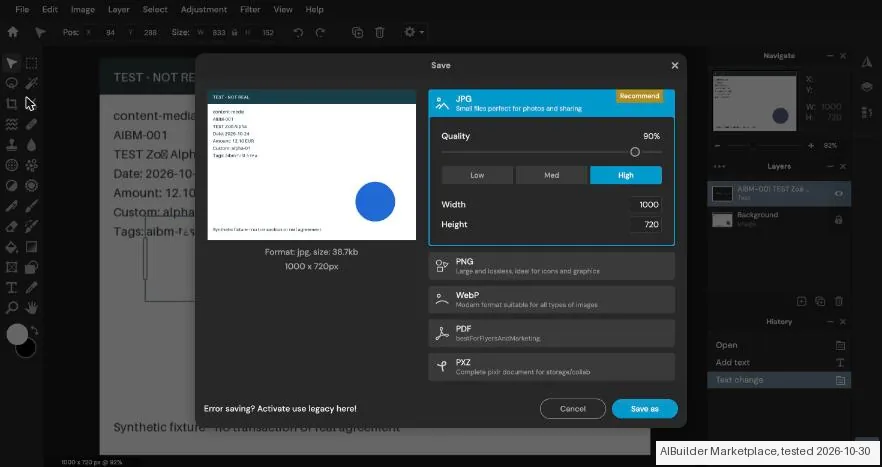
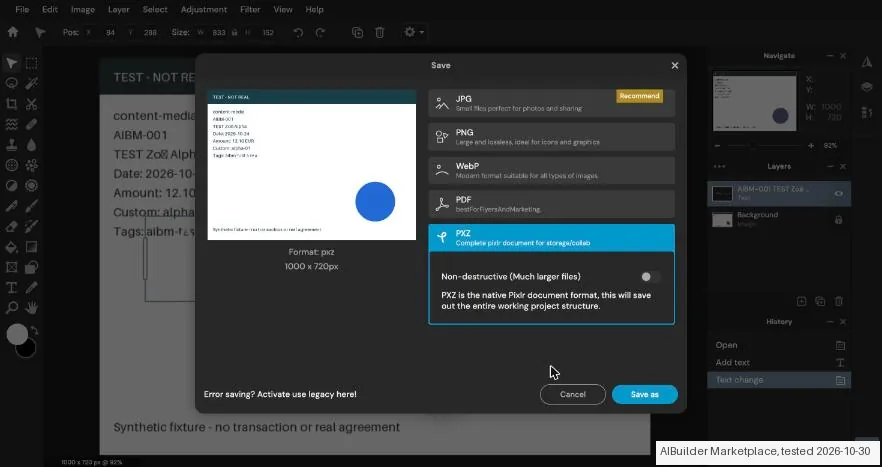
Does Pixlr solve it?YesOur test (30 October 2026): we edited without an account and saved as JPG, PNG, WebP, PDF or PXZ, where the layered PXZ file kept both text layers editable.
Your planPlus, €2.49 a month (€1.99 a month billed yearly), shown in euros from a Netherlands connection
Your pain“I mostly edit photos but want AI image and video generation on the same account.”
Does Pixlr solve it?PartlyPricing page, read 12 October 2026: Premium's 1,000 credits are about 200 pro images, and monthly credits reset to the plan allowance at each renewal.
Your planPremium, €9.99 a month (€7.99 a month billed yearly), 1,000 AI credits a month
- Creators for whom AI generation is the job. Our dossier comparison: PhotoGenerator is a generator only, with Starter at $12 a month for 360 credits as read on 3 October 2026, while Pixlr combines an editor with AI. Better fit: PhotoGenerator.
The “Try” buttons are affiliate links: we may earn a commission if you sign up, at no extra cost to you, and it never changes our verdict.
Transparency: the “Visit” links on this page are affiliate links: we may earn a commission if you sign up, at no extra cost to you. No vendor can pay for a better review or verdict. How we make money →
Which Pixlr plan do you need?
4 plans, 3 questions, no signup.
Answer three quick questions to see your plan.
Your plan
Plus
€2.49 a month, or €1.99 a month billed yearly
No ads, unlimited saves, 80 AI credits a month
Your plan
Premium
€9.99 a month, or €7.99 billed yearly
All AI models, 1,000 AI credits a month, full template library
Your plan
Ultra
€24.99 a month, or €19.99 yearly
Up to 10,000 credits a month, unlimited fast images (fair use)
Probably not Pixlr
From your answers, look at PhotoGenerator instead. Why ↓
Prices as we read them on 2026-10-28; check the checkout before you pay. The plan button is an affiliate link: we may earn a commission, at no extra cost to you. The PhotoGenerator link is an affiliate link too.
What Pixlr costs at your size
What each plan costs a month on annual billing (monthly billing below it), per user from Pixlr’s own pricing page. The cheapest plan at each size is marked. Plus stops at 1 user; Premium stops at 1 user; Ultra stops at 1 user; Ultra MAX stops at 1 user.
| Users | Free | Plus | Premium | Ultra | Ultra MAX |
|---|---|---|---|---|---|
| 1 user | €0Best value at this size | €1.99 €2.49 monthly | €7.99 €9.99 monthly | €19.99 €24.99 monthly | €39.99 €49.99 monthly |
| 3 users | €0Best value at this size | not available | not available | not available | not available |
| 5 users | €0Best value at this size | not available | not available | not available | not available |
| 10 users | €0Best value at this size | not available | not available | not available | not available |
| 25 users | €0Best value at this size | not available | not available | not available | not available |
| 50 users | €0Best value at this size | not available | not available | not available | not available |
Prices read 2026-10-28; tax excluded unless the vendor says otherwise. Calculated by our cost engine; the same numbers are in our open data.
See current prices on Pixlr →Exit test (measured 2026-10-30)
- Export route
- File > Save > PXZ or PNG, using the legacy Download method
- Formats
- ZIP, PNG
- Attachments included
- Not tested
- Re-import tested
- No
- Lost on export
- Nothing we checked
Formats describe this export route; offered formats may not have been inspected. Full exit test and scope ↓
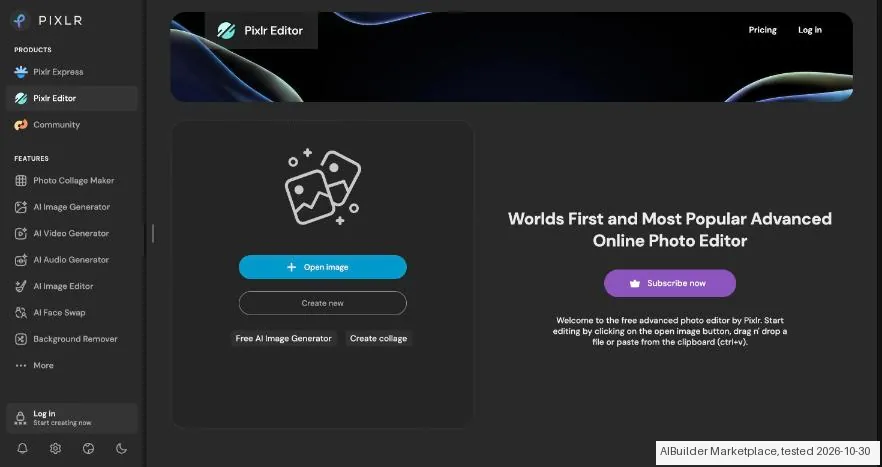
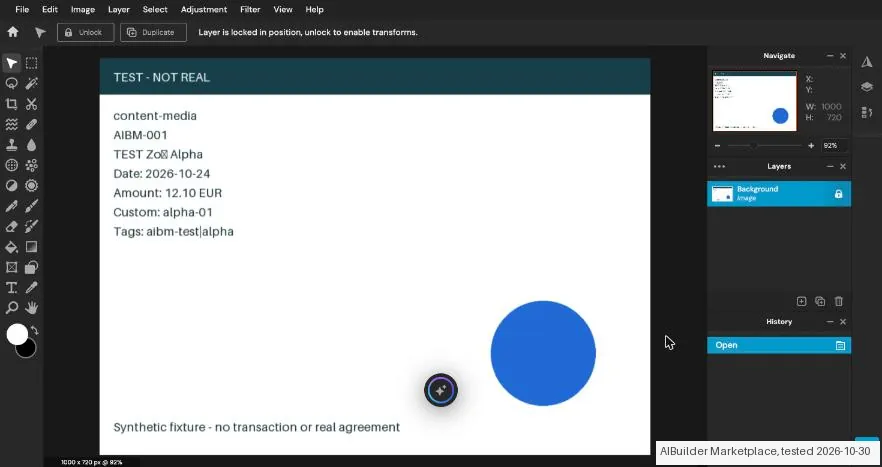
Tested by our team on 30 October 2026 without an account: our AI assistant used the free Pixlr Editor in our browser. We opened our two test images, added a text layer to each, and saved them as Pixlr project files and one as a PNG.
How we tested
- Pasted our two test images into the editor without logging in
- Added a text layer with accents to each
- Saved them as PXZ (one also as PNG) and opened the PXZ contents
- You can edit without an account, but saving shows a free-save counter: after our saves the pop-up read '0/3 daily free save!', then '1/3', then '1/3' again, each time with an invitation to sign up. We were not blocked after three saves, so how the limit counts is unclear.
- Save offers JPG, PNG, WebP, PDF and PXZ, Pixlr's own project format.
- The PXZ files are ZIPs that keep the layers: both text layers came back editable with their accents intact. The background images were stored as WebP, not as the original PNGs.
Pricing (2026)
✓ Pricing re-verified 28 Oct 2026
Pixlr has a free version, which its FAQ describes as usable without an account or charges, carrying ads and a limit on daily free saves whose number the site does not publish. Paid plans cover the web, desktop and mobile apps with one account. Plus is €2.49 a month, or €1.99 a month billed yearly: no ads, unlimited saves, one AI generation at a time and 80 AI credits a month (960 for the year on yearly billing).
Premium is €9.99 a month, or €7.99 billed yearly: all image, video and audio models, four concurrent generations, 1,000 AI credits a month (12,000 for the year), private mode and the full library of fonts, templates and elements. Ultra starts at €24.99 a month, or €19.99 yearly, with up to 10,000 credits a month (120,000 for the year), unlimited fast image generations subject to fair use, eight concurrent generations, a priority queue and extended high-resolution exports; Ultra MAX doubles the credits at €49.99 a month or €39.99 yearly.
Full pricing notes (3 more paragraphs)
The page estimates what credits buy: on Premium about 1,000 fast AI images, 200 pro images or 50 fast AI videos a month. Credit packs can be bought on top. The FAQ sets the rules: monthly subscription credits are topped back up to the plan allowance at each renewal rather than added to, they drop to zero if you cancel, pack credits never expire and are used only after the subscription credits run out, and once a payment has been processed Pixlr does not refund it.
Re-read on 28 October 2026 with a plain fetch from a Netherlands connection: unchanged (Plus €2.49 or €1.99 yearly, Premium €9.99 or €7.99, Ultra from €24.99 or €19.99, Ultra MAX €49.99 or €39.99). The MAX line explains the Ultra card's 'up to': regular Ultra gives 5,000 credits a month and MAX doubles that to 10,000. Plus is estimated at about 80 fast images, 16 pro images, 80 fast edits or 4 fast videos a month.
Payment is by Visa or Mastercard or PayPal; Pixlr does not accept cash cards, and other methods are arranged by email. The English home page still says plans start at $1.99 a month.
Plans change, so check the live price on their site before you buy.
What the pricing page doesn’t say
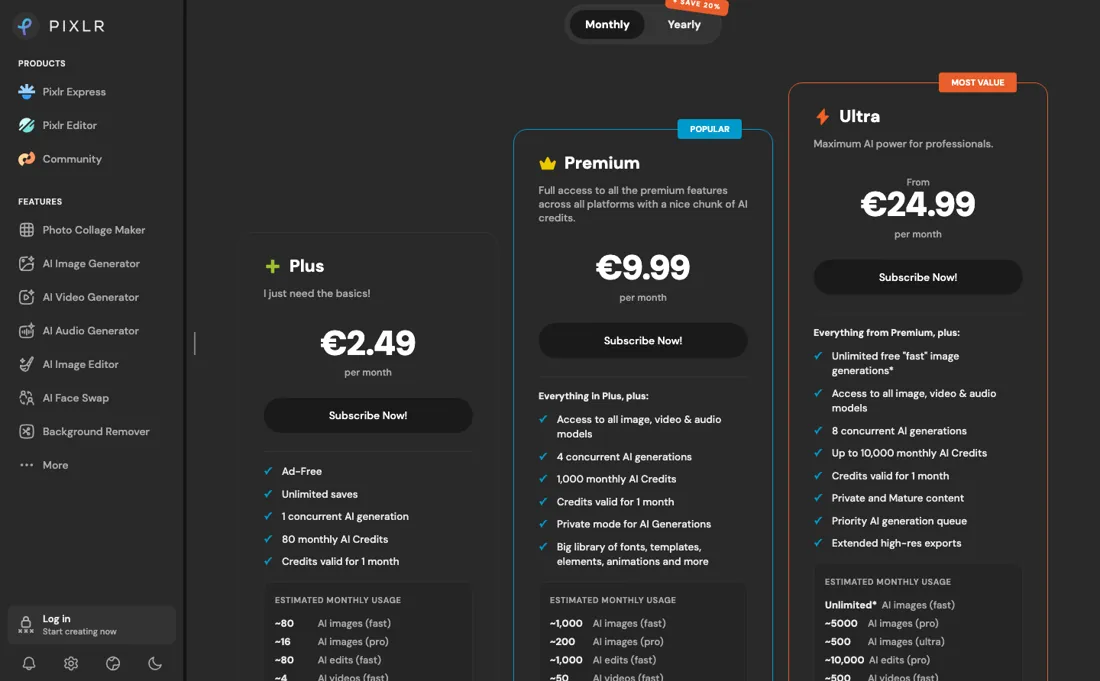
The credit estimates are generous for fast models and much thinner for the better ones; Premium's 1,000 credits are about 200 pro images by Pixlr's own table. Ultra's unlimited fast generation is subject to fair use, and the page says availability is not guaranteed. The free version carries ads and a daily save limit Pixlr does not quantify. Upgrading is not possible on a PayPal subscription. Prices here were read in euros; buyers elsewhere see their own currency.
The pricing FAQ and the Terms of Use contradict each other on credits. The FAQ says credit packs never expire; the terms, last updated 13 May 2026, say purchased credits are valid for one year from purchase and then expire automatically, and are non-refundable. The pricing page says yearly subscribers get all their credits valid for a year; the terms say all plan credits are provided monthly and any unused at the end of the month expire.
Until Pixlr aligns the two, plan as if the stricter terms apply: use packs within a year and do not count on carrying yearly credits from one month to the next. The terms also let Pixlr change the price, package or features of a plan at any time, with or without notice. Publishing AI-generated content on Pixlr's platform grants Pixlr an irrevocable, royalty-free, worldwide licence to it, so keep client work you have not released off its community features. Disputes go to arbitration in Singapore, where Pixlr Pte Ltd is based.
Watch the video review
What Pixlr does
Browser, desktop and mobile photo editor with AI image, video and voice generation; a free version with ads and paid plans that add ad-free editing, AI credits and a template library.
Plus buys no ads, Premium buys the AI
The two lower plans answer different needs. Plus at €2.49 a month removes the ads and the daily save limit and gives a token 80 AI credits, which the page reckons at about 80 fast images or 4 fast videos. If you mostly edit photos and make collages, that is the plan. Premium at €9.99 is the first plan with every image, video and audio model and 1,000 credits a month, about 200 images on the better pro models by the page's own estimate, plus the template and font library.
Ultra is for people generating in volume: from €24.99 a month, unlimited fast images under a fair-use clause, 8 parallel generations and a priority queue. Yearly billing takes about 20% off every tier and changes how credits behave: you get the whole year's credits valid for a year instead of a monthly allowance that is reset at each renewal. That suits uneven use. Do not overbuy on monthly billing, because unused monthly credits do not carry over and disappear entirely if you cancel; credit packs are the only credits that never expire.
Per credit, the ladder rewards volume. Plus works out at about 3.1 euro cents a credit (€2.49 for 80), Premium at 1 cent (€9.99 for 1,000) and Ultra at 0.5 cents (€24.99 for 5,000). Ultra MAX is €49.99 for 10,000, exactly the same price per credit as Ultra, so MAX buys volume, not a discount. The real jump is Premium to Ultra: 2.5 times the price for 5 times the credits, plus unlimited fast images under fair use, 8 parallel generations and the priority queue.
What we found running Pixlr ourselves
The first findings are at the top of this page. The rest:
- By default, saving uses the browser's file-save dialog. A plain download only works after switching on 'Use legacy save method (Download)' in the settings.
Claim vs. what we measured
We set a claim from Pixlr's own pages next to what we saw in our test, on the plan named. The status says whether the two describe the same thing and match; it is not a verdict on the product. Confirmations are listed too.
| What the vendor says | What we measured | Status | What it means if you buy |
|---|---|---|---|
| free advanced photo editorSource: pixlr.com, read 29 Oct 2026 | Measured 2026-10-30: The public Editor allowed guest editing of both images and three completed saves. Popups read 0/3 daily free save!, 1/3 daily free save!, 1/3 daily free save! (0/3 → 1/3 → 1/3); a daily maximum is not proven.Our test, 30 Oct 2026; Public Editor, no account | ConfirmedPixlr public guest editing and three completed saves across two page loads are observed. The literal counters 0/3 → 1/3 → 1/3 do not establish a daily maximum or remaining allowance. | Guest editing and three saves succeeded; the daily quota and reset behavior remain unknown. |
| free advanced photo editorSource: pixlr.com, read 29 Oct 2026 | Measured 2026-10-30: No checkout opened. The plan overview or free editing route does not establish a tax-inclusive payable total.Our test, 30 Oct 2026; Public Editor, no account | Not testableThe Pixlr guest workflow did not enter subscription checkout. Its save-success popups contain no comparable paid plan, billing term, seat count or tax-inclusive subscription total. | Final currency, tax, term, seats, fees and payment total remain unverified. |
Exit test: can you take your data out?
Edited both kit images in the public Editor without an account and saved two PXZ projects; the first image was also saved as PNG. Test date: 30 Oct 2026. We describe the friction rather than score it; this is one run with synthetic records, not a verdict on Pixlr.
| What we checked | What we saw |
|---|---|
| Came along in the export |
|
| Lost in the export | Nothing we could show was lost in this check. |
| Awkward but not lost | Both PNG backgrounds are stored as WebP inside PXZ. The missing glyph in the first source image predates editing. Save popups read 0/3 daily free save!, then 1/3 daily free save!, then 1/3 daily free save! after a new page load: 0/3 → 1/3 → 1/3. The third save succeeded, so a three-saves-per-day limit is not established. A fourth save dialog did not open; no quota block was demonstrated. Legacy Download was enabled to obtain files. |
| Export route | File > Save > PXZ or PNG, using the legacy Download method. |
| Export format | PXZ is a ZIP containing a manifest, background WebP, thumbnail and font; PNG is a flattened image. |
| Re-importing the export | The PXZ was inspected locally but was not reopened in Pixlr; application restoration remains untested. |
| Cancelling | Cancellation, expiry and account deletion were not tested. The control date, where recorded, is planning only. |
What the exit test does not show:
- Full signup screen count and first-result setup speed.
- Actual cancellation, expiry and deletion.
- All kit fields that were not entered.
- Application reimport or restoration.
Kit check counts
Kit content-media 1.0.0; run pixlr-2026-10-30; observed 2026-10-30.
- export / AIBM-001: Of 10 checks: 2 kept, 1 changed, 0 lost, 0 not offered, 7 not tested
- export / AIBM-002: Of 10 checks: 2 kept, 1 changed, 0 lost, 0 not offered, 7 not tested
Each record and phase uses this kit’s checks. Counts describe this run; they are not a score or a comparison between kits.
How this compares: across our exit tests of 330 tools, 60 gave us an export file. Pixlr gave us an export file in which no test data was missing or changed. Report 08: can you get your data out?
Mail in the first 14 days
0 emails in the 14-day window; first email: none observed; 0 with an explicit offer.
Retained inbox and junk only; removed or archived mail is outside this observation. Ambiguous supplier attribution is excluded. Day numbers use elapsed 24-hour periods since the recorded signup date at midnight Europe/Amsterdam; the signup hour is unknown. Offer flags quote literal subject/body text. Replies in our own correspondence (support tickets, our comment requests) are excluded; one-time codes, our own address, our account name and our name are replaced in brackets.
| Day | Time (UTC) | Sender | Literal subject | Folder | Offer evidence |
|---|
Screenshots from our test (click to enlarge)
What this test does not show:
- Opening the saved project file again
- AI tools
- Paid plans
Most of our reviews are researched rather than run. How we review explains which is which, and why we do not pretend otherwise.
Questions we are still checking
Facts about Pixlr that would change a buying decision, and where we stand on each. An unanswered question does not mean the feature is missing; it means we have not confirmed it yet.
- Do purchased credit packs expire after one year or never? Still checking
Applies to: the pricing FAQ says never; the Terms of Use (13 May 2026) say one year from purchase.
Why it matters: a buyer stocking up on packs for occasional video work could lose them.
Checked: Pixlr pricing FAQ (2026-10-28); Pixlr Terms of Use (2026-10-28) - Are yearly plan credits valid for the whole year or reset each month? Still checking
Applies to: the pricing page says all credits valid for 1 year; the terms say monthly with unused credits expiring.
Why it matters: uneven users choose yearly billing precisely to bank credits.
Checked: Pixlr pricing (2026-10-28); Pixlr Terms of Use (2026-10-28) - What do Pixlr's AI credit packs cost? Still checking
Applies to: the pricing page offers an AI Credit Pack top-up without a price in its served HTML.
Why it matters: packs are the only way past a plan's allowance.
Checked: Pixlr pricing (2026-10-28)
Have a public source that answers one of these? How we review explains how we check and correct.
Work at Pixlr? Answer these on the record. A person reads each answer before it is published as a dated statement from your company.
How to actually use Pixlr
Start on the free version in the browser; the FAQ says it needs no account. You will see ads and run into a daily save limit, which tells you quickly whether you use Pixlr often enough to pay. If you mostly need ad-free editing, Plus is the step. If you want the AI generators, estimate your month with the page's own table: Premium's 1,000 credits are about 1,000 fast images but only about 200 pro images or 50 fast videos.
Buy on the web with a card if you may want to upgrade later: the FAQ says upgrades are not possible on PayPal subscriptions, and app-store purchases are managed and refunded only by the app store. Pixlr itself does not refund a processed payment, so start with one month rather than a year. Schools can apply for free education access. Schools and education NGOs should not buy a plan first.
Pixlr for Education is free: register and verify a Pixlr account with an email on the school's own domain, have one staff representative fill in the application form, and allow 48 hours for the school to be registered. The knowledge base says the upgrade lasts 12 months, after which the school is offered 20% off Premium. The education page lists unlimited teacher and student registrations on a whitelisted domain, and the terms let teachers consent on behalf of students.
If you pay, use a Visa or Mastercard rather than PayPal when you might move up a tier, and cancel in your Subscriptions page at least a day before renewal: the terms confirm auto-renewal and no refunds for unused time.
Sources for this review
- Pixlr pricing and FAQ · read 28 Oct 2026: plan prices in EUR, Ultra 5,000 vs MAX 10,000 credits, per-plan estimates, packs never expire, payment methods
- Pixlr Terms of Use (13 May 2026) · read 28 Oct 2026: auto-renewal, price changes without notice, monthly credit expiry, purchased credits one year, AI content licence, Singapore arbitration
- Pixlr for Education · read 28 Oct 2026: free for educators and NGOs, school-domain account, one staff applicant
- Pixlr knowledge base: PixlrEdu · read 28 Oct 2026: 12-month upgrade, 20% off Premium afterwards, 48-hour registration
Full research notes and reading history (184 words)
Pixlr's own pages, read in a live browser on 12 October 2026: the pricing page at pixlr.com/pricing in both the monthly and the yearly view, from a Netherlands connection that shows prices in euros (plan features, credit allowances, the per-plan usage estimates, Ultra MAX and the fair-use note), the FAQ on the same page (credit renewal and expiry, refunds, PayPal and app-store payments) and the home page at pixlr.com (the free version, the $1.99 starting price in its English text, free access for education).
The number of daily free saves is not published. Review quotes on the home page are chosen by Pixlr and are not used. Pixlr is an Awin partner of ours. For the PayPal-upgrade question: the FAQ on pixlr.com/pricing, read on 24 October 2026. Re-read on 28 October 2026 with a plain fetch: the pricing page and FAQ, the home page, the Terms of Use (last updated 13 May 2026), the education page and Pixlr's knowledge-base articles on PixlrEdu and on ads.
Pixlr publishes no dated changelog; its blog (latest post 19 October 2026) carries prompt ideas rather than product changes.
Pixlr vs PhotoGenerator, side by side
Each column shows the vendor’s own published entry price, read on the date shown. Entry prices can cover different services or units, so check what each one buys. We do not average them into a score.
Both names above are affiliate links: we may earn a commission if you sign up, at no extra cost to you. Neither changes what this table says.
The natural comparison is PhotoGenerator: PhotoGenerator is in our dossiers too, read on 3 October 2026: a generator only, with Starter at $12 a month for 360 credits, or $120 a year for 4,320, and no free plan. Pixlr, read on 12 October 2026 in euros, combines an editor with AI generation: Premium is €9.99 a month for 1,000 credits, or €7.99 a month billed yearly, and there is a free version with ads. Credits are priced differently per model on both sites, so compare on the images you would actually generate, not on the credit count, and note the currencies are not converted here. If you mostly edit and only sometimes generate, Pixlr is the cheaper fit; if generation is the whole job, compare the per-model credit costs first..
Not a fit for you?
Pixlr is not the pick for creators for whom AI generation is the job. In that case, look at PhotoGenerator, built for people who want several image and video models behind one balance and one interface: switching between Nano Banana, GPT Image 2, Seedance, Kling, Veo and Wan without holding four subscriptions, and who generate enough to justify an annual plan, which takes 17% to 30% off every tier.
PhotoGenerator price: Starter $12/mo for 360 credits (billed monthly); $10/mo billed annually ($120/yr, 4,320 credits) (read 2026-10-03)
The Visit link is an affiliate link: we may earn a commission, at no extra cost to you. We picked this alternative for fit first; commission only decides between equal fits.
Frequently asked questions
Can you export your data from Pixlr?
Exit check 2026-10-30; route excerpt: File > Save > PXZ or PNG, using the legacy Download method; came along (excerpts): Both PXZ manifests retain separate background and text layers; lost (excerpts): none recorded in this test; re-import: not tested.
Do unused Pixlr AI credits roll over?
Not on monthly billing. Pixlr's FAQ, read 12 and 28 October 2026, says subscription credits are topped back up to the plan allowance at each renewal, so 863 left on Premium becomes 1,000, not 1,863, and they drop to zero if you cancel. Yearly plans are sold with the whole year's credits valid for a year, but the Terms of Use say plan credits expire monthly. Credit packs are used after the subscription credits; see the next question on how long they last.
Can I get a refund on a Pixlr subscription?
Pixlr says no. Its FAQ states it cannot process a refund once a payment has been processed, and subscriptions bought in a mobile app are refunded only through that app store. You can cancel at any time and keep premium features until the period ends. Read 12 October 2026.
Is Pixlr free to use?
Yes, with limits. The free version needs no account but shows ads and caps the number of saves per day; the site does not publish the number. Plus removes ads and the save limit from €2.49 a month (€1.99 yearly), read from a Netherlands connection on 12 October 2026; the English home page says plans start at $1.99.
Can I upgrade a Pixlr plan I bought with PayPal?
Not by yourself. The FAQ on pixlr.com/pricing, read on 24 October 2026, says plan upgrades are only available for credit or debit card purchases, not via PayPal; if you bought with PayPal, Pixlr asks you to email info@pixlr.com and its team will assist. If you expect to move up a tier later, paying by card avoids that support step.
Do Pixlr credit packs expire?
Pixlr's own pages disagree. The pricing FAQ (read 28 October 2026) says pack credits never expire and are used after subscription credits; the Terms of Use (13 May 2026) say purchased credits are valid for one year from purchase and then expire automatically. Use packs within a year to be safe.
Do yearly Pixlr credits last the whole year?
The pricing page says yes: on yearly billing all credits are valid for one year (12,000 on Premium). The Terms of Use say plan credits are provided monthly and expire at the end of each month. Ask Pixlr in writing before relying on a year-long balance.
Is Pixlr free for schools?
Yes, through Pixlr for Education: an ad-free upgrade for educators, students and education NGOs on a whitelisted school domain, approved within about 48 hours of the application. It lasts 12 months; after that the school is offered 20% off Premium (knowledge base, read 28 October 2026).
How can I pay for Pixlr?
On the web by Visa or Mastercard credit or debit card, or PayPal; in the mobile apps through the app store. Pixlr does not accept cash cards and arranges other methods via info@pixlr.com. Only card subscriptions can be upgraded in place.
Is this a hands-on review of Pixlr?
Yes. We tested Pixlr ourselves on 2026-10-30; the section above says what we tested, what we found and what we did not test, and where a figure comes from the vendor's own documentation instead. Most of our reviews are researched rather than run; we say which is which. We name what each tool is good and bad at, and we earn a commission only if you sign up, at no cost to you.
- Read 2026-10-12 in a live browser on pixlr.com/pricing, monthly and yearly views, from a Netherlands connection, which shows euros; the English home page says plans start at $1.99 a month.
- A dated screenshot of that pricing page, kept on this site as the receipt.
- Our own hands-on session with Pixlr (2026-10-30), written up in full further down this page.
Bottom line
In one line: No refunds once a payment is processed, and monthly AI credits reset to the plan allowance at renewal and fall to zero if you cancel.
Best for: people making quick social images in a browser.
The Try button is an affiliate link; we may earn a commission at no extra cost to you.
Others in this category
Reviewed design & content tools that share ground with Pixlr. They are comparable in what they do, not drop-in swaps:
New reviews, price changes we recorded, and the cost conditions we found. No sponsored placements. Unsubscribe anytime.
This is our researched assessment, not a paid placement. The “Visit” links on this page are affiliate links: we may earn a commission if you sign up, at no extra cost to you, and it never changes our take. How we review →