 Modelize Review (2026)
Transparency: the “Visit” links on this page are affiliate links — we may earn a commission if you sign up, at no extra cost to you. No vendor can pay for a better review or verdict. How we make money →
The economics are flat: at roughly $0.19 to $0.20 an image on every tier, moving up the ladder buys resolution, custom presets and support, never a cheaper image.
Visit Modelize → Affiliate link — we may earn a commission if you sign up; it does not change what this page says.
Watch the 2-minute review
The video version of this review, from our YouTube channel.
Pricing (2026)
✓ Pricing re-verified 17 Sep 2026
| This tool | $19 | 28th cheapest of 47 |
| Cheapest | $2.99 | MX AI |
| Median | $14.99 | |
| Most expensive | $450 | Attribuly |
Lowest paid entry price per account a month, billed monthly, in USD, among the 47 e-commerce growth apps we have researched (read between 2026-08-19 and 2026-10-03). Only tools priced in the same unit and on the same billing are compared — not a market survey, and cheapest is not best.
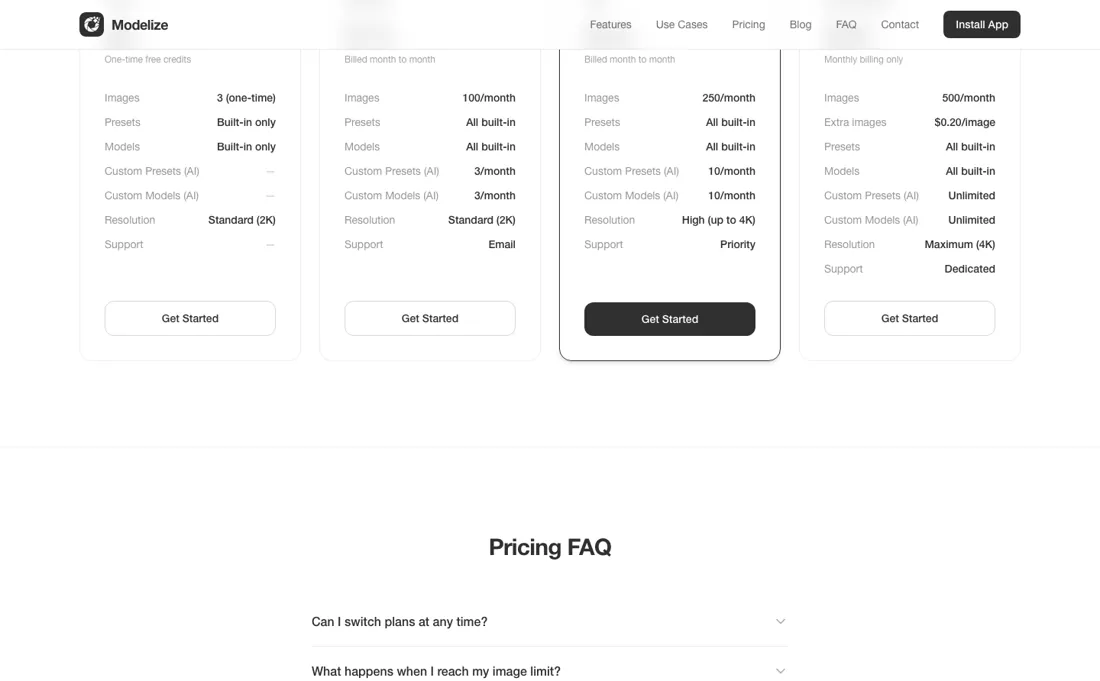
Free plan available, then Starter $19, Pro $49 and Enterprise $99 a month — the three paid rates are unchanged since 19 August 2026. The free tier was raised from 3 to 10 AI images, still one-time rather than per month, with built-in presets and models at standard 2K. Starter covers 100 images a month with 3 AI custom presets and 3 custom models, standard 2K and email support.
Pro at $49 covers 250 images, 10 custom presets and 10 custom models, resolution up to 4K and priority support. Enterprise at $99 includes 500 images with $0.20 per additional image, unlimited custom presets and models, maximum 4K and dedicated support. The annual option is gone: on modelize.studio/pricing, read the same day, all three paid tiers are labelled “Billed month to month” and the page carries no yearly rate and no two-months-free wording anywhere, where in August it sold Free, Starter and Pro annually.
All charges are billed in USD and recur every 30 days. Rating 4.9 from 25 App Store reviews (24 at five stars, one at three), up from 5.0 from 13 reviews on 19 August. Developer Optify, 16 Rue Cuvier, Lyon, France; the app launched 20 April 2026 and carries Shopify’s “Built for Shopify” badge. Plans change — always verify the live price on their site.
What the pricing page doesn’t say
Read it that way and the pricing is honest; read it as a volume discount and you will overbuy. Two other things deserve a clear head. The output quality rides on Google's Gemini image models rather than on anything Modelize owns, so results and consistency can shift when Google ships a new version, and that is outside the vendor's control as much as yours. And the app is genuinely new — launched 20 April 2026, 25 reviews on 17 September 2026 — so the 4.9 average is a small sample, not a track record.
Finally, an on-model photo generated by AI shows a person who does not exist; check what your ad platforms and marketplaces require you to disclose before you build a catalogue on it.
What Modelize does
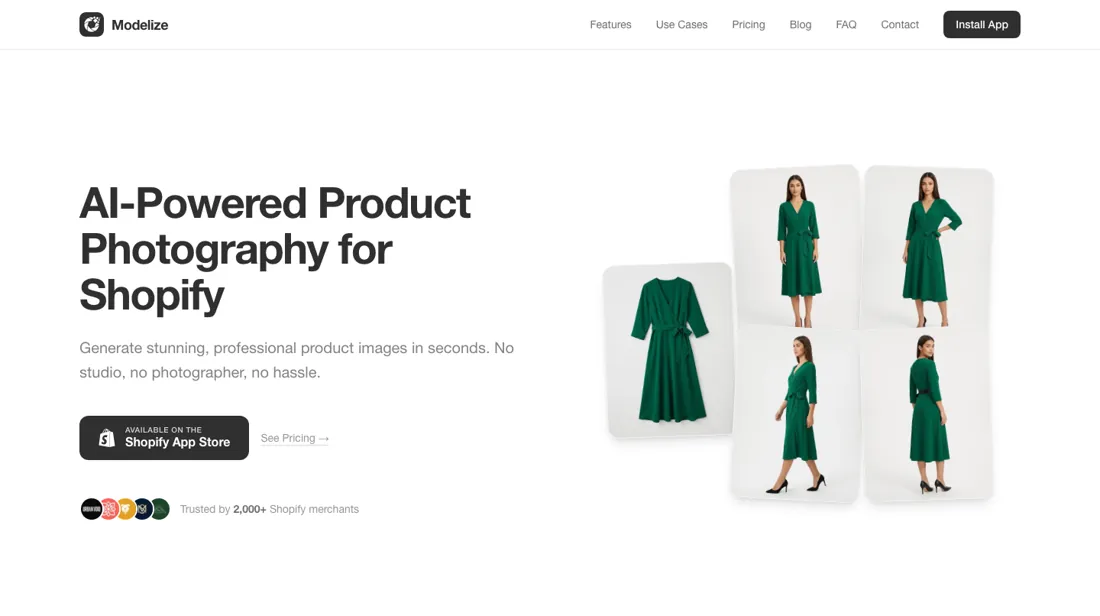
Shopify app that generates on-model, lifestyle, studio and flat-lay product photos in bulk from your existing catalogue images, using Google's Gemini image models.
What buyers report about Modelize
Recurring themes from the buyer-review sites listed at the foot of this page, read in August 2026. We have not run Modelize ourselves, so this is other buyers' experience rather than ours. We summarise it here because the complaints are usually the part a vendor page leaves out.
- • Product likeness is the thing reviewers single out: a French merchant writes that the generated photos keep their products identical to the originals, which is the failure mode buyers of AI photo tools worry about most.
- • Bulk generation and the built-in presets. A US parts retailer calls it the best app for bulk image generation and says the existing presets fit their industry without tuning.
- • Support is hands-on and answers in the chat window while you are still in it, by name (Titouan). Several reviewers say the developer solved the problem during the conversation rather than by ticket.
- • There is no critical review to report. Across the full listing there is not a single review below five stars, so nothing public documents what happens when output goes wrong, how the credit maths works out over months, or what support looks like once the founder is not the one answering.
Where the ratings disagree. The listing shows 5.0 across 13 reviews, and that number carries less weight than it looks. Most reviewers had the app installed for days rather than months — tenures run from four minutes to 29 days — and the majority are French-language reviews from a small merchant base. It reads as a young app with happy early users, not as a track record. Nothing here tells you how the per-image economics feel after a few hundred images.
Pages read (August 2026): Shopify App Store
When the paid plan is worth it
Do the division before you pick a tier, because the ladder is almost perfectly flat. Starter is $19 for 100 images, which is $0.19 an image. Pro is $49 for 250, which is $0.196. Enterprise is $99 for 500, which is $0.198, and every image past the allowance costs $0.20. There is no volume discount here at any point — you pay roughly nineteen or twenty cents an image whichever plan you are on.
So the tiers are not selling you cheaper images, they are selling three other things. Resolution is the first and the only hard capability difference: Free and Starter cap at 2K, Pro and Enterprise go up to 4K. If you need print or zoomable detail, that decision is made for you at $49. The second is custom presets and models, the AI-generated scene and mannequin setups you build yourself: 3 a month on Starter, 10 on Pro, unlimited on Enterprise.
The third is the support line, from email to priority to dedicated. That makes the choice simpler than most. Pick Starter if 2K is enough and you shoot in small batches. Pick Pro the moment you need 4K or more than three custom setups a month. And only look at Enterprise if you are past 500 images a month, or genuinely need unlimited custom models. Buying a higher tier for the image allowance alone gains you nothing.
One thing has changed since August: there is no annual rate any more. On modelize.studio, read 17 September 2026, all three paid tiers read “Billed month to month” and no yearly discount is offered, where Free, Starter and Pro previously sold annually at two months free. So there is nothing to save by committing. And the free tier is a demo rather than a plan — 10 images, once.
How to actually use Modelize
Spend the ten free images on your hardest product rather than your easiest one. A plain packshot will look fine from almost any tool, and what you actually need to know is whether the model shots hold up on your fabric, your finish and your worst source photo. If they do, start on Starter and watch the resolution ceiling rather than the image count. 2K is fine on a product grid and thin the moment someone zooms, and that single limit is what pushes most stores to Pro.
Build your custom presets early and reuse them, because consistency across a catalogue is the whole point and three new presets a month is enough only if you are not restarting every week. Keep the originals of everything you feed in. And before the catalogue goes live, look at the images as a set rather than one at a time; AI photography fails at the level of a page full of near-identical scenes, not at the level of a single shot.
Distilled from apps.shopify.com/modelize and modelize.studio/pricing, read 19 August 2026.
Frequently asked questions
What does a Modelize image actually cost?
Roughly nineteen or twenty cents on every plan, which is the one number that decides this purchase. Read on apps.shopify.com/modelize on 17 September 2026: Starter is $19 for 100 images a month ($0.19 each), Pro $49 for 250 ($0.196), Enterprise $99 for 500 ($0.198), and anything past an Enterprise allowance is $0.20. There is no volume discount at any rung, so climbing the ladder never makes an image cheaper. What the steps do buy is resolution — Free and Starter cap at 2K, Pro and Enterprise go up to 4K — plus custom AI presets and models (3 a month on Starter, 10 on Pro, unlimited on Enterprise) and a shorter support queue. Charges are in USD and recur every 30 days. Since August the annual option has disappeared: modelize.studio now labels all three paid tiers “Billed month to month”, so there is no yearly discount left to plan around.
Is the free plan enough to judge it on?
It is a demo rather than a plan, but it got more generous. As read on 17 September 2026 the free tier is 10 AI images, one-time rather than monthly — up from 3 in August. It gives you the built-in presets and models at standard 2K resolution, and not the custom AI presets and models, which start at 3 a month on Starter. So free tells you how the built-in scenes handle your products, and nothing about whether you can build a repeatable look of your own. Spend those ten on your most difficult item rather than a clean packshot: a flat product will come out fine from almost anything, and what you actually need to know is how the model shots handle your fabric, your finish and your worst source photo. Then look at the ten as a set, because AI catalogue photography fails at the level of a page of near-identical scenes.
How much of a track record is behind this app?
Five months of one, and it is growing quickly. The listing shows the app launched on 20 April 2026 and, read on 17 September 2026, carries 25 reviews averaging 4.9 — 24 at five stars and one at three — against 13 reviews averaging 5.0 a month earlier. It holds Shopify’s “Built for Shopify” badge, which is a standards check rather than a verdict on output. Two limits are worth holding next to that. The App Store listing is the vendor’s own sales channel, not an independent panel, and twenty-five reviews is a thin base for a catalogue-wide commitment. And the image quality rides on Google’s Gemini models rather than on anything Modelize owns, so consistency can shift when Google ships a new version — outside the vendor’s control as much as yours. Keep your originals.
What should I weigh before buying Design & Content software?
Up to a point, and that point is usually set by your plan. Check whether brand kits, custom fonts, colour locking and template controls sit on the tier you would actually buy, since these are common upsells. Test it with your own assets during the trial rather than the demo content, which is always chosen to flatter the output.
Is this a hands-on review of Modelize?
This is a researched assessment, not a hands-on test — where we've used a tool ourselves, we say so explicitly. We name what each tool is good and bad at, and we earn a commission only if you sign up, at no cost to you.
- Buyer reviews on the Shopify App Store listing, read August 2026.
- Re-read 2026-09-17 on apps.shopify.com/modelize, listed as “Modelize: AI Product Photos”.
- A dated screenshot of that pricing page, kept on this site as the receipt.
Others in this category
Reviewed design & content tools that share ground with Modelize — comparable in what they do, not drop-in swaps:
New reviews, price changes we recorded, and the cost conditions we found. No sponsored placements. Unsubscribe anytime.
This is our researched assessment — not a paid placement. The “Visit” links on this page are affiliate links: we may earn a commission if you sign up, at no extra cost to you, and it never changes our take. How we review →