Imgify Review (2026)
 By Daan Haket · Researched and written with an AI assistant · who does what
Start with the word 'free' on the listing card, because it does not mean what it looks like.
shopify stores that want their own logo falling down the page, or a marquee of partner, payment and press logos, rather than generic snow — and that have no artwork ready, since the AI logo maker is the one thing here the free competitors do not offer.
you only want seasonal snow, hearts or confetti: Dakaas Seasonal Effects does exactly that for nothing, with 200+ themes and a far deeper review record — and skip it too if you are counting on the free plan, which is restricted to development and partner stores and starts billing the moment you upgrade.
Transparency: the “Visit” links on this page are affiliate links — we may earn a commission if you sign up, at no extra cost to you. No vendor can pay for a better review or verdict. How we make money →
Pricing (2026)
✓ Pricing re-verified 20 Oct 2026
“or $28.70/year and save 20%”Source: apps.shopify.com/custom-falling-effect, read 20 Oct 2026
Billed in USD, with recurring charges billed every 30 days. There are two plans and the cheaper one is almost certainly not for you: the Development plan is free, unlocks every feature, and the listing states its limit plainly — development and partner stores only, with billing activated on upgrade. A live shop is therefore on the paid plan from day one.
Monthly Plan is $2.99 a month, or $28.70 a year with the annual saving the listing puts at 20%, and it carries the falling effect, the AI logo maker, custom image upload, appearance and density controls, the marquee logo slider, dozens of holiday presets, support for all themes and live chat support. A 7-day free trial applies to the paid plan. Effective Apps' own site, effectify.io, publishes no pricing page at all — /pricing and /apps both return 404, checked the same day, and the home page carries no prices — so unlike most Shopify apps there is no upper half of the ladder hiding on a vendor site. What the listing shows is the whole price record. Plans change — always verify the live price on their site.
What the pricing page doesn’t say
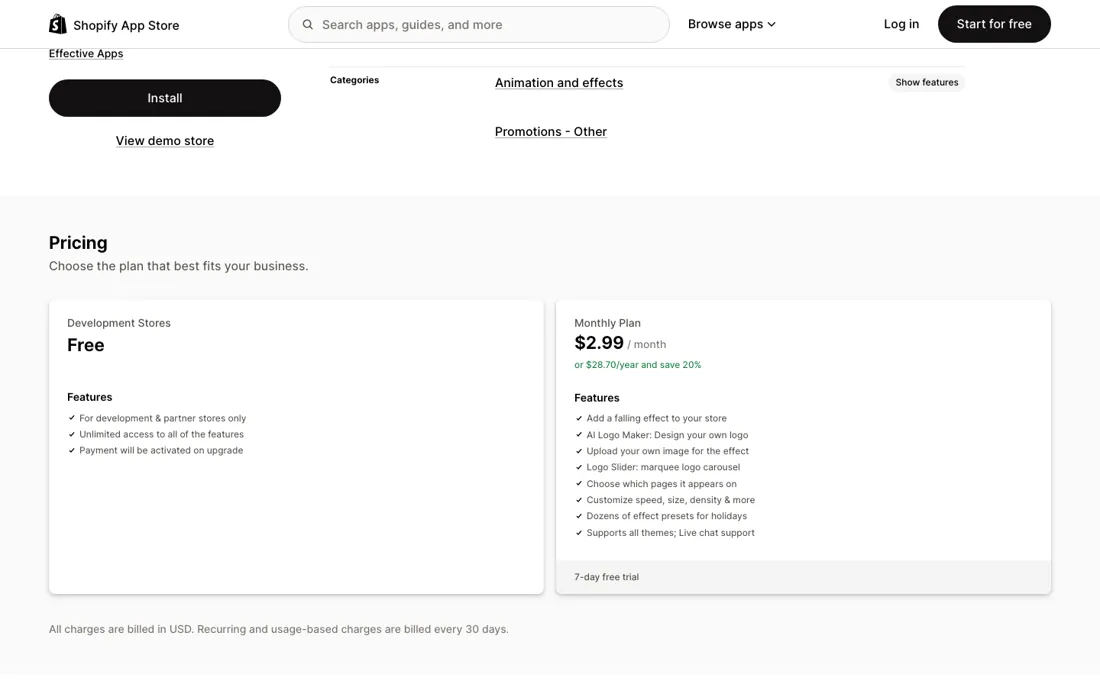
The free plan is development and partner stores only, and billing activates the moment you upgrade — a real storefront pays $2.99 from the first day, after a 7-day trial. Then the harder question: the nearest app in the same Shopify category costs nothing. Dakaas Seasonal Effects carries the same Built for Shopify badge, lists 200+ holiday themes plus cursor effects, music and scheduling, and has 1,567 reviews at 4.9 since May 2021 against Imgify's 32 at 4.8 since January 2020.
So you are not weighing $2.99 against nothing at all — you are weighing it against a free app with a public record roughly fifty times deeper. What the money actually answers is narrow: the AI logo maker and the marquee slider for partner, payment and press logos, neither of which is on the free app's feature list. That is a real difference and it is the whole case for paying.
And treat the sales pitch as a pitch. The listing promises effects that 'boost sales' and logo rows that build 'instant trust'; no conversion data is published for either claim, by this vendor or by the free ones. Note too what the recent reviews are built from — three of the newest come from stores that had the app installed for ten minutes, about three hours and nine months respectively, so most of that 4.8 says the install went smoothly, not that the thing kept working.
Watch the video review
The video version of this review, from our YouTube channel.
What Imgify does
Shopify app that drops your own logo — or snow, hearts and dozens of holiday presets — down the storefront, with a marquee slider for partner, payment and press logos and an AI logo maker for the artwork.
What buyers report about Imgify
Hands-on: not tested by usReported by buyers: the Shopify App Store listing and all four pages of its reviews, read September 2026
Themes from the buyer-review sites listed at the foot of this page, read in September 2026. We have not run Imgify ourselves, so this is other buyers' experience rather than ours. We summarise it here because the complaints are usually the part a vendor page leaves out.
- • The warm reviews are consistent about one thing: it does what it says without touching the theme code. 'Very easy just install and go. No coding needed. Best part that you can use custom logos' (US store, May 2023, seven days in). Several merchants describe reusing it season after season — an Albanian store ran it for Christmas and again for Valentine's Day and called it 'that extra magic touch'; a Taiwanese shop used a snow effect on the home page for the winter season after twelve months with the app; a UK store dropped a special anniversary logo down the page for an anniversary offer.
- • Support comes up repeatedly and unprompted, across five years and several languages: 'excellent customer support' (UK, 2021), 'excellent service, et excellent support technique' (France, 2025), 'Customer service is excellent- quick to check on new users and concerns' (US, March 2026). The developer also answers negative reviews publicly on the listing.
- • There are genuine long-haul users behind the rating, not only fresh installs: almost five years for one US bookshop, almost three years for two more, over two years for two others, and twelve and nine months for two seasonal stores.
- • The two features you actually pay for do not appear anywhere in the review record. Across all 32 reviews, read September 2026, not one mentions the marquee logo slider or the AI logo maker — the two things that separate the $2.99 plan from the free apps in the same category. Every review with text is about the falling effect: snow, Halloween, Valentine's Day, a custom logo dropping down the page. The listing is now titled around the logo slider while the slug is still custom-falling-effect, and the reviews describe the older product.
- • Much of the rating is a rating of the install rather than of the app in use. Twelve of the 32 reviews carry no text at all, and ten were written within a day of installing — at three minutes, five, ten, nineteen, twenty-two, twenty-seven (twice), about three hours, about twelve and about twenty-four.
- • The single one-star is the only report of the app doing harm, and it is short: a Spanish wine store wrote on 30 December 2025, after nineteen days, that the app broke their site with a bug and that they do not recommend it. The developer replied publicly the same day asking for details. Nobody has confirmed or contradicted it since.
- • The one four-star is a usability complaint with real time behind it: a US store, September 2025, about two months in, likes the app but reports the in-app message button sitting on top of the Save button, making it hard to save without hitting chat.
Where the ratings disagree. Only one platform carries reviews for this app — the Shopify App Store — and the gap is inside it rather than between platforms. The listing sells a logo slider, payment logos and an AI logo maker; the reviews, going back to January 2021, are about falling snowflakes. That is not a contradiction so much as a warning about the sample: the 4.8 was earned by a product this app used to be, and there is no public evidence yet about the features being charged for now.
Pages read (September 2026): Shopify App Store
What the money actually buys
There is only one paid plan, so the question is never which tier but whether $2.99 a month beats free. What it buys over the free competition is two things, and both are about your brand rather than the season: the AI logo maker, which generates falling artwork from a short prompt when you have no image ready, and the marquee logo slider for partner, payment and press logos. Neither appears on the feature list of Dakaas Seasonal Effects, the free app that leads this category with 1,567 reviews.
Everything else on the paid plan — falling effects, custom image upload, appearance and density control, page targeting, dozens of holiday presets, support for all themes — has a free equivalent one listing away. At $2.99 a month or $28.70 a year the sum is small enough that the real calculation is whether you want your own logo falling rather than snowflakes. If you do not, you are paying for presets you can have for nothing.
How to actually use Imgify
If you have a development store, install there first. The Development plan is free, unlocks every feature and only starts billing when you upgrade, which is the cheapest way to see whether a falling effect actually suits your theme. On a live store you are on the paid plan immediately, with a 7-day trial to decide. Switch on one surface and one occasion rather than everything at once. The app targets specific pages — home, product, cart, landing and custom pages — so the usual first test is the homepage for a single holiday using one of the presets.
Keep density and speed low: what reads as festive at a handful of images on screen reads as broken at fifty. If you have no artwork, run the AI logo maker before you go looking for an image. That feature, and the logo slider, are most of what you are paying for. Setup details taken from the app listing at apps.shopify.com/custom-falling-effect and its plan table, read 20 September 2026.
Where this section comes from: our research notes (224 words)
Read in a live browser on 20 September 2026. The Shopify App Store listing at apps.shopify.com/custom-falling-effect, gave the Built for Shopify badge, the rating of 4.8 from 32 reviews with its 30/1/0/0/1 star split, the launch date of 2 January 2020, the developer record (Effective Apps, 13 Max Nordau, Ashdod 7722119, Israel), the Animation and effects category, the ten storefront languages, the surfaces it targets (Shopify Admin, custom page, landing page, product page, home page, cart page) and the complete two-plan price ladder with its 7-day trial and USD billing note; the pricing panel was additionally captured in English in the same session, which is where the 'Logo Slider: marquee logo carousel' and 'Live chat support' wordings come from.
Effective Apps' own site effectify.io was checked the same day for tiers the listing does not show and has none: /pricing and /apps both return 404 and the home page carries no prices. The comparison figures for Dakaas Seasonal Effects (free, Built for Shopify, 4.9 from 1,567 reviews, launched 14 May 2021, 200+ themes) come from its own listing at apps.shopify.com/multi-seasonal-effects, read the same day. No third-party ratings were used.
Re-read 20 October 2026: the listing's plan ladder, 7-day trial and USD billing note were unchanged, and the help article 'About Imgify Custom Animation Effect' at effectify.help gave the selected-pages setting and the PNG advice.
The natural comparison is Dakaas Seasonal Effects — Both put falling effects on a Shopify storefront, both carry the Built for Shopify badge, and one of them is free. Dakaas lists 200+ holiday themes plus cursor effects, music and scheduling, and has 1,567 reviews at 4.9 since May 2021; Imgify has 32 reviews at 4.8 since January 2020 and costs $2.99 a month or $28.70 a year. The comparison goes Imgify's way on one axis only, and it is a narrow one: your own brand rather than the season. The AI logo maker that generates falling artwork from a short prompt, and the marquee slider for partner, payment and press logos, are not on the Dakaas feature list. If you want snow for December, Dakaas does it for nothing and far more merchants have vouched for it. If you want your logo falling down the page, Imgify is the one that does that — and at $2.99 the price is not the part of this decision worth agonising over..
Frequently asked questions
The listing shows a free plan — can I run it on my store for nothing?
No. The free tier is the Development plan, and the listing states its limit plainly: development and partner stores only, with billing activated on upgrade. A live storefront is on the paid plan from the first day, after a 7-day trial, at $2.99 a month or $28.70 a year. What the Development plan is genuinely good for is a rehearsal: it unlocks every feature, so you can see whether a falling effect suits your theme before a single charge. Read on apps.shopify.com/custom-falling-effect, 20 September 2026.
Do the reviews tell me whether the paid features are any good?
They do not, and that is worth knowing before you pay. We read all 32 reviews across the listing's four pages on 20 September 2026. Every review with text describes the falling effect — snow, Halloween, Valentine's Day, an anniversary logo dropped down the page. Not one mentions the marquee logo slider or the AI logo maker, and those two are the entire case for paying rather than installing a free competitor. Twelve of the 32 carry no text at all, and ten were written within a day of install (three minutes, five, ten, nineteen, twenty-two, twenty-seven twice, about three hours, about twelve, about twenty-four). The rating of 4.8 is real; it is mostly a rating of the install.
Monthly or annual?
The annual rate is $28.70 against $35.88 for twelve monthly payments — a saving of $7.18, the 20% the listing advertises. But this is a seasonal app and several reviewers use it that way, switching it on for Christmas and again for Valentine's Day. Four months at $2.99 is $11.96, well under the annual rate, so the year only pays if the logo slider or the AI logo maker earn their keep between the holidays. Figures read on apps.shopify.com/custom-falling-effect, 20 September 2026; the arithmetic is ours.
Can I show the effect on some pages and not others?
Yes. Imgify's own help article, 'About Imgify Custom Animation Effect' (effectify.help, read 20 October 2026), documents a 'Show on selected pages only' setting, so a seasonal effect can run on the home page without following shoppers onto every product page. The same article advises transparent-background PNG images for custom uploads. It does not say whether the setting differs by plan; on the listing the free Development plan unlocks every feature but only on development and partner stores, so a live shop gets it on the $2.99 plan.
Is this a hands-on review of Imgify?
This is a researched assessment, not a hands-on test — where we've used a tool ourselves, we say so explicitly. We name what each tool is good and bad at, and we earn a commission only if you sign up, at no cost to you.
- Buyer reviews on the Shopify App Store listing and all four pages of its reviews (32 reviews, 4.8, split 30/1/0/0/1), read September 2026.
- Prices read 2026-09-20 on apps.shopify.com/custom-falling-effect; re-verified 2026-10-20 on the same listing, unchanged.
- A dated screenshot of that pricing page, kept on this site as the receipt.
Others in this category
Reviewed design & content tools that share ground with Imgify — comparable in what they do, not drop-in swaps:
New reviews, price changes we recorded, and the cost conditions we found. No sponsored placements. Unsubscribe anytime.
This is our researched assessment — not a paid placement. The “Visit” links on this page are affiliate links: we may earn a commission if you sign up, at no extra cost to you, and it never changes our take. How we review →