 Alohi Review (2026)Fax, Sign and Scan Bill Separately
Transparency: the “Visit” links on this page are affiliate links — we may earn a commission if you sign up, at no extra cost to you. No vendor can pay for a better review or verdict. How we make money →
The honest catch is that Alohi is a suite of separate products — Fax.Plus, Sign.Plus, Scan.Plus — each with its own subscription, so "one ecosystem" can mean several line items if you want e-signatures and faxing and scanning.
Visit Alohi → Affiliate link — we may earn a commission if you sign up; it does not change what this page says.
Watch the 2-minute review
The video version of this review, from our YouTube channel.
⚡ Short on time? Watch the 30-second verdict Short.
Pricing (2026)
✓ Pricing re-verified 27 Sep 2026
Priced per product, in USD, with a currency switcher offering EUR, CHF and GBP. IMPORTANT: on Fax.Plus the '/month' figure on each card is the annual rate. Fax.Plus — Basic $6.99 a month billed as $83.99 annually (200 pages a month, one fax number, one member, $0.10 per extra page, 60 pages maximum per fax); Premium $13.99 / $167.99 (500 pages, $0.07 per extra page, 90 pages per fax, adds toll-free numbers, number porting, CSV log export and the ability to switch off reception); Business $27.99 / $335.99 (1,000 pages); Enterprise $79.99 a month on annual billing, $959.99 a year, and the only card that also shows a monthly-billing rate, 'starts at $99.99' (4,000 pages, multiple fax numbers, unlimited members, $0.03 per extra page, 250 pages per fax, 1,000 AI credits a month, SSO, HIPAA-compliant with BAA, the Fax.Plus API, data residency and Zapier).
The banner offers 'up to 3 months free with an annual plan (save up to 22%)'. A free plan gives 10 pages in total, not per month. Extra fax numbers are $4.99 a month (Business and Enterprise include two); vanity numbers $19.99; choosing your own number within a region is a one-time $19.99, or $29.99 from their handpicked memorable set. Porting is free but country-dependent — porting a US or Canadian number requires Premium or higher.
The footnotes warn that faxes to certain destinations may count as multiple pages, priced on a separate Sending Rates page, and that taxes are excluded. Sign.Plus is a separate subscription and prints annual and monthly rates side by side: Free (3 signature requests in total, 1 template, 1 user), Personal $9.99 annual / $14.99 monthly, $119.99 a year (1 user, 10 signature requests a month, 5 templates), Professional $19.99 / $29.99 per user, $239.99 a year (up to 5 users, unlimited requests, 10 templates), Business $29.99 / $49.99 per user, $359.99 a year (unlimited templates, document sharing, Zapier, custom branding), Enterprise $49.99 / $79.99 per user, $599.99 a year (SSO, HIPAA-compliant with BAA, advanced security controls, data residency, priority support).
Sign.Plus advertises 'save up to 40% with annual plans'. Request via SMS/WhatsApp is metered separately at 10, 30 and 150 a month from Professional upward. The Fax.Plus page's structured product data, read 27 September 2026, also lists monthly-billing prices for the lower tiers that the cards do not print: Basic $8.99, Premium $17.99, Business $34.99 and Enterprise $99.99 a month. Plans change — always verify the live price on their site.
Category context: Operations & Workflow. Across the 49 tools in this category that we researched with a public US-dollar price, the median entry price is $25 a month (lowest paid plan as listed, per seat where the vendor prices per seat). Alohi’s entry price of $6.99 a month sits below that median. Compare pricing conditions in the Software Cost Atlas →
What the pricing page doesn’t say
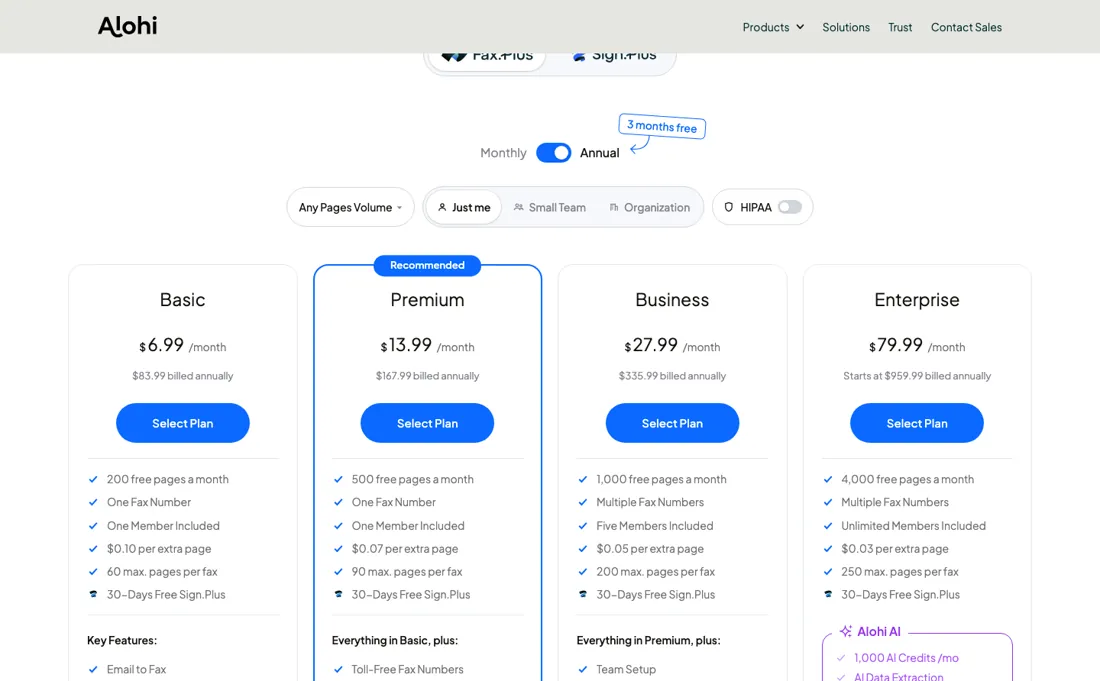
Page and member limits on the lower tiers are modest, and HIPAA/BAA sits only on the top tier. For a single job (say online faxing), it's clean and cheap; for the full workflow, add up the parts.
What Alohi does
One secure ecosystem for document workflows: Sign.Plus e-signatures, Fax.Plus online faxing and Scan.Plus scanning — paperwork handled, compliance included.
What buyers report about Alohi
Recurring themes from the buyer-review sites listed at the foot of this page, read in August 2026. We have not run Alohi ourselves, so this is other buyers' experience rather than ours. We summarise it here because the complaints are usually the part a vendor page leaves out.
- • Clean web app and a mobile experience reviewers single out — 4.6 on G2 across 60 reviews, 80% of them five stars.
- • Good value against the legacy fax services, from $6.99/month with a free tier, and support gets named repeatedly.
- • Trustpilot splits almost evenly between five-star and one-star reviews. That is not a middling product — it is two very different experiences, and the one-star end is billing.
- • An auto-renewal complaint where the reviewer disputed the charge and was refused a refund after a single day of service.
- • One reviewer reported pages failing to transmit while the system showed them as sent. For anything legal or medical, confirm receipt out of band.
Where the ratings disagree. 4.6 on G2 against a 50/43 split of five- and one-star reviews on Trustpilot. The G2 reviews are about faxing; the one-star Trustpilot reviews are about renewals and refunds.
When the paid plan is worth it
Read the billing period before the number. On Fax.Plus every plan card shows a '/month' figure that is the annual rate: Basic $6.99 is $83.99 billed annually, Premium $13.99 is $167.99, Business $27.99 is $335.99. Only the Enterprise card prints both, at $79.99 a month on annual billing against 'starts at $99.99' monthly. Sign.Plus prints both throughout — Personal $9.99 annual against $14.99 monthly, Professional $19.99 against $29.99 per user, Enterprise $49.99 against $79.99.
Then the arithmetic that decides your tier. Basic includes 200 pages and charges $0.10 for extras, Premium includes 500 at $0.07, so the crossover is 270 pages a month. What upgrading does not fix is what counts as a page. The vendor's own footnote says faxes to certain destinations may count as multiple pages, priced on a separate sending-rates page, and each tier caps a single fax at 60, 90 or 250 pages.
A larger allowance does not make an international fax cheaper per sheet, and a HIPAA BAA stays on Enterprise on both products.
How to actually use Alohi
Sign up with email or Google, verify the email, and you can send from the dashboard right away. The 10 free pages unlock only after you validate a mobile number, and Alohi sends the code only when the country of your IP address matches the phone's country code — the first place people stall. Receiving needs a plan and a number, bought in the same flow under Settings > Plan & Billing > Upgrade, where you choose country and city.
If that country requires address verification, you upload proof of billing address as PDF, JPG or PNG; the vendor's own estimate is 48 hours there, and 48-72 hours for regulatory approval generally. Two other snags: a mobile number already attached to another Fax.Plus account cannot be reused, and Free-to-paid upgrades can reassign your number, so wait 5-10 minutes and check "All My Numbers" before assuming it is lost. Porting an existing number is a separate track — Premium or above, LOA plus last invoice, temporary number in the meantime.
Distilled from fax.plus/pricing and sign.plus/pricing, both read on 10 September 2026 in the USD view — the Fax.Plus plan cards (Basic $6.99/$83.99, Premium $13.99/$167.99, Business $27.99/$335.99, Enterprise $79.99 annual with 'starts at $99.99' monthly and $959.99 a year), their page allowances, per-extra-page rates ($0.10, $0.07, $0.03), maximum pages per fax (60, 90, 250) and the footnotes on extra numbers ($4.99/mo), vanity and custom numbers ($19.99, $29.99), country-dependent porting (US and Canada require Premium or higher) and the warning that faxes to certain destinations may count as multiple pages; and the Sign.Plus cards and 'Compare the plans' table for the annual-versus-monthly pairs ($9.99/$14.99, $19.99/$29.99, $29.99/$49.99, $49.99/$79.99), the Free row's '3 Total' signature requests, the template counts (1, 5, 10, unlimited) and the SMS/WhatsApp request meter (10, 30, 150 a month). Note that fax.plus geo-redirects a browser to a localised path (/nl/pricing from the Netherlands), so the USD figures come from a direct request rather than the browser panel, and on the plan cards only Enterprise prints a monthly-billing rate. Re-read 27 September 2026 by plain fetch: every card amount, per-extra-page rate and footnote above unchanged on both pages, with the Business tier at $0.05 per extra page and 200 pages per fax, and the Free plan at $0.20 and 30. The Fax.Plus page now carries JSON-LD offers with monthly-billing prices for all four tiers (Basic $8.99, Premium $17.99, Business $34.99, Enterprise $99.99) beside the annual $83.99/$167.99/$335.99/$959.99. The two pricing FAQs on the same pages: subscriptions renew automatically, monthly or yearly; receiving needs an active paid plan and pages left; Sign.Plus recipients do not need an account; Qualified Electronic Signatures (eIDAS and ZertES) are available on all Sign.Plus plans at $5 per recipient, billed as credits in packs of 10 to 1,000; SMS/WhatsApp requests start at Professional with 10, 30 and 150 a month per seat. Setup and number validation steps come from the vendor help centre at help.alohi.com.
The natural comparison is DocuSign plus a standalone eFax service — best-of-breed single tools — Alohi's pitch is one vendor for fax, sign and scan; compare total cost across the parts you'd use.
Frequently asked questions
How much more does Fax.Plus cost on monthly billing?
About a quarter more. The plan cards show only the annual rate as a monthly figure, but the page's structured product data (read 27 September 2026) lists the monthly-billing prices: Basic $8.99 against $6.99, Premium $17.99 against $13.99, Business $34.99 against $27.99, and Enterprise $99.99 against $79.99. Annual billing is paid up front, $83.99 to $959.99 a year, and both renew automatically.
Do the people I send a Sign.Plus document to need an account?
No. Sign.Plus's pricing FAQ (read 27 September 2026) says recipients get an email to review and sign whether or not they are registered. What you pay for is the sending side: the free plan allows 3 signature requests in total and Personal 10 a month, and only Professional and above, from $19.99 per user a month billed annually, are unlimited.
Does Sign.Plus support qualified electronic signatures, and what do they cost?
Yes, on every plan, but not inside the subscription. The FAQ (read 27 September 2026) says Qualified Electronic Signatures, recognised under the EU eIDAS Regulation and Swiss ZertES, cost $5 per recipient, billed as credits sold in packs of 10 to 1,000. A contract with three signers who all need QES therefore adds $15 on top of the plan.
What should I weigh before buying Operations & Workflow software?
Usually it sits on top rather than replacing everything. Tools in this class tend to become the layer where work is tracked and handed off, while your existing systems stay the source of truth for their own data. Before you buy, map which tools it would replace outright and which it would merely sync with. If the answer is that it syncs with all of them, you are adding a layer rather than removing one.
Is this a hands-on review of Alohi?
This is a researched assessment, not a hands-on test — where we've used a tool ourselves, we say so explicitly. We name what each tool is good and bad at, and we earn a commission only if you sign up, at no cost to you.
- Buyer reviews on G2, Capterra, TrustRadius and Trustpilot, read August 2026.
- Read 2026-09-10 and re-read unchanged 2026-09-27 on fax.plus/pricing and sign.plus/pricing.
- A dated screenshot of that pricing page, kept on this site as the receipt.
Others in this category
Reviewed operations & workflow tools that share ground with Alohi — comparable in what they do, not drop-in swaps:
New reviews, price changes we recorded, and the cost conditions we found. No sponsored placements. Unsubscribe anytime.
This is our researched assessment — not a paid placement. The “Visit” links on this page are affiliate links: we may earn a commission if you sign up, at no extra cost to you, and it never changes our take. How we review →