 ManyChat Review (2026)The Free Plan Is 25 Contacts
Flows are button-and-script based, not natural language — type something unexpected and the bot falls back.
Visit ManyChat → Affiliate link — we may earn a commission if you sign up; it does not change what this page says.
Watch the 2-minute review
The video version of this review, from our YouTube channel.
⚡ Short on time? Watch the 30-second verdict Short.
Pricing (2026)
✓ Pricing re-verified 25 Sep 2026
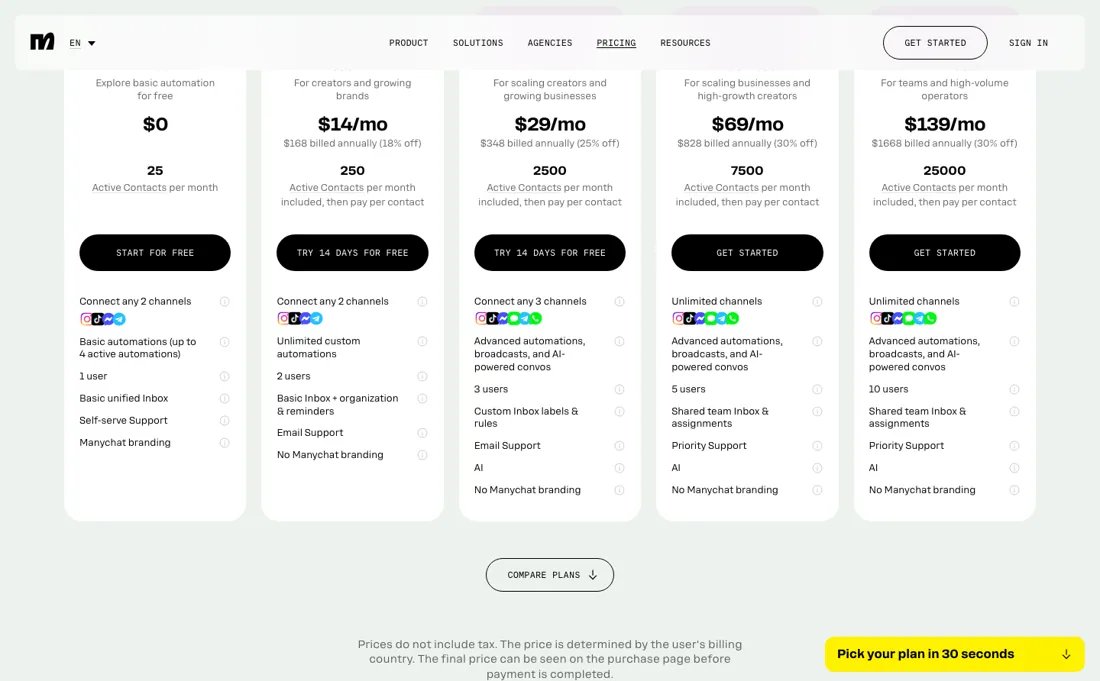
Read on their own pricing page, 6 September 2026, and again, unchanged, 25 September 2026. Free: $0, 25 active contacts, 2 channels, 1 user. Paid tiers are banded by active contacts and priced two ways — month to month, or the lower rate if you pay for the year. Essential $17/mo or $14/mo billed annually ($168, 18% off), 250 contacts, 2 channels, 2 users.
Pro $39/mo or $29 annually ($348, 25% off), 2,500 contacts, 3 channels, 3 users. Business $99/mo or $69 annually ($828, 30% off), 7,500 contacts, unlimited channels, 5 users. Advanced $199/mo or $139 annually ($1,668, 30% off), 25,000 contacts, unlimited channels, 10 users. Going over your allowance does not stop your automations: each extra active contact is billed at $0.10, $0.05, $0.025 and $0.004 on monthly billing, or $0.082, $0.038, $0.018 and $0.0028 on annual. Essential and Pro carry a 14-day free trial. Plans change — always verify the live price on their site.
What the pricing page doesn’t say
The AI add-on is closer to keyword-matching than real conversational AI, billing scales with contacts (a viral Reel can spike your bill), and support is email-only and slow.
What ManyChat does
Comment-to-DM and chat funnels for Instagram, Messenger, WhatsApp and SMS.

What buyers report about ManyChat
Recurring themes from the buyer-review sites listed at the foot of this page, read in August 2026. We have not run ManyChat ourselves, so this is other buyers' experience rather than ours. We summarise it here because the complaints are usually the part a vendor page leaves out.
- • The flow builder and comment-to-DM automation are reliable and easy — that is what G2 and Capterra reviewers rate.
- • For straightforward Instagram and Facebook automation it does what it says.
- • In March 2026 the free plan went from 1,000 contacts to 25. That is not a trim, it is a different product — most users were pushed to Essential at $14 a month billed annually ($17 month to month) or higher.
- • Billing is contact-based, so a campaign that reaches many people raises that month's bill whether or not they buy. Reviewers also say inactive contacts count until removed; ManyChat's pricing FAQ, read 25 September 2026, now counts only contacts who send or receive a message in the billing month.
- • Charges after cancellation and difficulty getting refunds recur.
- • Support is email-only with multi-day responses, worst on billing questions.
- • The AI features are closer to keyword matching than conversation — reviewers say they cannot learn from your content or hold context.
Pages read (August 2026): Trustpilot
When the paid plan is worth it
The meter is people you message in a month, not messages sent, and the published figures are the annual rates — a distinction worth $2 to $60 a month (read 6 September 2026). Paying month to month, the ladder is Essential $17 for 250 active contacts, Pro $39 for 2,500, Business $99 for 7,500 and Advanced $199 for 25,000. Commit to a year and those become $14, $29, $69 and $139, an 18% saving at the bottom and 30% at the top.
Only contacts who send or receive a message through ManyChat in that month count, one person once however many messages you exchange (pricing FAQ, re-read 25 September 2026), so a Reel that goes wide costs you in the month the replies arrive. Crossing a band boundary does not, however, jump your bill. ManyChat bills each additional active contact instead, and the rate falls hard as you climb: on annual billing 8.2 cents on Essential, 3.8 on Pro, 1.8 on Business and 0.28 on Advanced — a 29-fold spread.
That turns 'should I upgrade' into arithmetic. Essential costs $14 and Pro $29, so the $15 gap buys about 183 contacts of overage: past roughly 433 active contacts, Pro is simply cheaper. Pro to Business breaks even around 1,053 contacts over, and Business to Advanced around 3,889. Below those lines, overage is the cheap option and upgrading wastes money. One structural line sits outside all of it: two channels on Essential, three on Pro, unlimited from Business.
A third channel is a jump to $99 a month however few contacts you have. What upgrading does not solve is the annual lock. Annual plans cannot be downgraded or switched back to monthly until the term ends, and overages are billed monthly regardless. One thing does work in your favour: upgrade inside the same billing cycle and the overage fees accrued so far are forgiven. The free tier, meanwhile, is a demo — 25 active contacts since the March 2026 change.
How to actually use ManyChat
Watch the month a campaign lands, because that is when the bill moves. ManyChat counts active contacts: anyone who sends or receives a message through it during a monthly billing period, via automations, AI, broadcasts or the inbox, and one person counts once however many messages you exchange (pricing FAQ, re-read 25 September 2026). A viral Reel that pulls in thousands of replies lands in that month's count; people who stay silent afterwards stop counting unless you broadcast to them, so the broadcast list is the cost control, not a monthly prune.
Set an overage threshold on day one. Going over your allowance does not switch your automations off; it bills you per extra contact, and the console lets you cap how many of those you are willing to pay for. Then do the arithmetic rather than upgrading on instinct: at Essential's 8.2 cents a contact, Pro only becomes the cheaper plan somewhere past 433 active contacts. And if you do upgrade mid-cycle, the overage already accrued is forgiven, so there is no reason to wait for the billing date.
Check the free tier as it stands rather than as it is remembered: 25 active contacts, two channels, one user. Anything describing a generous ManyChat free plan is out of date. Build the fallback path deliberately, because it will be used. Flows are button-and-script based, so anyone who types something unexpected drops out — decide now whether they get a human, a menu or a link, and test it as a stranger would.
Distilled from Plan prices on both billing toggles, contact allowances, channel and user limits and the per-contact overage table read on manychat.com/pricing on 6 September 2026; the overage rates sit in the 'Compare plans and pricing info' table further down that page. The trial, refund, upgrade-and-downgrade and overage-forgiveness terms come from the FAQ on the same page. Break-even points are our own arithmetic on those published figures. Re-read 25 September 2026 in the browser (curl gets a 403): Essential $17 or $14 billed annually ($168), Pro $39 or $29 ($348), Business $99 or $69 ($828), Advanced $199 or $139 ($1,668), overage $0.10/$0.05/$0.025/$0.004 monthly and $0.082/$0.038/$0.018/$0.0028 annual, unchanged. The FAQ now defines an active contact as a person who sends or receives a message in the monthly billing period (one person once, however many messages), which replaces our earlier line that inactive contacts count until removed; it also gives the 14-day trial on Essential and Pro, no card for Free, upgrades prorated with a new period starting at once, downgrades from the next period, no annual downgrade or switch to monthly before the term ends, and a refund within 30 days of purchase via support.
The natural comparison is Chatfuel or newer AI chatbots — the other chat-automation routes.
Frequently asked questions
Do contacts I no longer talk to still count towards my bill?
No. ManyChat's pricing FAQ (read 25 September 2026) defines an Active Contact as a real person you interact with during a monthly billing period, through messages or automations, and counts one person once however many messages you exchange. A contact becomes active when a message is sent or received through automations, AI, broadcasts or the inbox. So someone who replied to a Reel in March and never hears from you again does not count in April; broadcasting to your whole list is what brings them back into the count.
Can I get a refund if ManyChat is not for me?
Within 30 days, yes. The FAQ (read 25 September 2026) says you can cancel at any time, and that if it has been under 30 days since you bought your plan you can cancel and get a refund by messaging support. Before paying at all, Essential and Pro carry a 14-day free trial, and the Free plan needs no credit card. Note the annual catch: an annual plan cannot be downgraded or switched to monthly until its term ends.
What happens to my bill if I upgrade in the middle of the month?
A new billing period starts immediately and the unused part of your current plan is credited towards the upgrade, per the FAQ (read 25 September 2026). If you had already gone over your contact allowance that cycle, upgrading within the same cycle forgives the overage fees so far and counts those contacts towards the new plan. Downgrades work the other way: they only take effect at the next billing period on monthly plans.
What should I weigh before buying Growth & Revenue software?
It depends on whether you have the bottleneck it solves. Small teams get the most out of this category when one clear problem is already costing real hours or revenue; buying ahead of that just adds cost and another login. Price it against the hours or lost deals it removes, not against its feature list, and start on the smallest plan that covers the job.
Is this a hands-on review of ManyChat?
This is a researched assessment, not a hands-on test — where we've used a tool ourselves, we say so explicitly. We name what each tool is good and bad at, and we earn a commission only if you sign up, at no cost to you.
- Buyer reviews on G2, Capterra, Trustpilot and Reddit, read August 2026.
- ManyChat’s own published pricing page.
- A dated screenshot of that pricing page, kept on this site as the receipt.
Others in this category
Reviewed growth & revenue tools that share ground with ManyChat — comparable in what they do, not drop-in swaps:
New reviews, price changes we recorded, and the cost conditions we found. No sponsored placements. Unsubscribe anytime.
This is our researched assessment — not a paid placement. The “Visit” links on this page are affiliate links: we may earn a commission if you sign up, at no extra cost to you, and it never changes our take. How we review →