 Ownr Review (2026)CA$49 Sole Trader, CA$499 to Incorporate
Ownr is Canada-only — provincial incorporation covers Ontario, Alberta, BC and Quebec — so it's no use outside Canada.
Visit Ownr → Affiliate link — we may earn a commission if you sign up; it does not change what this page says.
Watch the 2-minute review
The video version of this review, from our YouTube channel.
⚡ Short on time? Watch the 30-second verdict Short.
Pricing (2026)
✓ Pricing re-verified 22 Sep 2026
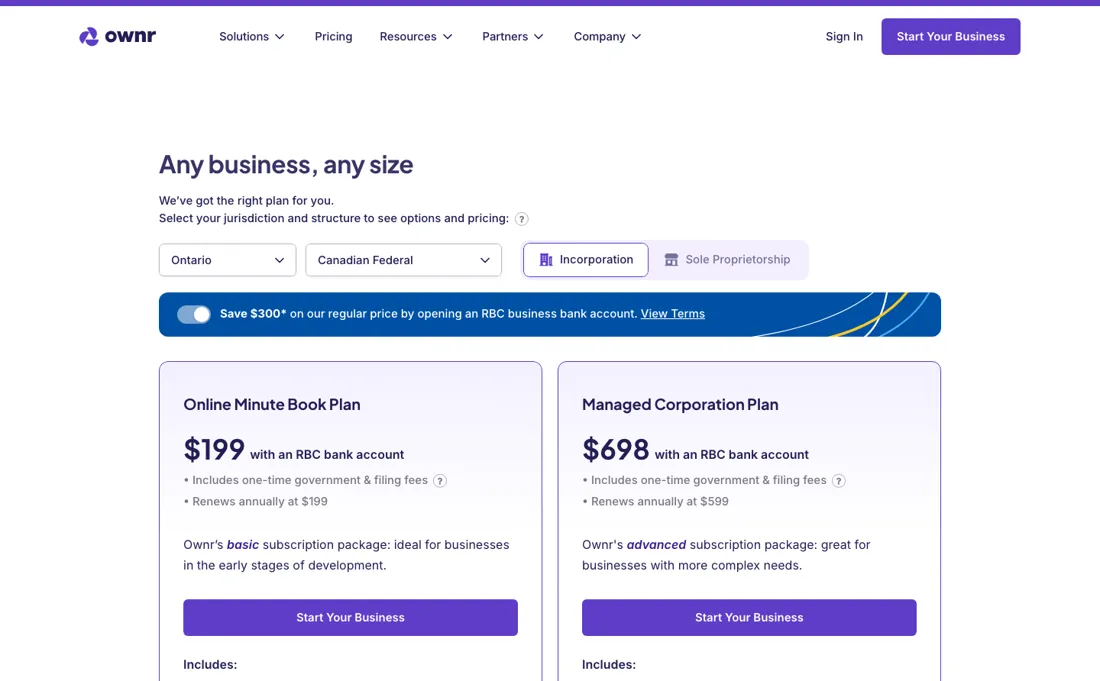
The page has two selectors, jurisdiction and structure, and shows different cards for each combination, so there is no single ladder. It also now leads with the discounted price rather than the regular one, which is the first thing to correct for. Sole proprietorship, Ontario: the card reads Free with an RBC bank account, plus applicable taxes, under a banner offering to save CA$49 on the regular price by opening one.
So the published regular price is CA$49 and the advertised price is nothing. It covers the government fees, business name searches, the registration number and documents, document storage, chat support and Ownr Perks. Incorporation is priced identically in Ontario and federally: the Online Minute Book Plan at CA$199 with an RBC bank account, renewing annually at CA$199, and the Managed Corporation Plan at CA$698 with an RBC bank account, renewing annually at CA$599.
Both cards state they include the one-time government and filing fees. The banner offers CA$300 off for opening an RBC account, which puts the regular first-year price at CA$499 and CA$998. British Columbia, which the selector labels Canadian Provincial, costs more to enter and the same to keep: Online Minute Book CA$399 with an RBC bank account renewing at CA$199, Managed Corporation CA$898 renewing at CA$599, with the same CA$300 rebate - so CA$699 and CA$1,198 at the regular price.
The renewal rate is the same in every jurisdiction; only the incorporation year differs. Three add-ons exist and all three are locked to the Managed Corporation Plan: Managed Shareholders at CA$297 a year including three shareholders and CA$99 a year for each one after that; Managed Employees and Contractors at CA$99 a year including three and CA$39 for each extra; and an Employee Stock Option Plan at CA$999 a year.
Two things on that page do not agree. Every plan card says it includes the one-time government and filing fees, while the small print under the comparison table says prices do not include government registry fees and that such fees are payable at the time of filing. Read the quote at checkout rather than the card. And the RBC offer is not a cashback that arrives later.
Ownr's help centre describes it as an instant discount taken at payment - CA$49 off a sole proprietorship, CA$300 off an incorporation - on the condition that you open an RBC business bank account at a branch within 60 days. Miss that window and the rebated amount is charged back to the card you paid with; open the account later and it is refunded once you tell Ownr's team.
If a branch visit inside two months is not certain, budget the regular price. Plans change — always verify the live price on their site.
What the pricing page doesn’t say
Two honest limits. And it's built for straightforward setups: it won't handle complex share structures, multi-investor shareholder agreements, tax planning, partnerships or non-profits. For those you still want an accountant or lawyer.
What Ownr does
Register or incorporate your business in Canada online and manage the legal admin: sole proprietorship or incorporation in minutes, plus contracts and documents — without a lawyer for every step. Canada-only, RBC-owned. Through our partner link, readers save 15% on registration or incorporation.
What buyers report about Ownr
Recurring themes from the buyer-review sites listed at the foot of this page, read in August 2026. We have not run Ownr ourselves, so this is other buyers' experience rather than ours. We summarise it here because the complaints are usually the part a vendor page leaves out.
- • A sole proprietorship registered in about 15 minutes for CA$49, and incorporation at CA$499-CA$699 with all documents included — reviewers say it saves hundreds against a lawyer.
- • Owned by RBC Ventures, and it has registered over 235,000 Canadian businesses.
- • 3.5 out of 5 across 18 Trustpilot reviews (read 25 August 2026) — a small sample, largely support and disputes over the RBC promotion. Read those before you rely on the bank offer being honoured.
- • The registration fee is one-time but the compliance and minute-book management is a subscription at CA$199-CA$599 a year. Budget it as ongoing.
- • Support is online only, with no phone option, and reviewers report delays exactly when something has gone wrong.
Pages read (August 2026): Trustpilot
When the paid plan is worth it
The Online Minute Book Plan, at CA$199 a year, covers a single-shareholder corporation that just needs its annual return filed, resolutions generated, and documents stored — and Ownr's own subscription policy, updated 6 August 2026, states that this plan is free for the first year and renews each year after that, so the first real bill lands twelve months after you incorporate. Incorporation packages include up to 3 user accounts, enough for a founder plus an accountant or lawyer.
Upgrading to the Managed Corporation Plan (CA$599 a year) becomes worth it once a company outgrows that account cap or starts making frequent director, officer, or address changes, since those are unlimited on the higher tier along with the legal agreement library. What upgrading does not touch is government processing time. Both plans wait in the same queues: Ownr's timeline page, updated 12 August 2026, puts a GST/HST number and a payroll number at 10 business days each, BC name requests at 6 business days (5 express), and Quebec incorporation at 6 business days, none of which move with your plan.
Paying more buys account capacity and unlimited changes inside Ownr's own system, not faster incorporation and not faster CRA turnaround.
How to actually use Ownr
Getting started means choosing a business structure (sole proprietorship or corporation), picking a name, and filling out Ownr's online application, which the platform says takes minutes to complete. Before starting, have your directors' and officers' legal names and addresses ready, since anyone beyond the primary owner needs to e-sign consent. What follows depends on province and structure: on Ownr's own timeline page, updated 12 August 2026, Ontario incorporation and sole proprietorship both process in 1 business day, as does British Columbia; Alberta takes 1-3 business days for either; federal named incorporation takes 1-3 business days and numbered 1-2; and Quebec incorporation takes 6 business days.
The long wait comes after registration, not during it, and it is longer than we previously reported: the same page now puts both the GST/HST number and the payroll number at 10 business days each, where our August reading said 2-3. Those are CRA queues, outside Ownr's control. For Ontario sole proprietorships registered after the CRA's August 2025 cutoff, the business number won't even appear in the Ownr dashboard; it has to be requested directly from the CRA.
Distilled from Ownr help center (help.ownr.co) service-timeline and plan-detail articles, plus an RBC partner page quoting Ownr's official plan prices; read 6 Aug 2026. Re-read 22 September 2026: the subscription policy article (help.ownr.co/en/articles/6184494, updated 6 Aug 2026), Can I cancel anytime (articles/2520889, 7 Jul 2026), Billing (articles/1091098, 26 Mar 2026), Why Was I Charged $49 or $300 (articles/9999235), What Do I Get With an Incorporation (articles/6173935) and How Long Does Registration Take on Ownr (articles/6173926, updated 12 Aug 2026). ownr.co/pricing itself returned a JavaScript shell with no amounts in the source on that date.
The natural comparison is a corporate lawyer or DIY government registration — the pricier-but-tailored route and the cheaper-but-error-prone one.
Frequently asked questions
Is the RBC rebate really CA$300 off, or does it come back to bite?
It is a real discount and it is conditional, and the condition has teeth. Ownr's help centre article on that unexplained charge describes the rebate as an instant discount applied at payment — CA$49 for a sole proprietorship, CA$300 for a corporation — taken off the price you pay on the day. In exchange you agree to open an RBC business bank account by visiting an RBC branch within 60 days of that payment. If no account is opened in that window, the rebated amount is charged to the card you originally paid with, which is why people find an unexplained CA$49 or CA$300 on their statement months later. It is recoverable: complete the branch setup afterwards and the charge is refunded to the same card, but only after you email Ownr's team to tell them it is done. A separate article confirms you can decline the offer up front and open an account later, in which case the rebate is deposited into the RBC account instead. So budget the full price unless a branch visit within two months is something you will actually do.
What am I locked into if I incorporate through Ownr?
A year at a time, with no refund for the unused part. Ownr's billing article states that all plans require a minimum subscription period of one year, and the subscription policy adds that corporate plans renew automatically on an annual basis, with an email ten days before each renewal. You can cancel at any time before renewal, but the cancellation only takes effect at the end of the current annual billing period and there is no credit or refund for the remaining portion. If a renewal has already been charged, Ownr does not refund it after 14 days from that charge, though your access runs to the end of the term you paid for. Two things soften this. Sole proprietors are not on a subscription at all — a one-time fee only — and the Online Minute Book Plan is free for its first year. One thing sharpens it: cancelling your Ownr account does not close your registration with the government, and Ownr explicitly recommends lining up another provider for annual returns, resolutions and cap-table work before you leave, or the corporation risks falling into default.
How fast will I actually be able to invoice a client?
Registration is the fast part and the tax numbers are not. On Ownr's own timeline page, updated 12 August 2026, the application takes minutes to fill in and the government step runs 1 business day for an Ontario or BC incorporation or sole proprietorship, 1-3 days in Alberta, 1-3 days for a federal named incorporation (1-2 numbered), and 6 business days in Quebec. Name work is same-day in Ontario, Alberta and federally, but a BC name request takes 6 business days, or 5 on express — so in BC the name, not the incorporation, sets your date. Then the CRA queue starts, and this is where our earlier figure was wrong: the same page now lists 10 business days for a GST/HST number and 10 for a payroll number, not the 2-3 days we reported in August. If you need to charge GST/HST or run payroll from day one, that is a fortnight to plan around, and none of it moves faster on a more expensive Ownr plan.
What should I weigh before buying Operations & Workflow software?
Usually it sits on top rather than replacing everything. Tools in this class tend to become the layer where work is tracked and handed off, while your existing systems stay the source of truth for their own data. Before you buy, map which tools it would replace outright and which it would merely sync with. If the answer is that it syncs with all of them, you are adding a layer rather than removing one.
Is this a hands-on review of Ownr?
This is a researched assessment, not a hands-on test — where we've used a tool ourselves, we say so explicitly. We name what each tool is good and bad at, and we earn a commission only if you sign up, at no cost to you.
- Buyer reviews on Trustpilot, SourceForge and Canadian business reviews, read August 2026.
- Prices read 22 September 2026 in a live browser on www.ownr.co/pricing, all amounts in Canadian dollars - Ownr sells into Canada only.
- A dated screenshot of that pricing page, kept on this site as the receipt.
Others in this category
Reviewed operations & workflow tools that share ground with Ownr — comparable in what they do, not drop-in swaps:
New reviews, price changes we recorded, and the cost conditions we found. No sponsored placements. Unsubscribe anytime.
This is our researched assessment — not a paid placement. The “Visit” links on this page are affiliate links: we may earn a commission if you sign up, at no extra cost to you, and it never changes our take. How we review →