 Planday Review (2026)
The €25 monthly platform fee on Plus is the line most comparisons miss.
Visit Planday → Affiliate link — we may earn a commission if you sign up; it does not change what this page says.
Watch the 2-minute review
The video version of this review, from our YouTube channel.
Pricing (2026)
✓ Pricing re-verified 17 Sep 2026
Three tiers, two of them priced. On the euro page, planday.com/de/preise, Starter is €2.99 per user per month with a 5-user minimum, Plus is €4.99 per user with a 10-user minimum plus a €25.00 monthly subscription fee on top of the per-user cost, and Pro is custom-priced with a demo button rather than a figure. The English page at planday.com/pricing now serves the UK list in its own pricing data — £2.99 Starter, £3.99 Plus and a £30.00 monthly subscription fee, same 5- and 10-user minimums — and carries a separate US and Canada column of $2.99 and $4.49 per user.
The three columns are not conversions of one another: Plus is €4.99 against £3.99 against $4.49, and the platform fee is €25 against £30, with no separate US figure published for it. The trial is 30 days on the Plus package and takes no credit card. The monthly fee is not charged on Starter; Planday’s FAQ says it applies to Plus and Pro alike and covers system access to advanced features, their development and maintenance.
Billing is monthly or quarterly, by major credit card or direct debit. Plans change — always verify the live price on their site.
What the pricing page doesn’t say
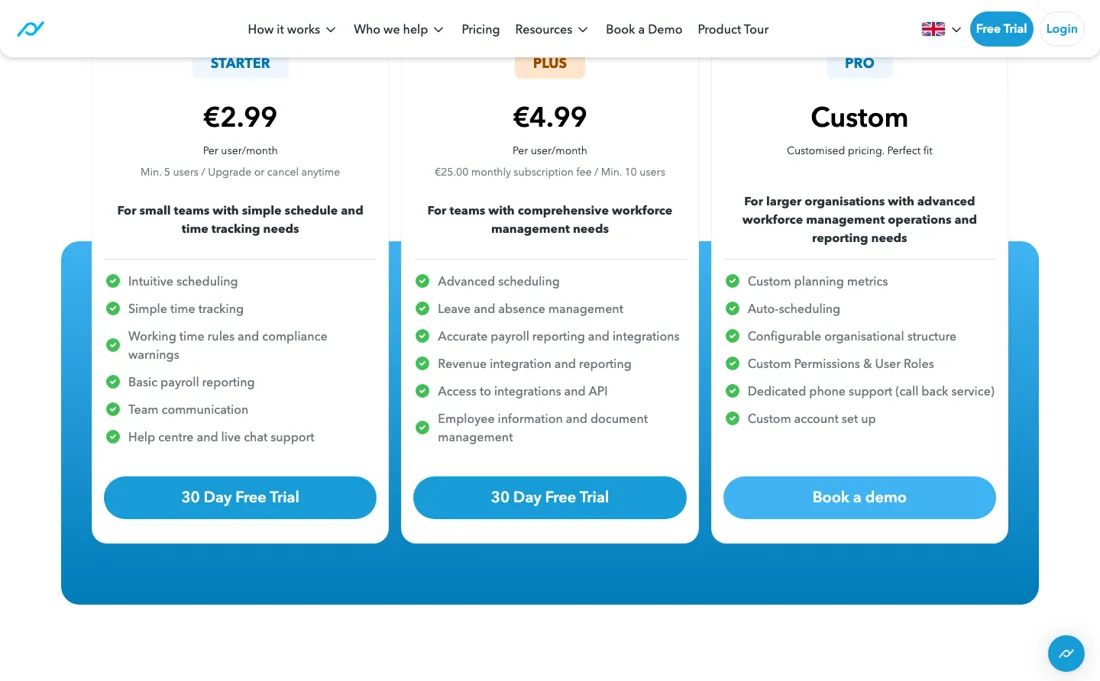
At the 10-user minimum, Plus is €49.90 in seats plus €25 flat, so €74.90 against €14.95 for five users on Starter — the jump is not from €2.99 to €4.99, it is roughly five times the bill. That fee also does not scale down, so the smaller your team, the larger a share of it you carry. Work out your real per-head cost at your actual headcount before choosing, and check which side of the line leave management and payroll integrations fall on, because those are the two features that usually force the upgrade.
What Planday does
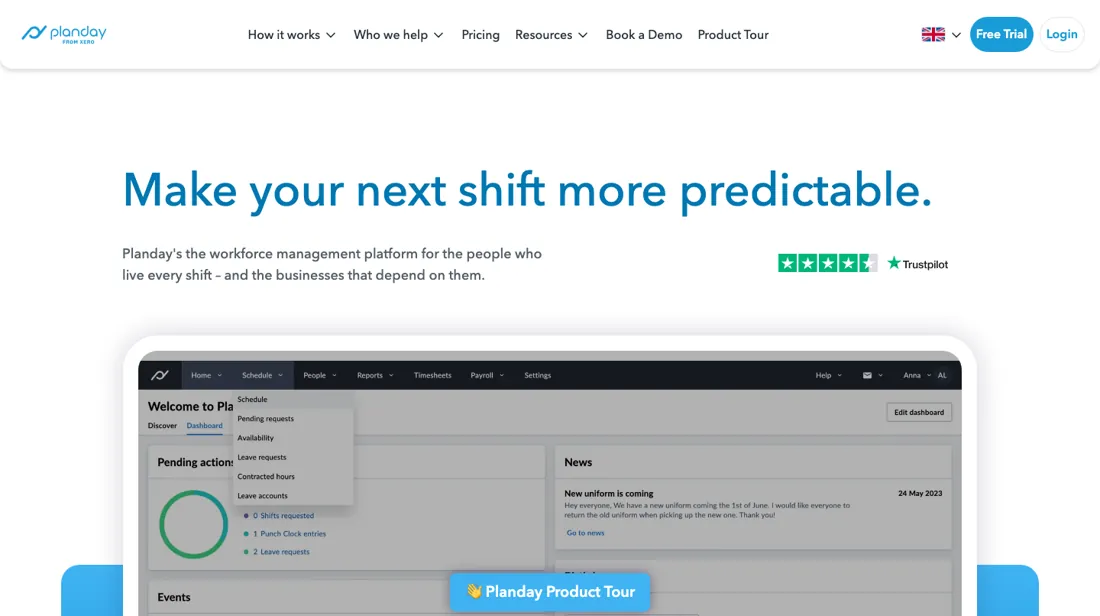
Employee scheduling and time tracking for shift businesses, owned by Xero. 30-day trial, no card.
What buyers report about Planday
Recurring themes from the buyer-review sites listed at the foot of this page, read in August 2026. We have not run Planday ourselves, so this is other buyers' experience rather than ours. We summarise it here because the complaints are usually the part a vendor page leaves out.
- • The strongest reviews are about payroll rather than scheduling: a medical practice reports cutting payroll time by more than half and scheduling time by about a third after replacing a practice-management system with no real HR functions, and a 2026 reviewer says pulling the payroll reports is straightforward.
- • Location-aware clock-in is singled out as the thing that stops buddy-punching, and the QuickBooks time-clock sync is named repeatedly.
- • Reviewers who compared several rota tools describe Planday as the one with the widest functional coverage in the category.
- • The mobile app is the recurring complaint. A restaurant-chain manager describes 30 to 45 second load times, improved after contacting support but still slow enough that staff complain.
- • The app also carries less than the desktop site: requesting holiday is named as a web-only task.
- • Reporting is described as basic, without the dashboards larger operators expect, and timesheets are not converted for payroll automatically.
- • Some reviewers say they found themselves in a twelve-month commitment with no warning before renewal.
Where the ratings disagree. That last gripe is the one worth carrying into the sales call: Planday's pricing page says 'Cancel any time' directly under the plan table, while reviewers describe an annual commitment they were not expecting. Ask for the term in writing rather than reading it off the pricing page. One Capterra reviewer switched to Planday from Parim and rated its functionality higher -- the two come up against each other regularly in shift-heavy businesses.
When the paid plan is worth it
The headline gap between Starter and Plus is two euros a user, and that is not what the step costs. These are the euro figures, and they are the ones to check against your own market first: the English-language page prices the same tiers in pounds and carries a separate US and Canada column, and the three lists are not conversions of one another. Starter is EUR 2.99 per user with a five-user minimum.
Plus is EUR 4.99 per user with a ten-user minimum AND a EUR 25 monthly subscription fee on top of the per-user charge -- a fee Starter does not carry. Planday's own FAQ says the subscription fee applies to Plus and Pro alike, though Pro's figure is not published. Run it at the minimum and the difference is stark: ten people on Starter costs EUR 29.90 a month, the same ten on Plus costs EUR 49.90 plus EUR 25, which is EUR 74.90.
That is two and a half times the price, not the 67% the per-user rates suggest. The flat fee also means the effective per-user cost falls as you grow: EUR 7.49 a head at ten users, EUR 5.99 at twenty-five, EUR 5.49 at fifty. Plus is therefore disproportionately expensive for exactly the small team most likely to be choosing between the two. Pro carries no figure at all -- the button books a demo -- so treat the ladder as two published prices and a conversation.
The trial is 30 days and takes no card, which is long enough to run a full rota cycle rather than a demo.
How to actually use Planday
Planday's setup guide is four tasks and it insists on the order: departments first, so shifts and staff group correctly; then employee groups by role or responsibility; then staff, with their personal details and pay rates; then your first schedule. A separate 'finalise your setup' list follows for punch clock, payroll and integrations. You need administrator access, and the same steps apply on any plan. The trial is 30 days on the Plus package and takes no card, which is long enough to run a full rota cycle rather than a demo.
Distilled from Planday's own help centre ('Tasks to get started with Planday' and the admin setup collection) plus the pricing-page FAQ read in a live browser, help.planday.com and planday.com/pricing, read 20 August 2026
Common Planday setup mistakes
Where Planday setups actually go wrong, and what it costs you when they do. Same sources as the setup notes above — not from a walkthrough we ran ourselves.
The thing buyers miss is how a user is counted.
- Anyone with a login is a user, and Planday bills in bundles of five -- its own worked example is 23 users billed as 25, so sitting just above a multiple of five is the expensive place to be.
- Setup help is a paid extra rather than part of the plan, and every SMS sent from Planday is charged on top, though the in-app messaging is included.
Planday vs Deputy, side by side
Both columns come from the same place: each vendor’s own published pricing, read on the date shown in the sources at the foot of this page. We do not average them into a score.
Both names above are affiliate links: we may earn a commission if you sign up, at no extra cost to you. Neither changes what this table says: both columns come straight from the vendors’ own pricing pages.
The natural comparison is Deputy — the closest like-for-like in shift scheduling, and the comparison hinges on Planday's €25 monthly platform fee on Plus. At ten users that fee is a third of the bill; at fifty it is noise. Work out your real per-head cost at your actual headcount on both before choosing, rather than comparing the per-seat headlines.
Frequently asked questions
Which price list applies to me — euros, pounds or dollars?
Check before you budget, because Planday publishes three columns and they are not conversions of each other. Read on 17 September 2026: the euro page (planday.com/de/preise) prices Starter at €2.99 per user per month and Plus at €4.99 plus a €25.00 monthly subscription fee. The English page at planday.com/pricing carries the UK list in its own pricing data — £2.99 and £3.99, with a £30.00 monthly fee — and a separate United States and Canada column of $2.99 and $4.49 per user. So the Plus seat is €4.99, £3.99 or $4.49 depending on where you buy, and the flat fee is €25 in euros against £30 in pounds, with no separate US figure published for it. The tier structure is identical everywhere: 5-user minimum on Starter, 10 on Plus, Pro quoted. Quote the currency alongside the number in any internal comparison.
Why is the step from Starter to Plus so much bigger than it looks?
Because two things change at once and only one of them is in the headline. Read 17 September 2026 on the euro page: Starter is €2.99 per user with a five-user minimum and no platform fee; Plus is €4.99 per user with a ten-user minimum and a €25.00 monthly subscription fee on top. Run it at the minimums and the difference is not the two euros a seat it appears to be: five people on Starter is €14.95 a month, ten on Plus is €49.90 plus €25, which is €74.90. The flat fee does not scale down, so it weighs heaviest on exactly the small team most likely to be choosing between the two — €7.49 a head at ten users against €5.49 at fifty. Planday’s own FAQ says the fee covers system access to advanced features, their development and maintenance. The 30-day Plus trial takes no card, which is long enough to run a real rota cycle.
What gets billed on top of the per-user price?
Three things, and the first one catches people out. Planday’s FAQ, read 17 September 2026, defines a user as anyone with a login to your account and says billing runs in bundles of five — their own example is 23 users billed as 25. So sitting just above a multiple of five is the expensive place to be, and every manager, every casual and every leaver who still has an account is counted. Second, every SMS sent from Planday carries a fee; the in-app messaging is included in the subscription. Third, setup help is a paid onboarding service rather than part of the plan. On the euro page the Plus tier also carries the €25.00 monthly subscription fee on top of the seats, which the FAQ says applies to Pro as well. Billing itself is monthly or quarterly, by major card or direct debit.
What should I weigh before buying HR & People software?
Compliance is country by country, so the honest answer is: only where the vendor says it is, and only for the entity type you actually have. Ask which countries are covered by its own entities versus a local partner, who carries the liability if something is filed wrong, and how changes in local law reach you. Get those answers in the contract rather than the sales deck.
Is this a hands-on review of Planday?
This is a researched assessment, not a hands-on test — where we've used a tool ourselves, we say so explicitly. We name what each tool is good and bad at, and we earn a commission only if you sign up, at no cost to you.
- Buyer reviews on Capterra, read August 2026.
- Re-read 2026-09-17; the euro list is unchanged since 20 August 2026, but which list you see depends on the page you open.
- A dated screenshot of that pricing page, kept on this site as the receipt.
Others in this category
Reviewed hr & people tools that share ground with Planday — comparable in what they do, not drop-in swaps:
New reviews, price changes we recorded, and the cost conditions we found. No sponsored placements. Unsubscribe anytime.
This is our researched assessment — not a paid placement. The “Visit” links on this page are affiliate links: we may earn a commission if you sign up, at no extra cost to you, and it never changes our take. How we review →