Optizen Review (2026)Shopify Video Upsells, AI Clips Metered
 By Daan Haket · Researched and written with an AI assistant · who does what
AI video is the reason to install this, and it is the one thing the subscription does not cover.
shopify stores that already own product video and want it working as an upsell at the product page, cart and post-purchase moments, or that want to test a handful of AI-generated clips cheaply before committing.
you want generated video across a large catalogue — the per-credit pricing, not the $9.99, is then the real bill — or you need an app with a merchant track record you can check before you install.
Transparency: the “Visit” links on this page are affiliate links — we may earn a commission if you sign up, at no extra cost to you. No vendor can pay for a better review or verdict. How we make money →
Pricing (2026)
✓ Pricing re-verified 5 Oct 2026
| This tool | $9.99 | 15th cheapest of 51 |
| Cheapest | $2.99 | MX AI |
| Median | $14.99 | |
| Most expensive | $450 | Attribuly |
Lowest paid entry price per account a month, billed monthly, in USD, among the 51 e-commerce growth apps we have researched (read between 2026-08-19 and 2026-10-09). Only tools priced in the same unit and on the same billing are compared — not a market survey, and cheapest is not best.
Three tiers, billed in USD. Free gives one active video upsell campaign, up to 5 conversions and bundles, YouTube or Vimeo videos only and all available placements, with a 7-day free trial. Starter is $9.99 a month and removes the campaign and conversion limits, adds AI-generated video and includes 2 AI video credits a month; extra credits are $2 each, sold in bundles of $2, $10, $20 and $40.
Pro is $29.99 a month for everything in Starter plus 5 AI video credits a month, all placements and priority support, with extra credits at $1.50 (bundles of $1.50, $7.50, $15 and $30). The subscription is flat. The AI video generation on top of it is not. Plans change — always verify the live price on their site.
Category context: Growth & Revenue. Across the 83 tools in this category that we researched with a public US-dollar price, the median entry price is about $30 a month (lowest paid plan as listed, per seat where the vendor prices per seat). Optizen’s entry price of $9.99 a month sits below that median. Compare pricing conditions in the Software Cost Atlas →
What the price did
We capture Optizen’s own pricing page every month and keep the figures, so this is our record of the page — not a forecast, and not someone else’s summary.
Three dated readings, no movement. On 31 August, 17 September and 5 October 2026 the App Store listing read Free with one campaign, 5 conversions and a 7-day trial, Starter at $9.99 a month with 2 AI video credits and extras at $2, and Pro at $29.99 with 5 credits and extras at $1.50, billed every 30 days in USD.
What the pricing page doesn’t say
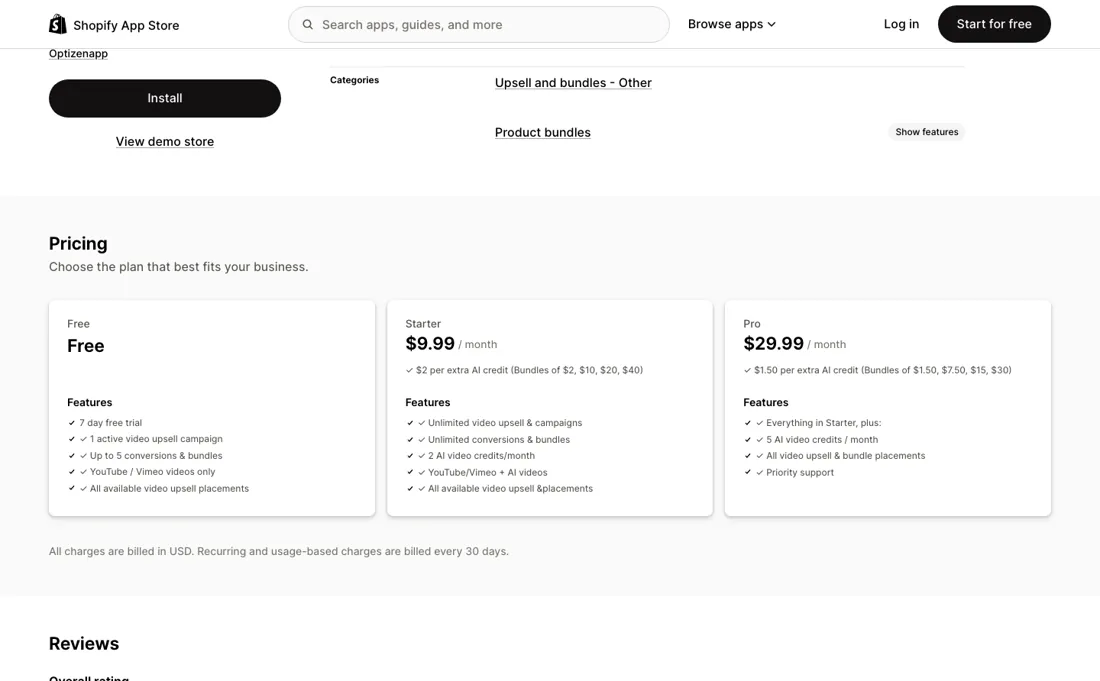
Starter's $9.99 buys two generated clips a month and Pro's $29.99 buys five; after that you pay $2 or $1.50 per clip. A store with fifty products that wants a video on each is buying credits, not a plan, and should price it that way before signing up. The free tier is a demo rather than a usable floor — one campaign, five conversions, no AI at all. And there is almost no merchant track record to read: the app launched on 30 October 2025 and, read 5 October 2026, carries exactly one App Store review, a five-star note from 11 November 2025 by a store that had used it for two days, so nearly a year in, you would in effect be the test.
Watch the video review
The video version of this review, from our YouTube channel.
What Optizen does
Shopify app that puts video upsells and bundles on product, cart and post-purchase pages, using your own clips or AI-generated ones.
What buyers report about Optizen
Hands-on: not tested by usReported by buyers: the Shopify App Store listing, read September 2026
Themes from the buyer-review sites listed at the foot of this page, read in September 2026. We have not run Optizen ourselves, so this is other buyers' experience rather than ours. We summarise it here because the complaints are usually the part a vendor page leaves out.
- • The single review on the listing, from an Australian store in November 2025 after two days of use, is a five-star. They had used other upsell apps and rate this one on the thing that makes it different: their own video playing at the moment the customer already has a card out. They also tried the AI video generation and call the output professional-looking, with a wide choice of voice, style and avatar, and say support answered quickly.
- • There is nothing to report, and that is the finding. One review, written after two days, is not a track record: nobody has yet said in public what the AI credits cost in practice at their catalogue size, whether the upsell survives a theme update, or how the app behaves after a month. Our own pricing section flags the credits as the real bill; no merchant voice confirms or refutes that yet.
Pages read (September 2026): Shopify App Store
What the money actually buys
Going from free to Starter mostly buys the limits away rather than new features: unlimited campaigns and unlimited conversions instead of one campaign and five conversions, plus the right to use AI-generated video at all. Pro at $29.99 lifts the monthly AI allowance from two clips to five, adds priority support, and drops the per-clip price from $2 to $1.50. So the tiers are really a video budget. Two AI clips a month is one product a fortnight; five barely covers a collection.
Any store that wants generated video across a catalogue ends up in credit bundles — up to $40 at a time on Starter, $30 on Pro — and at that point the subscription is the small half of the bill. If you bring your own footage the sum inverts: only AI generation is metered, so merchant-supplied YouTube and Vimeo video runs on the flat $9.99 with nothing on top.
How to actually use Optizen
Optizen installs from the App Store, so setup begins inside your store rather than at a separate signup. The free tier is the honest first step: one active campaign, up to five conversions and bundles, YouTube or Vimeo video only, with a 7-day trial attached. That is enough to answer the question that actually matters — does a video upsell change what shoppers do on your product and post-purchase pages, or do they scroll past it?
Point it at one best-selling product with a video you already own, and read the two things the app reports separately: engagement and revenue attribution. Only move to a paid tier once you have that answer, because paid is where AI video generation starts and where the metering starts with it. Starter at $9.99 a month includes two AI video credits, Pro at $29.99 includes five, and everything beyond the allowance is bought per clip.
Before you upgrade, count the products you would genuinely want a generated video for and multiply by $2 on Starter or $1.50 on Pro. That number, not the subscription, is your real monthly cost. Read on apps.shopify.com/optizen-video-upsell, 31 August 2026.
Distilled from Optizen Video Upsell & Bundles listing on the Shopify App Store (apps.shopify.com/optizen-video-upsell), read 31 August 2026 — plans and AI credit pricing, placements, launch date and developer details. Re-read 5 October 2026 (served HTML): $9.99 and $29.99, 2 and 5 AI credits, extras $2 (bundles $2/$10/$20/$40) and $1.50 (bundles $1.50/$7.50/$15/$30), one review dated 11 November 2025 (2 days using the app), launched 30 October 2025.
Optizen vs AfterSell, side by side
Each column shows the vendor’s own published entry price, read on the date shown. Entry prices can cover different services or units, so check what each one buys. We do not average them into a score.
Both names above are affiliate links: we may earn a commission if you sign up, at no extra cost to you. Neither changes what this table says.
The natural comparison is AfterSell — AfterSell is the broader, longer-established post-purchase upsell app on Shopify and the safer default if what you want is upsell coverage as such. Optizen is narrower on purpose: the offer is video, either yours or AI-generated, placed at product, cart and post-purchase moments. Choose Optizen if video is the thing you believe will move the offer — and price the AI credits before you do. Choose AfterSell if you want a track record and a wider feature set behind the upsell itself..
Frequently asked questions
What does Optizen cost?
Three tiers, billed in USD every 30 days, read on apps.shopify.com/optizen-video-upsell on 5 October 2026 and unchanged since our first reading on 31 August. Free carries a 7-day trial, one active video upsell campaign, up to 5 conversions and bundles, and YouTube or Vimeo video only. Starter is $9.99 a month for unlimited campaigns, unlimited conversions and bundles, AI video alongside your own, and 2 AI video credits a month. Pro is $29.99 a month for five credits, every placement and priority support. The listing publishes no annual column at all, so the monthly figure is the figure.
How many AI videos does a plan actually include?
Two a month on Starter and five on Pro, and the listing prices everything above that separately: $2 per extra AI credit on Starter, sold in bundles of $2, $10, $20 and $40, or $1.50 per credit on Pro, in bundles of $1.50, $7.50, $15 and $30. Put a catalogue against those numbers before you pick a plan. Fifty generated clips on Pro is $75 of credits on top of the $29.99 subscription, and the subscription is the smaller half of that bill. What the page does not say is whether re-generating a clip costs another credit.
Is the free plan enough to test the thing it advertises?
Not quite, and the gap is the point of the app. Free gives you one active campaign, up to 5 conversions and bundles, and all the placement options, but the videos have to be your own on YouTube or Vimeo — AI-generated video begins on Starter at $9.99. So the free tier proves whether video upsells move your AOV at all, which is a fair question to answer first, but it cannot tell you whether the generated clips are good enough to put in front of buyers. Read 17 September and 5 October 2026.
How much of a track record can I check before installing?
Very little, and you should know that going in. The listing says the app launched on 30 October 2025 and it carries exactly one rating, a five-star one left on 11 November 2025 by a merchant who had used the app for two days; the developer is Optizenapp, in Macclesfield, South Australia. One review is not a pattern, so there is no merchant experience here to read — which is why the free tier and its 7-day trial matter more than usual. Read 17 September and 5 October 2026.
Is this a hands-on review of Optizen?
This is a researched assessment, not a hands-on test — where we've used a tool ourselves, we say so explicitly. We name what each tool is good and bad at, and we earn a commission only if you sign up, at no cost to you.
- Buyer reviews on the Shopify App Store listing (1 review), read September 2026.
- Prices read 2026-08-31 on apps.shopify.com/optizen-video-upsell; re-read 2026-09-17 and 2026-10-05, every amount unchanged.
- A dated screenshot of that pricing page, kept on this site as the receipt.
Others in this category
Reviewed growth & revenue tools that share ground with Optizen — comparable in what they do, not drop-in swaps:
New reviews, price changes we recorded, and the cost conditions we found. No sponsored placements. Unsubscribe anytime.
This is our researched assessment — not a paid placement. The “Visit” links on this page are affiliate links: we may earn a commission if you sign up, at no extra cost to you, and it never changes our take. How we review →