 Dripify Review (2026)From $39/user, Against LinkedIn's Rules
Understand what you are buying before the price matters: LinkedIn prohibits this entire product category.
Visit Dripify → Affiliate link — the rest of this page is the honest version, including who should skip it.
Pricing (2026)
✓ Pricing re-verified 26 Aug 2026
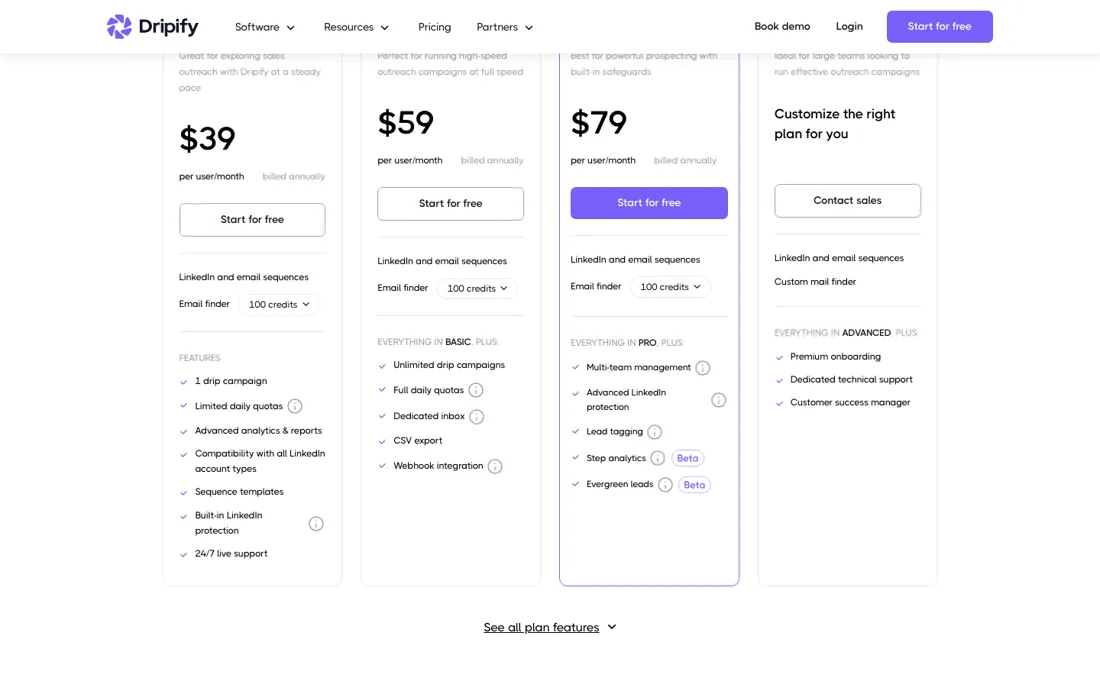
- Basic — $39/user/month annually, $59 month to monthone drip campaign, 20 connection requests and 30 messages a day, 100 email-finder credits
- Pro — $59/user/month annually, $79 month to monthunlimited campaigns at full quotas (75 requests, 100+ messages), dedicated inbox, CSV export, webhook and HubSpot
- Advanced — $79/user/month annually, $99 month to monthadds multi-team management, advanced LinkedIn protection, lead tagging, step analytics and evergreen leads
- Enterprise — quote — contact salespremium onboarding, dedicated technical support and a customer success manager
Four tiers, priced per user: Basic $39, Pro $59 and Advanced $79 per user per month billed annually, plus an Enterprise tier that is quote-only. Month to month the same tiers read $59, $79 and $99 per user; both columns sit in the page and the FAQ repeats all six numbers in words. A 7-day free trial runs without a credit card.
So the 'up to 35% off' the toggle advertises is real but front-loaded: you pay a year up front to get it, and the discount shrinks as you go up the range — about 34 percent on Basic, 25 on Pro, 20 on Advanced. What each tier buys is unusually consequential here, and the page now prints the daily quotas instead of calling them 'limited': Basic sends 20 connection requests, 30 messages, 10 Sales Navigator InMails and 100 profile views a day, against 75, 100+, 30 and 200+ on Pro and Advanced.
Basic is also capped at one drip campaign; unlimited campaigns and full quotas start at Pro, which adds a dedicated inbox, CSV export and the webhook and HubSpot integrations, and Advanced adds multi-team management, advanced LinkedIn protection, lead tagging, step analytics and evergreen leads. Every tier includes 100 email-finder credits a month and the top-ups are priced openly: 1,000 credits $29, 2,000 $49, 5,000 $69, 10,000 $99.
One seat connects one LinkedIn account, so five reps means five seats, and ten or more seats goes through sales. Plans change — always verify the live price on their site.
What the pricing page doesn’t say
Its User Agreement bans using 'bots or other unauthorized automated methods' to 'send or redirect messages', and its prohibited-software page says members using such tools 'risk having their accounts restricted or shut down'. There is no carve-out for cloud tools or low volumes, and Dripify is not an outlier here — every competitor sits on the same side of that line. Dripify's own documentation is candid about the consequence, warning that LinkedIn 'may issue warnings, temporary restrictions, or even permanent bans', and it publishes a recovery procedure for exactly that scenario.
Two things follow. First, the advertised ceiling is not a working speed: the app allows up to 75 connection requests a day, while Dripify's own setup guide tells beginners to run 10 to 15, and brand-new accounts 2 to 5, building up 10 to 20 percent a week. Anyone buying on the headline number is buying capacity they are told not to use. Second, Activity Control sits on the $79 Advanced tier.
It is the feature Dripify names as its best protection, and it adjusts your pace automatically. On Basic and Pro, safe pacing is your own manual responsibility. And when a vendor writes that a feature 'makes sure your LinkedIn account won't get flagged', read that as a claim about a third party's enforcement decisions that no vendor can actually guarantee.
What Dripify does
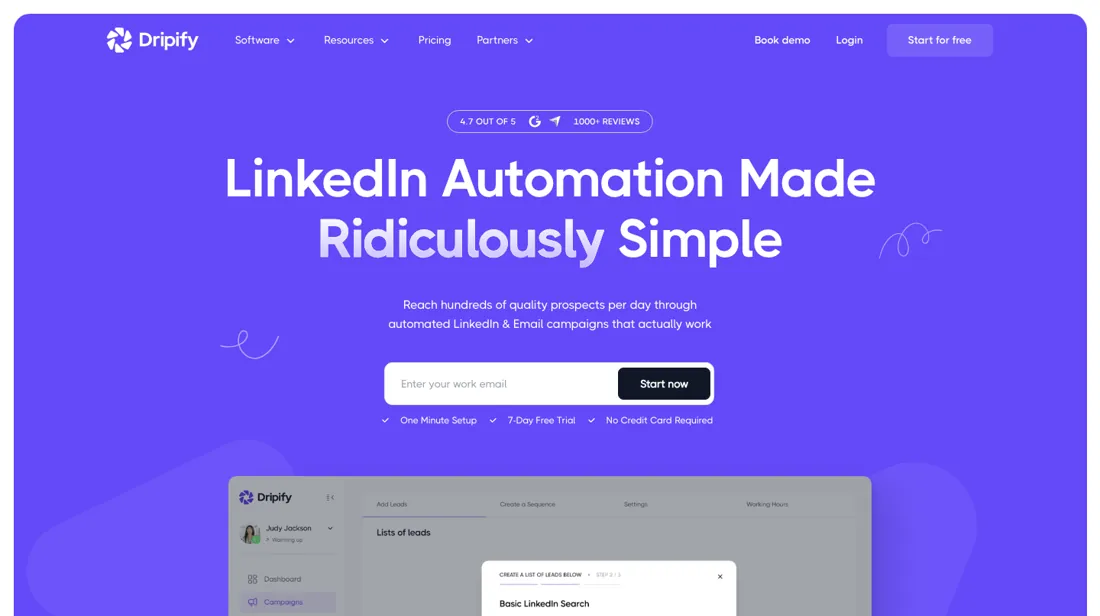
Cloud-based LinkedIn outreach automation — drip sequences of connection requests, messages, InMails and profile views, with configurable daily limits and a built-in email finder. From $39 per user/month billed annually, 7-day free trial without a card.
What buyers report about Dripify
Recurring themes from the buyer-review sites listed at the foot of this page, read in August 2026. We have not run Dripify ourselves, so this is other buyers' experience rather than ours. We summarise it here because the complaints are usually the part a vendor page leaves out.
- • Cloud-based, so it runs without your machine on, and the interface is genuinely easy. $39 to $79 a month on annual billing.
- • Reviewers running modest volumes report campaigns working as described.
- • Account restriction risk is the headline. Independent testing across 50 LinkedIn accounts found a 23% restriction rate within 90 days, and after LinkedIn's May 2026 enforcement wave user reports moved into the 27-34% range. Weigh that against what your LinkedIn profile is worth to you.
- • Billing continuing after cancellation, bugs in the billing module and confusing auto-renewal all recur.
- • No email integration, so multi-channel sequencing is out.
- • Outreach messages read generic unless you do the personalisation work yourself, and support is slow.
When the paid plan is worth it
Basic at $39 is a trial-in-disguise: one drip campaign and quotas the page itself calls limited. If you run more than a single sequence, Pro at $59 is the real entry point — that is where unlimited campaigns, full daily quotas, a dedicated inbox, CSV export and webhooks live. The jump to Advanced at $79 buys one thing that matters more than the rest of the feature list: Activity Control, which Dripify's own safety guide tells you to switch on, and which adjusts your daily connecting and messaging limits based on your account history.
If your LinkedIn account carries real professional value, that $20 gap is cheap insurance for the category's main risk. Two things no tier fixes. Pricing is per user, so a team of five pays five times, and LinkedIn's own weekly invitation ceiling still applies no matter which plan you are on — as Dripify puts it, no automation can overcome the limits set by LinkedIn.
Narrated summary of this section — not a screen recording; every figure in it is the one sourced above.
How to actually use Dripify
Setup is genuinely light: Dripify runs in the cloud, so there is no download and no Chrome extension for the core product — you connect your LinkedIn account and campaigns keep running with your browser closed.
Distilled from Dripify's own help centre (daily limits, safety algorithm, account and billing articles) plus LinkedIn's User Agreement and prohibited-software pages
Common Dripify setup mistakes
Where Dripify setups actually go wrong, and what it costs you when they do. Same sources as the setup notes above — not from a walkthrough we ran ourselves.
The friction is not technical, it is behavioural.
- Set your daily limits before your first campaign, not after: Settings → Limits & Activity has a slider per action type and a range dropdown that randomises volume, so a setting of 60 with range 5 sends between 55 and 65.
- Start at 10 to 15 connection requests a day, or 2 to 5 on a brand-new account, and raise by 10 to 20 percent a week — that is Dripify's own guidance, not ours.
- Two administrative traps worth knowing up front, both from the vendor's documentation.
- Removing a team member from your workspace does not stop billing for that seat, which has to go through support; and a downgrade only takes effect at the end of your paid term, while an upgrade bills immediately.
- Reviewers across several platforms report unexpected renewals and difficulty cancelling; the help centre documents how to buy a plan but has no article on cancelling one, so put your renewal date in your calendar yourself.
Dripify vs Expandi, side by side
Both columns come from the same place: each vendor’s own published pricing, read on the date shown in the sources at the foot of this page. We do not average them into a score.
Both names above are affiliate links: we may earn a commission if you sign up, at no extra cost to you. Neither changes what this table says: both columns come straight from the vendors’ own pricing pages.
The natural comparison is Expandi — the closest head-to-head — both are cloud-based with a regional dedicated IP, so the 'cloud versus extension' framing you will read in affiliate roundups does not actually separate them. The real difference is the pricing model: Expandi sells one Business plan with everything included at $99 per user a month, 20 percent off annually, while Dripify tiers both quotas and safety features. Watch the $39-versus-$99 gap that roundups quote — that is Dripify's annual rate against Expandi's monthly one. Month against month it is $59 to $99 versus $99, and at the top of Dripify's range the two cost the same. Both price lists read on 2026-07-24; verify them yourself before you buy..
More on Dripify
Everything we publish about Dripify links back here — the review stays the honest hub:
The ex-banker filter — the same yardstick on every review (how we review): My ex-banker filter is simple: does Dripify remove a real cost — time, errors, missed revenue — bigger than what it charges?
Frequently asked questions
What should I weigh before buying Sales & CRM software?
Most tools in this category plug in rather than replace. Check which direction the data flows and whether the sync is genuinely two-way, because a one-way push creates a second source of truth that your reps will quietly stop trusting. If it does aim to replace your CRM, price the migration honestly: history, custom fields and reporting rarely move across cleanly.
Is this a hands-on review of Dripify?
This is a researched assessment, not a hands-on test — where we've used a tool ourselves, we say so explicitly. We name what each tool is genuinely good and bad at, and we earn a commission only if you sign up, at no cost to you.
- Buyer reviews on G2, Trustpilot and independent safety testing, read August 2026.
- Re-verified 2026-08-26 on their own pricing page — note that dripify.io now redirects to dripify.com.
- A dated screenshot of that pricing page, kept on this site as the receipt.
Others in this category
The sales & crm tools closest to Dripify that we have also reviewed. They overlap rather than match:
New dossiers, cost-traps we found, and tools that earned a keep — no hype, no sponsored-disguised-as-advice. Unsubscribe anytime.
This is our researched assessment — not a paid placement. The “Visit” links on this page are affiliate links: we may earn a commission if you sign up, at no extra cost to you, and it never changes our take. How we review →