Woodpecker Review (2026)$7 per 100 Prospects, $35 Minimum
 By Daan Haket · Researched and written with an AI assistant · who does what
The $7-per-100-prospects unit reads cheap, but a real outbound motion stacks add-ons fast.
outbound teams that want usage-priced cold email plus LinkedIn outreach, with unlimited seats and email accounts included instead of per-user fees.
you send occasional one-off campaigns (usage pricing only wins when you actually use it), or your motion is LinkedIn-heavy — $29 per connected account adds up.
Transparency: the “Visit” links on this page are affiliate links — we may earn a commission if you sign up, at no extra cost to you. No vendor can pay for a better review or verdict. How we make money →
Pricing (2026)
✓ Pricing re-verified 5 Oct 2026
Free trial: the pricing page and its FAQ put it at 14 days or 100 cold emails, whichever comes first (read 21 September 2026), and Woodpecker's partner team told us the same day that sign-ups through a partner link such as ours start on 30 days instead — their statement, dated, not something we have run through a fresh account. Usage-priced: $7.00 per 100 contacted prospects, and the smallest volume the slider offers is 500 — so $35 a month is the practical entry rather than the $7 headline.
Contact 200 prospects and you still pay $35; the per-100 figure only starts describing your bill once you are past that minimum. Unlimited team members and unlimited connected email accounts are included, and the page prices in twelve currencies (EUR, USD, GBP, CHF, AUD, BRL, CAD, DKK, INR, NOK, PLN, SEK). An annual toggle advertises SAVE 33% against monthly. The sending allowance is derived, not chosen: the page states that emails per month equal contacted prospects multiplied by 16, the maximum number of campaign steps, which puts the 500-prospect entry at 16,000 emails a month.
Full pricing notes (2 more paragraphs)
Add-ons are where an outbound motion actually gets expensive, and there are now two grades of managed sending address rather than one: LinkedIn accounts $29 a month each; email addresses on Google or Microsoft $6 a month each; email addresses on Maildoso, Mailforge, Infraforge or Azure $4 a month each; extra warm-ups $5 a month per email account; new domains at roughly $1 a month per domain, billed annually, which the page flags as an approximation because it depends on the domain name and shows the exact price before payment.
Lead Finder credits start at 500 for $10. The rest of the add-on list, read 5 October 2026: Infraforge dedicated servers $59 a month per server, Azure domain hosting $20 a month per domain, domain transfers $1 a month per domain billed annually, the integrations line (API, webhooks, MCP, CLI) at $20 a month, an agency panel at $27 a month per active client with white label at $5 a month per active client, and outbound workshops at $2,000 one-time for four two-hour sessions, $500 per extra session. Prices exclude VAT.
Plans change — always verify the live price on their site.
Category context: Sales & CRM. Across the 12 tools in this category that we researched with a public US-dollar price, the median entry price is about $45 a month (lowest paid plan as listed, per seat where the vendor prices per seat). Woodpecker’s entry price of $35 a month sits below that median. Compare pricing conditions in the Software Cost Atlas →
What the price did
We capture Woodpecker’s own pricing page every month and keep the figures, so this is our record of the page — not a forecast, and not someone else’s summary.
The base rate held across three dated readings. On 11 August, 18 September and 5 October 2026 woodpecker.co/pricing read $7.00 per 100 contacted prospects, LinkedIn accounts at $29 a month and extra warm-ups at $5. What moved was the managed-address line: in August one price, $6 a month per address, and by 18 September two grades, $6 on Google or Microsoft and $4 on Maildoso, Mailforge, Infraforge or Azure, still the case on 5 October.
What the pricing page doesn’t say
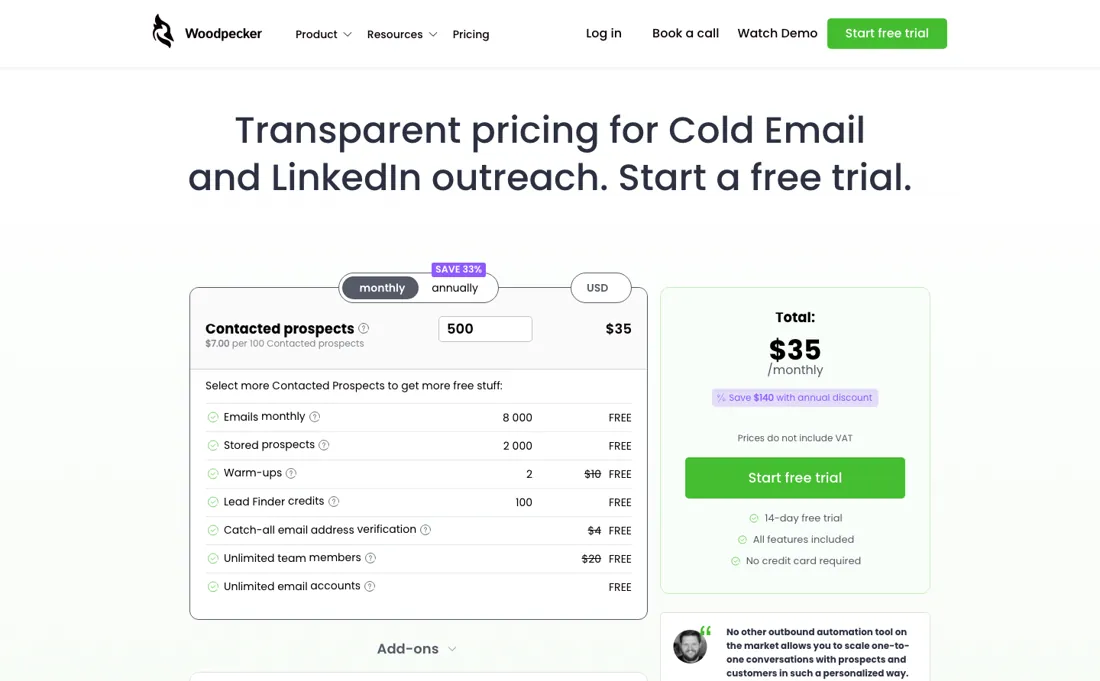
Every connected LinkedIn account is $29 a month, managed sending addresses $6 a month apiece and extra warm-ups $5 per account — and contacted prospects are the meter, so scaling outreach scales the bill.
Watch the 2-minute review
The video version of this review, from our YouTube channel.
⚡ Short on time? Watch the 30-second verdict Short.
What Woodpecker does
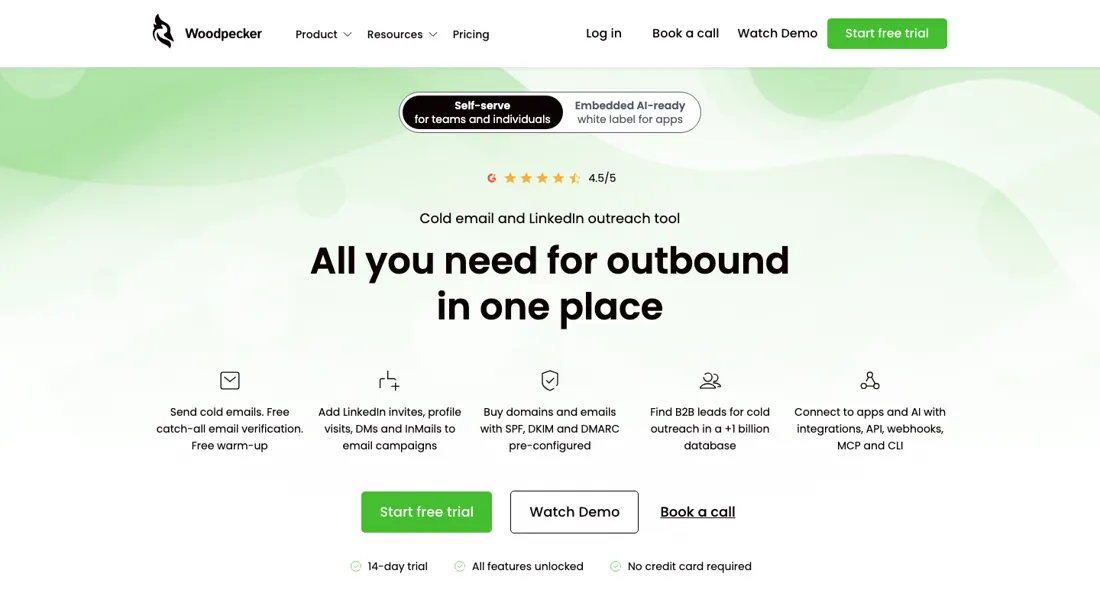
Cold email and LinkedIn outreach platform priced by contacted prospects — unlimited team seats and email accounts, built-in warm-ups, deliverability tooling and a lead finder.
What buyers report about Woodpecker
Hands-on: not tested by usReported by buyers: G2 and cold-email practitioner reviews, read August 2026
Themes from the buyer-review sites listed at the foot of this page, read in August 2026. We have not run Woodpecker ourselves, so this is other buyers' experience rather than ours. We summarise it here because the complaints are usually the part a vendor page leaves out.
- • Deliverability out of the box is the reason agencies pick it, and it is the hardest thing to get right in this category. 4.3 on G2.
- • Easy to use and support that reviewers call exceptional.
- • No built-in prospect database — you source contacts elsewhere, which is a separate cost and a separate tool.
- • Email only. No LinkedIn in the base product; that is a $29/month per account add-on.
- • Contact volume caps force upgrades once a team is genuinely active. Base is $35/month for 500 contacted prospects, then $7 per 100.
- • Sequence management has no drag-and-drop, and performance slows across multiple campaigns.
When the paid plan is worth it
Woodpecker has no free tier — only a 14-day trial capped at 100 sent emails — so 'upgrading' really means adding paid add-ons on top of the usage-priced base plan. That base plan already includes unlimited seats, unlimited connected mailboxes, catch-all verification, 4 free warm-ups, and 100 Lead Finder credits. The add-ons pay off when a specific capability, not volume, is the blocker. LinkedIn outreach costs $29/month per connected account, worth it once a campaign genuinely needs multichannel touches rather than email alone.
The $20/month integrations add-on (API, Webhooks, MCP Server, CLI) covers more than custom syncs now that Woodpecker runs a hosted MCP endpoint at api.woodpecker.co/mcp/v1: connect it once and campaigns, prospect uploads and reporting can be driven by prompt from an AI client, and Woodpecker's own pricing page lists Claude and CLI as new integrations inside that same $20 line (checked 2026-09-07). Worth the add-on if you already work in an AI client all day and would rather ask for a campaign's numbers than open the dashboard; dead weight if you don't.
Extra warm-ups run $5/month per account once the 4 free slots are used. What none of these buy is speed. Woodpecker's own help center recommends warming up a new domain for about 3 months, and a new mailbox on an already-established domain for 3-4 weeks, before real sending. No add-on shortens that runway or lifts the 250-email daily cap on Woodpecker-bought Google/Microsoft mailboxes.
How to actually use Woodpecker
First real value means a sent campaign that actually lands: connect a mailbox, build a path (opening email plus follow-up steps), import prospects, set a daily limit, and hit run. What Woodpecker's own help center flags as the real bottleneck is deliverability timing, not the interface. A new domain needs about 3 months of warm-up, and even a new mailbox on an already-established domain needs 3-4 weeks, before automated sending is considered safe.
The free trial runs only 14 days or 100 emails, whichever comes first. Once sending, Google/Microsoft mailboxes bought through Woodpecker are capped at 250 emails per day, Maildoso/Infraforge ones at 100 per day, and the default recommended opening-email pace is 50 per day — limits that shape how fast a campaign scales even after setup is finished.
Where this section comes from: our research notes (136 words)
Pricing page https://woodpecker.co/pricing/ (read 2026-08-11); Quickstart help article https://woodpecker.co/help-center/en/articles/5234626-quickstart-vol-1-how-to-set-up-a-cold-email-campaign (read 2026-08-11); Sending Limits help article https://woodpecker.co/help-center/en/articles/5641974-sending-limits-in-woodpecker-app (read 2026-08-11); How to warm up a domain https://woodpecker.co/help-center/en/articles/5258965-how-to-warm-up-a-domain (read 2026-08-11); How to warm up an email account https://woodpecker.co/help-center/en/articles/5258998-how-to-warm-up-an-email-account (read 2026-08-11); What's new changelog https://woodpecker.co/help-center/en/articles/5213594-what-s-new (read 2026-08-11, checked for recent product changes, last substantive entry Aug 2024); Status page https://status.woodpecker.co/ (read 2026-08-11, all systems operational, no numeric incident data); pricing page re-read 2026-10-05 (served HTML): $7.00 per 100 contacted prospects from 500, SAVE 33% annual, twelve currencies, LinkedIn $29, warm-ups $5, addresses $6 and $4, domains ~$1, transfers $1, Infraforge servers $59, Azure hosting $20 per domain, integrations $20, agency panel $27 and white label $5 per active client, workshops $2,000 plus $500 per extra session, prices excluding VAT; FAQ trial 14 days or 100 cold emails, whichever comes first.
Woodpecker vs lemlist, side by side
Each column shows the vendor’s own published entry price, read on the date shown. Entry prices can cover different services or units, so check what each one buys. We do not average them into a score.
Both names above are affiliate links: we may earn a commission if you sign up, at no extra cost to you. Neither changes what this table says.
The natural comparison is lemlist — lemlist is the seat-priced all-rounder with the big template community; Woodpecker prices by contacted prospects with unlimited seats — leaner for small teams, add-ons stack at scale.
Frequently asked questions
What is the smallest bill Woodpecker will send me?
$35 a month, not $7. The rate is $7.00 per 100 contacted prospects, but the volume slider on woodpecker.co/pricing starts at 500 prospects and offers nothing below it (read 18 September and again 5 October 2026), so 500 ÷ 100 × $7.00 = $35 is the floor. Contact 200 people in a month and the bill is still $35. The per-100 unit only begins to describe what you pay once your list is past the minimum, and an annual commitment is advertised at 33% off the monthly rate.
What counts as a ‘contacted prospect’?
A person, per campaign, per month — not an email. The pricing page explains that contacting someone several times inside the same campaign counts once toward the limit, while the same person in two separate campaigns counts twice (read 18 September and again 5 October 2026). That makes list hygiene and campaign structure a pricing decision, not just a deliverability one. The sending allowance follows from the same number: the page puts emails per month at prospects × 16, the maximum campaign length, so the 500-prospect entry carries 16,000 emails.
What will the add-ons cost on top?
Enough to change the answer, and the list grew since our August reading. On 18 September 2026, and unchanged on 5 October, the page prices LinkedIn accounts at $29 a month each, extra warm-ups at $5 a month per email account, and managed sending addresses at two grades: $6 a month each on Google or Microsoft, $4 a month each on Maildoso, Mailforge, Infraforge or Azure. New domains run about $1 a month per domain billed annually, which the page itself calls an approximation and settles at checkout. Lead-finding credits are sold separately again, in blocks, on top of all of that.
Is this a hands-on review of Woodpecker?
This is a researched assessment, not a hands-on test — where we've used a tool ourselves, we say so explicitly. We name what each tool is good and bad at, and we earn a commission only if you sign up, at no cost to you.
- Buyer reviews on G2 and cold-email practitioner reviews, read August 2026.
- Price re-verified 2026-09-18 and again 2026-10-05 against woodpecker.co/pricing.
- A dated screenshot of that pricing page, kept on this site as the receipt.
Others in this category
Reviewed sales & crm tools that share ground with Woodpecker — comparable in what they do, not drop-in swaps:
New reviews, price changes we recorded, and the cost conditions we found. No sponsored placements. Unsubscribe anytime.
This is our researched assessment — not a paid placement. The “Visit” links on this page are affiliate links: we may earn a commission if you sign up, at no extra cost to you, and it never changes our take. How we review →