Salesflow Review (2026)$99 A Seat, $24.99 At 100
 By Daan Haket · Researched and written with an AI assistant · who does what
The per-seat rate falls with team size but the monthly bill does not follow it: 19 seats on Starter is $1,330 while 20 seats on Pro is $799, so a team that stops one seat short of a tier pays $531 a month more for less.
outbound sales teams and agencies running LinkedIn sequences across several seats, where the per-seat price drops and the admin panel earns its keep.
you are one person sending a handful of connection requests a week — the quotas are far above what you need and the seat price is at its highest.
Transparency: the “Visit” links on this page are affiliate links — we may earn a commission if you sign up, at no extra cost to you. No vendor can pay for a better review or verdict. How we make money →
Pricing (2026)
✓ Pricing re-verified 1 Oct 2026
Read on Salesflow's own pricing page. It returns a 403 to plain fetches but renders normally in a browser, so these are their published figures rather than third-party ones: Basic $99 per seat from 1 seat, Starter $70 from 5 seats, Pro $39.95 from 20, Agency $29.98 from 50 and Enterprise $24.99 from 100. Agency and Enterprise require an annual commitment billed monthly, and the comparison table adds seats one at a time on Basic, Starter and Pro but in batches of 5 on Agency and 10 on Enterprise.
Longer terms are discounted on top of that: 15% off at six months and 30% off at twelve. There is no free tier and the trial is seven days without a card. The monthly quotas — around 400 LinkedIn invites, 2,000 follow-up messages and 800 Open InMails — are reported by independent reviews and do not appear on the pricing page itself. Plans change — always verify the live price on their site.
Category context: Sales & CRM. Across the 16 tools in this category that we researched with a public US-dollar price, the median entry price is $44 a month (lowest paid plan as listed, per seat where the vendor prices per seat). Salesflow’s entry price of $99 a month sits above that median. Compare pricing conditions in the Software Cost Atlas →
Correction after re-checking: Corrected on 9 September 2026. Our earlier version said Salesflow's pricing page could not be read and quoted $79 per seat billed annually from third-party reviews. The 403 applies only to our server; in a browser the page renders, and $79 appears nowhere on it. The Enterprise tier at $24.99 from a hundred seats was missing from our ladder altogether, which is why the entry price now reads $24.99 rather than $29.98.
What the price did
We capture Salesflow’s own pricing page every month and keep the figures, so this is our record of the page — not a forecast, and not someone else’s summary.
Salesflow's pricing page carried the same ladder on 9 September and 1 October 2026: Basic $99, Starter $70, Pro $39.95, Agency $29.98 and Enterprise $24.99 per seat a month, with 15% off at six months and 30% off at twelve. The $79 per seat this review quoted before 9 September came from third-party reviews and never appeared on the vendor's page.
What the pricing page doesn’t say
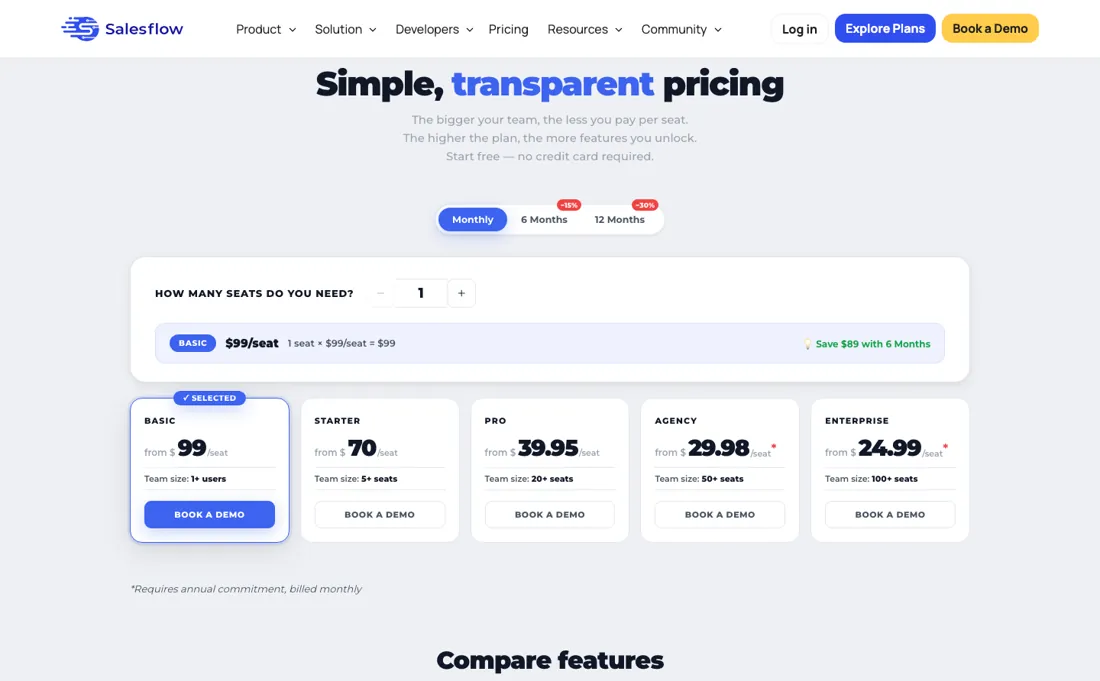
The same cliff sits at 49-to-50 seats and again at 99-to-100. And the monthly quotas are the real ceiling: 400 invites and 800 Open InMails is a fixed budget, not a starting point.
Watch the video review
The video version of this review, from our YouTube channel.
What Salesflow does
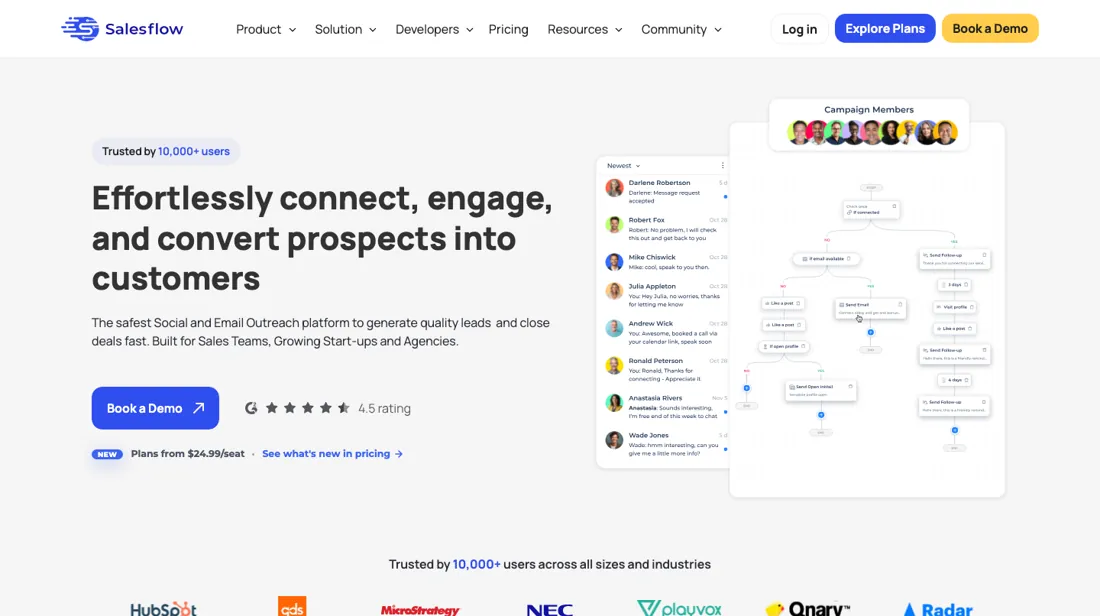
LinkedIn outreach automation for outbound sales teams — connection requests, follow-up sequences and Open InMails, with email steps for multichannel campaigns, plus an admin panel and seat management for agencies.
What buyers report about Salesflow
Hands-on: not tested by usReported by buyers: independent LinkedIn-automation reviews, read August 2026
Themes from the buyer-review sites listed at the foot of this page, read in August 2026. We have not run Salesflow ourselves, so this is other buyers' experience rather than ours. We summarise it here because the complaints are usually the part a vendor page leaves out.
- • Runs connection requests, follow-ups and Open InMails from one sequence, with email steps layered on for multichannel campaigns.
- • Agency and team tooling is what reviewers single out: admin panel, seat management, a global activity dashboard, shared templates and a shared blacklist.
- • Per-seat price falls steeply with team size, which reviewers rate well for agencies.
- • A solo user pays roughly two to three times the per-seat price an agency pays for the same product.
- • Monthly quotas are fixed rather than scaling — 400 invites, 2,000 follow-ups, 800 Open InMails on the single-user plan.
- • In August 2026 we could not read a pricing page, so buyers compared on third-party figures. That has since changed: Salesflow's own pricing page renders in a browser and publishes per-seat tiers with seat minimums (see the pricing section above).
When the paid plan is worth it
There is no free tier, so the question is which seat count you are buying into — and on Salesflow that changes the price per seat more than any feature does. Their own published rates: Basic $99 per seat from one seat, Starter $70 from five, Pro $39.95 from twenty, Agency $29.98 from fifty and Enterprise $24.99 from a hundred, with Agency and Enterprise requiring an annual commitment billed monthly.
Longer terms take a further 15% off at six months and 30% off at twelve. Read that ladder by the monthly bill rather than by the seat rate, because the two come apart at every threshold. Nineteen seats on Starter is $1,330 a month; twenty seats on Pro is $799. The twentieth seat makes the bill smaller, and the same holds at forty-nine to fifty and at ninety-nine to a hundred.
If you are sitting one seat below a boundary you are paying more for less. The quotas are what you are actually renting: around 400 LinkedIn invites, up to 2,000 follow-ups and 800 Open InMails a month. Those figures come from independent reviews rather than from the pricing page, which does not publish them, so check them against your real weekly send volume before you commit. The trial is seven days and takes no card — enough to test one sequence, not a month of sending.
How to actually use Salesflow
Start with your LinkedIn account limits, not with the software. Salesflow automates invites and messages from your own profile, and LinkedIn enforces its own weekly connection ceiling regardless of what you have paid for. A tool quota of 400 invites a month is only reachable if your account is in good standing. Warm the account up before you run a full sequence. Outreach tools get accounts restricted when volume jumps overnight, and the cost of that is your profile, not your subscription.
Build one sequence end to end before adding email steps. The multichannel piece is what separates this from a plain connection-request tool, but a broken LinkedIn step multiplied across channels is just a faster way to burn a list. If you are an agency, set up the admin panel, seat management and the shared blacklist on day one — the blacklist in particular, because it is what stops two of your people contacting the same prospect.
Where this section comes from: our research notes (133 words)
salesflow.io/pricing read in a browser on 9 September 2026 — the five seat-tier cards, the term-discount toggle and the plan comparison table. The page returns a 403 to our server but renders normally in a browser, so the figures are the vendor's own. The monthly invite, follow-up and InMail quotas are not published on that page and come from independent reviews of Salesflow read on 2 August 2026. Re-read on 1 October 2026 in a headless browser: the same five cards and rates, the Monthly / 6 Months -15% / 12 Months -30% toggle, and a comparison table that also states how seats are added (one at a time on Basic, Starter and Pro, batches of 5 on Agency and 10 on Enterprise). Still no sending quotas on the page; salesflow.io/llms.txt returns 404.
Salesflow vs Expandi, side by side
Each column shows the vendor’s own published entry price, read on the date shown. Entry prices can cover different services or units, so check what each one buys. We do not average them into a score.
Both names above are affiliate links: we may earn a commission if you sign up, at no extra cost to you. Neither changes what this table says.
The natural comparison is Expandi or Dripify — other LinkedIn outreach tools.
Frequently asked questions
Which plan is cheapest for the size of team I have?
Not the one your seat count lands on — Salesflow's per-seat rate drops so sharply at each tier boundary that buying a seat you do not need is often cheaper. On the ladder read 9 September 2026 and unchanged on 1 October (Basic $99 per seat from 1, Starter $70 from 5, Pro $39.95 from 20, Agency $29.98 from 50, Enterprise $24.99 from 100), nineteen seats on Starter costs $1,330 a month while twenty seats on Pro costs $799 — one extra seat saves $531 every month. The same cliff repeats: 49 seats on Pro is $1,957.55 against $1,499 for 50 on Agency, and 99 on Agency is $2,968.02 against $2,499 for 100 on Enterprise. One catch before you jump: Agency and Enterprise require an annual commitment billed monthly, so the seat that saves you $458 a month also ties you in for a year, and past fifty the comparison table adds seats in batches of 5 on Agency and 10 on Enterprise. The arithmetic is ours, on their published rates.
Do the longer-term discounts stack on top of the tier price?
Yes, by their own pricing page: 15% off at six months and 30% off at twelve, applied on top of whatever your seat count already earns. On Pro at twenty seats that turns $799 a month into about $559 at the twelve-month rate. Two things to hold onto. That is our arithmetic on their published percentages, not a quoted price, so confirm it before signing. And there is no free tier to fall back on if the fit is wrong — the trial is seven days without a card, which is the whole window you get to find out.
What are the monthly sending limits?
Salesflow does not publish them, and that matters more than the price. The figures in circulation — around 400 LinkedIn invites, 2,000 follow-up messages and 800 Open InMails a month — come from independent reviews, not from Salesflow's own pricing page, which lists seats and rates and nothing about volume. Treat them as unconfirmed. For a sequencing tool those caps, not the per-seat rate, decide whether a plan fits your outreach, so ask for them in writing and test them inside the seven-day trial. A headless-browser re-read of salesflow.io/pricing on 1 October 2026 again showed seats, rates and features and no volume caps.
Is this a hands-on review of Salesflow?
This is a researched assessment, not a hands-on test — where we've used a tool ourselves, we say so explicitly. We name what each tool is good and bad at, and we earn a commission only if you sign up, at no cost to you.
- Buyer reviews on independent LinkedIn-automation reviews, read August 2026.
- Read 2026-09-09, re-read 2026-10-01.
- A dated screenshot of that pricing page, kept on this site as the receipt.
Others in this category
Reviewed sales & crm tools that share ground with Salesflow — comparable in what they do, not drop-in swaps:
New reviews, price changes we recorded, and the cost conditions we found. No sponsored placements. Unsubscribe anytime.
This is our researched assessment — not a paid placement. The “Visit” links on this page are affiliate links: we may earn a commission if you sign up, at no extra cost to you, and it never changes our take. How we review →