 Clay Review (2026)
Two honest catches: a steep learning curve (expect 2–4 weeks, many teams need a dedicated Clay expert), and credits that are hard to forecast at scale. It's an enrichment engine, not a sender — you still need Instantly, Lemlist or Outreach to actually email. Throughout this review we weigh it against ZoomInfo.
Watch the 2-minute review
Same honest take, in video form — from our YouTube channel.
Pricing (2026)
✓ Pricing re-verified 17 Aug 2026
| This tool | $167 | 19th cheapest of 22 |
| Cheapest | $4.99 | Upsell.com |
| Median | $39 | |
| Most expensive | $1,199 | Flocksy |
Entry price per month, USD. Our own dated readings of 22 growth & revenue tools — not a market survey, and cheapest is not best.
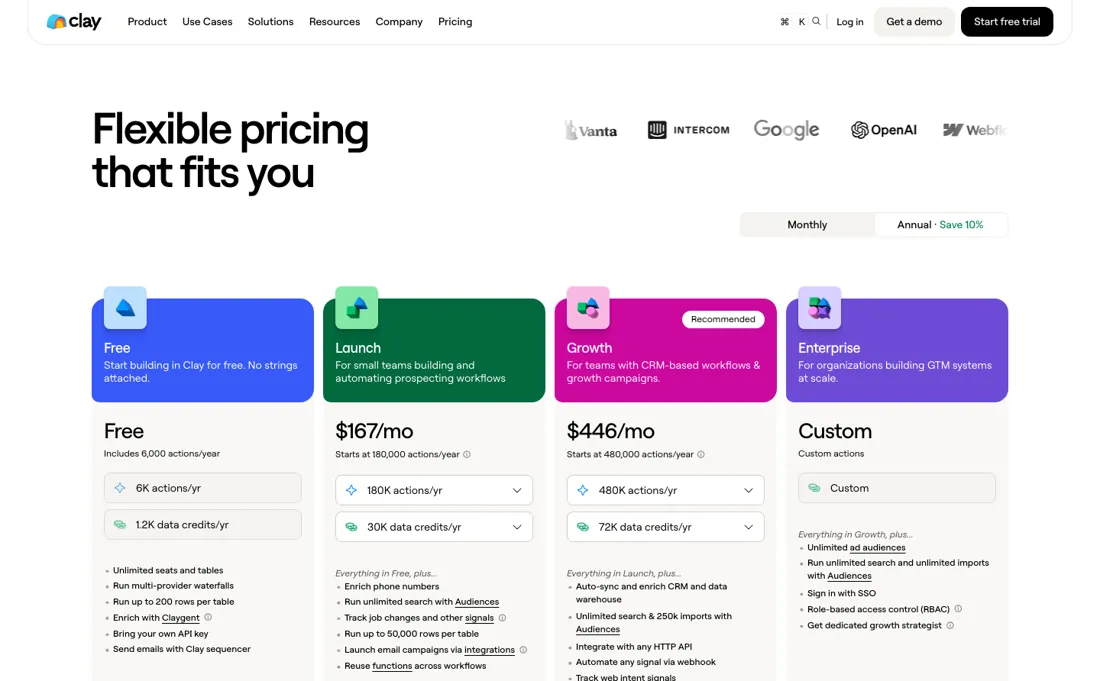
Clay now meters two things separately: actions and data credits, and each plan is an expandable volume rather than a fixed tier. The entry paid plan is $167/mo billed monthly, starting at 15,000 actions a month. The volume ladder runs $60, $150, $200, $290 and $540 a month for 15K, 40K, 60K, 100K and 200K actions monthly. Billed annually, the same ladder starts at $54/mo for 180K actions a year and runs to $486/mo for 2.4M.
The recommended plan is $446/mo starting at 40,000 actions a month, expanding from $185/mo annually. Data credits are a separate meter again: from $125/mo for 2,500 credits a month up to $2,125/mo for 50,000, or $113/mo for 30,000 a year up to $1,913/mo for 600,000. Annual billing saves 10%. Waterfall enrichment spends credits per lookup, so the credit meter rather than the plan is what decides the bill. Plans change — always verify the live price on their site.
What the price did
We capture Clay’s own pricing page every month and keep the figures, so this is our record of the page — not a forecast, and not someone else’s summary.
Clay's page looks volatile and is not. Our July and August 2026 captures carry exactly the same two ladders: $54, $135, $180, $261 and $486 a month for annual action volumes, and $60, $150, $200, $290 and $540 for monthly ones, plus the same $167 entry figure. The page returned those same numbers on 17 August 2026. What changed is our understanding of it: the credit-based description we carried before does not match any of the three readings.
Clay’s pricing page, as we read it
What Clay does
Waterfall enrichment and custom research workflows for go-to-market teams. It enriches rather than sends, so you still need a separate email tool. From about $185/month (Launch, 2,500 credits) to $495 (Growth), with credit spend that is hard to forecast and a two-to-four-week learning curve.
What buyers report about Clay
Recurring themes from the buyer-review sites listed at the foot of this page, read in August 2026. We have not run Clay ourselves, so this is other buyers' experience rather than ours. We summarise it here because the complaints are usually the part a vendor page leaves out.
- • 150+ data providers in one waterfall with AI agents that research prospects — nothing else does this, and that is why reviewers persist through the learning curve. 4.7 on G2 across roughly 189 reviews.
- • The March 2026 pricing overhaul cut credit cost on the most-used enrichments by about half.
- • Credit burn is the most-repeated G2 dislike, and 42% of complaints in a 500-person GTM survey were about uncontrolled credit consumption. Reviewers describe spending $500 just learning the interface.
- • Failed lookups still consume credits, and top-up pricing carries a 30% markup that is not on the pricing page.
- • The learning curve is four to six weeks by reviewers' own accounts. Budget that as onboarding cost, not a weekend.
- • Support is slow, with bugs going unresolved. Free, then Launch from $185, Growth from $495.
Where the ratings disagree. 4.7 on G2 against 2.2 on Trustpilot — though that Trustpilot figure rests on only 9 reviews, so weigh it lightly. The theme in it is support and credits, which matches the G2 complaints rather than contradicting them.
When the paid plan is worth it
Clay's free tier is a demo surface: 100 Data Credits and 500 Actions a month, 200 rows per table, and no phone number enrichment. Launch is priced at $167/mo on the plan card and $185/mo in the plan FAQ, with 2,500 Data Credits and 15,000 Actions a month. That is where it becomes operational: phone numbers, job-change and signal tracking, email campaign integrations and scheduled recurring enrichment runs. Clay's documentation sizes the Launch band, 2,500 to 10,000 Data Credits, at roughly 1,000 records a month; the FAQ's 2,500 is that band's floor.
Growth, $446/mo on the card and $495/mo in the FAQ, brings 6,000 Data Credits and 40,000 Actions. But the real reason to take it is plumbing: CRM auto-sync, HTTP API integrations, webhook automation, web intent signals and warehouse connections, with up to 250k CRM and warehouse imports. Without a CRM to write back to, the step is hard to justify. Seats and tables are unlimited on every plan, so you pay for throughput, not headcount.
Every enrichment costs one Action even with your own provider API key, Actions never roll over, and credit top-ups on Launch and Growth carry a 30% premium.
Our monthly capture read this vendor's pricing page in July 2026 and again in August 2026, and the amounts were the same both times. We keep watching — the registry records what moves.
How to actually use Clay
Nothing happens in Clay until a table has a source: a CSV, a Find People or Find Companies list, a CRM import, or a webhook. Clay's documentation puts CRM, warehouse and webhook imports outside the Action meter, and importing first-party data consumes neither Actions nor Data Credits. Sourcing accounts and contacts costs no Action either, but does spend Data Credits unless you access free data or use your own API keys.
From there the work is a waterfall: pick the data point, order the providers, enter the required inputs, such as email addresses or social profile URLs. A documented stumbling block: adding a Find Company source to an existing table errors unless columns for professional social URLs or company domains already exist. Editing a source's filters after a run does not update existing rows; delete and re-run the step, or duplicate the table.
At the row limit, Clay imports records up to the limit and stops automatically, with no error message displayed. Salesforce Reports cap at 2,000 records (API restriction).
Distilled from Clay's own pages, read 2026-07-31: the plan FAQ and plan comparison on the pricing page (https://www.clay.com/pricing) for plan contents, prices and top-up terms; the Sources doc (https://university.clay.com/docs/sources) for source types, the required-column error, the non-retroactive source edit, the behaviour at the row limit and the 2,000-record Salesforce Reports cap; the Waterfalls doc (https://university.clay.com/docs/building-a-data-waterfall) for the waterfall build steps and the required data inputs; and the Actions & Data Credits doc (https://university.clay.com/docs/actions-data-credits) for which activities consume Actions, which consume Data Credits, the per-record credit range and the Launch sizing band.
Clay vs ZoomInfo, side by side
Both columns come from the same place: each vendor’s own published pricing, read on the date shown in the sources at the foot of this page. We do not average them into a score.
The ZoomInfo link above is an affiliate link — we may earn a commission if you sign up, at no extra cost to you — and the other column is a plain link. Neither changes what this table says: both columns come straight from the vendors’ own pricing pages.
The natural comparison is ZoomInfo or Apollo — the all-in-one data platforms. Weigh it against ZoomInfo on the job you actually need done.
The ex-banker filter — the same yardstick on every review (how we review): My ex-banker filter is simple: does Clay remove a real cost — time, errors, missed revenue — bigger than what it charges?
Frequently asked questions
What does Clay cost?
There is no single answer, because Clay meters actions and data credits separately and each is an expandable volume. The entry paid plan is $167 a month billed monthly for 15,000 actions; expanding actions runs $60, $150, $200, $290 and $540 a month for 15K to 200K. Data credits are bought on their own ladder, from $125 a month for 2,500 credits to $2,125 for 50,000. Annual billing takes 10% off. Read on 17 August 2026.
Is there a Clay free trial or discount?
Annual billing is the published discount, at 10% — modest by the standards of this category, where 20% is common. People search for Clay promo codes often; we have found none. The more useful lever is sizing: because both meters expand in steps, buying the step you need rather than the one above it matters more than any code would.
Why do people say Clay burns budget?
Because the plan is not the meter. Waterfall enrichment spends a data credit per lookup per provider, so a single list run through several providers consumes credits far faster than the action count suggests. The two ladders are independent: you can be well inside your action allowance and out of data credits in the same week. Watch the credit balance, not the plan.
What should I weigh before buying Growth & Revenue software?
It depends on whether you have the bottleneck it solves. Small teams get the most out of this category when one clear problem is already costing real hours or revenue; buying ahead of that just adds cost and another login. Price it against the hours or lost deals it removes, not against its feature list, and start on the smallest plan that covers the job.
Is this a hands-on review of Clay?
This is a researched assessment, not a hands-on test — where we've used a tool ourselves, we say so explicitly. We name what each tool is genuinely good and bad at, and we have no affiliate relationship with Clay — we earn nothing whether you sign up or not.
- Buyer reviews on G2, Trustpilot and a survey of 500 GTM professionals, read August 2026.
- Re-verified 2026-08-17 on their own pricing page; the model has changed since most write-ups, ours included.
- A dated screenshot of that pricing page, kept on this site as the receipt.
Others in this category
The growth & revenue tools closest to Clay that we have also reviewed. They overlap rather than match:
New dossiers, cost-traps we found, and tools that earned a keep — no hype, no sponsored-disguised-as-advice. Unsubscribe anytime.
This is our researched assessment — not a paid placement. How we review →