TestDriver.ai Review (2026)$24 a Seat Plus $0.08 a Minute
 By Daan Haket · Researched and written with an AI assistant · who does what
You do not control your own seat count.
teams already living inside GitHub pull requests who want end-to-end tests to exist at all — mention @testdriverai in a PR, get a written, run and committed test back with a recording — and who would otherwise keep postponing a Playwright suite nobody has time to maintain.
your contributor list is much longer than your test needs, because seats are billed per GitHub user who touches a PR rather than per tester; you ship a Mac, iOS or Android app, which Pro does not cover at all; or your suite is long enough that sandbox minutes, not seats, become the real bill.
Transparency: the “Visit” links on this page are affiliate links — we may earn a commission if you sign up, at no extra cost to you. No vendor can pay for a better review or verdict. How we make money →
Pricing (2026)
✓ Pricing re-verified 2 Nov 2026
Two tiers, and Pro has been repriced since our September reading. Pro is now $24 per seat a month plus $0.08 for every testing minute, with 360 testing minutes included and a 14-day free trial. In September it was $20 a seat, $0.14 a minute and 120 minutes, so the seat went up and the meter got cheaper and roomier. The trial ends after 14 days or 360 testing minutes, whichever comes first; you add a card at checkout and the plan converts automatically at $24 a seat.
After the trial the FAQ says your plan includes 360 testing minutes each billing period, with usage beyond that metered by the second at $0.08 a minute. Read the seat rule carefully, because you do not choose it: a seat is any GitHub user who gets a TestDriver review on a pull request or runs a test in the billing period. Inviting people to the team in the web console is free and does not create seats.
Full pricing notes (2 more paragraphs)
Testing minutes are billed for as long as the sandbox is running, which starts automatically on pull-request generation and on test runs, so the meter covers the machine's uptime rather than the duration of your assertions. Charges, including the one when the trial converts, are non-refundable; seat changes are prorated. On the comparison table read 18 September 2026, Pro is cloud-hosted and covers web apps, Chrome extensions, VSCode extensions, Windows desktop apps, Linux and Windows, with unlimited AI generation and test runs.
Enterprise is quote-only and self-hosted, with unlimited testing and no per-minute fees, and the pricing page now says it carries a 30-day money-back guarantee. Mac desktop, Android and iOS were listed as coming soon, and only under Enterprise. The company is Haxor Inc.
Plans change — always verify the live price on their site.
What the price did
We read TestDriver.ai’s own pricing page on a schedule and keep every reading, so this is our record of the page — not a forecast, and not someone else’s summary. A change appears here only after we confirmed the new price on the page itself.
Price changes we confirmed on TestDriver.ai’s own pricing page:
- Pro (seat): raised from $20 to $24 per seat per month, between 19 Oct 2026 and 31 Oct 2026. Vendor’s page: “Pro is now $24 per seat a month plus $0.08 for every testing minute, with 360 testing minutes included” (source, read 2 Nov 2026)
- Pro (testing minute): cut from $0.14 to $0.08 per testing minute, between 19 Oct 2026 and 31 Oct 2026. Vendor’s page: “Pro is now $24 per seat a month plus $0.08 for every testing minute, with 360 testing minutes included” (source, read 2 Nov 2026)
What the pricing page doesn’t say
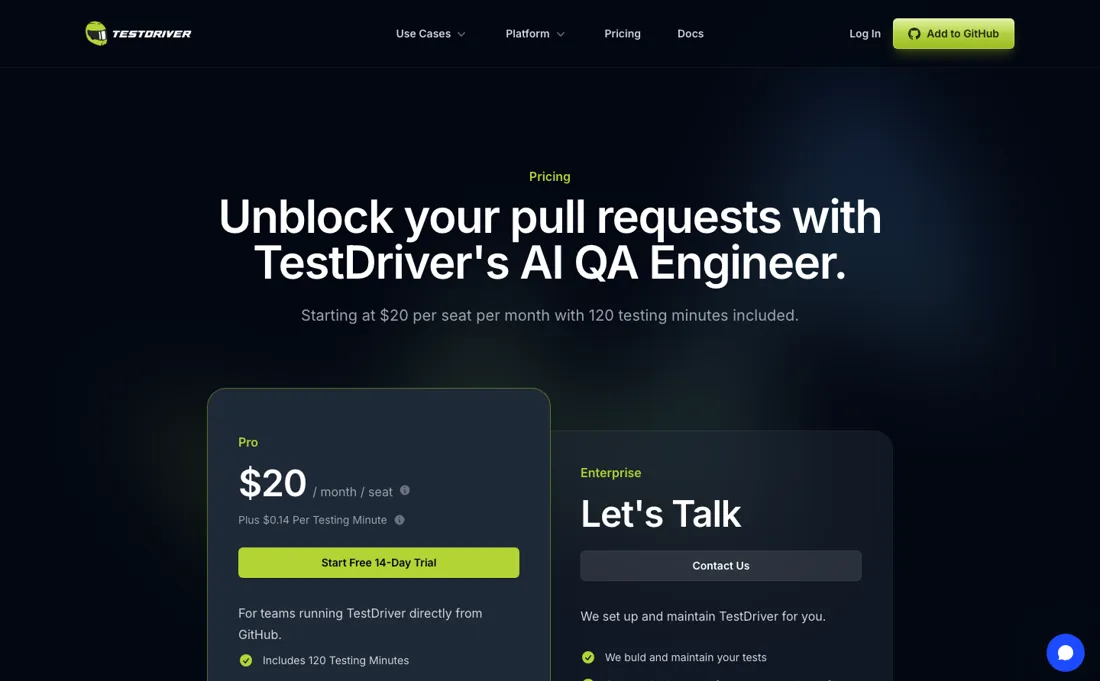
The pricing page says a seat is billed automatically for every GitHub user who gets a pull-request review or runs a test — so the bill is set by who touches your repository, not by a number you chose. On a team of ten that is $240 a month before a single test has run, and it scales with contributors rather than with usage. The allowance improved in the repricing we read on 2 November 2026: 360 testing minutes at the published $0.08 overage rate is $28.80 of metered value against a $24 seat.
But the meter still runs on sandbox uptime rather than test duration: the clock covers booting the machine and loading your app, not only the part where it clicks things. A suite that takes eight minutes of wall time per pull request exhausts 360 minutes in 45 pull requests. The FAQ now says your plan includes 360 testing minutes each billing period, which reads as one allowance for the plan rather than 360 per seat.
Budget it that way: on a ten-person team the gap between 360 and 3,600 minutes is $259.20 a month at $0.08. And note that charges, including the one when the trial converts, are non-refundable. One coverage trap: if you ship a Mac desktop app, or anything on iOS or Android, Pro does not cover you. Those platforms are marked coming soon and sit under Enterprise, which is quote-only. What is genuinely good here is the part that usually breaks.
Tests are written against what a user does rather than against selectors — the generated file reads `td.find("signup button").click()` and `td.assert("dashboard is visible")` — and the documentation tells you to describe behaviour instead of implementation, which is the opposite of the brittle CSS-selector suites this category is famous for. That is also the risk: an element resolved by an AI from a description can drift for reasons a diff will not show you.
Watch the video review
The video version of this review, from our YouTube channel.
What TestDriver.ai does
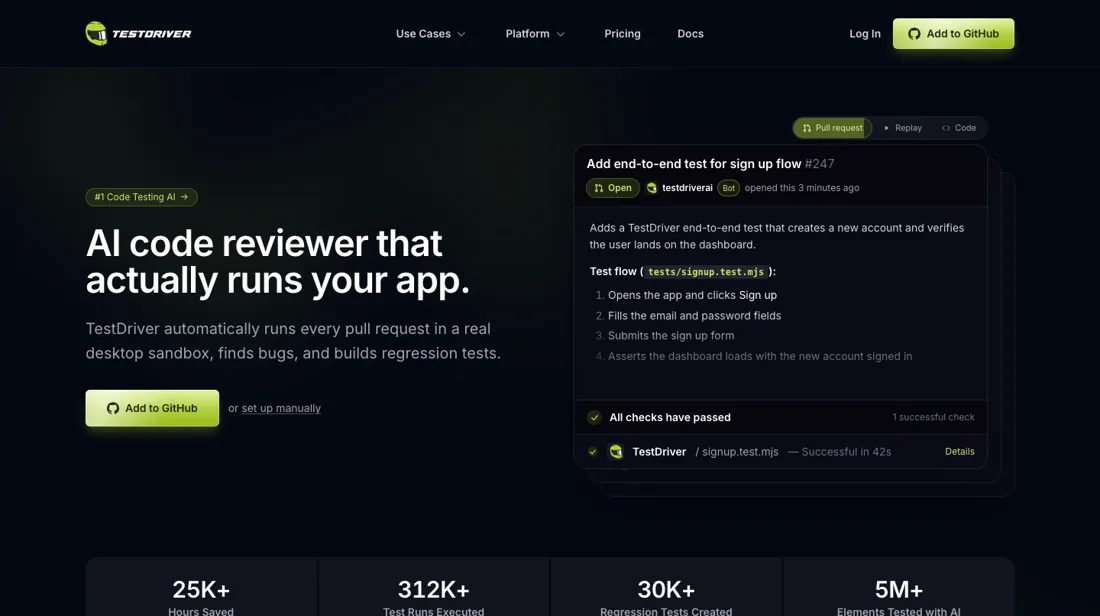
AI QA engineer that lives in GitHub: mention @testdriverai in a pull request or issue and it starts a real desktop sandbox, runs your application, writes and runs an end-to-end UI test, posts a recording, and commits the test file to your repository — then reruns it on every pull request that touches the same ground. Tests are written against behaviour rather than selectors (find “signup button”, assert “dashboard is visible”). Covers web apps, Chrome and VSCode extensions, Windows desktop and Linux; Mac, iOS and Android are Enterprise-only and marked coming soon. By Haxor Inc.
The seat is the cheap part; the meter and the headcount are not
There is one buyable plan, so the question is not which tier but what the bill actually becomes at your shape of team. Start with the seat, because it is the part you cannot control. $24 a month per GitHub user who gets a pull-request review or runs a test (it was $20 until the repricing we read on 2 November 2026). A five-person team is $120, a ten-person team $240, a twenty-person team $480 — and that number tracks your contributor list rather than your testing.
An open-source repository with outside contributors is the pathological case worth thinking through before you install the app. Then add the meter. 360 testing minutes are included each billing period and every minute after that is $0.08, metered by the second on sandbox uptime. A thousand minutes a month is $51.20 of overage; two thousand is $131.20. Those stay small next to the seats for longer than they used to: at ten seats and 2,000 minutes you are at $240 plus $131.20, so the seats are still the larger half.
The FAQ says your plan includes 360 testing minutes each billing period, which reads as one allowance for the whole plan, not 360 per seat. Budget it that way, and remember the bill is non-refundable once charged. Enterprise is the other shape entirely: self-hosted, unlimited minutes, and Haxor's own team writing and maintaining the tests, investigating failures and reporting bugs. No price is published, and that is consistent — it is a service contract rather than a bigger plan.
If your reason for looking at this category is that nobody on the team wants to own the test suite, Enterprise is the tier that actually answers it, and the quote will reflect that.
Our monthly capture read this vendor's pricing page in September 2026 and again in October 2026, and the amounts were the same both times, including $0.14 and $20 from the pricing above. We keep watching — the registry records what moves.
How to actually use TestDriver.ai
Install the GitHub App and pick the repositories deliberately — not the whole organisation. Seats are billed per GitHub user who gets a pull-request review or runs a test, so the scope you grant is the scope you pay for. Start with one repository and one team. Write the request the way the documentation tells you to. Mention @testdriverai in a pull request or an issue and describe what a user does and what they should see: “Log in, add the first product to the cart, and confirm the cart badge shows 1” works, while “click #add-btn” does not.
TestDriver replies in the thread, starts a sandbox, writes the test, runs it, posts the result with a link to a recording, and then opens a pull request that adds the test file to your repository. The test lands as a real file you can read and edit — `td.find("signup button").click()`, `td.assert("dashboard is visible")` — so review it like any other code rather than trusting it because it passed once.
Measure your sandbox minutes during the trial, not after. It ends after 14 days or 360 testing minutes, whichever comes first, and converts to a paid, non-refundable charge automatically. The meter runs on how long the sandbox is up, including boot and app load, so the only way to know your real monthly cost is to watch what a typical pull request consumes and multiply by your merge rate. That number, not the seat price, is what decides whether this is cheap.
Before the trial ends, put one thing in writing: what happens to the seat count when an outside contributor opens a pull request. The pricing page counts any GitHub user who gets a review or runs a test, and does not single out contributors from outside your organisation. And check the platform list against what you actually ship. Web, Chrome extensions, VSCode extensions, Windows desktop and Linux are covered on Pro. Mac desktop, iOS and Android are marked coming soon and sit under Enterprise only.
Where this section comes from: our research notes (269 words)
testdriver.ai/pricing, re-read on 2 November 2026: Pro at $24 per seat per month with $0.08 per testing minute and 360 testing minutes included, the 14-day trial capped at 360 minutes, the FAQ on seats, per-billing-period minutes, per-second metering, non-refundable charges and Enterprise's 30-day money-back guarantee. Earlier reading: testdriver.ai/pricing, read in a live browser on 18 September 2026: the Pro tier at $20 per seat per month with $0.14 per testing minute and 120 testing minutes included, the 14-day free trial, the statement that seats are automatically billed for every GitHub user who gets a PR review or runs a test, the note that testing minutes are billed for the duration the sandbox is running and that this starts automatically on PR generation and test runs, and the full feature comparison table (cloud versus self-hosted, included minutes, team users, overage rate, and the platform rows for web apps, Chrome extensions, VSCode extensions, Windows desktop apps, Mac desktop apps, Android, iOS, Linux, Windows and Mac, plus test recordings, analytics, CPU/RAM/network profiles, root access, custom VM images, support tiers, guided setup, test creation, test maintenance, failure investigation, bug reporting, VPN deployment and bring-your-own-keys).
The company name Haxor Inc comes from the footer of that page. The workflow and the example test file come from testdriver.ai itself and from docs.testdriver.ai/quickstart-github, read the same day: installing the GitHub App, mentioning @testdriverai in a pull request or issue, the sandbox run, the recording link, the pull request that commits the test, the advice to describe user behaviour rather than implementation details, and the generated `td.find(...)` / `td.assert(...)` syntax. No independent reviews were found to read.
TestDriver.ai vs BugHerd, side by side
Each column shows the vendor’s own published entry price, read on the date shown. Entry prices can cover different services or units, so check what each one buys. We do not average them into a score.
Both names above are affiliate links: we may earn a commission if you sign up, at no extra cost to you. Neither changes what this table says.
The natural comparison is BugHerd — These solve the same problem from opposite ends, and we carry no direct automated-QA competitor to put beside this one — worth saying plainly rather than inventing a peer. BugHerd, from our own dossiers (re-verified 5 September 2026), is where humans report what they found: about $42 a month for 5 members, $67 for 10 and $125 for 25, with unlimited projects and unlimited client users, and extra members at $6.60 each billed annually. It is a fixed, predictable bill and it catches what a person noticed. TestDriver is the machine doing the looking, and its bill moves with your team and your runtime rather than staying still. At ten seats it is $240 a month before minutes, against BugHerd's $67 for the same headcount — but BugHerd never opens your app, and nothing in it stops a regression merging. The honest comparison is not really between these two: it is between TestDriver and the Playwright suite you would write yourself, where the software is free and the cost is the engineer-weeks to build it and the maintenance nobody budgets for. Price that against $24 a seat before deciding..
Frequently asked questions
What does TestDriver.ai cost?
Pro is $24 per seat a month plus $0.08 for every testing minute, with 360 testing minutes included each billing period and a 14-day free trial — re-read on testdriver.ai/pricing on 2 November 2026 (it was $20, $0.14 and 120 minutes in September). Enterprise is quote-only and self-hosted, with no per-minute fees, and it is the tier where Haxor's own team writes and maintains your tests. The seat price is the larger half of most bills: at ten seats you are at $240 a month before a minute is metered, and 2,000 minutes on top of that adds $131.20.
How many seats will I actually be billed for?
As many GitHub users as touch a pull request. The pricing page states that seats are billed automatically for every GitHub user who gets a pull-request review or runs a test, so the number is set by your contributor list rather than by a figure you choose. Inviting people to the team in the web console is free and does not create a seat. That makes a five-person team $120 a month and a twenty-person team $480, and it makes an open repository with outside contributors worth thinking through before you install the GitHub App.
Are the 360 included testing minutes per seat or per account?
Per plan, as far as the page says. The FAQ, re-read on 2 November 2026, states that after the trial your plan includes 360 testing minutes each billing period, and that testing beyond that is billed at $0.08 per minute, metered by the second. It does not multiply the allowance by seats, so budget for one pool of 360 minutes. In September the page listed 120 minutes without any qualification, which is why older write-ups call this unclear.
Does it test Mac, iOS or Android apps?
Not on Pro. The comparison table covers web apps, Chrome extensions, VSCode extensions, Windows desktop apps, Linux and Windows on the cloud tier. Mac desktop apps, Android and iOS are all marked “coming soon” and appear only in the Enterprise column, which carries no published price. If your product ships on those platforms, this is a quote conversation rather than a $24 signup.
Is this still the YAML tool I read about?
No — and that matters if you are reading older write-ups. TestDriver used to be driven by YAML files, and the company's own CEO said in a public thread on r/QualityAssurance that the YAML version 6 was limited for large suites and custom logic, with a JavaScript rewrite planned for early 2026. It arrived early. Version 7.0.0 was published to npm on 22 November 2025, the 6.x line stopped receiving releases on 2 December 2025, and the package has been on 7.x ever since — 7.11.139 is current, with builds as recent as 18 September 2026 (read on registry.npmjs.org/testdriverai on 20 September 2026). The documentation agrees: docs.testdriver.ai is a JavaScript SDK end to end, and several of its example pages are marked as converted from the old .yaml acceptance tests. So any YAML limitation you find discussed online describes a version the vendor stopped shipping in December 2025.
Is this a hands-on review of TestDriver.ai?
This is a researched assessment, not a hands-on test — where we've used a tool ourselves, we say so explicitly. We name what each tool is good and bad at, and we earn a commission only if you sign up, at no cost to you.
- Re-verified 2026-11-02 on testdriver.ai/pricing.
- A dated screenshot of that pricing page, kept on this site as the receipt.
Others in this category
Reviewed developer tools that share ground with TestDriver.ai — comparable in what they do, not drop-in swaps:
Also in developer tools, for browsing rather than as an alternative:
New reviews, price changes we recorded, and the cost conditions we found. No sponsored placements. Unsubscribe anytime.
This is our researched assessment — not a paid placement. The “Visit” links on this page are affiliate links: we may earn a commission if you sign up, at no extra cost to you, and it never changes our take. How we review →