 DigitalOcean Review (2026)The $4 Server Is Just the Start
Transparency: we earn nothing from DigitalOcean; the links to it are plain links. How we make money →
The $4 Droplet is real, but it is the smallest machine — 512 MiB of memory — and it is only the server.
Pricing (2026)
✓ Pricing re-verified 3 Oct 2026
- Droplets (Basic) — $4 to $96 a month512 MiB, 1 vCPU, 10 GiB SSD and 500 GiB transfer at $4, up to 16 GiB, 8 vCPUs and 6,000 GiB transfer at $96; billed per second
- App Platform — free for three static-site apps; containers from $5 a monthfree tier: three static-site apps with 1 GiB transfer each; containers at $5, $10, $12, $25 and $50 a month
- Managed Databases — from $15 a monthMongoDB, Kafka, PostgreSQL, MySQL, Caching, Valkey and OpenSearch; daily backups and failover included
- Kubernetes — from $12 a monthmanaged Kubernetes with a free control plane
- GPU Droplets — from $0.76 per GPU-hour on demandRTX 4000 Ada $0.76, L40S $1.57, H100 $4.41 and H200 $4.47 per GPU-hour on demand; H100 $3.26 on a 12-month reservation
DigitalOcean is pay-as-you-go cloud infrastructure: you rent the pieces and pay per piece. Basic Droplets (virtual servers) run from $4 a month for 512 MiB, 1 vCPU, 10 GiB of SSD and 500 GiB of outbound transfer, through $6 (1 GiB), $12 (2 GiB), $18, $24 and $48 up to $96 a month for 16 GiB and 8 vCPUs. Since 1 January 2026 Droplets are billed per second, with a minimum of 60 seconds or $0.01.
Backups are extra: 20% of the Droplet price for weekly or 30% for daily, and outbound transfer beyond the allowance is $0.01 per GiB. App Platform has a free tier for three static-site apps (1 GiB of transfer each, further static apps $3 each); apps with a server start at $5 a month for a fixed container with 1 vCPU and 512 MiB, limited to one instance, then $10, $12, $25 and $50, with a $7 development database, a $25 dedicated egress IP and $0.02 per GiB beyond the bandwidth allowance.
Managed databases start at $15 a month, managed Kubernetes at $12, load balancers at $12 and Spaces object storage at $5. GPU Droplets run on demand from $0.76 per GPU-hour (RTX 4000 Ada) through $1.57 (L40S) to $4.41 (H100) and $4.47 (H200); a 12-month reservation brings the H100 to $3.26, and the GPU page says new pricing took effect on 1 August 2026.
DigitalOcean also owns Cloudways and lists its managed hosting from $11 a month on the same pricing page. Billing is monthly in arrears: the card is charged on the first day of the month for the previous month's usage, or earlier if usage passes a threshold. Plans change — always verify the live price on their site.
What the pricing page doesn’t say
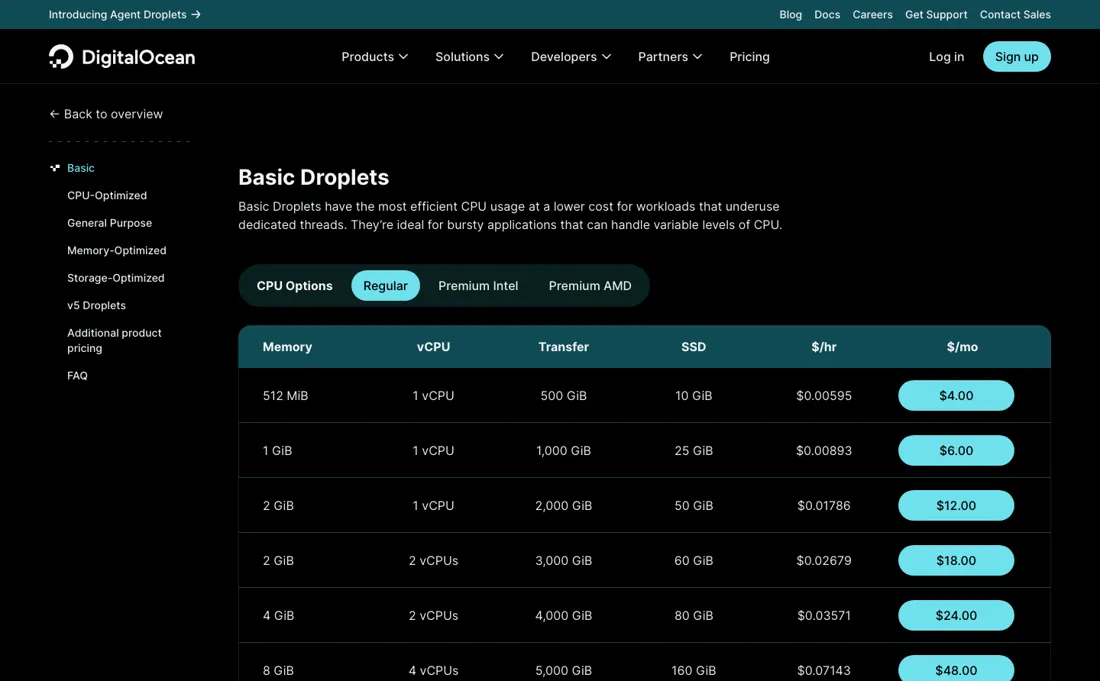
Backups cost 20% (weekly) or 30% (daily) of the Droplet price on top, a managed database starts at $15 a month and a load balancer at $12, so a small production app is several line items rather than one: a 2 GiB Droplet at $12 with daily backups ($3.60) and the smallest managed database ($15) comes to $30.60 a month before any bandwidth overage. Billing is per second and in arrears, which is fair, but the bill arrives after the month you used — set a billing alert on day one.
What DigitalOcean does
Developer cloud for running apps, APIs and databases: virtual servers (Droplets), a managed app platform, managed databases, Kubernetes, object storage and on-demand GPUs, billed per second.
Droplet or App Platform: who looks after the server
A $4 Droplet and a $5 App Platform container look almost the same on paper — 1 vCPU and 512 MiB each — but you are buying different jobs. The Droplet is a virtual machine: you install, secure and patch it yourself, and it comes with 10 GiB of SSD and 500 GiB of outbound transfer. The App Platform container is a managed runtime: you deploy from GitHub or GitLab, HTTPS and the CDN are included, and the paid tier adds automatic OS patching, with 50 GiB of transfer on the $5 plan and a limit of one instance on a fixed-CPU container.
Pay the extra dollar when you would rather not run a server; take the Droplet when you want root access and ten times the transfer allowance.
How to actually use DigitalOcean
Set a billing alert before you create anything. DigitalOcean bills in arrears on the first day of the month, or earlier if usage passes a threshold, and its own FAQ says you can be emailed when the bill crosses an amount you choose. Then match the product to the job: a static front end fits App Platform's free tier (three static-site apps, 1 GiB of transfer each); an app with a server starts on a $5 App Platform container or a Droplet from $4.
Switch on backups when you create a Droplet (30% of its price for daily), and add a managed database from $15 when you would rather not run your own.
Distilled from DigitalOcean's own pricing pages, read 3 October 2026: the overview (digitalocean.com/pricing), Droplets (digitalocean.com/pricing/droplets), App Platform (digitalocean.com/pricing/app-platform), GPU Droplets (digitalocean.com/pricing/gpu-droplets) and Managed Databases (digitalocean.com/pricing/managed-databases). This review is researched, not hands-on: we have not run workloads on DigitalOcean for it.
DigitalOcean vs Cloudways, side by side
Each column shows the vendor’s own published entry price, read on the date shown. Entry prices can cover different services or units, so check what each one buys. We do not average them into a score.
The Cloudways link above is an affiliate link — we may earn a commission if you sign up, at no extra cost to you — and the other column is a plain link. Neither changes what this table says.
The natural comparison is Cloudways — DigitalOcean owns Cloudways and sells both: a Droplet is the raw server you run yourself, while Cloudways puts a managed WordPress and PHP stack with platform support on a cloud server for more per month. Choose on how much server work you want to do..
Frequently asked questions
Is DigitalOcean free?
Partly. App Platform's free tier runs three static-site apps with 1 GiB of transfer each, Functions include 90,000 GiB-seconds a month at no charge, and the platform includes free DNS, cloud firewalls, a container registry with one repository and 500 MiB, and one uptime check a month. Anything with a server — a Droplet, a container app, a database — is paid, from $4 a month for the smallest Droplet. Read on digitalocean.com/pricing on 3 October 2026.
What does a small production app cost on DigitalOcean?
Count the line items, not the Droplet. On the prices we read on 3 October 2026: a 2 GiB Droplet is $12 a month, daily backups add 30% of that ($3.60), and the smallest managed database is $15, so $30.60 a month before any bandwidth overage at $0.01 per GiB. On App Platform the same idea starts from a $5 container plus a $7 development database.
How does DigitalOcean bill?
Monthly in arrears: on the first day of the month it charges the card for the previous month's usage, or earlier if usage passes a threshold. Droplets are billed per second since 1 January 2026, with a minimum of 60 seconds or $0.01. Adding a card can trigger a temporary pre-authorisation, typically $1, which DigitalOcean cancels.
What do GPUs cost on DigitalOcean?
On demand from $0.76 per GPU-hour for an RTX 4000 Ada up to $4.41 for an H100 and $4.47 for an H200 (read 3 October 2026; DigitalOcean says new GPU pricing took effect on 1 August 2026). A 12-month reservation brings the H100 to $3.26. An H100 left running on demand for a 720-hour month is $3,175.20.
What should I weigh before buying Developer Tools software?
Read the documentation before you commit, because it is the most honest preview of the product. Look for a quickstart you can actually finish, error responses that are documented rather than guessed at, published rate limits and a clear statement of what happens when you hit them, and a changelog showing the API is still maintained. Vague limits usually mean you will discover them in production.
Is this a hands-on review of DigitalOcean?
This is a researched assessment, not a hands-on test — where we've used a tool ourselves, we say so explicitly. We name what each tool is good and bad at, and we have no affiliate relationship with DigitalOcean — we earn nothing whether you sign up or not.
- Read 3 October 2026 on digitalocean.com/pricing and its Droplets, App Platform, GPU Droplets and Managed Databases pages.
- A dated screenshot of that pricing page, kept on this site as the receipt.
Others in this category
Reviewed developer tools that share ground with DigitalOcean — comparable in what they do, not drop-in swaps:
Also in developer tools, for browsing rather than as an alternative:
New reviews, price changes we recorded, and the cost conditions we found. No sponsored placements. Unsubscribe anytime.
This is our researched assessment — not a paid placement. How we review →