SwitchStation Review (2026)Claude Code and Codex Session Monitor for Mac
 By Daan Haket · Researched and written with an AI assistant · who does what
SwitchStation is in early access, so you cannot download it freely and the public release is not finished.
Mac users who run several Claude Code or Codex sessions at once and want to see which one is waiting for them, then jump to the right window in one click.
you use other coding agents, you work on Windows or Linux, or you want a build you can download today without asking for access.
Transparency: the “Visit” links on this page are affiliate links: we may earn a commission if you sign up, at no extra cost to you. No vendor can pay for a better review or verdict. How we make money →
Pricing (2026)
✓ Pricing re-verified 12 Nov 2026
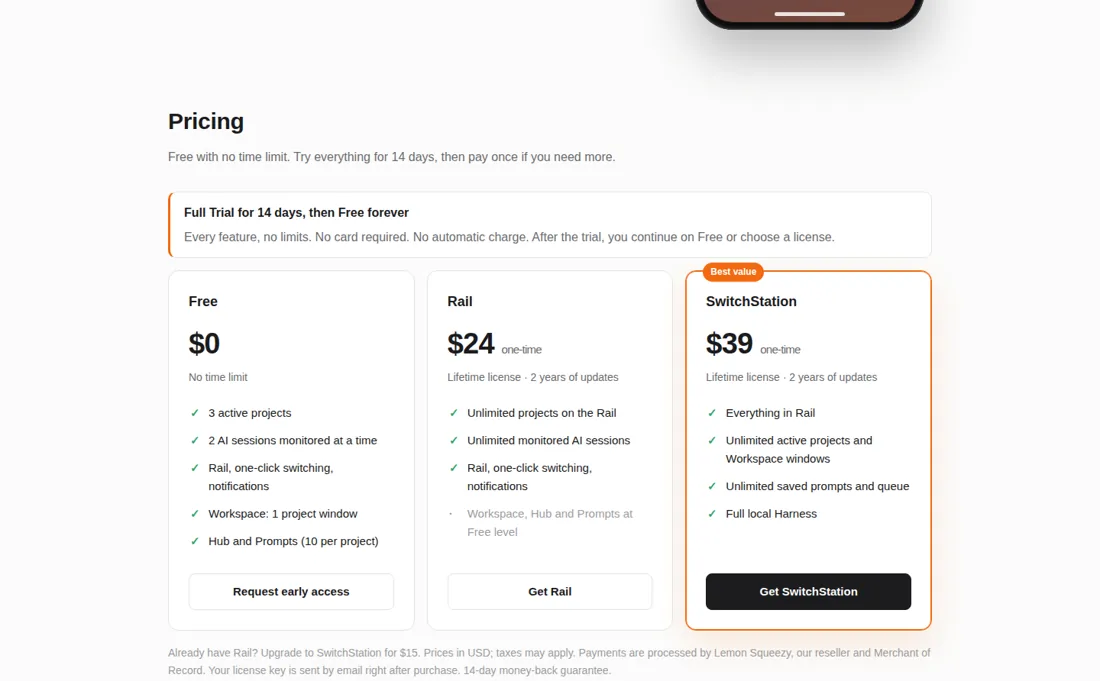
“Free $0 No time limit 3 active projects 2 AI sessions monitored at a time”Source: switchstation.sssflow.com, read 5 Nov 2026
“Try everything free for 14 days. No card required. No automatic charge.”Source: switchstation.sssflow.com, read 5 Nov 2026
“Email us within 14 days of purchase for a full refund.”Source: switchstation.sssflow.com, read 5 Nov 2026
SwitchStation has three licence levels and no subscription. Free costs $0 with no time limit: 3 active projects, 2 AI sessions monitored at a time, the Rail with one-click switching and notifications, one Workspace project window, and the Hub and Prompts (10 per project). Rail costs $24 one time and removes the limits on projects and monitored sessions; Workspace, Hub and Prompts stay at the Free level.
SwitchStation costs $39 one time and adds unlimited active projects and Workspace windows, unlimited saved prompts and queue, and the full local Harness. Both paid licences are lifetime licences with 2 years of updates from the purchase date; after that the page says the update policy may change. Someone with Rail can upgrade for $15. One licence works on up to 3 Macs.
Every new install gets a 14-day full trial with no card and no automatic charge, then continues on Free or on a licence. The page says prices are in USD, taxes may apply, Lemon Squeezy processes payments, and there is a 14-day money-back guarantee by email. Plans change, so check the live price on their site before you buy.
What the pricing page doesn’t say
It only follows Claude Code and OpenAI Codex CLI, the Remote iPhone feature is marked coming soon, and the page says nothing about what happens to updates after the first two years.
What SwitchStation does
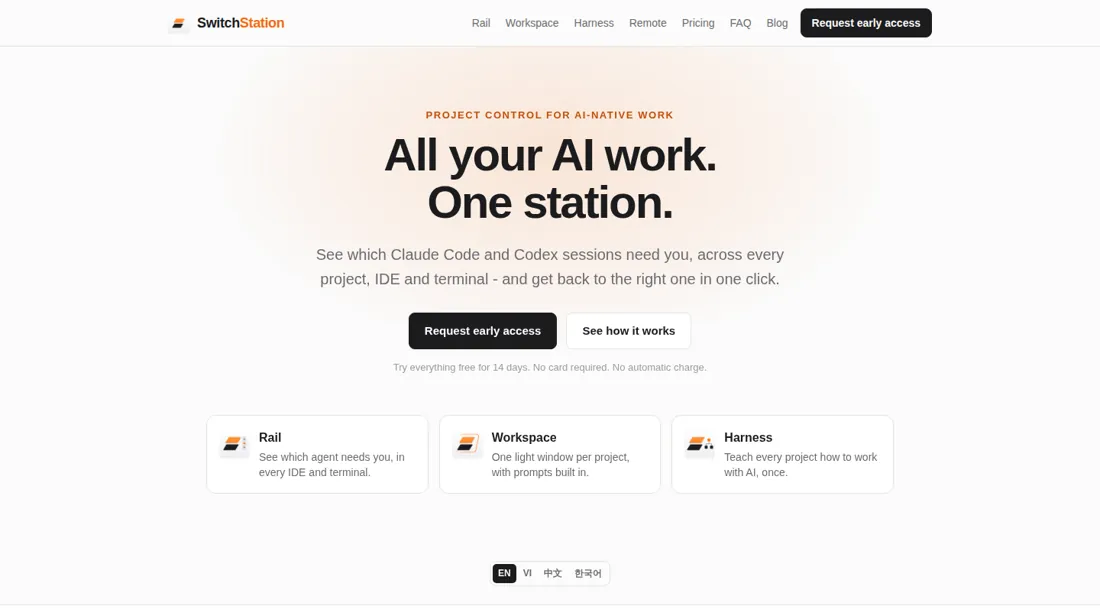
Mac app that shows which Claude Code and Codex sessions are waiting for you across projects and terminals, with a lightweight project workspace and a free plan.
Rail removes the limits; $39 adds the Workspace and Harness
The Free plan already gives you the Rail for 2 sessions and 3 projects, which is enough to test the idea. If you run more agents in parallel, Rail at $24 is the cheaper step, because it only lifts the project and session limits. The $39 licence matters if you want the Workspace windows, unlimited saved prompts and the Harness setup layer. Going from Rail to the full licence costs $15, so starting with Rail loses nothing.
How to actually use SwitchStation
SwitchStation is in early access: the page asks you to request a build by email (info@sssflow.com) and describe how you work with AI agents. The app needs macOS 14 Sonoma or later and runs on Apple silicon and Intel. The Rail installs lightweight hooks for Claude Code and Codex that only report state, and it asks for Accessibility permission only to bring the right window to the front. We did not request a build or install it.
Distilled from SwitchStation's own homepage with its pricing section, FAQ and comparison table, read on 12 November 2026 with research prepared on 5 November 2026. SwitchStation is an affiliate partner of ours through Lemon Squeezy. We have not used the app ourselves.
The natural comparison is Cursor: Cursor is an editor with its own agent, not a monitor for terminal sessions, and it is not one of our reviewed tools. Test the Free plan next to your normal terminal for a day and count how often you switch windows to check an agent.
Frequently asked questions
How much does SwitchStation cost?
Per the page read on 12 November 2026, Free is $0 with no time limit, Rail is $24 one time and SwitchStation is $39 one time, all in US dollars plus any tax. The paid licences are for life and include two years of updates.
Is there a trial?
Yes. The page says the full trial lasts 14 days, needs no card and charges nothing automatically. After it you continue on Free or pick a licence.
Which agents does it follow?
Claude Code and OpenAI Codex CLI, in any terminal or editor that runs them on your Mac and in its own Workspace window.
Can I get a refund?
The page says to email within 14 days of purchase for a full refund.
How many Macs can I use?
Up to three Macs per licence. You move a licence by deactivating it on the old Mac first.
What do we not know?
How the app works in daily use, since we have not used it, when the public release arrives, and what the update terms are after the two included years.
Is this a hands-on review of SwitchStation?
This is a researched assessment, not a hands-on test. Where we've used a tool ourselves, we say so explicitly. We name what each tool is good and bad at, and we earn a commission only if you sign up, at no cost to you.
- Read 2026-11-12 on switchstation.sssflow.com, US dollars.
- A dated screenshot of that pricing page, kept on this site as the receipt.
Others in this category
Reviewed developer tools that share ground with SwitchStation. They are comparable in what they do, not drop-in swaps:
Also in developer tools, for browsing rather than as an alternative:
New reviews, price changes we recorded, and the cost conditions we found. No sponsored placements. Unsubscribe anytime.
This is our researched assessment, not a paid placement. The “Visit” links on this page are affiliate links: we may earn a commission if you sign up, at no extra cost to you, and it never changes our take. How we review →