Pagecloud Review (2026)Pagecloud AI, No Native Blog or Store
 By Daan Haket · Tested hands-on · written with an AI assistant · who does what
Pagecloud AI has no native blog or online store; the pricing FAQ, read on 12 October 2026, says Pagecloud AI does not currently include native blogging or ecommerce, so on Launch, Grow and Optimize you embed or link an outside service.
- Best for Consultants needing a small brochure site
- Not for shop owners and bloggers wanting everything built in
From $22 · Launch · per month equivalent billed annually · read 2026-10-25
Try Pagecloud →Affiliate link: we may earn a commission if you sign up, at no extra cost to you. It never changes our verdict.
Is Pagecloud right for you?
Your pain“Building a site by hand eats my week, and all I need is a few pages that bring in inquiries.”
Does Pagecloud solve it?YesOur test (30 Oct 2026): the AI built a first version in about six minutes, though it ignored two headings we had asked for.
Your planLaunch, $22 a month billed annually ($26 monthly), one-person plan
Try Pagecloud →
Your pain“A freelancer and I both change the site, and a single login keeps getting in the way.”
Does Pagecloud solve it?PartlyPricing page, read 11 October 2026: Grow allows up to 10 team members, but AI usage is shown only as multipliers with no numbers.
Your planGrow, $36 a month billed annually ($45 monthly)
Try Pagecloud →
- Shop owners and bloggers wanting everything built in. Pricing FAQ, read 12 October 2026: Pagecloud AI has no native blog or ecommerce on any of its three plans. Better fit: Weblium.
The “Try” buttons are affiliate links: we may earn a commission if you sign up, at no extra cost to you, and it never changes our verdict.
Also in: Software for freelancers and solo businesses
Transparency: the “Visit” links on this page are affiliate links: we may earn a commission if you sign up, at no extra cost to you. No vendor can pay for a better review or verdict. How we make money →
Which Pagecloud plan do you need?
3 plans, 2 questions, no signup.
Answer two quick questions to see your plan.
Your plan
Launch
$22 a month billed annually ($26 monthly)
Some AI usage, no team members
Your plan
Grow
$36 a month billed annually ($45 monthly)
Twice the AI usage, up to 10 team members
Your plan
Optimize
$69 a month billed annually ($89 monthly)
Five times the AI usage, up to 100 team members
Probably not Pagecloud
From your answers, look at Weblium instead. Why ↓
Prices as we read them on 2026-10-25; check the checkout before you pay. The plan button is an affiliate link: we may earn a commission, at no extra cost to you.
What Pagecloud costs at your size
What each plan costs a month on annual billing (monthly billing below it), per user from Pagecloud’s own pricing page. The cheapest plan at each size is marked. On annual billing the cheapest plan changes from Launch to Grow between 1 and 2 users. Launch stops at 1 user; Grow stops at 10 users; Optimize stops at 100 users.
| Users | Launch | Grow | Optimize |
|---|---|---|---|
| 1 user | $22Best value at this size $26 monthly | $36 $45 monthly | $69 $89 monthly |
| 3 users | not available | $36Best value at this size $45 monthly | $69 $89 monthly |
| 5 users | not available | $36Best value at this size $45 monthly | $69 $89 monthly |
| 10 users | not available | $36Best value at this size $45 monthly | $69 $89 monthly |
| 25 users | not available | not available | $69Best value at this size $89 monthly |
| 50 users | not available | not available | $69Best value at this size $89 monthly |
Prices read 2026-10-25; tax excluded unless the vendor says otherwise. Calculated by our cost engine; the same numbers are in our open data.
See current prices on Pagecloud →Exit test (measured 2026-10-30)
- Export route
- Project and Dashboard menus were inspected without finding a site download
- Formats
- Not tested
- Attachments included
- Not tested
- Re-import tested
- With our own file, not the standard kit (see below)
- Lost on export
- Not tested
Formats describe this export route; offered formats may not have been inspected. Full exit test and scope ↓
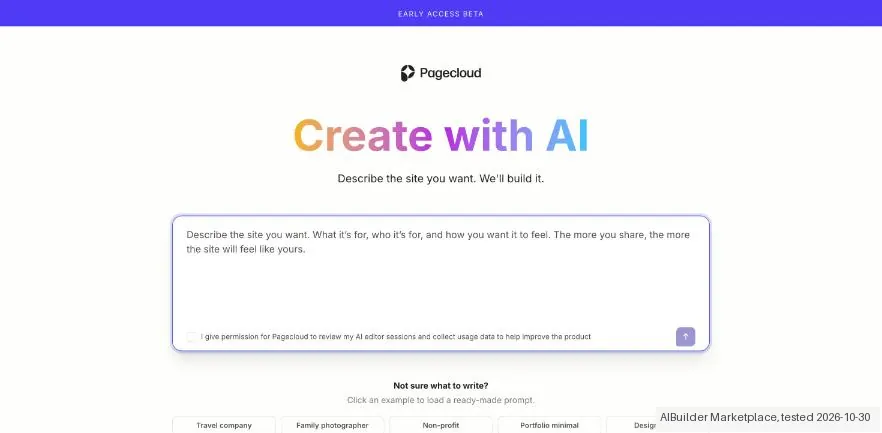
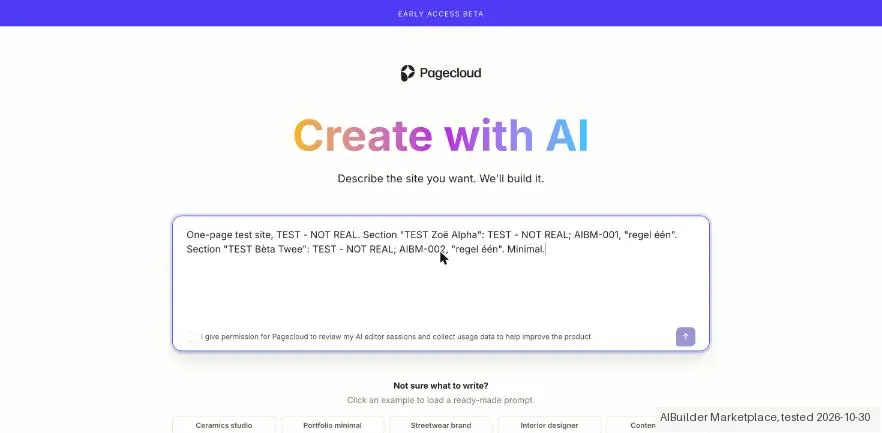
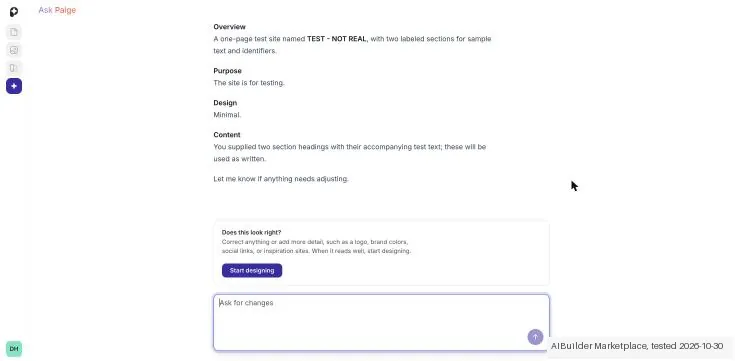
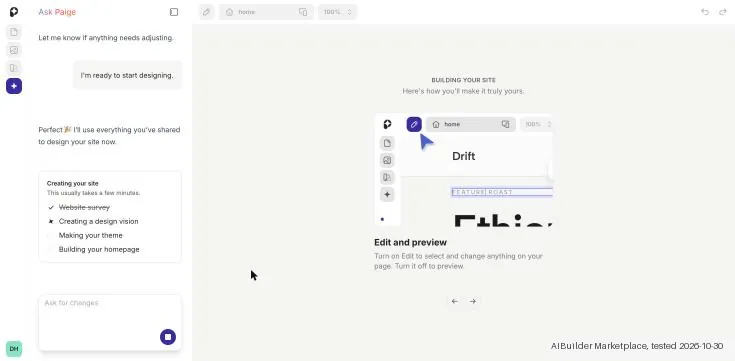
Tested by our team on 30 October 2026 in the free early access beta: Daan created the account and our AI assistant ran the test in Daan's browser. We asked the AI builder for a one-page site with two sections of our test text and looked for an export. We did not publish the site.
How we tested
- Gave the AI builder a prompt with two sections of test text
- Compared the finished page with the prompt
- Looked through the project and dashboard menus for an export
- Building was free during the beta, with no card.
- The AI builder only starts if you tick 'I give permission for Pagecloud to review my AI editor sessions and collect usage data'. Until then the send button stays disabled.
- The assistant summed up our request and said our two section headings and text 'will be used as written'. The finished page did not contain them; it had its own placeholder sections instead.
Pricing (2026)
✓ Pricing re-verified 25 Oct 2026
Three plans, each with Pagecloud AI, hosting, SSL, your own domain, inquiry forms with an inbox, analytics and SEO settings. Billed annually and shown as a monthly equivalent: Launch $22, Grow $36, Optimize $69. Billed monthly: Launch $26, Grow $45, Optimize $89. The plans differ only in AI usage and team members: Launch has 'some AI usage' and no team members, Grow twice the AI usage and up to 10 team members, Optimize five times and up to 100.
The page says these are relative allowances, not a guaranteed number of pages or requests, and that numerical allowances are not specified; extra AI credits are sold in bundles, without a price on the page. Monthly plans get a fresh allowance each month; annual plans receive the year's allowance up front. Annual plans add a free custom domain (up to a $20 value) and one year of Google Workspace for one user (an $82 value).
Full pricing notes (2 more paragraphs)
The FAQ says Pagecloud AI is in beta and normal AI usage is not charged during the beta, though excessive use may be rate-limited, and that it does not include native blogging or ecommerce: you link to an external service or embed its code. Re-read on 25 October 2026 with a plain fetch of pagecloud.com/pricing and Pagecloud's llms.txt: prices, AI multipliers, team limits and the annual extras unchanged, and the page still says Free to create during the beta.
The terms of service renew a subscription for another one or twelve months unless notice is given at least ten days before it ends, and say payments are non-refundable even if you stop using the Services.
Plans change, so check the live price on their site before you buy.
Vendor-confirmed: Confirmed in writing by Pagecloud (Mike Grouchy) via Pagecloud support email, 30 Oct 2026, 30 Oct 2026. Not tested by us at a checkout.
What the pricing page doesn’t say
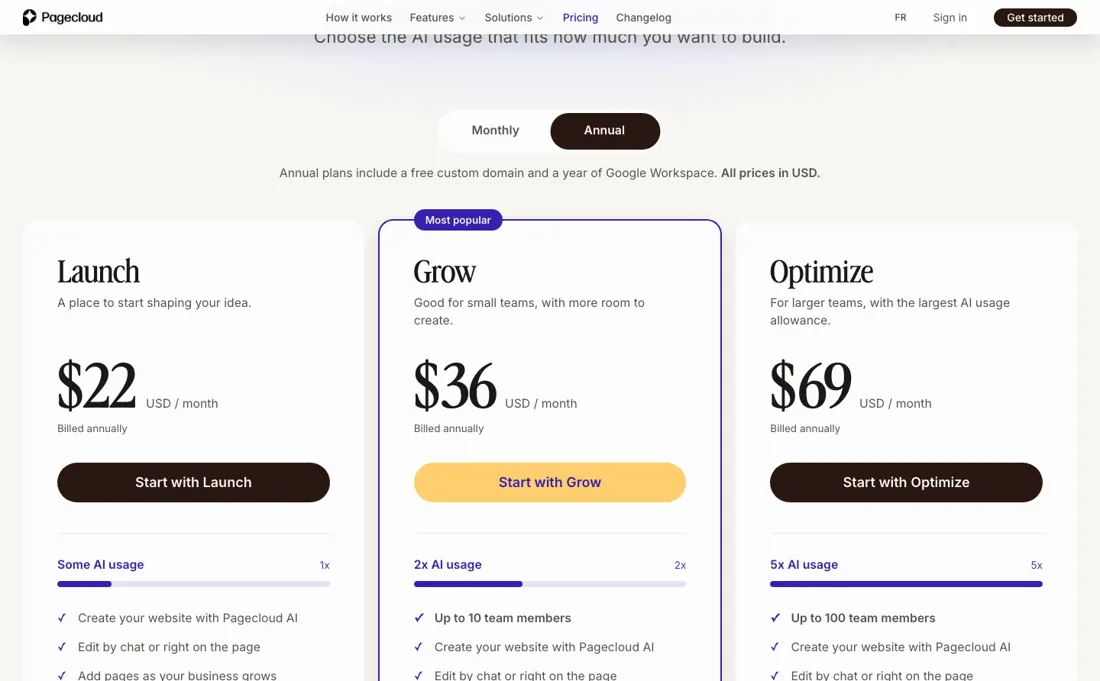
The plans are separated by AI usage that the page gives only as multipliers with no numbers, and AI is free 'for typical use' during a beta, so what you will pay for AI once the beta ends is not on the page. Launch includes no team members. The older Pagecloud Classic builder is kept for existing customers only (llms.txt, read 25 October 2026), so this review covers only the Pagecloud AI plans.
The terms renew a subscription automatically unless notice is given at least ten days before it ends and say payments are non-refundable; after a suspension or termination Pagecloud says it will try to help you retrieve data within 10 days. There is no import of an existing site yet.
Watch the video review
The video version of this review, from our YouTube channel.
What Pagecloud does
AI website builder for small businesses: describe your business and Pagecloud AI builds the site, which you edit by chat or on the page, with inquiry forms, privacy-first analytics, SEO settings and hosting included.
Upgrade for people, not for features
All three Pagecloud AI plans have the same building, editing, forms, analytics and hosting tools. The upgrades buy two things: more AI usage and logins for other people. Launch at $22 a month billed annually is a one-person plan. Grow at $36 is the step for a small business where a colleague or freelancer also edits the site, with up to 10 team members and twice the AI usage. Optimize at $69 is for larger teams of up to 100.
The AI part is hard to price because the page gives only multipliers, no numbers, and says normal AI use is free during the beta. Until Pagecloud publishes real allowances, choose on team size. Monthly billing costs $4 to $20 a month more depending on the plan, but annual billing pays the year up front and adds a domain and a year of Google Workspace for one user, so it only makes sense once you know you are staying.
The changelog shows how young the AI product is. Monthly posts from June to September 2026 added form submissions in a dashboard inbox and free stock photos in the editor (June), autosave with a separate Publish step, undo for AI changes and SEO and analytics by chat (July), open sign-up for anyone plus responsive preview and an editor that fits a phone (August), and editing with your team, SVG uploads and Google Workspace email (September, posted 6 October).
You are buying a product that changes month by month, one more reason to start on monthly billing. For freelancers and agencies, the Pros programme offers bundled pricing and revenue sharing once approved, priority support, a listing in the Pro directory, migration help priced by size and volume, and a one-year free trial. The page publishes no programme prices; you pay once you publish a client site.
What we found running Pagecloud ourselves
The first findings are at the top of this page. The rest:
- Building the site took about six minutes.
- We found no way to download or export the site in the project and dashboard menus.
Claim vs. what we measured
We set a claim from Pagecloud's own pages next to what we saw in our test, on the plan named. The status says whether the two describe the same thing and match; it is not a verdict on the product. Confirmations are listed too.
| What the vendor says | What we measured | Status | What it means if you buy |
|---|---|---|---|
| Free to create during the beta.Source: pagecloud.com, read 29 Oct 2026 | Measured 2026-10-30: Site creation succeeded during Early Access Beta without a payment.Our test, 30 Oct 2026; Early Access Beta | ConfirmedCompared on the early access beta account on 30 October; paid plans were not opened. | Creation requires consent to session review and usage-data collection; publishing was not tested. |
| Free to create during the beta.Source: pagecloud.com, read 29 Oct 2026 | Measured 2026-10-30: No checkout opened. The plan overview or free editing route does not establish a tax-inclusive payable total.Our test, 30 Oct 2026; Early Access Beta | Not testableSame beta account, one unpublished site built by the AI builder. | Final currency, tax, term, seats, fees and payment total remain unverified. |
| You supplied two section headings with their accompanying test text; these will be used as written.Source: app.pagecloud.com, read 30 Oct 2026 | Measured 2026-10-30: Both supplied kit section headings and texts are absent from the generated page.Our test, 30 Oct 2026; Early Access Beta | ContradictedThe assistant's own summary of our prompt, compared with the page it then built. | The supplied text was not used as promised; manual correction would be needed. |
Exit test: can you take your data out?
Built an unpublished beta site from a prompt containing two kit section headings and text. Test date: 30 Oct 2026. We describe the friction rather than score it; this is one run with synthetic records, not a verdict on Pagecloud.
| What we checked | What we saw |
|---|---|
| Fields offered by the export dialog | |
| Not offered in the field selector |
|
| The exported file | We did not inspect the file, so data retention and loss remain unverified. |
| Awkward but not lost | The submit button remained disabled until permission to review AI editor sessions and collect usage data was selected. Building then succeeded without payment. No image was uploaded. The temporary preview is separate from clicking Publish site. |
| Export route | Project and Dashboard menus were inspected without finding a site download. Pages & settings was not searched. |
| Export format | No site export file; export availability remains untested. |
| Re-importing the export | Reimport was not tested because no export was obtained. |
| Cancelling | Cancellation, expiry and account deletion were not tested. The control date, where recorded, is planning only. |
What the exit test does not show:
- Full signup screen count and first-result setup speed.
- Actual cancellation, expiry and deletion.
- All kit fields that were not entered.
- Application reimport or restoration.
Kit check counts
Kit content-media 1.0.0; run pagecloud-2026-10-30; observed 2026-10-30.
- export / AIBM-001: Of 10 checks: 0 kept, 0 changed, 0 lost, 0 not offered, 10 not tested
- export / AIBM-002: Of 10 checks: 0 kept, 0 changed, 0 lost, 0 not offered, 10 not tested
- reimport / AIBM-001: Of 10 checks: 0 kept, 0 changed, 0 lost, 0 not offered, 10 not tested
- reimport / AIBM-002: Of 10 checks: 0 kept, 0 changed, 0 lost, 0 not offered, 10 not tested
Each record and phase uses this kit’s checks. Counts describe this run; they are not a score or a comparison between kits.
How this compares: across our exit tests of 102 tools, 57 gave us an export file. For Pagecloud no usable export file reached us during the test session. Report 08: can you get your data out?
Mail in the first 14 days
Measurement running until 2026-11-12T23:00:00Z (last observed 2026-11-12T02:18:02.155848Z).
4 emails in the 14-day window so far; first email after signup: unknown (exact signup time not recorded); 0 with an explicit offer.
Retained inbox and junk only; removed or archived mail is outside this observation. Ambiguous supplier attribution is excluded. Day numbers use elapsed 24-hour periods since the recorded signup date at midnight Europe/Amsterdam; the signup hour is unknown. Offer flags quote literal subject/body text. Replies in our own correspondence (support tickets, our comment requests) are excluded; one-time codes, our own address, our account name and our name are replaced in brackets.
| Day | Time (UTC) | Sender | Literal subject | Folder | Offer evidence |
|---|---|---|---|---|---|
| Day 0 | 2026-10-30 10:08:18 UTC | Pagecloud team / pagecloud.com | Confirm Your Email: It’s you! | inbox | |
| Day 0 | 2026-10-30 10:08:20 UTC | Pagecloud team / pagecloud.com | Welcome to the Pagecloud.ai beta | inbox | |
| Day 0 | 2026-10-30 13:08:22 UTC | Pagecloud team / pagecloud.com | Welcome to Pagecloud 💜 | inbox | |
| Day 8 | 2026-11-07 11:00:12 UTC | Pagecloud team / pagecloud.com | Let me introduce myself! | inbox |
Screenshots from our test (click to enlarge)
What this test does not show:
- Publishing the site
- Uploading our own images
- Paid features and prices
- Contacting support
Most of our reviews are researched rather than run. How we review explains which is which, and why we do not pretend otherwise.
Questions we are still checking
Facts about Pagecloud that would change a buying decision, and where we stand on each. An unanswered question does not mean the feature is missing; it means we have not confirmed it yet.
- How much AI usage do the Pagecloud AI plans include in numbers, and what will it cost after the beta? Still checking
Applies to: the pricing page gives only multipliers (Launch some, Grow 2x, Optimize 5x) and says normal AI usage is not charged during the beta.
Why it matters: the plans differ mainly in AI usage, so without numbers a buyer cannot tell which plan fits.
Checked: Pagecloud pricing (2026-10-25) - What do extra AI credit bundles cost? Still checking
Applies to: the pricing FAQ says extra AI credits can be bought in bundles, without a price.
Why it matters: heavy users on Launch need to compare a credit bundle with the step up to Grow.
Checked: Pagecloud pricing (2026-10-25); Pagecloud llms.txt (2026-10-25)
Have a public source that answers one of these? How we review explains how we check and correct.
Work at Pagecloud? Answer these on the record. A person reads each answer before it is published as a dated statement from your company.
How to actually use Pagecloud
Start by describing your business to Pagecloud AI; it builds the first version of the site, which you then edit by chat or by clicking on the page. Set up the inquiry form and inbox early, since that is how visitors reach you. If you need a shop, decide which outside service you will embed or link to before you build, because Pagecloud AI has no native store (pricing FAQ, read 12 October 2026).
A blog is a smaller gap: there is no dedicated blog editor, but Pagecloud's Mike Grouchy told us in writing on 30 October 2026 that you can write blog posts with the product itself, and pointed to Pagecloud's own blog at pagecloud.com/blog as the example. Pagecloud's help centre has blog and store guides, but the blog guide we read is labelled for the Classic editor, so check which product a guide is for before you follow it.
Stay on monthly billing until you know how much AI editing you use; the annual plan's domain and Google Workspace year are only worth it once you are staying. Moving an existing site is a manual job for now. The switching-platforms guide (read 25 October 2026) says AI import and reimagining is coming soon and that today's route is a planned manual rebuild: list the pages worth keeping, set 301 redirects for addresses that change, keep the old site live while you review the new one, and switch the domain last.
For the domain, use the DNS records shown on the AI Site's Domain setup page. The help article warns against registrar DNS templates, such as Hover Connect, unless the provider says they support Pagecloud AI Sites, because older templates install Classic records that do not connect an AI Site, and asks you to contact support if the status has not changed after 48 hours. To cancel, click your name on the sites dashboard, then Billing, then Cancel Account, or ask support; access continues to the end of the billing cycle (help article updated 18 February 2026).
Under the terms, auto-renewal has to be off at least ten days before a term ends.
Sources for this review
- Pagecloud pricing · read 25 Oct 2026: plan prices, AI multipliers, team members, annual extras, beta AI usage, USD, free to create during the beta
- Pagecloud llms.txt · read 25 Oct 2026: Classic remains available to existing customers; no native ecommerce in Pagecloud AI
- Pagecloud changelog · read 25 Oct 2026: monthly Pagecloud AI updates June to September 2026
- Pagecloud switching platforms · read 25 Oct 2026: no import yet, manual rebuild, redirects, external stores and booking embeds
- Pagecloud Pros · read 25 Oct 2026: bundled pricing, revenue sharing, migration help, one-year free trial
- Pagecloud terms of service · read 25 Oct 2026: 1- or 12-month subscriptions, 10-day renewal notice, non-refundable payments, 10-day data retrieval, Ontario law
- Pagecloud data processing addendum and privacy policy · read 25 Oct 2026: data importer to Canada, Ottawa privacy officer, backups of deleted content
- Pagecloud help: cancel and connect an AI Site domain · read 25 Oct 2026: cancel steps and access to end of cycle; DNS records, registrar templates, 48-hour check
Full research notes and reading history (204 words)
Pagecloud's own pricing page (pagecloud.com/pricing), read on 2026-10-11 with both billing options and the FAQ expanded: plan prices, AI usage multipliers, team members, the annual extras and the answers on AI usage, the beta, currency and the lack of a native blog or store in Pagecloud AI. On 2026-10-12 we re-read that blog-and-store answer and read Pagecloud's Classic pages (pagecloud.com/classic, /classic/pricing and /classic/blogging) and the help-centre article 'Creating a Blog on Pagecloud', which is labelled for the Classic editor.
Those pages describe a built-in blog and store tools in Pagecloud Classic, the original builder, but do not say whether new customers can still choose it; this review covers the Pagecloud AI plans only. Pagecloud is a PartnerStack partner of ours. On 25 October 2026 we re-read the pricing page and read, with a plain fetch, Pagecloud's llms.txt, the changelog at pagecloud.com/blog/updates, the switching-platforms guide, the Pros programme page, the legal index, the terms of service (last change noted 26 March 2021, when the data processing addendum was added), the privacy policy, the data processing addendum, and help-centre articles on cancelling and on connecting a domain to an AI Site.
The llms.txt answers the Classic question: it says Pagecloud Classic remains available to existing customers.
Pagecloud vs Weblium, side by side
Each column shows the vendor’s own published entry price, read on the date shown. Entry prices can cover different services or units, so check what each one buys. We do not average them into a score.
Both names above are affiliate links: we may earn a commission if you sign up, at no extra cost to you. Neither changes what this table says.
The natural comparison is Weblium: Weblium is in our dossiers too: a template builder with a free plan, where the online store, blog and multilingual pages come with its Business plan. Pagecloud AI builds the site from a conversation and, per its pricing FAQ read on 12 October 2026, does not currently include a native blog or store on any of its three plans. If you plan to sell or publish articles, Weblium covers that natively and Pagecloud AI does not; if you want the AI to do the building, Pagecloud AI is the one designed for it. Pagecloud's older Classic builder has its own blog and store tools, but its llms.txt says Classic remains available to existing customers, so this comparison is with Pagecloud AI..
Not a fit for you?
Pagecloud is not the pick for shop owners and bloggers wanting everything built in. In that case, look at Weblium, built for small businesses and freelancers who want a template-based site with forms and integrations for one business, at a low yearly price.
Weblium price: Free (3 pages); Starter $11/mo billed yearly ($16 monthly); Business $17.50/mo yearly ($25 monthly); one site per subscription (read 2026-10-25)
The Visit link is an affiliate link: we may earn a commission, at no extra cost to you. We picked this alternative for fit first; commission only decides between equal fits.
Frequently asked questions
Can you export your data from Pagecloud?
Exit check 2026-10-30; route excerpt: Project and Dashboard menus were inspected without finding a site download …; came along (excerpts): not_tested; lost (excerpts): not_tested; re-import: not tested.
How much does Pagecloud cost?
Read on 11 October 2026 on pagecloud.com/pricing, which lists the Pagecloud AI plans: Launch $22 a month billed annually or $26 monthly, Grow $36 or $45, Optimize $69 or $89, all in USD. Annual plans add a free custom domain and one year of Google Workspace for one user.
Can I build an online store or blog with Pagecloud?
Not natively with Pagecloud AI, the product on Pagecloud's current pricing page. Its pricing FAQ, read on 12 October 2026, says Pagecloud AI does not currently include native blogging or ecommerce, on any of its three plans; for a store you link to an external service or add its embed code. For a blog the gap is smaller: Pagecloud told us in writing on 30 October 2026 that there is no dedicated blog editor but you can write blog posts with the product itself, as its own blog at pagecloud.com/blog shows. Pagecloud's original builder, now called Pagecloud Classic, has a built-in blog and store tools, but Pagecloud's llms.txt (read 25 October 2026) says Classic remains available to existing customers, so a new buyer should not plan on it. The switching guide adds that an embedded external store is not the same as moving your products natively.
How much AI usage do I get?
The page gives only relative levels: Launch some, Grow twice and Optimize five times as much, with no numbers specified. During the beta, normal AI usage is not charged, and extra AI credits can be bought in bundles.
Can I import my existing website into Pagecloud?
Not yet. The switching-platforms guide (read 25 October 2026) says AI import and reimagining is coming soon and that moving today means a planned manual rebuild with Pagecloud AI, using content and images you are entitled to reuse. It recommends keeping useful addresses, setting redirects for the ones that change and keeping the old site live until the new one is ready. Larger moves can be discussed through a form on that page; for agencies in the Pros programme migration help is priced by size and volume.
Can I get a refund from Pagecloud?
The terms say no: you can stop using the Services at any time, but payments are non-refundable even if you stop. Subscriptions run for one or twelve months and renew automatically unless notice is given at least ten days before the end. Cancelling from the dashboard keeps access until the end of the billing cycle (help article updated 18 February 2026).
Where does Pagecloud process my data?
In Canada, according to its data processing addendum, which names PageCloud or its subcontractor as data importer to Canada, a country the EU treats as offering adequate protection. PageCloud Inc. is a Canadian company, its terms are governed by the laws of Ontario, and its privacy officer is its General Counsel in Ottawa. The privacy policy notes that deleted content may remain in backup copies for disaster recovery.
Is this a hands-on review of Pagecloud?
Yes. We tested Pagecloud ourselves on 2026-10-30; the section above says what we tested, what we found and what we did not test, and where a figure comes from the vendor's own documentation instead. Most of our reviews are researched rather than run; we say which is which. We name what each tool is good and bad at, and we earn a commission only if you sign up, at no cost to you.
- Read 2026-10-11 on pagecloud.com/pricing, USD, with the monthly and annual toggle and the FAQ opened.
- A dated screenshot of that pricing page, kept on this site as the receipt.
- Our own hands-on session with Pagecloud (2026-10-30), written up in full further down this page.
Bottom line
In one line: Pagecloud AI has no native blog or store on Launch, Grow or Optimize; AI usage is given only as multipliers.
Best for: consultants needing a small brochure site.
The Try button is an affiliate link; we may earn a commission at no extra cost to you.
Others in this category
Reviewed website builders that share ground with Pagecloud. They are comparable in what they do, not drop-in swaps:
New reviews, price changes we recorded, and the cost conditions we found. No sponsored placements. Unsubscribe anytime.
This is our researched assessment, not a paid placement. The “Visit” links on this page are affiliate links: we may earn a commission if you sign up, at no extra cost to you, and it never changes our take. How we review →