Weblium Review (2026)$11 Sites, Store and Blog Only on Business
 By Daan Haket · Tested hands-on · written with an AI assistant · who does what
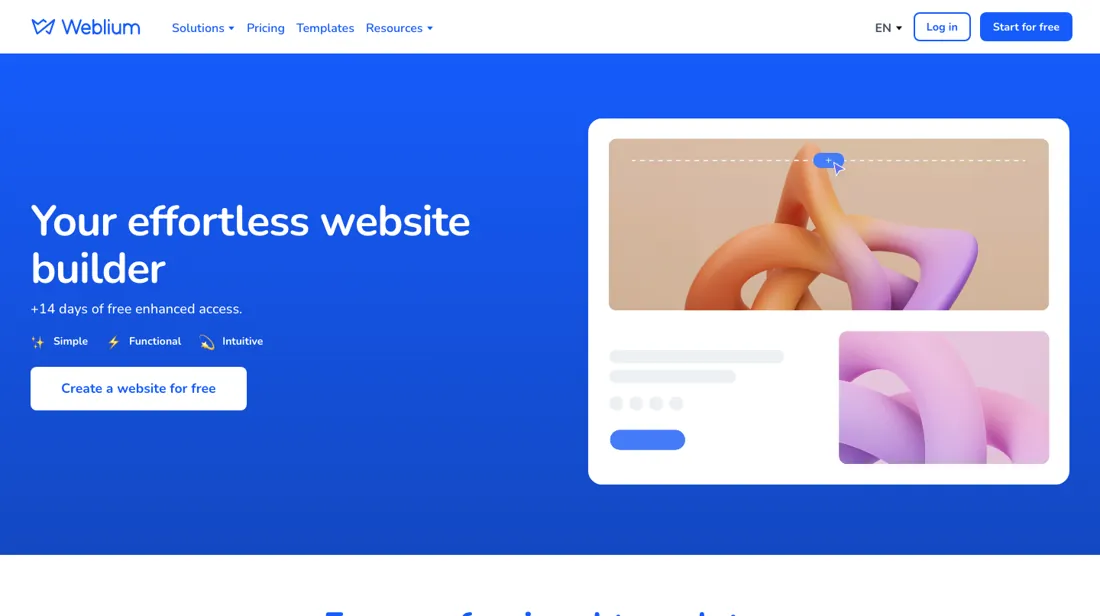
Starter caps a site at 10 pages and 5 GB of bandwidth and has no blog or online store; those need Business.
- Best for Freelancers and small firms building one template-based site
- Not for agencies running many client sites under one subscription
From $11 · Starter · per month billed yearly ($132 a year), one website · read 2026-10-25
Try Weblium free →Affiliate link: we may earn a commission if you sign up, at no extra cost to you. It never changes our verdict.
Is Weblium right for you?
Your pain“My business needs a simple site with lead forms, and big yearly fees are out of reach.”
Does Weblium solve it?Vendor says yesPricing page, read 8 October 2026: Starter adds lead capture tools, integrations, advanced SEO settings, up to 10 pages per site and no Weblium branding.
Your planStarter, $11/mo billed yearly ($16 monthly); one site per subscription
Your pain“A plain site can't sell products or run a blog, and I need both on one site.”
Does Weblium solve it?PartlyOur test (30 October 2026): our first product import, built in the export's format, finished with no message and added nothing, so we added the products by hand.
Your planBusiness, $17.50/mo billed yearly ($25 monthly); store, blog and up to 5 languages
- Agencies running many client sites under one subscription. Pricing page, read 8 October 2026: one subscription equals one website; multi-site bundles of 5, 10 or 15 cut the cost by 25-40%. Better fit: Brizy.
The “Try” buttons are affiliate links: we may earn a commission if you sign up, at no extra cost to you, and it never changes our verdict.
Also in: Software for freelancers and solo businesses · Software for Shopify and online stores
Transparency: the “Visit” links on this page are affiliate links: we may earn a commission if you sign up, at no extra cost to you. No vendor can pay for a better review or verdict. How we make money →
Which Weblium plan do you need?
3 plans, 3 questions, no signup.
Answer three quick questions to see your plan.
Your plan
Free
Free, no credit card
Up to 3 pages, 100 MB storage, 300+ templates
Your plan
Starter
$11 a month billed annually ($16 monthly)
10 pages, SEO settings, forms, no Weblium branding
Your plan
Business
$17.50 a month annually ($25 monthly)
Online store, blog, up to 5 languages, up to 500 pages
Probably not Weblium
From your answers, look at Brizy instead. Why ↓
Prices as we read them on 2026-10-25; check the checkout before you pay. The plan button is an affiliate link: we may earn a commission, at no extra cost to you. The Brizy link is an affiliate link too.
Exit test (measured 2026-10-30)
- Export route
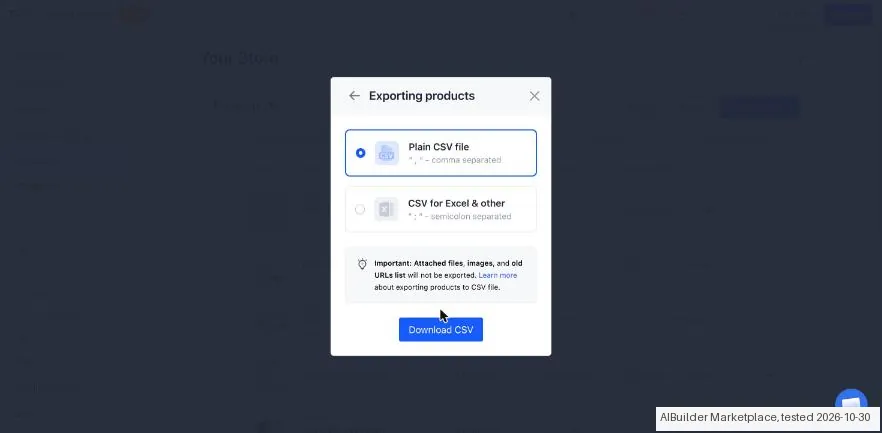
- Your Store > Products > select the two test products > Export > Selected products > Plain CSV > Download CSV
- Formats
- CSV
- Attachments included
- Not tested
- Re-import tested
- Yes
- Lost on export
- Nothing we checked
Formats describe this export route; offered formats may not have been inspected. Full exit test and scope ↓
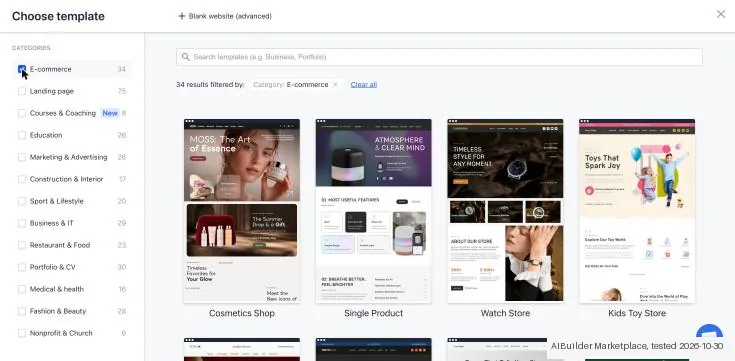
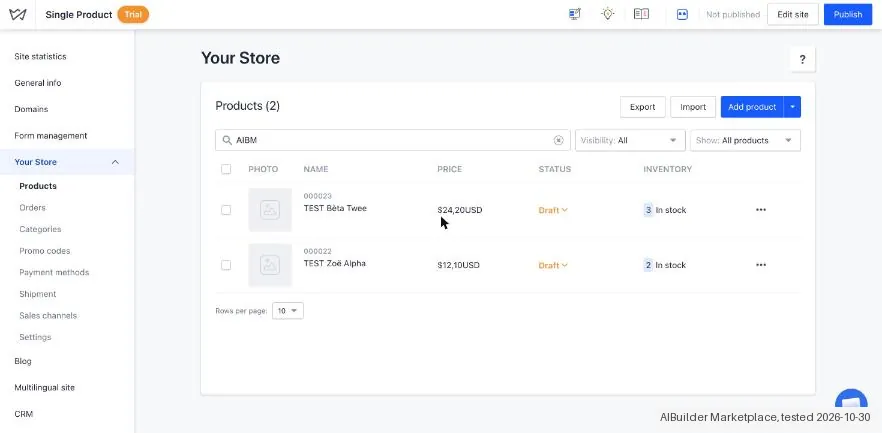
Tested by our team on 30 October 2026 on the free trial: we created the account and our AI assistant ran the test in our browser. We started an unpublished shop from a template, added two made-up products, exported them, imported a changed copy and looked at the plans.
How we tested
- Started a shop from a template and added two made-up products as drafts
- Exported the products as CSV
- Imported a copy with one description changed and exported again
- Looked at the plans
- The trial runs on the Business plan for 14 days; Free is 'Free for 60 days', not forever. Starter is $16 and Business $25 a month, or $11 and $17.50 billed yearly. No card was asked.
- Products save as drafts ('Your site visitors can't see it yet'), and the site stays unpublished until you click Publish.
- The product export is a plain CSV. The export screen warns that attached files, images and old URLs are not exported.
Pricing (2026)
✓ Pricing re-verified 25 Oct 2026
Three plans, each for one website. Free has the editor, 300+ templates, mobile optimisation, free icons and photos and the Evo AI assistant, with up to 3 pages per site, 100 MB storage and 100 MB bandwidth and no credit card; the Free card's '60 days' label is how long a free site stays online, explained below. Starter is $11 a month billed annually ($132 a year) or $16 billed monthly ($192 a year): advanced SEO settings, lead capture tools, advanced design, integrations and custom code, up to 10 pages per site, 3 GB media storage, 5 GB bandwidth and no Weblium branding.
Business, marked most popular, is $17.50 a month annually ($210 a year) or $25 monthly ($300 a year) and adds the online store, the blog, multilingual sites in up to 5 languages, up to 500 pages, 10 GB storage and 20 GB bandwidth. Starter and Business have a 14-day free trial without a card. Each subscription covers one website; bundles for 5, 10 or 15 sites save 25-40%.
Full pricing notes (3 more paragraphs)
Annual plans include a free domain for the first year. You can upgrade any time, but to move to a lower plan you cancel auto-renewal and buy the new plan after the current one ends. If a renewal payment fails, paid features stay on for 5 days and the site then drops to Free. Weblium Studio builds sites for you from $300, and a white-label version for agencies starts at $48 a month.
Re-read on 25 October 2026 with a plain fetch: plan contents and the FAQ amounts ($132 and $210 a year, $16 and $25 a month) unchanged; the bundle prices on the cards render only in a browser. Weblium's changelog explains the 60 days. In the pricing update dated 2 September 2026, which it calls its first major pricing update in seven years, the old Free and Pro plans became Free, Starter and Business, and a Free website now stays live for up to 60 days.
A new site starts with a 14-day trial, then stays on Free for 46 days before it goes offline; its data is kept for another 60 days and then deleted permanently. The help article comparing the plans (updated 31 July 2026) adds that a Free site is not indexed by search engines, cannot connect a domain or use contact forms, and that an account can hold up to three Free sites at a time.
Plans change, so check the live price on their site before you buy.
What the pricing page doesn’t say
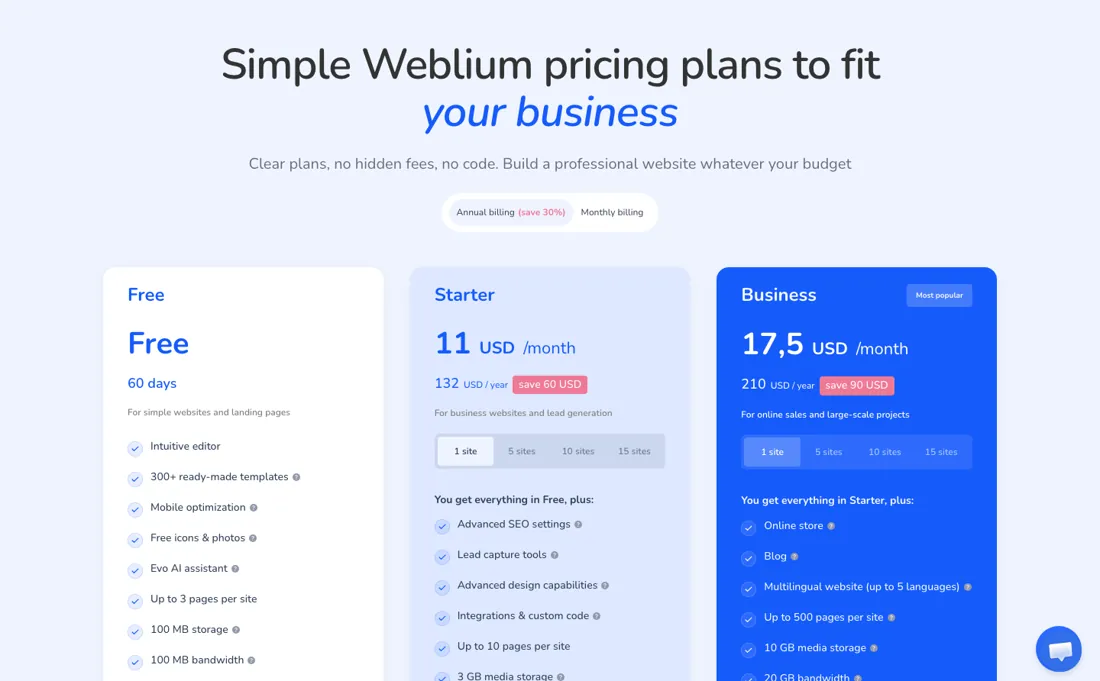
Every subscription covers one website, and moving to a cheaper plan only works after the current term ends. The Free plan is limited to 3 pages, 100 MB storage and 100 MB bandwidth, and a Free site goes offline 46 days after its 14-day trial and is deleted 60 days after that. During the trial a site cannot be indexed, connect a domain or show form replies in readable form.
Weblium's own savings figures disagree: the pricing page claims up to 67% off for paying yearly, its FAQ and the September 2026 pricing post say up to 30%, and the bundle help article from 2024 says up to 50% against 25-40% on the pricing page.
Watch the video review
The video version of this review, from our YouTube channel.
What Weblium does
Template-based website builder for small businesses, with an AI assistant, lead capture forms and integrations, and an online store, blog and multilingual pages on the Business plan.
Starter is a lead-generation site; selling or blogging means Business
The jump from Free to Starter is mostly about being taken seriously: your own branding off, SEO settings, forms and integrations, and room for 10 pages instead of 3. For a service business that wants a few pages and a contact form, $11 a month billed yearly is the whole bill for one site. The line that decides most purchases is between Starter and Business. The online store, the blog and multilingual pages are only on Business, and Starter stops at 10 pages and 5 GB of bandwidth.
If you plan to publish articles or sell anything, budget $17.50 a month yearly from the start rather than upgrading later. Monthly billing costs about 45% more on Starter ($16 against $11) and a downgrade only takes effect after the paid term ends, so test on the 14-day trial before choosing a yearly plan. The Free plan is a place to build, not a cheap way to stay online. Weblium's plan comparison says a Free site does not appear in Google or Bing, cannot use contact forms, embeds, pop-ups or integrations, and goes offline once its publishing window ends.
Anyone who needs a site visitors can find pays at least $132 a year for Starter. Two extras decide between billing options. The free first-year domain comes with a single annual plan but not with a bundle, according to the bundle help article. And paying before the trial ends earns bonus time, 10 extra days on a monthly or 40 on an annual subscription, according to the pricing post of 2 September 2026.
Existing Pro subscribers move to Business at their next renewal and pay the Business price from then on; a subscription with auto-renewal switched off simply ends instead (migration post, 16 September 2026).
What we found running Weblium ourselves
The first findings are at the top of this page. The rest:
- Our two products came back with names, accents, SKU and stock intact. Prices lost a trailing zero (12.10 became 12.1), and the description came back wrapped in HTML.
- Re-importing the export with one description changed updated that product in place: still two products, the same IDs, and nothing else changed.
- Our first import, built from scratch in the export's format, finished without any message and added nothing. We added the products by hand instead.
Claim vs. what we measured
We set a claim from Weblium's own pages next to what we saw in our test, on the plan named. The status says whether the two describe the same thing and match; it is not a verdict on the product. Confirmations are listed too.
| What the vendor says | What we measured | Status | What it means if you buy |
|---|---|---|---|
| 14-day free trial.Source: weblium.com, read 29 Oct 2026 | Measured 2026-10-30: The app labels the offer as a fourteen-day Business trial; an actual expiry date was not displayed. The separate Free offer lasts sixty days.Our test, 30 Oct 2026; Business trial | ConfirmedCompared on the Business trial of one unpublished shop, as shown on the subscription page. | Free access shown in this plan list is time limited. |
| 14-day free trial.Source: weblium.com, read 29 Oct 2026 | Measured 2026-10-30: No checkout opened. The plan overview or free editing route does not establish a tax-inclusive payable total.Our test, 30 Oct 2026; Business trial | Not testableSame trial; Starter and Business prices were read in the plan switcher, monthly and yearly, without a checkout. | Final currency, tax, term, seats, fees and payment total remain unverified. |
Exit test: can you take your data out?
Created two draft products manually, exported them, and updated the second description through an ID-preserving CSV reimport. Test date: 30 Oct 2026. We describe the friction rather than score it; this is one run with synthetic records, not a verdict on Weblium.
| What we checked | What we saw |
|---|---|
| Came along in the export |
|
| Lost in the export | Nothing we could show was lost in this check. |
| Awkward but not lost | The initial custom CSV import produced no products or message; its cause is unknown and is not counted as data loss. Product amounts were entered in the store currency USD although the kit uses EUR. Description line structure is represented by HTML blocks, and price formatting drops the trailing zero. The export dialog warns that attached files, images and old URLs are excluded. |
| Export route | Your Store > Products > select the two test products > Export > Selected products > Plain CSV > Download CSV. |
| Export format | UTF-8 CSV without BOM. Descriptions contain HTML, prices use a decimal point, and Visibility is no. |
| Re-importing the export | Reimport retained the same slug IDs and variants. Only the second description changed; the first record and all other parsed fields remained identical, with no duplicates. |
| Cancelling | Cancellation, expiry and account deletion were not tested. The control date, where recorded, is planning only. |
What the exit test does not show:
- Full signup screen count and first-result setup speed.
- Actual cancellation, expiry and deletion.
- All kit fields that were not entered.
Kit check counts
Kit inventory-products 1.0.0; run weblium-2026-10-30; observed 2026-10-30.
- export / AIBM-001: Of 10 checks: 4 kept, 1 changed, 0 lost, 1 not offered, 4 not tested
- export / AIBM-002: Of 10 checks: 4 kept, 1 changed, 0 lost, 1 not offered, 4 not tested
- reimport / AIBM-001: Of 10 checks: 4 kept, 1 changed, 0 lost, 1 not offered, 4 not tested
- reimport / AIBM-002: Of 10 checks: 4 kept, 1 changed, 0 lost, 1 not offered, 4 not tested
Each record and phase uses this kit’s checks. Counts describe this run; they are not a score or a comparison between kits.
How this compares: across our exit tests of 257 tools, 60 gave us an export file. Weblium gave us a file, but some of our test data was missing or changed in it. Report 08: can you get your data out?
Mail in the first 14 days
1 emails in the 14-day window; first email after signup: unknown (exact signup time not recorded); 0 with an explicit offer.
Retained inbox and junk only; removed or archived mail is outside this observation. Ambiguous supplier attribution is excluded. Day numbers use elapsed 24-hour periods since the recorded signup date at midnight Europe/Amsterdam; the signup hour is unknown. Offer flags quote literal subject/body text. Replies in our own correspondence (support tickets, our comment requests) are excluded; one-time codes, our own address, our account name and our name are replaced in brackets.
| Day | Time (UTC) | Sender | Literal subject | Folder | Offer evidence |
|---|---|---|---|---|---|
| Day 8 | 2026-11-07 10:13:04 UTC | Weblium team / weblium.com | [Important] Your trial period is coming to an end. | inbox |
Screenshots from our test (click to enlarge)
What this test does not show:
- Selling or taking an order
- Images and other attachments in the export
- A paid checkout
- Contacting support
Most of our reviews are researched rather than run. How we review explains which is which, and why we do not pretend otherwise.
Questions we are still checking
Facts about Weblium that would change a buying decision, and where we stand on each. An unanswered question does not mean the feature is missing; it means we have not confirmed it yet.
- What do the 5-, 10- and 15-site bundles cost? Still checking
Applies to: the bundle prices on the pricing cards render only in a browser; the plain page shows placeholders.
Why it matters: agencies and owners of several sites choose between single plans and bundles on the yearly total.
Checked: Weblium pricing (2026-10-25) - How much does annual billing really save on Weblium? Sources disagree
Applies to: the pricing page says up to 67%, the FAQ and the September 2026 pricing post say up to 30%; the FAQ amounts work out at about 31% on Starter and 30% on Business.
Why it matters: the advertised saving is the main argument for paying a year ahead.
Answer: Contradictory. Weblium's pricing page advertises savings of up to 67% on annual billing, while its pricing FAQ and the September 2026 pricing post say up to 30%; the FAQ's own amounts work out at about 31% on Starter and 30% on Business (both read 25 October 2026).
Checked: Weblium pricing (2026-10-25); Weblium: New Weblium Pricing (2026-10-25) - Does a failed renewal keep paid features for 5 or for 10 days? Sources disagree
Applies to: the pricing FAQ says 5 days of retries; the terms of use say cancellation follows if it is not solved within 10 days of the invoice due date.
Why it matters: a shop owner with an expired card needs to know how long checkout keeps working.
Answer: Contradictory. The pricing FAQ says a failed payment is retried for 5 days, while the terms of use say cancellation follows if it is not solved within 10 days of the invoice due date (both read 25 October 2026).
Checked: Weblium pricing FAQ (2026-10-25); Weblium terms of use (2026-10-25)
Have a public source that answers one of these? How we review explains how we check and correct.
Work at Weblium? Answer these on the record. A person reads each answer before it is published as a dated statement from your company.
How to actually use Weblium
Build the first version on the Free plan or the 14-day trial; neither needs a card. Count the pages you need: Free stops at 3 and Starter at 10, while Business allows 500. Decide on Business before launch if you want a blog, a shop or a second language. Choose yearly billing only once the site is ready, because the yearly plan includes the first-year domain but cannot be downgraded until it ends.
Do not judge search visibility or a custom domain during the trial: the plan comparison (updated 31 July 2026) lists domain connection, search-engine indexing, custom code, links to external sites and readable form replies as unavailable until you pay. Form replies sent during the trial arrive encrypted and become readable after you buy a plan. If you will sell, check the payment provider before you build. The help centre has guides for Stripe, PayPal, Square, Klarna, Mollie, iDEAL, PayU (receiving payments in Polish zloty or Czech koruna only) and manual payment, and says payment methods work on paid and trial sites only.
Products can be exported to a CSV file and imported again for bulk edits (help article updated 14 September 2026), which is also the way to take your catalogue with you if you leave.
Sources for this review
- Weblium pricing and FAQ · read 25 Oct 2026: plans and limits, yearly and monthly amounts, one site per subscription, renewal and downgrade rules, savings figures
- Weblium: New Weblium Pricing (dated 2 September 2026) · read 25 Oct 2026: first major pricing update in 7 years, 60-day Free limit, 46 days after trial, 60-day data retention, trial bonus days
- Weblium: Moving to Weblium's new plans (dated 16 September 2026) · read 25 Oct 2026: Pro to Business at next renewal, Amber and bundle mapping, auto-renewal off ends the subscription
- Weblium help: Comparison of the Free, Trial and paid subscriptions · read 25 Oct 2026: Trial and Free limitations (indexing, domain, forms), three Free sites, Starter limits
- Weblium help: Purchasing subscriptions in a bundle · read 25 Oct 2026: no free domain with bundles, bundles renew together, up to -50% wording
- Weblium help: payment methods and product export · read 25 Oct 2026: supported payment providers, PayU currencies, CSV export and re-import
- Weblium terms of use (9 April 2025) · read 25 Oct 2026: 14-day refund, domain deduction, failed-payment 10 days, bandwidth 7 days, fee changes
Full research notes and reading history (116 words)
Weblium's own pricing page and its FAQ, read in a headless browser on 2026-10-08 (both billing toggles, the plan limits, the trial and renewal rules). Weblium is an Awin partner of ours. Documentation read on 2026-10-08 in help.weblium.com: canceling your paid subscription, transferring a domain to another registrar, the domain included in annual plans, and adding contributors. Re-read on 25 October 2026 with a plain fetch: the pricing page and FAQ, the terms of use (last updated 9 April 2025), the changelog at updates.weblium.com (the pricing update dated 2 September 2026 and the plan-migration post dated 16 September 2026), and help-centre articles on the Free, Trial and paid plans, bundles, payment methods and the product export.
Weblium vs Webflow, side by side
Each column shows the vendor’s own published entry price, read on the date shown. Entry prices can cover different services or units, so check what each one buys. We do not average them into a score.
Both names above are affiliate links: we may earn a commission if you sign up, at no extra cost to you. Neither changes what this table says.
The natural comparison is Webflow: Webflow is in our research too and gives designers far more control over layout, CMS and code, at higher prices. Weblium is the simpler template builder: cheaper per site, but with page caps and the blog and store only on Business.
Not a fit for you?
Weblium is not the pick for agencies running many client sites under one subscription. In that case, look at Brizy, built for freelancers and agencies that build several client websites and want hosting included, with a white-label option to resell the builder under their own brand.
Brizy price: Cloud: Personal $19/mo ($190/yr, 1 site); Agency $69/mo ($690/yr, 10 sites); White Label $159/mo ($1,590/yr, 10 sites); extra sites $17/$12/$8 a month (read 2026-10-24)
The Visit link is an affiliate link: we may earn a commission, at no extra cost to you. We picked this alternative for fit first; commission only decides between equal fits.
Frequently asked questions
Can you export your data from Weblium?
Exit check 2026-10-30; route excerpt: Your Store > Products > select the two test products > Export > Selected products > Plain CSV > Download CSV; came along (excerpts): Both products, Unicode names, SKUs, quantities and slug IDs are present in both exports; lost (excerpts): none recorded in this test; re-import: tested.
How much does Weblium cost?
Read on 8 October 2026: Free with 3 pages; Starter $11 a month billed yearly ($132) or $16 monthly; Business $17.50 a month yearly ($210) or $25 monthly. Prices are per website.
Can I sell products on Weblium Starter?
No. The online store, the blog and multilingual sites are part of the Business plan.
Can I downgrade a Weblium plan?
Not mid-term. The FAQ says you cancel auto-renewal and buy the lower plan after the current subscription ends; upgrades are possible any time.
Can I take my Weblium domain with me if I leave?
Yes. A domain bought through Weblium can be moved to another registrar: you email support from the account's address for the Auth/EPP code. After the transfer the new registrar bills the domain, and a site still on Weblium is disconnected until you reconnect the domain (help article, read 8 October 2026). The free domain that comes with an annual plan is free for the first year only; after that the renewal is charged to your saved payment method.
Can a designer or client work on the site with me?
Yes. You can invite up to 10 contributors per site. They can edit and publish, manage the blog, form replies and integrations and add custom code, but cannot touch domain settings, delete or duplicate the site, invite others or see the subscription and payment method (help article updated 26 April 2024, read 8 October 2026). Whether contributors cost extra is not stated there.
What happens when I cancel a Weblium plan?
Cancelling stops auto-renewal; the plan stays in your account until it expires, and then the site loses its paid features. If the site is already in the grace period after a failed payment, cancel via chat or support@weblium.com (help article updated 31 July 2026, read 8 October 2026). An export of the site itself is not described in the help centre.
Can I keep a website on Weblium's Free plan?
Not for long, and not visibly. Since the pricing update dated 2 September 2026 a new site has a 14-day trial, then 46 days on Free, after which it goes offline; Weblium keeps its data for another 60 days and then deletes it permanently. The plan comparison (updated 31 July 2026) adds that a Free site is not indexed by search engines, cannot connect a domain and has no contact forms, and that you can hold up to three Free sites per account.
Can I get a refund from Weblium?
Yes, within 14 days. Weblium's terms of use (last updated 9 April 2025) let you claim your money back within fourteen days of purchase if you are not satisfied for any reason, by emailing support. If Weblium bought a domain for you as part of the plan, it may deduct the domain price from the refund or let you keep the domain. A domain renewed automatically is not refunded, and the refund right does not apply after a breach of the content guidelines.
What happened to Weblium's old Pro plan?
It becomes Business at your next renewal. Weblium's migration post dated 16 September 2026 says your current paid period runs on its old terms, then auto-renewal charges the new Business price; Pro Amber becomes Business Amber and Pro bundles become Business bundles of the same size. If auto-renewal is off, the subscription simply ends and you buy a new one the usual way.
What happens if a Weblium renewal payment fails?
The pricing FAQ says paid features stay active for 5 days while Weblium retries the payment, after which the site drops to Free. The terms of use say that if the problem is not solved within 10 days of the invoice due date, the subscription is cancelled and the site suspended. The terms also give you 7 calendar days to apply configuration changes Weblium emails you after a bandwidth overrun, before it may restrict the site.
Is this a hands-on review of Weblium?
Yes. We tested Weblium ourselves on 2026-10-30; the section above says what we tested, what we found and what we did not test, and where a figure comes from the vendor's own documentation instead. Most of our reviews are researched rather than run; we say which is which. We name what each tool is good and bad at, and we earn a commission only if you sign up, at no cost to you.
- Read 2026-10-08 on weblium.com/pricing in a browser render, USD; the FAQ says all prices are in USD.
- A dated screenshot of that pricing page, kept on this site as the receipt.
- Our own hands-on session with Weblium (2026-10-30), written up in full further down this page.
Bottom line
In one line: Starter stops at 10 pages with no blog or shop, and each subscription covers one site.
Best for: freelancers and small firms building one template-based site.
The Try button is an affiliate link; we may earn a commission at no extra cost to you.
Others in this category
Reviewed website builders that share ground with Weblium. They are comparable in what they do, not drop-in swaps:
New reviews, price changes we recorded, and the cost conditions we found. No sponsored placements. Unsubscribe anytime.
This is our researched assessment, not a paid placement. The “Visit” links on this page are affiliate links: we may earn a commission if you sign up, at no extra cost to you, and it never changes our take. How we review →