 Notify Me Review (2026)Worth It If You Sell Out
Notify Me does one job — turning out-of-stock moments into recovered sales via back-in-stock and pre-order alerts — and its value is entirely tied to how often you actually sell out.
Visit Notify Me → Affiliate link — we may earn a commission if you sign up; it does not change what this page says.
Watch the 2-minute review
The video version of this review, from our YouTube channel.
⚡ Short on time? Watch the 30-second verdict Short.
Pricing (2026)
✓ Pricing re-verified 23 Sep 2026
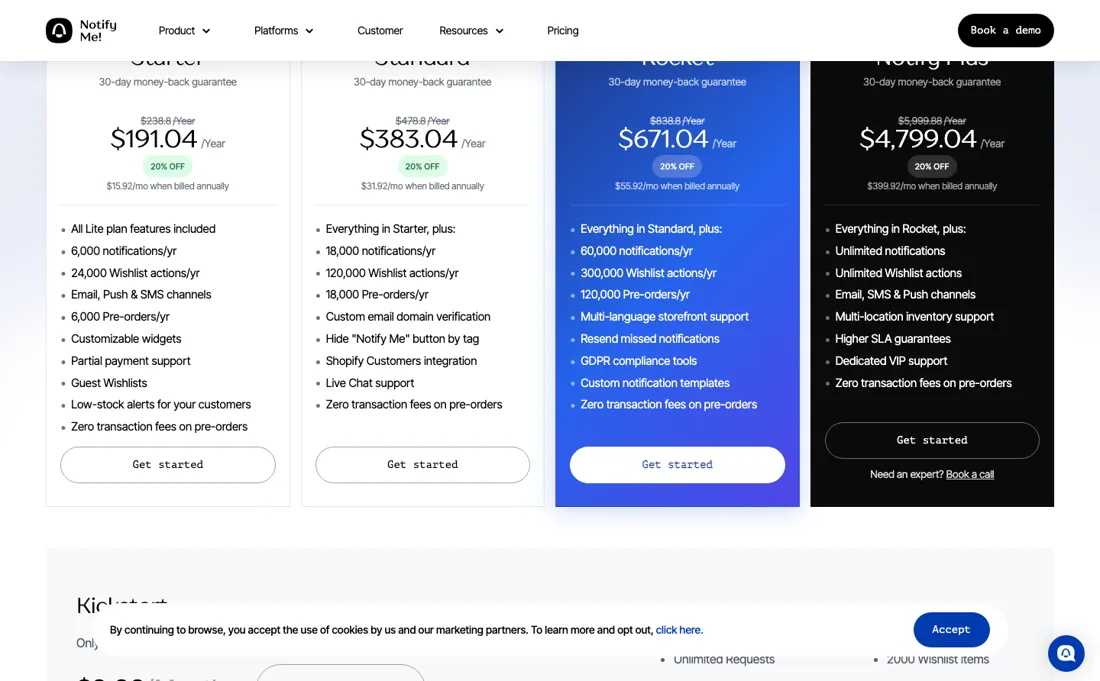
Four tiers: Lite, a free plan with mostly lifetime allowances, then Kickstart $9.90/mo or $95/yr, Starter $19.90/mo or $191/yr, Standard $39.90/mo or $383/yr, with annual marked 20% off, plus an Enterprise tier arranged by meeting. Each paid tier runs a discounted first month ($3.96, $7.96 and $15.96). Kickstart and Starter carry the same caps (500 alerts, 500 preorders); Standard raises them to 1,500 each, and the listing says unlimited plans are available inside the app.
Pre-orders above the plan limit are $0.20 each and $0.15 on Standard; SMS and WhatsApp are priced per country. Kickstart is restricted to Basic Shopify stores in their first year. Lite's allowances are mostly lifetime, not monthly: 100 back-in-stock requests, 5 pre-orders, 50 wishlist actions and 5 SMS and 5 WhatsApp messages over the life of the store, plus 10 notifications a month. 7-day trial and a 30-day money-back guarantee. Plans change — always verify the live price on their site.
What the pricing page doesn’t say
If your catalog rarely goes out of stock, you won't see much return. As with any Shopify app it's another monthly line item and another script on your storefront, so weigh it against the real revenue you're leaking to stock-outs.
What Notify Me does
Shopify app to recover lost sales on out-of-stock products: back-in-stock notifications, pre-orders and wishlists that keep customers buying instead of bouncing.

What buyers report about Notify Me
Recurring themes from the buyer-review sites listed at the foot of this page, read in August 2026. We have not run Notify Me ourselves, so this is other buyers' experience rather than ours. We summarise it here because the complaints are usually the part a vendor page leaves out.
- • Merchants describe back-in-stock alerts that recover sales without a monthly commitment on the free tier.
- • Waitlist, preorder, wishlist and low-stock alerts in one app, with a free plan and no transaction fee on back-in-stock alerts.
- • Support is repeatedly named as fast, helpful and professional.
- • Only 1% of those 3,418 reviews are one-star, so there is no meaningful complaint pattern to report. That is unusual and worth saying plainly rather than manufacturing a criticism.
- • The one thing to check is your own theme: back-in-stock buttons are theme-dependent, and that is where installation problems arise in this category generally.
When the paid plan is worth it
The ladder has four rungs, not two: free Lite, Kickstart $9.90 a month, Starter $19.90 and Standard $39.90, or $95, $191 and $383 prepaid for a 20% saving, with a 7-day trial and a 30-day money-back guarantee. What decides whether any tier is worth it is a number from your own store, not theirs: how much revenue you lose to stock-outs. This app does one job — turning an out-of-stock moment into a recovered sale through back-in-stock and pre-order alerts — so its return is entirely a function of how often you actually sell out.
A catalogue that rarely goes out of stock has nothing for it to recover, and at $9.90 a month that is $95 prepaid a year for alerts nobody triggers. So run the estimate before the trial: count the SKUs that went out of stock in the last quarter, multiply by their average order value and by a conservative recovery rate. If that figure does not clear about $120 a year you are on Lite or on nothing; the tiers above earn their keep only once alert volume is the constraint, at 500 on Kickstart and on Starter alike against 1,500 on Standard, so Starter's extra $10 a month buys branding, reports and page-builder support rather than more alerts.
Three costs sit off the headline: pre-orders above the plan limit at $0.20 each ($0.15 on Standard), SMS and WhatsApp priced by country, and another script on your storefront. Weigh all of it against the revenue you are actually leaking rather than against the sticker. The 30-day money-back guarantee makes that measurement cheap to run for real.
How to actually use Notify Me
Measure the leak before you install anything, because this app's value is entirely a function of how often you sell out. Pull the last three months and count the times a product with real demand hit zero, and for how long. Multiply by your average order value and by a realistic recovery rate. If your catalogue rarely goes out of stock, that number is small and no tier changes it.
Then start on Lite and watch notification volume, since that is what the tiers scale on. Kickstart at $9.90 is limited to Basic Shopify stores in their first year, Starter $19.90, Standard $39.90. Your alert count decides which, and pre-orders past the limit bill on top. Check your page speed before and after. This is another script on your storefront as well as another monthly line, and both belong in the comparison against the revenue you are actually leaking to stock-outs.
There is a 7-day trial and a 30-day money-back guarantee, which together are long enough to see a real restock cycle.
Distilled from apps.shopify.com/back-in-stock-notifications and notify-me.io/pricing, read 2 September 2026 and again 23 September 2026. The App Store listing carries the full four-tier ladder with the annual prices, the first-month discounts, the alert and pre-order caps per plan and the per-preorder overage; the vendor pricing page prints only Lite, Kickstart and an Enterprise contact tier, but it is the only source for Lite's lifetime limits and for the 30-day money-back line in its FAQ. Vendor sources only; no independent tutorial was consulted for this section.
The natural comparison is Swym or Appikon Back in Stock — comparable Shopify restock-alert apps — compare on SMS costs and notification limits at your volume.
Frequently asked questions
Can I run Notify Me on the free Lite plan for good?
Only for a very small catalogue. Read 23 September 2026, Lite's limits on notify-me.io/pricing are mostly lifetime rather than monthly: 100 back-in-stock requests, 5 pre-orders, 50 wishlist actions and 5 SMS and 5 WhatsApp messages over the life of the store, with 10 notifications a month on top. Once a store has collected 100 sign-up requests in total, Lite is used up however slowly they arrived. It works as a way to see whether shoppers click the button at all; it is not a plan to stay on. The first paid rung, Kickstart at $9.90 a month, lifts that to 500 alerts and 500 pre-orders, but only for Basic Shopify stores in their first year.
What does Starter at $19.90 get me over Kickstart at $9.90?
Not more volume. Read 23 September 2026 on the Shopify App Store listing, both plans carry 500 alerts across email, SMS and push and 500 pre-orders without a transaction fee, and both charge $0.20 per pre-order above the limit. Starter adds brand-customised emails, a pre-order delivery fulfillment trigger, basic reports, low-stock alerts to you and page-builder integration. The practical reason most stores land on Starter is the other way round: Kickstart is only open to Basic Shopify stores in their first year, so an older store or one on a higher Shopify plan starts at $19.90. Volume only rises at Standard, $39.90, with 1,500 alerts and 1,500 pre-orders and a lower $0.15 pre-order overage.
What if I pay and it does not recover any sales?
You can get the money back. Read 23 September 2026, the FAQ on notify-me.io/pricing says Notify Me offers a 7-day trial and a 30-day money-back guarantee on top of refunds for subscriptions, and every paid tier on the App Store listing shows the 7-day free trial and a discounted first month ($3.96 on Kickstart, $7.96 on Starter, $15.96 on Standard). A month is long enough to see one real restock cycle. Count how many notified shoppers actually bought after the alert, and compare that revenue to the plan price before the guarantee runs out. SMS and WhatsApp messages are priced by country on top of the plan, so include them in that sum.
What should I weigh before buying Growth & Revenue software?
It depends on whether you have the bottleneck it solves. Small teams get the most out of this category when one clear problem is already costing real hours or revenue; buying ahead of that just adds cost and another login. Price it against the hours or lost deals it removes, not against its feature list, and start on the smallest plan that covers the job.
Is this a hands-on review of Notify Me?
This is a researched assessment, not a hands-on test — where we've used a tool ourselves, we say so explicitly. We name what each tool is good and bad at, and we earn a commission only if you sign up, at no cost to you.
- Buyer reviews on the Shopify App Store, read August 2026.
- Price re-verified 2026-09-23 against the Shopify App Store listing and notify-me.io/pricing.
- A dated screenshot of that pricing page, kept on this site as the receipt.
Others in this category
Reviewed growth & revenue tools that share ground with Notify Me — comparable in what they do, not drop-in swaps:
New reviews, price changes we recorded, and the cost conditions we found. No sponsored placements. Unsubscribe anytime.
This is our researched assessment — not a paid placement. The “Visit” links on this page are affiliate links: we may earn a commission if you sign up, at no extra cost to you, and it never changes our take. How we review →